


Python CLI 待办事项管理器实战:从内存到 JSON 持久化

本文通过 Python 编写一个命令行待办事项管理器,逐步演示如何从基础的内存列表操作演进到包含 JSON 文件持久化、异常处理和交互式菜单的完整工具。文章详细解析了数据结构设计、文件读写逻辑以及主循环分发机制,帮助开发者掌握 Python 基础语法在实际项目中的应用。
一、项目架构与数据结构
构建一个命令行工具(CLI)的核心在于清晰的数据流转。本项目的核心数据结构是一个字典,用于存储单条待办事项,包含以下关键字段:
id:自增的唯一标识符。title:待办事项的具体内容。completed:布尔值,表示是否完成。created_at:创建时间,格式为YYYY-MM-DD HH:MM。
所有待办事项存储在一个全局列表中,并通过 todos.json 文件实现持久化。程序采用菜单驱动的循环架构,用户通过输入数字选择功能,程序根据映射关系调用对应的处理函数。
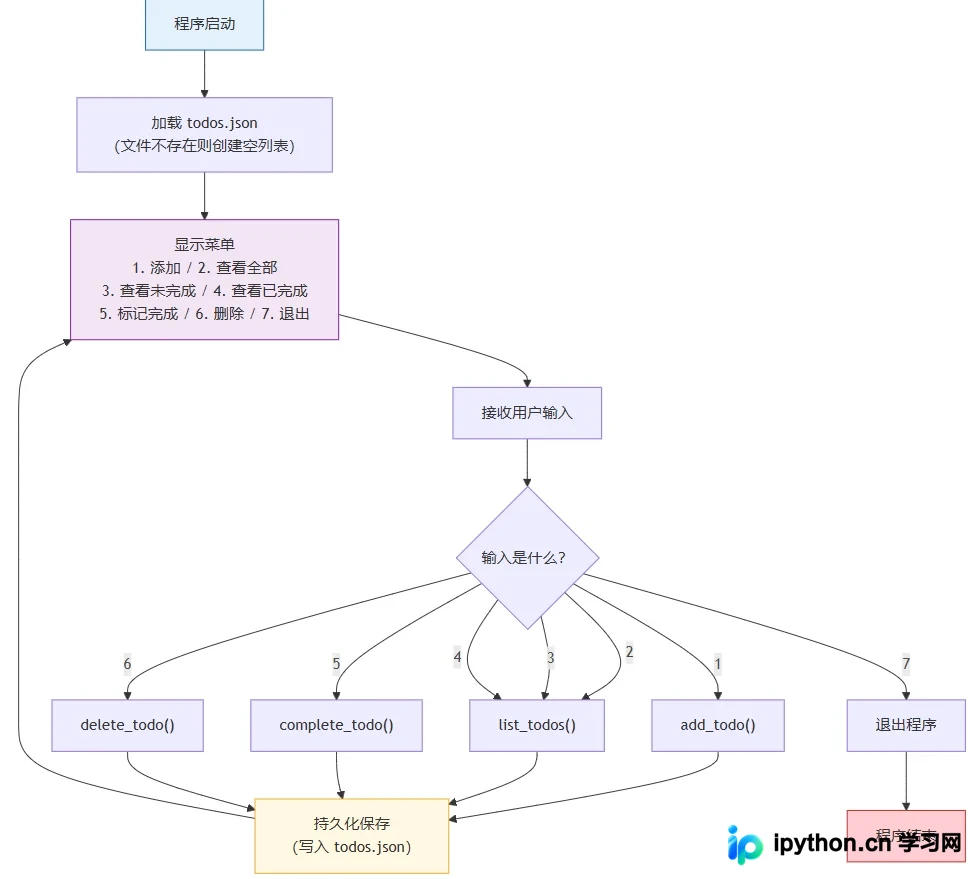
二、核心功能实现
1. 基础数据操作(内存版)
在引入文件操作前,首先实现内存中的数据管理。这有助于验证数据结构的合理性。我们需要维护一个全局列表 todos 和一个自增计数器 next_id。
import datetime

todos = []          # 全局列表,存储所有待办项
next_id = 1        # 下一个可用的 ID

def add_todo(title):
    global next_id
    todo = {
        "id": next_id,
        "title": title,
        "completed": False,
        "created_at": datetime.datetime.now().strftime("%Y-%m-%d %H:%M"),
    }
    todos.append(todo)
    next_id += 1
    print(f"✅ 已添加:{title}")

def list_todos():
    if not todos:
        print("📋 暂无待办事项")
        return
    for todo in todos:
        status = "✓" if todo["completed"] else "○"
        print(f"  [{status}] #{todo['id']} {todo['title']}")
2. 状态管理与删除
待办事项的状态变更(完成)和删除操作需要精确匹配 id。由于 id 是逻辑编号,不等于列表索引,因此遍历时需使用 enumerate 获取索引以进行删除操作。
def complete_todo(todo_id):
    for todo in todos:
        if todo["id"] == todo_id:
            if todo["completed"]:
                print(f"⚠️  #{todo_id} 已经是完成状态")
                return
            todo["completed"] = True
            print(f"🎉 #{todo_id} {todo['title']} 已标记完成")
            return
    print(f"❌ 未找到 ID 为 {todo_id} 的待办项")

def delete_todo(todo_id):
    for i, todo in enumerate(todos):
        if todo["id"] == todo_id:
            removed = todos.pop(i)
            print(f"🗑️  已删除:{removed['title']}")
            return
    print(f"❌ 未找到 ID 为 {todo_id} 的待办项")
3. JSON 持久化存储
为了实现数据不丢失,引入 json 和 os 模块。采用“每次修改立即保存”的策略,确保数据一致性。
import json
import os

FILENAME = "todos.json"

def save_todos():
    """将当前 todos 列表写入 JSON 文件"""
    with open(FILENAME, "w", encoding="utf-8") as f:
        json.dump(todos, f, ensure_ascii=False, indent=2)
    print(f"💾 已保存到 {FILENAME}")

def load_todos():
    """从 JSON 文件加载待办项列表"""
    global next_id
    if not os.path.exists(FILENAME):
        print("📁 首次运行,创建空数据文件")
        return
    with open(FILENAME, "r", encoding="utf-8") as f:
        loaded = json.load(f)
    todos.clear()
    todos.extend(loaded)
    # 恢复 next_id:已有 ID 的最大值 + 1
    if todos:
        next_id = max(t["id"] for t in todos) + 1
    else:
        next_id = 1
    print(f"📂 已从 {FILENAME} 加载 {len(todos)} 条待办")
4. 交互式主循环与异常处理
主函数 main 负责构建用户界面。使用字典映射菜单选项到具体逻辑,并通过 try-except 块处理非数字输入(ValueError)和文件异常(FileNotFoundError)。同时,捕获 KeyboardInterrupt 以优雅处理 Ctrl+C 退出。
MENU = """
========================================
         📝 待办事项管理器
========================================
  1. 添加待办
  2. 查看待办
  3. 标记完成
  4. 删除待办
  5. 退出
========================================
请输入选项(1-5):
"""

def main():
    load_todos()
    while True:
        try:
            choice = input(MENU).strip()
            if choice == "1":
                title = input("请输入待办内容:").strip()
                if not title:
                    print("⚠️  内容不能为空")
                    continue
                add_todo(title)
            elif choice == "2":
                list_todos()
            elif choice == "3":
                list_todos()
                if not todos:
                    continue
                try:
                    todo_id = int(input("请输入要完成的待办 ID:").strip())
                except ValueError:
                    print("⚠️  请输入数字 ID")
                    continue
                complete_todo(todo_id)
            elif choice == "4":
                list_todos()
                if not todos:
                    continue
                try:
                    todo_id = int(input("请输入要删除的待办 ID:").strip())
                except ValueError:
                    print("⚠️  请输入数字 ID")
                    continue
                delete_todo(todo_id)
            elif choice == "5":
                print("👋 下次见!")
                break
            else:
                print("⚠️  无效选项,请输入 1-5 之间的数字")
        except KeyboardInterrupt:
            print("\n👋 强制退出,下次见!")
            break

if __name__ == "__main__":
    main()
三、完整代码与运行效果
完整的代码整合了上述所有功能,并增加了按状态过滤查看的功能。运行程序后,数据将自动保存至 todos.json,下次启动时自动加载。
"""
待办事项管理器 v1.0
命令行界面,数据持久化到 JSON 文件
"""

import json
import os
import datetime

FILENAME = "todos.json"
todos = []
next_id = 1

def load_todos():
    """从 JSON 文件加载待办项列表,不存在则创建空文件"""
    global next_id
    if not os.path.exists(FILENAME):
        open(FILENAME, "w", encoding="utf-8").close()
        print("📁 首次运行,已创建空数据文件")
        return
    try:
        with open(FILENAME, "r", encoding="utf-8") as f:
            data = json.load(f)
        todos.clear()
        todos.extend(data)
        next_id = (max(t["id"] for t in todos) + 1) if todos else 1
        print(f"📂 已加载 {len(todos)} 条待办")
    except (json.JSONDecodeError, IOError) as e:
        print(f"⚠️  数据文件读取失败,将使用空列表:{e}")

def save_todos():
    """将当前 todos 列表写入 JSON 文件"""
    try:
        with open(FILENAME, "w", encoding="utf-8") as f:
            json.dump(todos, f, ensure_ascii=False, indent=2)
    except IOError as e:
        print(f"❌ 保存失败:{e}")

def add_todo(title):
    """添加一条待办项"""
    global next_id
    todo = {
        "id": next_id,
        "title": title,
        "completed": False,
        "created_at": datetime.datetime.now().strftime("%Y-%m-%d %H:%M"),
    }
    todos.append(todo)
    next_id += 1
    save_todos()
    print(f"✅ 已添加 [{todo['id']}] {title}")

def list_todos(filter_status=None):
    """列出所有待办项,支持按状态过滤"""
    if not todos:
        print("📋 暂无待办事项")
        return
    print("\n" + "=" * 40)
    for todo in todos:
        if filter_status is not None and todo["completed"] != filter_status:
            continue
        status = "✓" if todo["completed"] else "○"
        line = f"  [{status}] #{todo['id']} {todo['title']}"
        if todo["completed"]:
            line += f" ({todo['created_at']})"
        print(line)
    print("=" * 40)
    print(f"共 {len(todos)} 条,"
          f"已完成 {sum(1 for t in todos if t['completed'])} 条,"
          f"未完成 {sum(1 for t in todos if not t['completed'])} 条")

def complete_todo(todo_id):
    """将指定 ID 的待办标记为已完成"""
    for todo in todos:
        if todo["id"] == todo_id:
            if todo["completed"]:
                print(f"⚠️  #{todo_id} 已经是完成状态")
                return
            todo["completed"] = True
            save_todos()
            print(f"🎉 #{todo_id} 已标记完成:{todo['title']}")
            return
    print(f"❌ 未找到 ID 为 {todo_id} 的待办项")

def delete_todo(todo_id):
    """删除指定 ID 的待办项"""
    for i, todo in enumerate(todos):
        if todo["id"] == todo_id:
            removed = todos.pop(i)
            save_todos()
            print(f"🗑️  已删除:{removed['title']}")
            return
    print(f"❌ 未找到 ID 为 {todo_id} 的待办项")

def main():
    load_todos()
    MENU = """
========================================
         📝 待办事项管理器 v1.0
========================================
  1. 添加待办
  2. 查看全部
  3. 查看未完成
  4. 查看已完成
  5. 标记完成
  6. 删除待办
  7. 退出
========================================
    """
    while True:
        try:
            choice = input(MENU).strip()
            if choice == "1":
                title = input("请输入待办内容:").strip()
                if not title:
                    print("⚠️  内容不能为空")
                    continue
                add_todo(title)
            elif choice == "2":
                list_todos()
            elif choice == "3":
                list_todos(filter_status=False)
            elif choice == "4":
                list_todos(filter_status=True)
            elif choice == "5":
                list_todos(filter_status=False)
                if not todos:
                    continue
                raw = input("请输入要完成的待办 ID(直接回车取消):").strip()
                if not raw:
                    continue
                try:
                    complete_todo(int(raw))
                except ValueError:
                    print("⚠️  请输入数字")
            elif choice == "6":
                list_todos()
                if not todos:
                    continue
                raw = input("请输入要删除的待办 ID(直接回车取消):").strip()
                if not raw:
                    continue
                try:
                    delete_todo(int(raw))
                except ValueError:
                    print("⚠️  请输入数字")
            elif choice == "7":
                print("👋 下次见!")
                break
            else:
                print("⚠️  无效选项,请输入 1-7")
        except KeyboardInterrupt:
            print("\n👋 下次见!")
            break

if __name__ == "__main__":
    main()
四、运行示例
以下是程序运行时的典型交互过程,展示了数据的添加、查看、完成及持久化保存。
$ python todo_manager.py
📂 已加载 3 条待办

========================================
         📝 待办事项管理器 v1.0
========================================
  1. 添加待办
  2. 查看全部
  3. 查看未完成
  4. 查看已完成
  5. 标记完成
  6. 删除待办
  7. 退出
========================================

请输入选项(1-7):
2

========================================
  [○] #1 阅读模块与包文章
  [✓] #2 整理 Python 笔记
  [○] #3 完成待办管理器 v1
========================================
共 3 条,已完成 1 条,未完成 2 条

请输入选项(1-7):
1
请输入待办内容:发布文章到 CSDN
💾 已保存到 todos.json
✅ 已添加 [4] 发布文章到 CSDN

请输入选项(1-7):
5

========================================
  [○] #1 阅读模块与包文章
  [○] #3 完成待办管理器 v1
  [○] #4 发布文章到 CSDN
========================================
共 3 条,已完成 0 条,未完成 3 条

请输入要完成的待办 ID(直接回车取消):3
💾 已保存到 todos.json
🎉 #3 已标记完成:完成待办管理器 v1

请输入选项(1-7):
7
👋 下次见!程序退出后,todos.json 文件内容如下:
[
  {
    "id": 1,
    "title": "阅读模块与包文章",
    "completed": false,
    "created_at": "2026-04-27 09:15"
  },
  {
    "id": 2,
    "title": "整理 Python 笔记",
    "completed": true,
    "created_at": "2026-04-26 20:30"
  },
  {
    "id": 3,
    "title": "完成待办管理器 v1",
    "completed": true,
    "created_at": "2026-04-27 10:00"
  },
  {
    "id": 4,
    "title": "发布文章到 CSDN",
    "completed": false,
    "created_at": "2026-04-27 10:05"
  }
]
五、扩展与工程原则
当前版本已具备核心功能,若要将其打造为更接近真实产品的工具,可考虑以下扩展方向:
- 优先级管理:在字典中增加
priority字段,并使用sort(key=...)进行排序。 - 截止日期:利用
datetime模块支持截止日期,并支持按日期排序。 - 分类标签:使用列表或集合(
set)支持多标签分类。 - 命令行参数:使用
sys.argv实现非交互式的命令行参数入口。 - 数据统计:实现更详细的数据统计汇总和格式化输出。


六、总结
在开发此类工具时,遵循以下工程原则有助于提高代码质量:
- 数据结构先行:先确定 JSON 存储结构,再编写代码。
- 函数封装:每个功能封装为独立函数,保持主逻辑清晰。
- 主循环分发:主循环只负责接收输入和分发任务,不处理具体业务逻辑。
- 即时保存:数据量较小时,每次修改立即保存,避免复杂的事务处理。
- 分散异常处理:异常处理分散到具体场景,而非集中包裹整个程序。
- 字典映射:使用字典做分支映射,简化主循环结构。
以上就是使用 Python 编写 CLI 待办事项管理器的详细内容,更多关于 Python 命令行工具开发、JSON 数据持久化及异常处理机制的资料请关注本站其它相关文章!
本站声明
本文内容仅供参考,不代表本站观点。转载或引用请注明出处。如发现内容问题,请通过联系我们页面反馈。















