


Python实现自定义图片水印生成器

发布时间:2026-10-15 |
5人浏览过
本文介绍如何使用Python的PIL库实现一个图片水印生成器。该工具支持为单张图片或指定目录批量添加水印,允许用户自定义水印文本、颜色、字体大小及显示位置。通过具体代码示例,展示了如何快速生成用于数据采集的水印图片,适用于需要大量水印素材的场景。
Python水印生成器实现
本文分享了使用Python实现图片水印生成的具体代码,供读者参考学习。
构建一个水印生成器,旨在方便进行水印图片的数据采集。该工具可以为指定的单个图片文件或整个目录批量添加水印,并支持对水印的文本内容、显示位置、颜色以及大小进行自定义设置。
# -*- encoding=utf-8 -*-
import time
from PIL import Image, ImageDraw,ImageFont,ImageEnhance

"""图片水印生成器,自定义文字,颜色,大小,位置"""


# 横向上方水印
def auto_make_watermark1(filepath,content,color,savefilepath):
    """
    :param filepath: 图片路径
    :param content: 水印文字
    :param color: 水印颜色
    :param savefilepath: 保存路径
    :return:
    """
    image = Image.open(filepath).convert('RGB')
    draw = ImageDraw.Draw(image)
    font=ImageFont.truetype("simsun.ttc", 40, encoding="unic",index=1)  # 设置水印字体
    draw.text((80, 200), content,color, font) # 设置水印位置
    image.save(savefilepath)

# 横向中间水印
def auto_make_watermark2(filepath,content,color,savefilepath):
    """
    :param filepath: 图片路径
    :param content: 水印文字
    :param color: 水印颜色
    :param savefilepath: 保存路径
    :return:
    """
    image = Image.open(filepath).convert('RGB')
    draw = ImageDraw.Draw(image)
    font=ImageFont.truetype("simsun.ttc", 40, encoding="unic",index=1)  # 设置水印字体
    draw.text((80, 400), content,color, font)   # 设置水印位置
    image.save(savefilepath)

# 横向最下方水印
def auto_make_watermark3(filepath,content,color,savefilepath):
    """
    :param filepath: 图片路径
    :param content: 水印文字
    :param color: 水印颜色
    :param savefilepath: 保存路径
    :return:
    """
    image = Image.open(filepath).convert('RGB')
    draw = ImageDraw.Draw(image)
    font=ImageFont.truetype("simsun.ttc", 40, encoding="unic",index=1)  # 设置字体
    draw.text((80,image.size[1]-150), content,color, font) # 设置水印位置
    image.save(savefilepath)

# 横向中间倾斜水印45度
def auto_make_watermark4(filepath,content,color,savefilepath,radio):
    """
    :param filepath: 图片路径
    :param content: 水印文字
    :param color: 水印颜色
    :param savefilepath: 保存路径
    :param radio: 水印倾斜角度
    :return:
    """
    im = Image.open(filepath)
    watermark = Image.new('RGBA', im.size)
    draw = ImageDraw.Draw(watermark, 'RGBA')
    font = ImageFont.truetype("simsun.ttc", 40, encoding="unic", index=1)
    # x y 坐标
    draw.text((80, 400), content, font=font,  fill=color)
    # 旋转45度
    watermark = watermark.rotate(radio, Image.BICUBIC)
    # 透明的
    alpha = watermark.split()[3]
    alpha = ImageEnhance.Brightness(alpha).enhance(0.7)
    watermark.putalpha(alpha)
    # 合成新的图片
    image2 = Image.composite(watermark, im, watermark)
    image2.save(savefilepath)

if __name__ == '__main__':
    time1=time.time()
    filepath=r'F:/img_spam/python添加水印/10064003738101263000320010013284.jpg'

    savefilepath='F:/img_spam/python添加水印/生成/'
    text="诚招发单人,vx:18668124728"
    colors=['red','green','black']

    for color in colors:
        auto_make_watermark1(filepath,text,color,savefilepath+'10064003738101263000320010013285'+'_'+color+'_'+'top'+'.jpg')
        auto_make_watermark2(filepath, text, color,savefilepath + '10064003738101263000320010013285' + '_' + color+'_' +'mmddle'+'.jpg')
        auto_make_watermark3(filepath, text, color,savefilepath + '10064003738101263000320010013285' + '_' + color +'_'+ 'down' + '.jpg')
        auto_make_watermark4(filepath, text, color,savefilepath + '10064003738101263000320010013285' + '_' + color+'_' + 'angle' + '.png',45)
        auto_make_watermark4(filepath, text, color,savefilepath + '10064003738101263000320010013285' + '_' + color + '_' +'angle_50' + '.png', -50)

    time2=time.time()
    print('总共耗时:' + str(time2 - time1) + 's')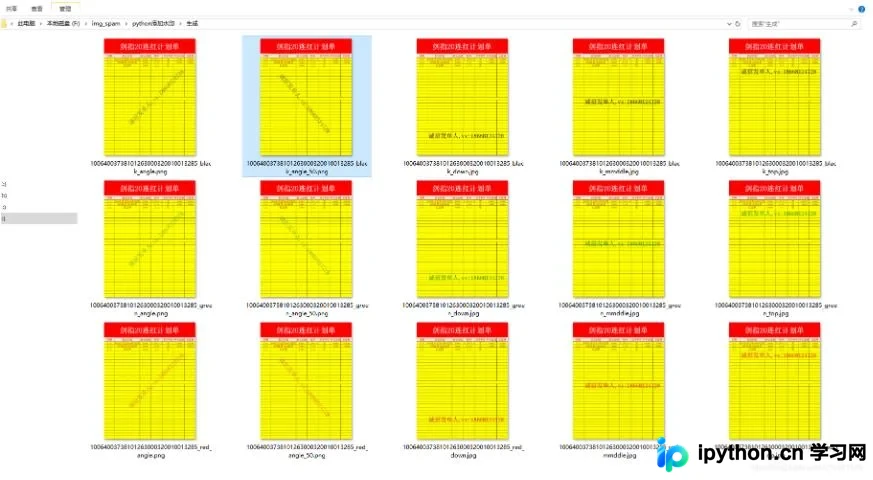
以上就是本文的全部内容,希望能为读者提供有益的帮助,欢迎继续支持本站。
本站声明
本文内容仅供参考,不代表本站观点。转载或引用请注明出处。如发现内容问题,请通过联系我们页面反馈。















