


Python函数性能检测:内存、时间与代码行级分析工具详解

本文汇总了五款实用的Python性能检测工具,涵盖内存占用、运行耗时及代码行级分析。通过memory_profiler、timeit、line_profiler及heartrate等工具,结合具体代码示例,展示如何精准定位程序瓶颈,帮助开发者优化Python应用效率。
尽管Python常被戏称为“慢语言”,但生态中仍提供了丰富的性能检测工具,协助开发者提升程序运行效率。
本文整理了五款优秀的Python性能检测工具,覆盖内存使用量、代码执行耗时以及函数调用次数等关键维度。
基础测试函数
为了在后续的性能测试中进行统一对比,首先需要定义一个基础的Python函数。
def base_func():
    for n in range(10000):
        print('当前n的值是:{}'.format(n))
memory_profiler进程监控
memory_profiler属于Python的非标准库,需通过pip命令进行安装。该工具主要用于监控进程状态及分析内存使用情况。
pip install memory_profiler
安装memory_profiler库后,可直接利用装饰器注解的方式对目标函数进行测试。
from memory_profiler import profile
@profile
def base_func1():
    for n in range(10000):
        print('当前n的值是:{}'.format(n))
base_func1()
# Line #    Mem usage    Increment  Occurrences   Line Contents
# =============================================================
#     28     45.3 MiB     45.3 MiB           1   @profile
#     29                                         def base_func():
#     30     45.3 MiB      0.0 MiB       10001       for n in range(10000):
#     31     45.3 MiB      0.0 MiB       10000           print('当前n的值是:{}'.format(n))
根据返回的数据结果显示,执行该函数过程中占用了45.3 MiB的内存空间。
timeit时间统计
timeit是Python的内置模块,专门用于测试代码单元格的运行时间。由于它是内置模块,因此无需额外安装。
import timeit
def base_func2():
    for n in range(10000):
        print('当前n的值是:{}'.format(n))
res = timeit.timeit(base_func2,number=5)
print('当前的函数的运行时间是:{}'.format(res))
# 当前的函数的运行时间是:0.9675800999999993
基于上述函数的运行返回结果,该函数的总运行时间约为0.96秒。
line_profiler行级代码检测
若仅需检测函数内部局部代码的运行时间,推荐使用line_profiler,它能够精确统计每一行代码的执行耗时。
line_profiler同样属于Python的非标准库,安装时需使用pip命令进行下载。
pip install line_profiler
最便捷的使用方式是将需要测试的函数直接传入检测器即可。
def base_func3():
    for n in range(10000):
        print('当前n的值是:{}'.format(n))
from line_profiler import LineProfiler
lp = LineProfiler()
lp_wrap = lp(base_func3)
lp_wrap()
lp.print_stats()
# Line #      Hits         Time  Per Hit   % Time  Line Contents
# ==============================================================
#     72                                           def base_func3():
#     73     10001     162738.0     16.3      4.8      for n in range(10000):
#     74     10000    3207772.0    320.8     95.2          print('当前n的值是:{}'.format(n))
从运行结果可以看出每行代码的具体耗时及其占比,需注意此处时间单位为微秒。
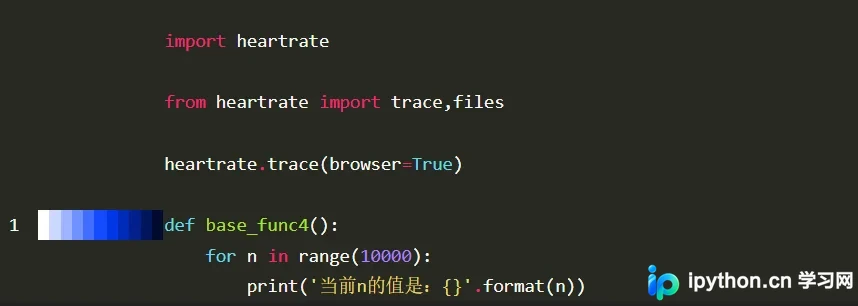
heartrate可视化监控
heartrate最引人注目的功能是支持在网页端以类似监测心率的方式可视化展示程序的执行过程。它也是非标准库,需通过pip安装。
pip install heartrate
import heartrate
heartrate.trace(browser=True)
def base_func4():
    for n in range(10000):
        print('当前n的值是:{}'.format(n))
运行程序后,控制台将打印如下日志信息:
#  * Serving Flask app "heartrate.core" (lazy loading)
#  * Environment: production
#    WARNING: This is a development server. Do not use it in a production deployment.
#    Use a production WSGI server instead.
#  * Debug mode: off
同时,系统会自动在浏览器中打开地址:http://127.0.0.1:9999。
以上即为Python函数运行内存、时间及性能检测工具的详细介绍,更多Python性能检测相关资料,敬请关注本站其他文章。
本站声明
本文内容仅供参考,不代表本站观点。转载或引用请注明出处。如发现内容问题,请通过联系我们页面反馈。















