


OpenCV Python实现灰度图像前景区域提取与过滤

发布时间:2026-10-15 |
4人浏览过
本文介绍使用OpenCV和Python从灰度图像中提取前景区域的方法。通过设定阈值生成Mask,利用findContours查找轮廓,并根据设定的面积占比过滤掉过小的前景块。代码展示了如何裁剪有效Patch并保留原始图像结构,适用于图像预处理和特征提取场景。
灰度图像前景提取与过滤概述
本文旨在演示如何从灰度图像中,依据特定阈值提取多个前景区域,并自动过滤掉面积过小的无效区域。
以下是基于OpenCV的Python实现逻辑,核心函数定义为clip_gray_patches:
核心代码实现逻辑
def clip_gray_patches(img_gray, ths=32, filter_percent=0.0005):
    """
    从灰度图像切出多个前景区域,阈值大于ths,过滤面积占比小于filter_percent的图像
    @param img_gray: 灰度图像
    @param ths: 前景阈值
    @param filter_percent: 过滤面积
    @return: patches list, 轮廓图像
    """

    # 根据thresh_val过滤mask
    ret, gray_mask = cv2.threshold(img_gray, ths, 1, 0)
    contours, hierarchy = cv2.findContours(gray_mask, cv2.RETR_TREE, cv2.CHAIN_APPROX_SIMPLE)

    img_area = get_image_size(img_gray)  # 图像面积

    img_copy = copy.copy(img_gray)
    img_patches = []

    # 遍历全部轮廓
    for cnt in contours:
        area = cv2.contourArea(cnt)
        if area / img_area < filter_percent:  # 过滤小图像
            continue

        # 将小patch的前景设置为255,背景设置为0
        mask = np.zeros(img_gray.shape)
        cv2.drawContours(mask, [cnt], -1, 255, -1)
        mask = mask.astype(np.uint8)

        # 将原图,根据mask,贴入新图像中,再提取mask
        masked = cv2.add(img_gray, np.zeros(np.shape(img_gray), dtype=np.uint8), mask=mask)
        box = get_mask_box(mask)
        img_patch = get_cropped_patch(masked, box)

        img_patches.append(img_patch)
        img_copy = cv2.drawContours(img_copy, [cnt], -1, 255, 1)  # 绘制边界

    return img_patches, img_copy

def get_image_size(img):
    """
    获取图像尺寸
    """
    h, w = img.shape[:2]
    return float(h * w)

def get_mask_box(mask):
    """
    mask的边框
    """
    import numpy as np
    y, x = np.where(mask)
    x_min = np.min(x)
    x_max = np.max(x)
    y_min = np.min(y)
    y_max = np.max(y)
    box = [x_min, y_min, x_max, y_max]
    return box

def get_cropped_patch(img, box):
    """
    获取Img的Patch
    :param img: 图像
    :param box: [x_min, y_min, x_max, y_max]
    :return 图像块
    """
    h, w = img.shape[:2]
    x_min = int(max(0, box[0]))
    y_min = int(max(0, box[1]))
    x_max = int(min(box[2], w))
    y_max = int(min(box[3], h))

    if len(img.shape) == 3:
        img_patch = img[y_min:y_max, x_min:x_max, :]
    else:
        img_patch = img[y_min:y_max, x_min:x_max]
    return img_patch
输入与输出图像示例
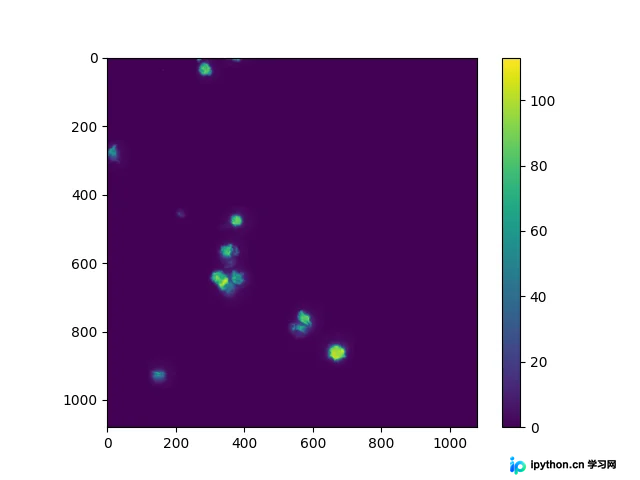
处理前的原始灰度图像如下所示:
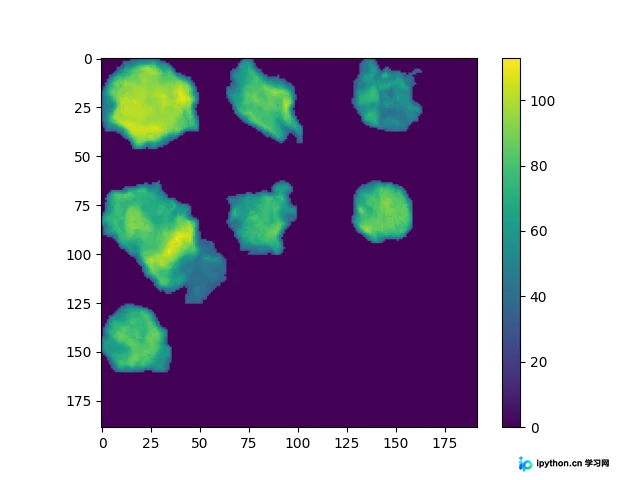
经过阈值分割和前景提取后的输出图像效果如下:
以上就是关于利用OpenCV从灰度图像中切出Mask前景区域的完整实现。如需了解更多相关技术细节,建议查阅本站过往文章或关注后续更新,感谢支持。
本站声明
本文内容仅供参考,不代表本站观点。转载或引用请注明出处。如发现内容问题,请通过联系我们页面反馈。















