


Python3 Queue多线程通信详解:类型、模式与实战示例

本文详解Python3中queue模块的三种队列类型:先进先出、后进先出及优先级队列,重点介绍利用Queue实现线程间安全通信的生产消费模式。通过特殊哨兵值协调消费者关闭,并结合task_done与join方法处理任务完成状态,最后展示多线程环境下任务分发与日志记录的完整代码示例。
Queue分类
在Python3中,queue模块主要提供三种队列实现:
- 先进先出(FIFO)队列
- 后进先出(LIFO)栈
- 优先级队列
这三种队列的导入方式分别如下:
from queue import Queue
from queue import LifoQueue
from queue import
具体使用方法请参考下方的代码引用说明。
示例一:生产消费模式
Queue 对象内部已封装了必要的锁机制,因此你可以安全地在多个线程间共享数据。在使用队列协调生产者和消费者的关闭逻辑时,可能会遇到一些复杂性。一种通用的解决方案是在队列中放置一个特殊的终止信号值,当消费者读取到该值时,便终止执行。
例如:
from queue import Queue
from threading import Thread
# 用来表示终止的特殊对象
_sentinel = object()
# A thread that produces data
def producer(out_q):
for i in range(10):
print("生产")
out_q.put(i)
out_q.put(_sentinel)
# A thread that consumes data
def consumer(in_q):
while True:
data = in_q.get()
if data is _sentinel:
in_q.put(_sentinel)
break
else:
print("消费", data)
# Create the shared queue and launch both threads
q = Queue()
t1 = Thread(target=consumer, args=(q,))
t2 = Thread(target=producer, args=(q,))
t1.start()
t2.start()
运行结果:
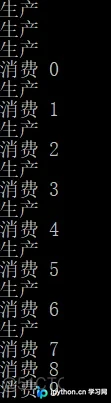
本例中有一个关键细节:消费者在读取到特殊终止值后,会立即将其重新放入队列中,以便传递给其他监听该队列的消费者线程。这样,所有等待在队列上的消费者线程都能接收到终止信号并安全关闭。尽管队列是最常用的线程间通信机制,但你也可以通过创建自定义数据结构并添加所需的锁和同步机制来实现线程间通信。最常见的方法是使用 Condition 变量来包装你的数据结构。下面的示例演示了如何创建一个线程安全的优先级队列。
import heapq
import threading
class PriorityQueue:
def __init__(self):
self._queue = []
self._count = 0
self._cv = threading.Condition()
def put(self, item, priority):
with self._cv:
heapq.heappush(self._queue, (-priority, self._count, item))
self._count += 1
self._cv.notify()
def get(self):
with self._cv:
while len(self._queue) == 0:
self._cv.wait()
return heapq.heappop(self._queue)[-1]
示例二:task_done和join
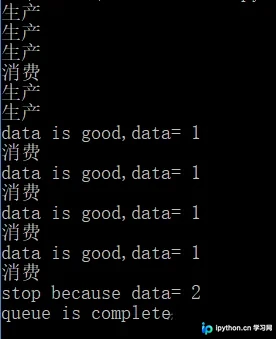
使用队列进行线程间通信是一个单向且结果不确定的过程。通常情况下,你无法确切知道接收数据的线程何时接收数据并开始工作。不过,队列对象提供了一些基本的完成状态特性,如下例中的 task_done() 和 join():
from queue import Queue
from threading import Thread
class Producer(Thread):
def __init__(self, q):
super().__init__()
self.count = 5
self.q = q
def run(self):
while self.count > 0:
print("生产")
if self.count == 1:
self.count -= 1
self.q.put(2)
else:
self.count -= 1
self.q.put(1)
class Consumer(Thread):
def __init__(self, q):
super().__init__()
self.q = q
def run(self):
while True:
print("消费")
data = self.q.get()
if data == 2:
print("stop because data=", data)
# 任务完成,从队列中清除一个元素
self.q.task_done()
break
else:
print("data is good,data=", data)
# 任务完成,从队列中清除一个元素
self.q.task_done()
def main():
q = Queue()
p = Producer(q)
c = Consumer(q)
p.setDaemon(True)
c.setDaemon(True)
p.start()
c.start()
# 等待队列清空
q.join()
print("queue is complete")
if __name__ == '__main__':
main()
运行结果:
示例三:多线程中使用Queue
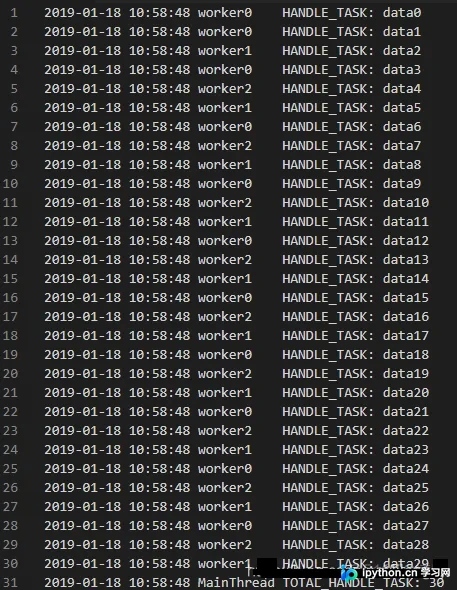
设置两个队列,一个是待处理的任务队列 todo_queue,另一个是已完成任务的队列 done_queue。每次执行线程时,先从 todo_queue 队列中取出一个任务值,执行完毕后,将其放入 done_queue 队列。如果 todo_queue 为空,则退出循环。
import logging
import logging.handlers
import threading
import queue

log_mgr = None
todo_queue = queue.Queue()
done_queue = queue.Queue()
class LogMgr:
def __init__(self, logpath):
self.LOG = logging.getLogger('log')
loghd = logging.handlers.RotatingFileHandler(logpath, "a", 0, 1)
fmt = logging.Formatter("%(asctime)s %(threadName)-10s %(message)s", "%Y-%m-%d %H:%M:%S")
loghd.setFormatter(fmt)
self.LOG.addHandler(loghd)
self.LOG.setLevel(logging.INFO)
def info(self, msg):
if self.LOG is not None:
self.LOG.info(msg)
class Worker(threading.Thread):
global log_mgr
def __init__(self, name):
threading.Thread.__init__(self)
self.name = name
def run(self):
while True:
try:
task = todo_queue.get(False)
if task:
log_mgr.info("HANDLE_TASK: %s" % task)
done_queue.put(1)
except queue.Empty:
break
return
def main():
global log_mgr
log_mgr = LogMgr("mylog")
for i in range(30):
todo_queue.put("data"+str(i))
workers = []
for i in range(3):
w = Worker("worker"+str(i))
workers.append(w)
for i in range(3):
workers[i].start()
for i in range(3):
workers[i].join()
total_num = done_queue.qsize()
log_mgr.info("TOTAL_HANDLE_TASK: %d" % total_num)
exit(0)
if __name__ == '__main__':
main()
输出日志文件结果:
至此,关于Python3 Queue多线程通信的文章介绍完毕。如需了解更多Python Queue多线程通信相关内容,请搜索本站历史文章或继续浏览下方相关文章。希望大家以后多多支持本站!
本站声明
本文内容仅供参考,不代表本站观点。转载或引用请注明出处。如发现内容问题,请通过联系我们页面反馈。















