


怎么通过__annotations__在运行时获取Python函数注解

在 Python 中获取函数注解的最直接方法,是在运行时直接读取函数对象的 __annotations__ 属性。Python 会把定义在函数参数及返回值上的类型注解,存放在该属性对应的一个标准字典(dict)中。只要函数已在当前进程中定义或导入,就可以像访问普通对象属性一样读取它。
一、基础用法:直接读取函数的 __annotations__
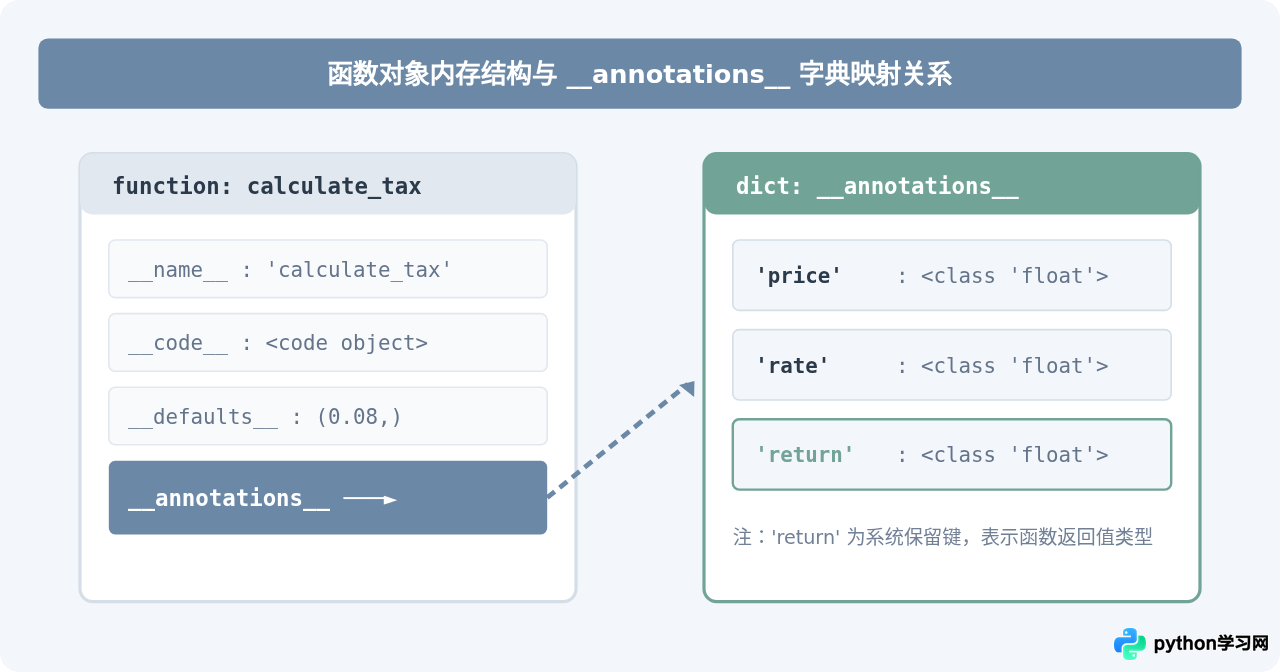
当我们在函数定义中使用了形参类型标注或返回值标注时,Python 解释器在编译该函数对象时便会创建 __annotations__ 字典。字典的键是参数名,值是该参数声明时对应的类型或表达式;对于函数的返回值注解,则使用固定的特殊字符串 'return' 作为键。
def calculate_tax(price: float, rate: float = 0.08) -> float:
    return price * rate

# 运行时直接访问 __annotations__
annotations = calculate_tax.__annotations__

print("类型:", type(annotations))
print("完整注解字典:", annotations)
print("price 的注解:", annotations.get("price"))
print("返回值的注解:", annotations.get("return"))
运行上述代码,控制台给出的示例输出如下:
类型: <class 'dict'>
完整注解字典: {'price': <class 'float'>, 'rate': <class 'float'>, 'return': <class 'float'>}
price 的注解: <class 'float'>
返回值的注解: <class 'float'>从输出中可以看出,annotations 是一个普通字典,其内部存储的值即为真正的 Python 类型对象 float。你可以通过标准字典方法如 keys()、items() 或 get() 进行遍历和安全取值。
二、运行时获取注解的典型操作流程
在实际开发(如编写参数校验装饰器、序列化工具或 API 路由解析器)中,通过 __annotations__ 获取注解通常包含定义函数、提取字典、检查键值和进行类型断言四个步骤。
- 明确目标函数:确保要检查的对象是一个标准的 Python 函数或方法。
- 访问
__annotations__:优先使用getattr(func, "__annotations__", None)进行安全访问,避免对象没有该属性时抛出AttributeError。 - 区分参数与返回值:根据字典键值区分普通入参和特殊键
'return'。若只需检查参数,可通过排除'return'进行过滤。 - 验证与使用:根据提取到的类型对象(如
int、str)执行具体的类型匹配或业务逻辑。
def validate_inputs(func):
    """一个简单的运行时参数类型检查器示例"""
    annotations = getattr(func, "__annotations__", {})
    # 提取所有入参的类型注解,剔除返回值 'return'
    param_types = {k: v for k, v in annotations.items() if k != "return"}

    def wrapper(*args, **kwargs):
        # 演示:在调用时读取注解并输出调试信息
        print(f"[调用 {func.__name__}] 预期参数注解: {param_types}")
        return func(*args, **kwargs)

    return wrapper

@validate_inputs
def send_message(user_id: int, content: str) -> bool:
    return True

send_message(101, "Hello World")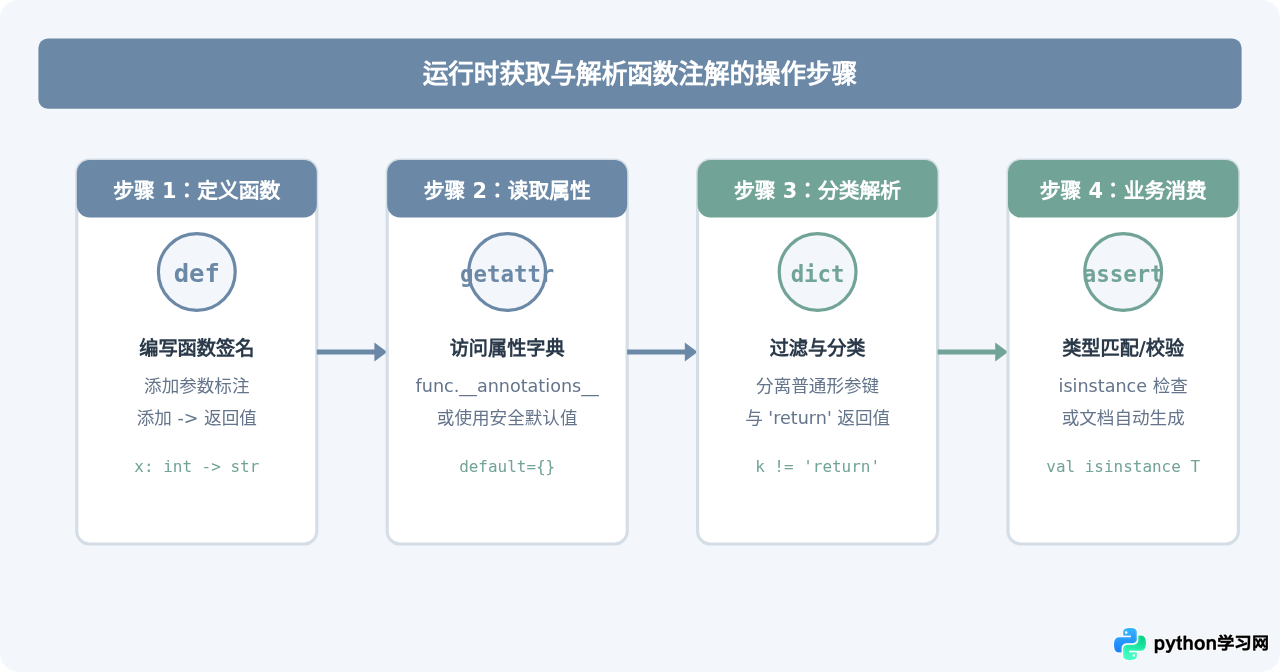
三、必须注意的关键陷阱与特殊场景
虽然直接读取 func.__annotations__ 非常简单,但在稍微复杂的工程项目中,直接访问该属性可能会遇到以下两个常见陷阱:
1. 延迟求值与字符串化注解(PEP 563)
如果在代码模块顶部引入了 from __future__ import annotations,Python 将开启注解的延迟求值机制(Deferred Evaluation of Annotations)。在该模式下,所有注解在编译时均不再求值为具体的类对象,而是全部以字符串形式存入 __annotations__ 中。
from __future__ import annotations

def process_data(data: list[int]) -> dict[str, int]:
    return {"sum": sum(data)}

# 此时直接访问 __annotations__
print(process_data.__annotations__)
示例输出:
{'data': 'list[int]', 'return': 'dict[str, int]'}注意观察:字典中 'data' 的值是字符串 'list[int]',而不是类型对象。如果你直接使用 isinstance(val, process_data.__annotations__['data']),程序将直接抛出 TypeError: isinstance() arg 2 must be a type 异常。
2. 没有标注时的属性表现
如果函数在定义时完全没有使用类型注解,在 Python 3.10 之前,首次访问 func.__annotations__ 时会惰性创建一个空字典 {}。但在某些特殊的内置函数、C 扩展函数或特殊包装对象上,__annotations__ 属性可能根本不存在。因此直接使用点号访问 func.__annotations__ 有触发 AttributeError 的风险。
四、标准库官方推荐方案对比
为了解决直接读取 __annotations__ 带来的字符串化、继承关系处理以及特殊对象缺失属性的问题,Python 官方在后续版本中提供了功能更加健全的标准库函数:
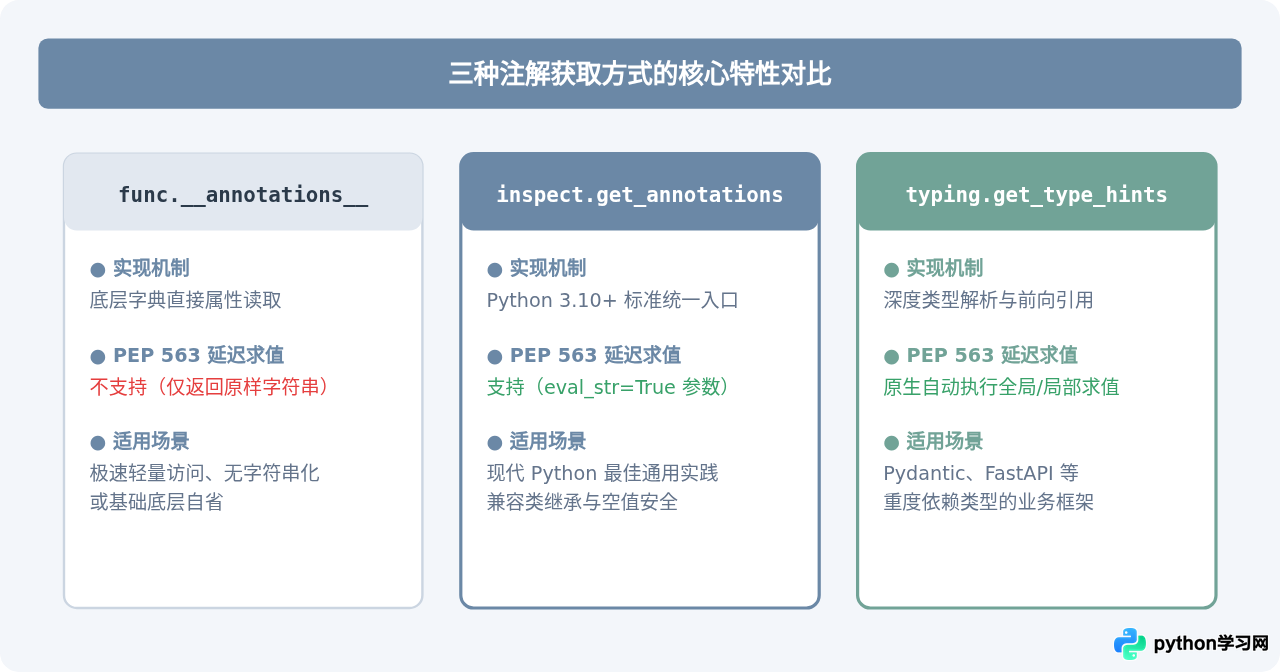
inspect.get_annotations(obj):自 Python 3.10 引入的标准获取函数。它统一封装了对函数、类、模块注解的安全访问逻辑,在属性不存在时安全返回空字典,并支持通过参数eval_str=True自动将字符串化注解还原为真实类型。typing.get_type_hints(obj):自 Python 3.5 引入的高级类型解析工具。它不仅会将字符串化注解求值为真实类型,还会递归解析ForwardRef(前向引用)和全局命名空间中的复杂类型定义。
代码对比示例:处理字符串化注解
以下示例清晰展示了三种方式在面对类型注解被字符串化时的不同表现:
from __future__ import annotations
import inspect
import typing

def add_item(item: str, count: int = 1) -> list[str]:
    return [item] * count

# 方式 1:直接读 __annotations__
print("直接读取:", add_item.__annotations__["item"], type(add_item.__annotations__["item"]))

# 方式 2:使用 inspect.get_annotations(eval_str=True)(Python 3.10+)
inspected = inspect.get_annotations(add_item, eval_str=True)
print("inspect 解析:", inspected["item"], type(inspected["item"]))

# 方式 3:使用 typing.get_type_hints()
hints = typing.get_type_hints(add_item)
print("typing 解析:", hints["item"], type(hints["item"]))
输出结果对比:
直接读取: str <class 'str'>
inspect 解析: <class 'str'> <class 'type'>
typing 解析: <class 'str'> <class 'type'>技术要点归纳:直接从 __annotations__ 中拿出的 'item' 是一个字符串 "str";而通过 inspect.get_annotations(eval_str=True) 或 typing.get_type_hints(),Python 会在定义该函数的全局作用域中把字符串解析回内置的 <class 'str'> 类型对象。
五、选型与应用总结
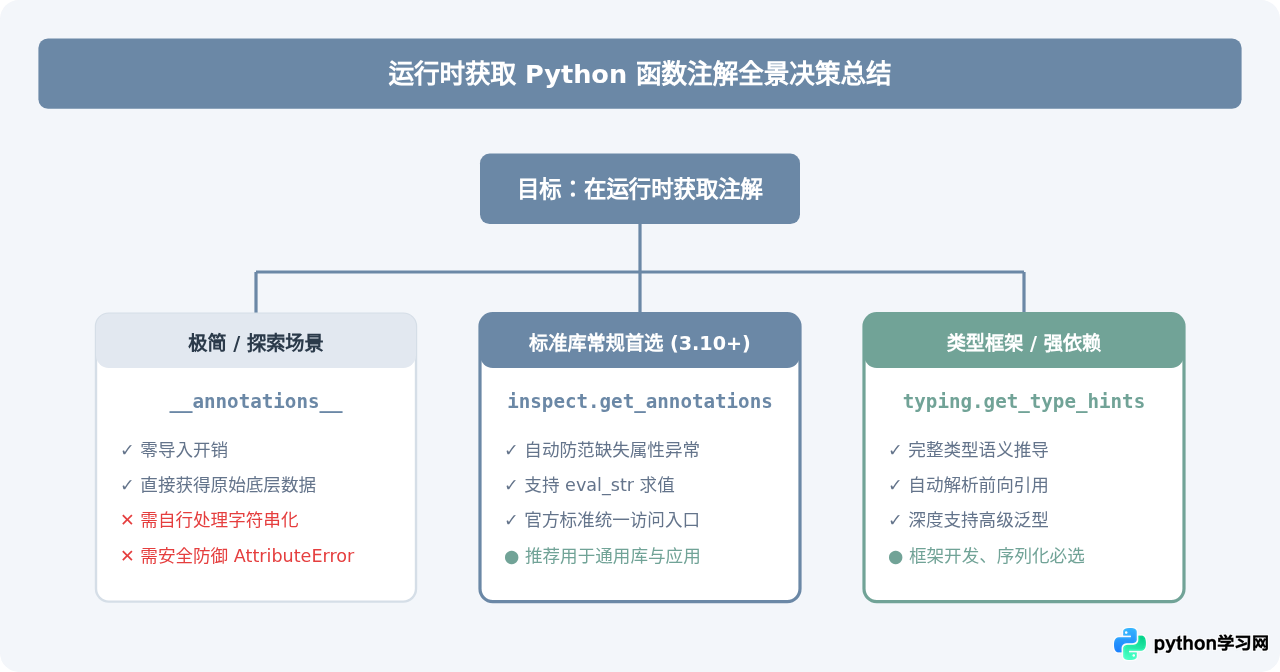
在 Python 运行时获取函数注解时,可以遵循如下决策路径:
- 如果你的代码运行在简单脚本或确定没有使用
from __future__ import annotations的轻量工具中,直接使用getattr(func, "__annotations__", {})是执行开销最小、依赖最少的方式。 - 在 Python 3.10 及以上版本的现代工程代码中,优先使用
inspect.get_annotations(func)。 - 如果你正在编写依赖复杂泛型、联合类型(
Union)、前向声明或数据验证的框架,应该直接使用typing.get_type_hints(func)。
本站声明
本文内容仅供参考,不代表本站观点。转载或引用请注明出处。如发现内容问题,请通过联系我们页面反馈。















