


Python爬虫在电商价格监控中的实战应用

构建电商价格监控系统的本质是建立一套“定时抓取-精准解析-数据比对-差值告警”的自动化流水线。在面对电商平台频繁变动的促销政策与动态定价机制时,手动核对价格不仅成本高昂且容易错失关键低价窗口。本文将直接从系统架构出发,利用 Python 的核心网络请求库与本地轻量数据库,详细演示如何编写稳定提取商品标价、追踪历史波动并触发降价推送的完整可执行方案。
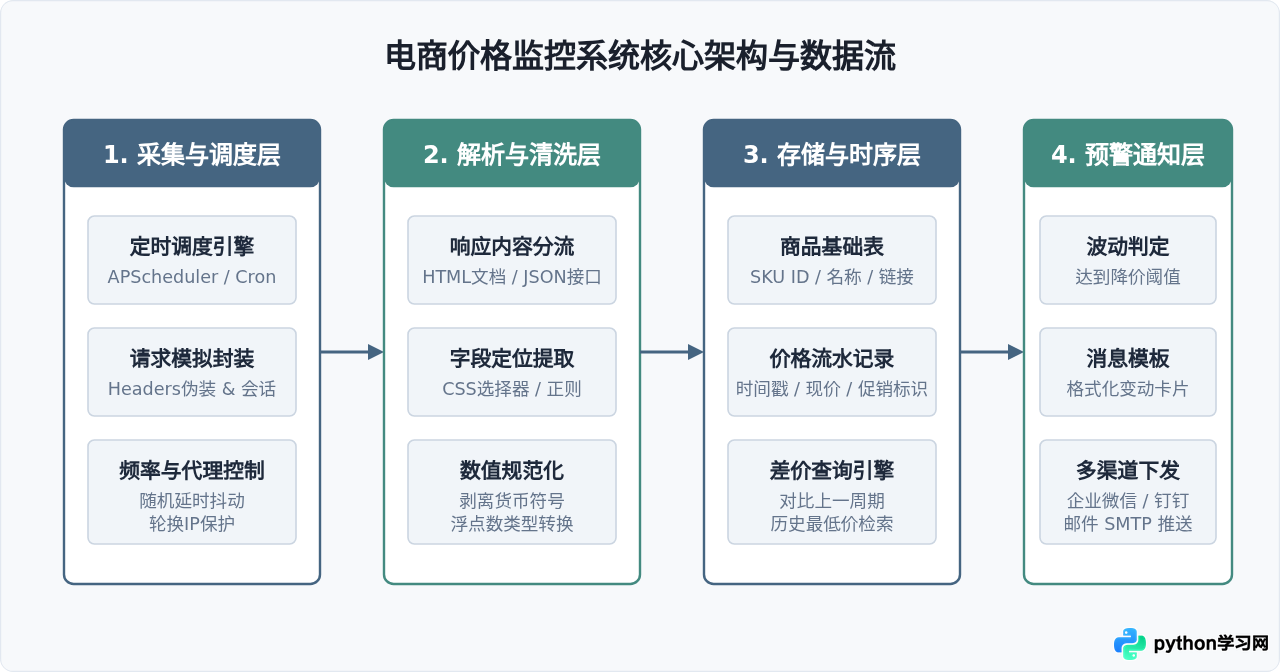
一、电商价格监控系统的整体架构与工作流
一套能够稳定运行的价格监控系统不能仅仅依赖单次运行的抓取脚本,它需要明确解耦网络通信、内容解析、数据存储与消息通知四个核心层级。这种分层结构确保了当页面结构发生改变时,只需调整解析逻辑,而不会影响底层的存储与预警判定。
二、目标商品抓取与字段精确解析
电商网站通常分为服务端渲染页面(静态 HTML)和客户端动态渲染页面(通过异步 API 返回 JSON)。在实际操作中,应优先在浏览器开发者工具(F12)的 Network 面板中排查价格接口;如果价格直接包含在 HTML 标签中,则使用 requests 结合 BeautifulSoup 或 lxml 进行提取。
在解析价格时,原始数据通常混杂有货币符号(如 ¥ 或 $)、文字提示(如“券后价”或“起”)以及千分位逗号。因此,必须编写严格的正则过滤,将字符串清洗为标准的浮点数(float)。
import re
import requests
from bs4 import BeautifulSoup

def fetch_product_price(item_url: str) -> dict:
    headers = {
        "User-Agent": (
            "Mozilla/5.0 (Windows NT 10.0; Win64; x64) "
            "AppleWebKit/537.36 (KHTML, like Gecko) "
            "Chrome/118.0.0.0 Safari/537.36"
        ),
        "Accept-Language": "zh-CN,zh;q=0.9",
        "Referer": "https://www.example-shop.com/"
    }

    try:
        response = requests.get(item_url, headers=headers, timeout=10)
        response.raise_for_status()
    except requests.RequestException as err:
        return {"status": "error", "message": f"请求失败: {err}"}

    soup = BeautifulSoup(response.text, "html.parser")

    # 模拟提取标题与价格节点(实际节点根据目标平台选择器调整)
    title_node = soup.select_one(".product-title") or soup.select_one("h1")
    price_node = soup.select_one(".product-price") or soup.select_one(".promo-price")

    if not price_node:
        return {"status": "failed", "message": "未定位到价格元素,可能触发验证码或结构改动"}

    raw_title = title_node.get_text(strip=True) if title_node else "未知商品"
    raw_price = price_node.get_text(strip=True)

    # 清洗价格:匹配第一组数字和小数点组合
    matched = re.search(r"(\d+(?:\.\d+)?)", raw_price.replace(",", ""))
    if not matched:
        return {"status": "failed", "message": f"无法提取有效价格数值: {raw_price}"}

    clean_price = float(matched.group(1))
    return {
        "status": "success",
        "title": raw_title,
        "price": clean_price
    }

# 示例调用
# result = fetch_product_price("https://www.example-shop.com/item/100023.html")
# print(result)
timeout 参数。当目标电商平台由于流量激增或反爬防御拒绝响应时,未设置超时的请求会导致爬虫主线程永久挂起,阻塞后续所有监控任务。
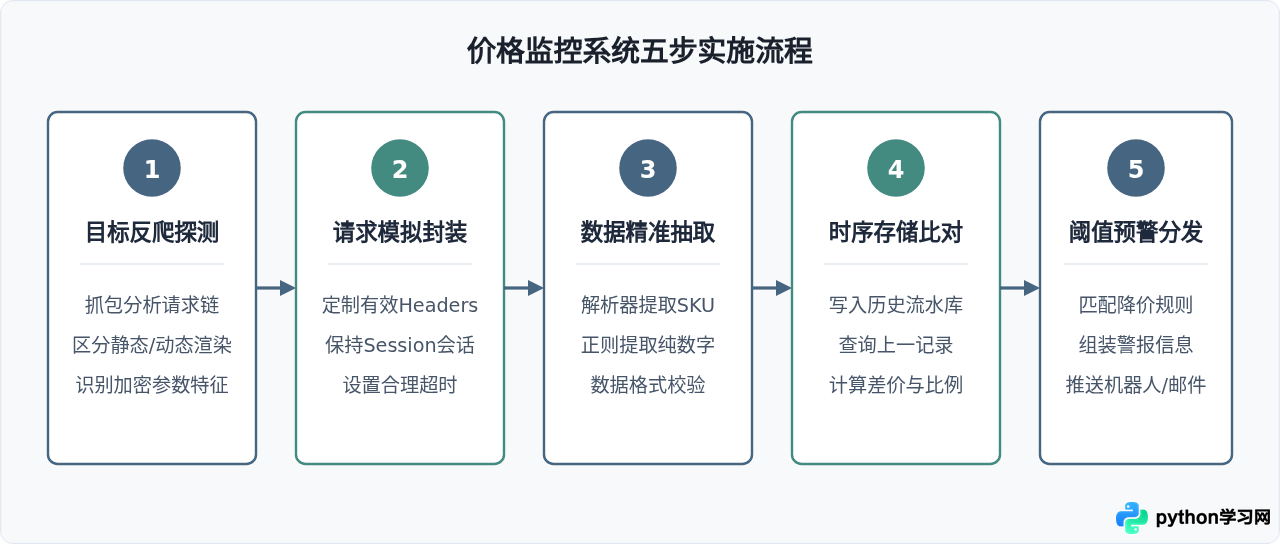
三、系统构建与实施的五步流程
搭建价格监控程序应遵循清晰的操作路径。从前期排查、逻辑实现到生产部署,各环节需按部就班推进,避免因直接编写定时抓取而频繁触发风控。
四、价格数据持久化与历史比对逻辑
仅获取当下的单次价格无法体现变动趋势。我们需要将每次成功抓取的结果持久化保存到数据库中。对于中小规模的监控任务,Python 内置的 sqlite3 模块是首选:无需配置独立数据库服务器,以单文件形式存储,读写性能满足高频比对需求。
数据库应包含两张核心表:
products:存储商品唯一标识(sku_id)、商品全称及监控链接。price_history:记录抓取时间戳、当时抓取到的价格以及关联的sku_id。
import sqlite3
from datetime import datetime

class PriceStorage:
    def __init__(self, db_path: str = "price_monitor.db"):
        self.conn = sqlite3.connect(db_path)
        self.create_tables()

    def create_tables(self):
        cursor = self.conn.cursor()
        # 商品主表
        cursor.execute("""
            CREATE TABLE IF NOT EXISTS products (
                sku_id TEXT PRIMARY KEY,
                title TEXT,
                url TEXT
            )
        """)
        # 价格时序表
        cursor.execute("""
            CREATE TABLE IF NOT EXISTS price_history (
                id INTEGER PRIMARY KEY AUTOINCREMENT,
                sku_id TEXT,
                price REAL,
                recorded_at TIMESTAMP,
                FOREIGN KEY (sku_id) REFERENCES products(sku_id)
            )
        """)
        self.conn.commit()

    def record_price(self, sku_id: str, title: str, url: str, current_price: float) -> dict:
        cursor = self.conn.cursor()

        # 确保商品信息已存在
        cursor.execute("""
            INSERT INTO products (sku_id, title, url)
            VALUES (?, ?, ?)
            ON CONFLICT(sku_id) DO UPDATE SET title = excluded.title
        """, (sku_id, title, url))

        # 获取上一条价格记录
        cursor.execute("""
            SELECT price, recorded_at FROM price_history
            WHERE sku_id = ?
            ORDER BY recorded_at DESC LIMIT 1
        """, (sku_id,))
        last_record = cursor.fetchone()

        # 写入本次最新记录
        now = datetime.now()
        cursor.execute("""
            INSERT INTO price_history (sku_id, price, recorded_at)
            VALUES (?, ?, ?)
        """, (sku_id, current_price, now))
        self.conn.commit()

        # 计算比对差值
        if last_record:
            old_price = last_record[0]
            diff = current_price - old_price
            return {
                "has_previous": True,
                "old_price": old_price,
                "current_price": current_price,
                "diff": diff,
                "is_drop": diff < 0
            }

        return {
            "has_previous": False,
            "current_price": current_price,
            "diff": 0.0,
            "is_drop": False
        }
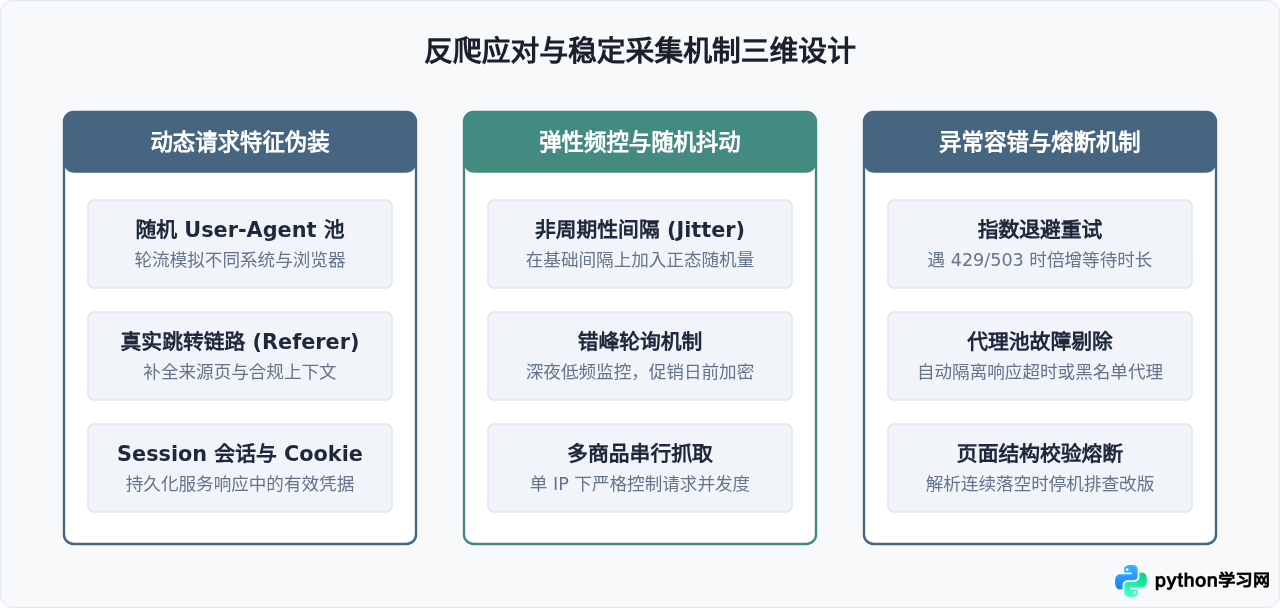
五、反爬策略与采集稳定性机制
电商平台通常配备有严密的反爬防护体系,常见手段包括高频封禁 IP、设备指纹检测、滑动验证码与请求频率探测。如果监控爬虫以固定的周期(例如每隔整60秒)并发发起访问,极易被风控系统识别为自动化行为。为了确保长期监控的存活率,需要从请求头模拟、频控抖动和异常容错三个维度进行加固。
六、变价阈值触发与即时通知服务
当比对逻辑判定商品发生降价且幅度超过指定阈值时,系统应立刻触发通知通道。在实际业务中,最简捷高效的推送方式是使用工作群机器人 Webhook(如企业微信、飞书或钉钉机器人),亦可使用 Python 原生 smtplib 发送邮件通知。
import json
import requests

def send_alert_webhook(webhook_url: str, item_title: str, old_p: float, new_p: float, item_url: str):
    """
    通过 Webhook 发送降价提醒卡片
    """
    drop_val = round(old_p - new_p, 2)
    percent = round((drop_val / old_p) * 100, 1)

    payload = {
        "msgtype": "markdown",
        "markdown": {
            "content": (
                f"### 📢 电商价格监控变动提醒\n"
                f"- **商品名称**: {item_title}\n"
                f"- **历史价格**: ¥{old_p}\n"
                f"- **当前现价**: ¥{new_p}\n"
                f"- **降幅额度**: ¥{drop_val} (降 {percent}%)\n"
                f"- **商品直达**: [点击查看商品]({item_url})\n"
                f"> 监控节点已自动记录本次价格时序。"
            )
        }
    }

    try:
        resp = requests.post(
            webhook_url,
            headers={"Content-Type": "application/json"},
            data=json.dumps(payload),
            timeout=5
        )
        return resp.status_code == 200
    except requests.RequestException:
        return False
七、系统组装与定时巡检循环
下面将各模块组合为完整的监控控制流。通过加入随机休眠机制(random.uniform),避免固定频次访问被服务端识别,实现长期稳定的自动化价格追踪。
import time
import random

def run_monitor_cycle():
    storage = PriceStorage("prices.db")
    webhook_url = "https://qyapi.weixin.qq.com/cgi-bin/webhook/send?key=YOUR_KEY"

    # 待监控商品列表清单
    target_items = [
        {
            "sku_id": "SKU_889201",
            "url": "https://www.example-shop.com/item/889201.html",
            "threshold": 50.0  # 降价超过50元触发推送
        }
    ]

    for item in target_items:
        sku = item["sku_id"]
        url = item["url"]
        threshold = item["threshold"]

        # 1. 抓取与清洗
        res = fetch_product_price(url)
        if res.get("status") != "success":
            print(f"[{sku}] 抓取失败: {res.get('message')}")
            continue

        title = res["title"]
        curr_price = res["price"]

        # 2. 存储与比对
        compare = storage.record_price(sku, title, url, curr_price)
        print(f"[{sku}] 当前价格: {curr_price}")

        # 3. 阈值判定与警报触发
        if compare["has_previous"] and compare["is_drop"]:
            drop_amount = abs(compare["diff"])
            if drop_amount >= threshold:
                print(f"[{sku}] 达到降价阈值,触发警报推送: 降价 {drop_amount} 元")
                send_alert_webhook(
                    webhook_url=webhook_url,
                    item_title=title,
                    old_p=compare["old_price"],
                    new_p=curr_price,
                    item_url=url
                )

        # 4. 随机抖动休眠,避免并发冲击
        sleep_seconds = random.uniform(3.5, 7.0)
        time.sleep(sleep_seconds)

if __name__ == "__main__":
    # 执行单次监控周期
    run_monitor_cycle()
八、电商价格监控实践全景总结与规范
在生产环境长期部署价格监控爬虫时,技术实现仅是基础,系统的健壮性设计与合规运行规范同样决定了工程的存续时间。下表总结了关键环节的考量维度:
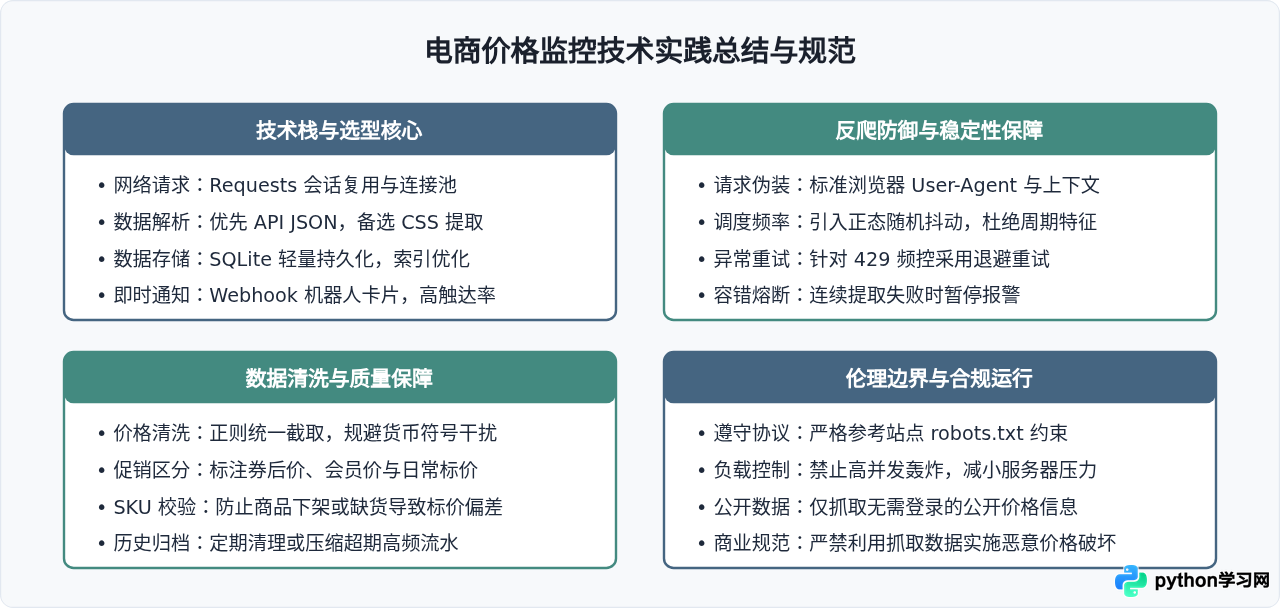
通过合理结合上述采集、存储与报警模块,开发者便能在低硬件资源开销下建立起一套高可用的价格雷达。在实际落地中,建议先选取少量 SKU 进行连续 48 小时的稳定性测试,根据目标平台的阻断频率微调轮询间隔与请求头策略,从而实现长期无人值守的自动化监控。
本站声明
本文内容仅供参考,不代表本站观点。转载或引用请注明出处。如发现内容问题,请通过联系我们页面反馈。















