


Python pygame实现贪吃蛇游戏教程(下):豆子交互、蛇身增长与碰撞检测

本文介绍使用Python和pygame开发贪吃蛇游戏的进阶功能。重点讲解如何通过坐标判断实现豆子消失效果,利用数组管理蛇身坐标以实现长度动态增长,以及通过遍历坐标检测蛇头与身体、身体各节之间的重合来实现游戏失败判定。包含完整代码逻辑说明及关键片段解析。
承接上一篇pygame实现贪吃蛇游戏(上)的内容,本节将继续深入介绍游戏核心功能的实现。
1. 豆子被吃掉后的处理逻辑
在代码中移动蛇头的逻辑之后,增加对蛇头坐标与豆子坐标是否一致的判断即可实现该功能。
if snake_x == bean_x and snake_y == bean_y:
 bean_x,bean_y = get_bean_pos()
运行测试,当蛇头与豆子坐标重合时,豆子会立即消失并重新生成。
2. 蛇身长度的动态增长
此前蛇身仅由单一坐标变量表示,随着游戏进行蛇身会变长,因此改用数组来存储身体各节的坐标更为合理,需对蛇身相关变量进行重构。
在初始化body_x和body_y后,将初始坐标加入名为body_arr的数组中。
body_arr = [(body_x,body_y)]
修改绘制蛇身的pygame.draw.rect调用,改为遍历body_arr数组并逐个绘制矩形。
for body_x,body_y in body_arr:
 pygame.draw.rect(screen,yellow,[body_x-20,body_y-20,40,40],5)
蛇身的移动逻辑也需改为循环处理,使身体每一节依次继承前一节的坐标位置。
body_arr = [(snake_x,snake_y)]+body_arr[:-1]
吃到豆子后蛇身加长的具体实现如下:首先备份蛇身最后一节的坐标位置。
last_body_x,last_body_y = body_arr[-1]
若判定吃到豆子,则将备份的最后一节坐标追加到body_arr数组末尾,从而实现蛇身加长。
body_arr.append((last_body_x,last_body_y))
此时,游戏的基础视觉效果已完整呈现。
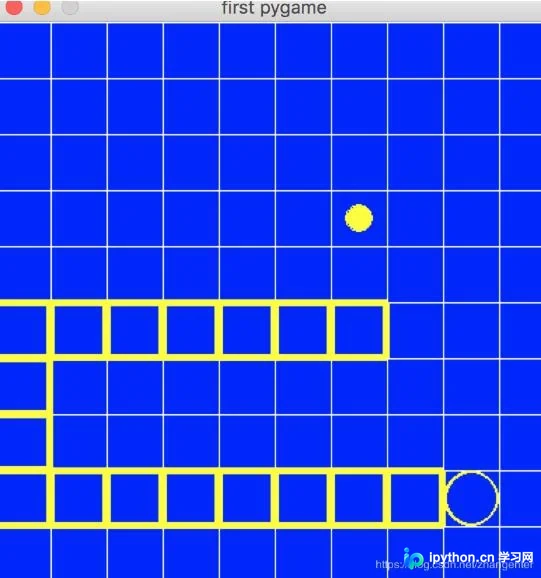
3. 蛇身自身碰撞导致游戏失败的判定逻辑
引入一个标记变量来表示当前游戏状态。
game_state = 1 # 游戏状态1.表示正常 2.表示失败
在移动判断的代码中加入对该标记的检查,仅当状态正常时才执行移动逻辑。
if game_state == 1 and pygame.time.get_ticks() >= ticks:
在移动逻辑末尾增加检测:判断蛇头是否与身体任一节重合,以及身体各节之间是否有重合。
for body_x,body_y in body_arr: # 判断下蛇头和身体是否有重合
      if snake_x == body_x and snake_y == body_y:
        game_state = 2
        break
for i in range(len(body_arr)-1):
      for j in range(i+1,len(body_arr)):
        if body_arr[i][0] == body_arr[j][0] and body_arr[i][1] == body_arr[j][1]: # 判断下身体每节是否有重合
          game_state = 2
          break
游戏失败后的界面效果如下图所示。
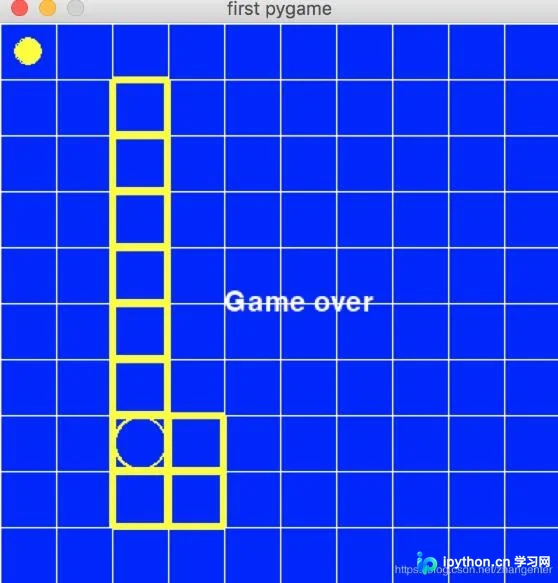
移除网格线显示,使游戏界面更加简洁清晰。
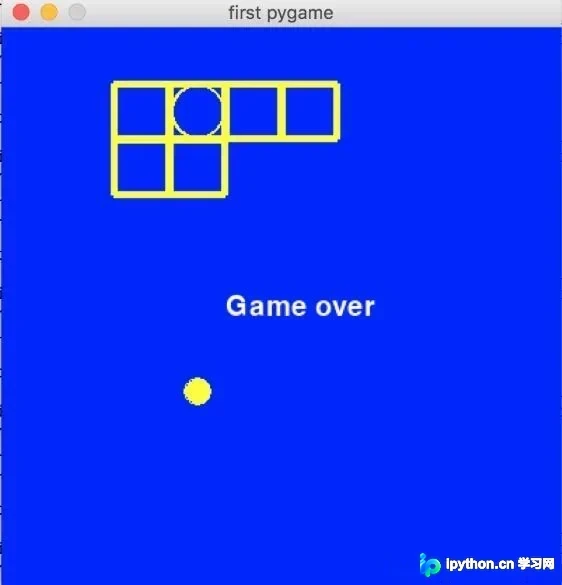
最后附上完整的程序代码供参考。
# -*- coding=utf-8 -*-
import random
import pygame
from pygame.locals import KEYDOWN,K_LEFT,K_RIGHT,K_UP,K_DOWN
pygame.init()
screencaption = pygame.display.set_caption('first pygame')
screen = pygame.display.set_mode((400,400)) #设置400*400窗口

snake_x = random.randint(0,9)*40+20
snake_y = random.randint(0,9)*40+20

game_state = 1 # 游戏状态1.表示正常 2.表示失败
def get_bean_pos():
 return random.randint(0,9)*40+20,random.randint(0,9)*40+20

yellow = 255,255,0

bean_x,bean_y = get_bean_pos()

diff_ticks = 300 # 移动一次蛇头的事件,单位毫秒
ticks = pygame.time.get_ticks()
ticks += diff_ticks

#dire = random.randint(0,3) # 假设0、1、2、3分别代表方向左、右、上、下
if snake_x < 200:
 dire = 1 # 往右移动
else:
 dire = 0 # 往左移动

body_y = snake_y
if dire == 0: # 向左移动
 if snake_x + 40 < 400:
  body_x = snake_x + 40
 else: # 身体不能放右侧了,只能往上下方向放
  if snake_y > 200:
   body_x = snake_x
   body_y -= 40
  else:
   body_x = snake_x
   body_y += 40
else: # 向右移动
 if snake_x - 40 > 0:
  body_x = snake_x - 40
 else: # 身体不能放左侧了,只能往上下方向放
  if snake_y > 200:
   body_x = snake_x
   body_y -= 40
  else:
   body_x = snake_x
   body_y += 40
body_arr = [(body_x,body_y)]

def set_snake_next_pos(snake_x, snake_y):
 if dire == 0:
  if snake_x - 40 > 0:
   snake_x -= 40
 if dire == 1:
  if snake_x + 40 < 400:
   snake_x += 40
 if dire == 2:
  if snake_y - 40 > 0:
   snake_y -= 40
 if dire == 3:
  if snake_y + 40 < 400:
   snake_y += 40
 return snake_x,snake_y

while True:
 for event in pygame.event.get():
   if event.type == pygame.QUIT:
    pygame.quit()
    exit()
   if event.type == KEYDOWN:
    if event.key == K_LEFT:
     if dire!=0 and dire!=1 and snake_x - 40 > 0: # 和当前方向不是同方向或反方向并且可以左移
      dire = 0
    if event.key == K_RIGHT:
     if dire!=0 and dire!=1 and snake_x + 40 < 400: # 和当前方向不是同方向或反方向并且可以右移
      dire = 1
    if event.key == K_UP:
     if dire!=2 and dire!=3 and snake_y - 40 > 0: # 和当前方向不是同方向或反方向并且可以上移
      dire = 2
    if event.key == K_DOWN:
     if dire!=2 and dire!=3 and snake_y + 40 < 400: # 和当前方向不是同方向或反方向并且可以下移
      dire = 3

 screen.fill((0,0,255)) # 将界面设置为蓝色

 #for x in range(0,400,40):
 # pygame.draw.line(screen,(255,255,255),(x,0),(x,400),1)
 #for y in range(0,400,40):
 # pygame.draw.line(screen,(255,255,255),(0,y),(400,y),1)

 pygame.draw.circle(screen,yellow,[snake_x,snake_y],20,2)
 for body_x,body_y in body_arr:
  pygame.draw.rect(screen,yellow,[body_x-20,body_y-20,40,40],5)

 pygame.draw.circle(screen,yellow,[bean_x,bean_y],10,10)

 if game_state == 2:
  myfont = pygame.font.Font(None,30)
  white = 255,255,255
  textImage = myfont.render("Game over", True, white)
  screen.blit(textImage, (160,190))


 pygame.display.update() # 必须调用update才能看到绘图显示

 if game_state == 1 and pygame.time.get_ticks() >= ticks:
  last_body_x,last_body_y = body_arr[-1]
  body_arr = [(snake_x,snake_y)]+body_arr[:-1]
  snake_x,snake_y = set_snake_next_pos(snake_x,snake_y)
  ticks += diff_ticks
  #if snake_x == bean_x and snake_y == bean_y:
  # bean_x,bean_y = get_bean_pos()
  # body_arr.append((last_body_x,last_body_y))
  for body_x,body_y in body_arr:
   if snake_x == body_x and snake_y == body_y: # 判断下蛇头和身体是否有重合
    game_state = 2
    break
  for i in range(len(body_arr)-1):
   for j in range(i+1,len(body_arr)):
    if body_arr[i][0] == body_arr[j][0] and body_arr[i][1] == body_arr[j][1]: # 判断下身体每节是否有重合
     game_state = 2
     break

 if snake_x == bean_x and snake_y == bean_y:
  bean_x,bean_y = get_bean_pos()
  body_arr.append((last_body_x,last_body_y))
以上就是本文的全部内容,希望对大家的学习有所帮助,也希望大家多多支持本站。
本站声明
本文内容仅供参考,不代表本站观点。转载或引用请注明出处。如发现内容问题,请通过联系我们页面反馈。















