


Python操作INI配置文件详解:从基础到封装类实现

发布时间:2026-10-12 |
3人浏览过
本文详细介绍Python中处理INI格式配置文件的方法。通过ConfigParser模块,演示如何读取和写入配置项,涵盖获取Section、Option及具体值的操作。此外,文章提供了一个完整的TEINI封装类,实现了增删改查及类型安全读取功能,帮助开发者高效管理项目配置。
INI文件概述
INI文件格式是部分平台或软件中配置文件的非正式标准,其核心结构由节(section)和键(key)组成,在微软Windows操作系统中应用广泛。此类配置文件的扩展名通常以INI结尾。
INI文件的基本结构
- 节标识 [section]
- 键名称 option
- 配置值 value
具体应用实例
示例1
python25.ini
[teachers]
name = ['yushen', 'pianpian']
age = 16
gender = '女'
favor = {"movie": "追风", "music": "周杰伦"}

[student]
name = ['啦啦迷弟', '啦啦迷妹']
age = 18
对ini文件进行基础操作
from configparser import ConfigParser

# 初始化
config = ConfigParser()

# 读取文件
config.read('python25.ini', encoding='utf-8')

a = config.get('teachers', 'name')
print(a)
print(type(a))
执行结果如下:

示例2
fz.ini
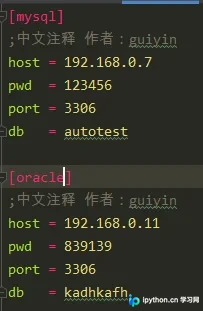
读取fz.ini文件的代码实现
import configparser
import os

curpath = os.path.dirname(os.path.realpath(__file__))
cfgpath = os.path.join(curpath, "fz.ini")

# fz.ini的路径
print(cfgpath)

# 创建管理对象
conf = configparser.ConfigParser()

# 读ini文件
conf.read(cfgpath, encoding="utf-8")


# 获取所有的section
sections = conf.sections()
# 返回list
print(sections)

items = conf.items('oracle')
# list里面对象是元祖
print(items)
运行输出结果:
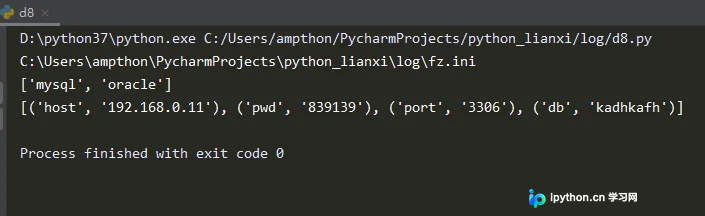
示例3,功能封装升级
提供set修改、add添加、write写入、remove删除等操作接口
该封装类实现了以下核心功能:
- 获取所有sections列表
- 获取指定section的options列表
- 获取指定section的配置信息列表
- 按数据类型读取配置信息
- 新增section
- 设置指定option的值
- 删除指定section
- 删除指定option
# -*- coding:utf-8 -*-

from configparser import ConfigParser
import os


class TEINI:
 def __init__(self, path):
  self.path = path
  self.ini = ConfigParser()
  self.ini.read(self.path)


 # 获取sections列表
 def get_sections(self):
  if self.ini:
   return self.ini.sections()

 # 获取指定的section的options列表
 def get_options_by_section(self, section):
  if self.ini:
   return self.ini.options(section)

 # 获取指定section的配置信息列表
 def get_section_items(self, section):
  if self.ini:
   return self.ini.items(section)

 # 按类型读取配置信息
 # 返回字符串类型
 def get_string(self, section, option):
  if self.ini:
   return self.ini.get(section, option)

 # 返回int类型
 def get_int(self, section, option):
  if self.ini:
   return self.ini.getint(section, option)

 # 返回float类型
 def get_float(self, section, option):
  if self.ini:
   return self.ini.getfloat(section, option)

 # 返回bool类型
 def get_boolean(self, section, option):
  if self.ini:
   return self.ini.getboolean(section, option)

 # 新增section
 def add_section(self, section):
  if self.ini:
   self.ini.add_section(section)
   self.ini.write(open(self.path, "w"))

 # 设置指定option值
 def set_option(self, section, option, value):
  if self.ini:
   self.ini.set(section, option, value)
   self.ini.write(open(self.path, "w"))

 # 删除指定section
 def remove_section(self, section):
  if self.ini:
   self.ini.remove_section(section)
   self.ini.write(open(self.path, "w"))

 # 删除指定option
 def remove_option(self, section, option):
  if self.ini:
   self.ini.remove_option(section, option)
   self.ini.write(open(self.path, "w"))


if __name__ == "__main__":
 print("python ini标准库解析实例======根据需求运行代码!!!")

 # 如果存在mysql.ini先删除,方便下列代码的运行
 if os.path.exists("mysql.ini"):
  os.remove("mysql.ini")

 # 我们先写一些数据到mysql.ini中
 ini = TEINI("mysql.ini")

 # 先加一个mysql section
 mysql_section = "mysql"
 ini.add_section(mysql_section)

 # 在mysql section下写入一些配置信息
 ini.set_option(mysql_section, "host", "192.168.3.1")
 ini.set_option(mysql_section, "port", "3306")
 ini.set_option(mysql_section, "db", "mysql")
 ini.set_option(mysql_section, "user", "admin")
 ini.set_option(mysql_section, "password", "111111")

 # 再添加一个oracle section
 oracle_section = "oracle"
 ini.add_section(oracle_section)

 # oracle section下写入一些配置信息
 ini.set_option(oracle_section, "host", "192.172.0.1")
 ini.set_option(oracle_section, "port", "8080")
 ini.set_option(oracle_section, "db", "oracle")
 ini.set_option(oracle_section, "user", "guiyin")
 ini.set_option(oracle_section, "password", "666666")

 # 获取下所有的section,并在console输出
 sections = ini.get_sections()
 print(sections)

 # 遍历各个section下的options,并在console中输出
 print("===" * 20)
 for sec in sections:
  print(sec, " 中的options为: ")
  options = ini.get_options_by_section(sec)
  print(options)
  print("===" * 20)

 # 获取各个section下的配置信息
 for sec in sections:
  print(sec, " 中的配置信息为: ")
  items = ini.get_section_items(sec)
  print(items)
  print("***" * 20)

 # 获取指定的option值这里演示读取host和port
 host = ini.get_string("mysql", "host")
 port = ini.get_int("mysql", "port")
 print("类型: ", type(host), " ", type(port))
 print(host, " ", port)

 # 删除mysql中的host配置
 ini.remove_option("mysql", "host")

 # 删除oracle section
 ini.remove_section("oracle")

 # 修改mysql port的值为4000
 ini.set_option("mysql", "port", "5538")


 # 最终mysql.ini中的文件内容如下
 # [mysql]
 # port = 5538
 # db = mysql
 # user = admin
 # password = 111111
items = ini.get_section_items("mysql")
print(items)
print("!!!" * 20)
运行结果如下:
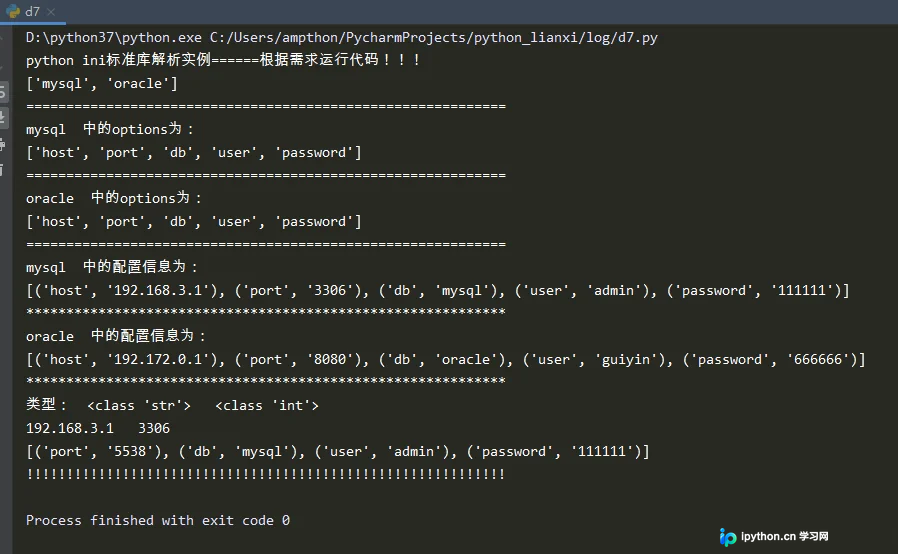
总结
至此,关于Python操作ini类型配置文件的介绍已完成。如需了解更多相关Python操作ini类型配置文件内容,请搜索本站历史文章或继续浏览后续文章,感谢大家的支持!
本站声明
本文内容仅供参考,不代表本站观点。转载或引用请注明出处。如发现内容问题,请通过联系我们页面反馈。















