


Python+OpenCV简易车道线检测实现与优化

发布时间:2026-10-12 |
2人浏览过
本文介绍基于Python和OpenCV的车道线检测简易实现。通过Canny边缘检测获取图像轮廓,利用霍夫变换提取直线,并结合感兴趣区域(ROI)过滤背景。文中展示了基础算法及引入斜率线性拟合后的优化效果,代码包含边缘处理、区域掩膜及直线绘制逻辑,适合初学者理解计算机视觉基础流程。
本文分享一个基于Python和OpenCV的车道线检测简易实现方案,供读者参考。
使用的核心技术栈为Python语言配合OpenCV计算机视觉库。
整体实现逻辑如下:
1. 使用Canny算法进行边缘检测,提取图像中的边缘特征; 2. 应用霍夫变换在图像中识别直线; 3. 定义梯形感兴趣区域(ROI),聚焦于车辆前方视野范围; 4. 计算并绘制最终的车道线。
基础算法的运行效果展示:
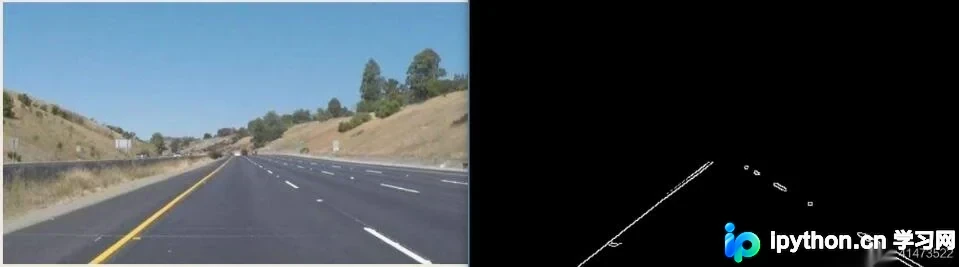
具体代码实现如下:
import cv2
import numpy as np


def canny():
 gray = cv2.cvtColor(lane_image, cv2.COLOR_RGB2GRAY)
 #高斯滤波
 blur = cv2.GaussianBlur(gray, (5, 5), 0)
 #边缘检测
 canny_img = cv2.Canny(blur, 50, 150)
 return canny_img


def region_of_interest(r_image):
 h = r_image.shape[0]
 w = r_image.shape[1]
 # 这个区域不稳定,需要根据图片更换
 poly = np.array([
 [(100, h), (500, h), (290, 180), (250, 180)]
 ])
 mask = np.zeros_like(r_image)
 # 绘制掩膜图像
 cv2.fillPoly(mask, poly, 255)
 # 获得ROI区域
 masked_image = cv2.bitwise_and(r_image, mask)
 return masked_image


if __name__ == '__main__':
 image = cv2.imread('test.jpg')
 lane_image = np.copy(image)
 canny = canny()
 cropped_image = region_of_interest(canny)
 cv2.imshow("result", cropped_image)
 cv2.waitKey(0)
在霍夫变换基础上增加线性拟合以优化结果:
优化后的效果展示:
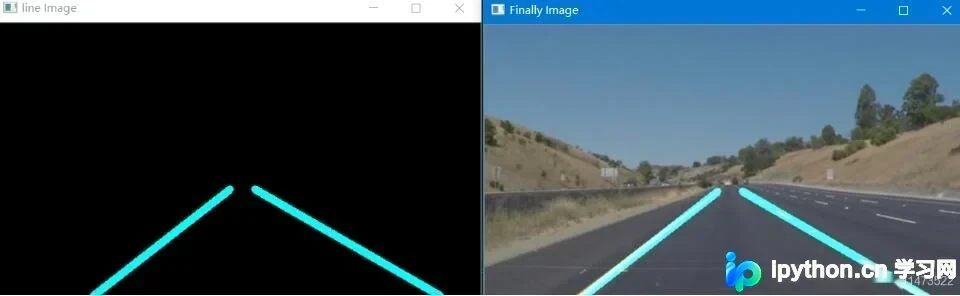
优化版本的代码实现如下:
主要改进在于根据直线斜率进行线性拟合,从而过滤掉噪声点并连接有效线段。
import cv2
import numpy as np


def canny():
 gray = cv2.cvtColor(lane_image, cv2.COLOR_RGB2GRAY)
 blur = cv2.GaussianBlur(gray, (5, 5), 0)

 canny_img = cv2.Canny(blur, 50, 150)
 return canny_img


def region_of_interest(r_image):
 h = r_image.shape[0]
 w = r_image.shape[1]

 poly = np.array([
 [(100, h), (500, h), (280, 180), (250, 180)]
 ])
 mask = np.zeros_like(r_image)
 cv2.fillPoly(mask, poly, 255)
 masked_image = cv2.bitwise_and(r_image, mask)
 return masked_image


def get_lines(img_lines):
 if img_lines is not None:
 for line in lines:
 for x1, y1, x2, y2 in line:
 # 分左右车道
 k = (y2 - y1) / (x2 - x1)
 if k < 0:
  lefts.append(line)
 else:
  rights.append(line)


def choose_lines(after_lines, slo_th): # 过滤斜率差别较大的点
 slope = [(y2 - y1) / (x2 - x1) for line in after_lines for x1, x2, y1, y2 in line] # 获得斜率数组
 while len(after_lines) > 0:
 mean = np.mean(slope) # 计算平均斜率
 diff = [abs(s - mean) for s in slope] # 每条线斜率与平均斜率的差距
 idx = np.argmax(diff) # 找到最大斜率的索引
 if diff[idx] > slo_th: # 大于预设的阈值选取
 slope.pop(idx)
 after_lines.pop(idx)
 else:
 break

 return after_lines


def clac_edgepoints(points, y_min, y_max):
 x = [p[0] for p in points]
 y = [p[1] for p in points]

 k = np.polyfit(y, x, 1) # 曲线拟合的函数,找到xy的拟合关系斜率
 func = np.poly1d(k) # 斜率代入可以得到一个y=kx的函数

 x_min = int(func(y_min)) # y_min = 325其实是近似找了一个
 x_max = int(func(y_max))

 return [(x_min, y_min), (x_max, y_max)]


if __name__ == '__main__':
 image = cv2.imread('F:\\A_javaPro\\test.jpg')
 lane_image = np.copy(image)
 canny_img = canny()
 cropped_image = region_of_interest(canny_img)
 lefts = []
 rights = []
 lines = cv2.HoughLinesP(cropped_image, 1, np.pi / 180, 15, np.array([]), minLineLength=40, maxLineGap=20)
 get_lines(lines) # 分别得到左右车道线的图片

 good_leftlines = choose_lines(lefts, 0.1) # 处理后的点
 good_rightlines = choose_lines(rights, 0.1)

 leftpoints = [(x1, y1) for left in good_leftlines for x1, y1, x2, y2 in left]
 leftpoints = leftpoints + [(x2, y2) for left in good_leftlines for x1, y1, x2, y2 in left]

 rightpoints = [(x1, y1) for right in good_rightlines for x1, y1, x2, y2 in right]
 rightpoints = rightpoints + [(x2, y2) for right in good_rightlines for x1, y1, x2, y2 in right]

 lefttop = clac_edgepoints(leftpoints, 180, image.shape[0]) # 要画左右车道线的端点
 righttop = clac_edgepoints(rightpoints, 180, image.shape[0])

 src = np.zeros_like(image)

 cv2.line(src, lefttop[0], lefttop[1], (255, 255, 0), 7)
 cv2.line(src, righttop[0], righttop[1], (255, 255, 0), 7)

 cv2.imshow('line Image', src)
 src_2 = cv2.addWeighted(image, 0.8, src, 1, 0)
 cv2.imshow('Finally Image', src_2)

 cv2.waitKey(0)
当前方案的局限性:
该代码实用性较低,难以直接应用于实际生产环境,但可作为初学者的练习项目。 其他相关检测思路: 斑马线检测:通过获取车辆前方感兴趣区域,计算白色像素点的比例即可实现判断; 行人检测:利用OpenCV内置的行人检测函数,基于预训练的数据集进行识别。
以上就是本文的全部内容,希望对读者学习有所帮助,欢迎支持本站。
本站声明
本文内容仅供参考,不代表本站观点。转载或引用请注明出处。如发现内容问题,请通过联系我们页面反馈。















