


解决TensorFlow与models版本不兼容:安装指定版本教程

在使用TensorFlow Object Detection API进行模型训练或部署时,开发者常遇到因models库版本与TensorFlow主程序版本不匹配而导致的报错。由于GitHub上的models仓库默认指向最新版本,若使用的TensorFlow并非最新,直接克隆代码往往无法运行。本文旨在提供一套完整的解决方案,指导用户如何安装指定版本的TensorFlow,并精确切换models库以匹配该版本。
安装指定版本的TensorFlow
首先,需要通过pip工具安装目标版本的TensorFlow。TensorFlow提供了GPU加速版本(tensorflow-gpu)和CPU版本,用户可根据硬件环境选择。安装命令如下:
pip install tensorflow-gpu==1.14.0注意:上述命令中的版本号1.14.0仅为示例,实际使用时请替换为你需要的具体版本号。安装完成后,建议通过Python命令验证安装是否成功。
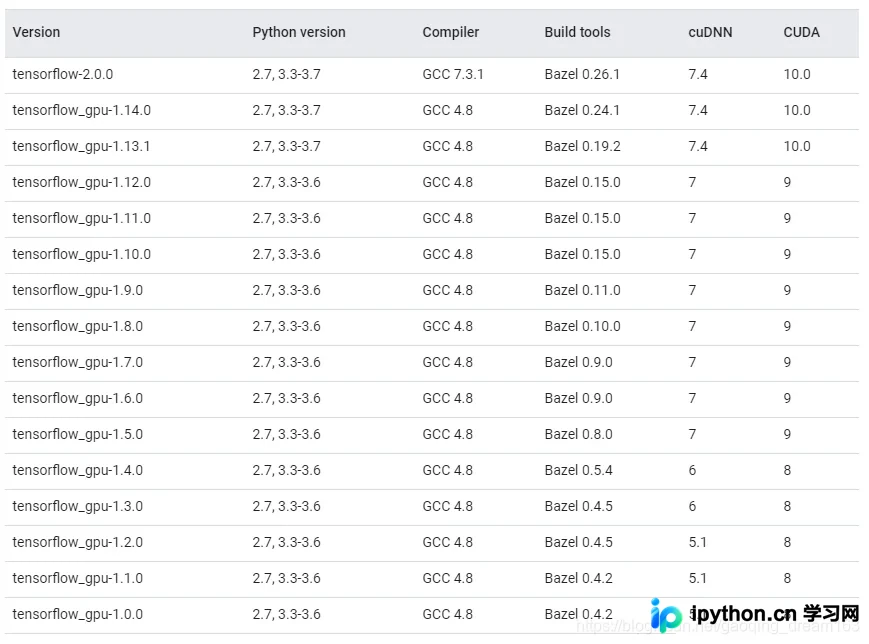
TensorFlow与CUDA版本对照
TensorFlow的不同版本对CUDA和cuDNN的版本有严格的依赖关系。如果CUDA版本不匹配,即使TensorFlow安装成功,在调用GPU加速时也会报错。请参考官方文档或相关对照表,确保你的CUDA版本与TensorFlow版本兼容。
安装并切换models版本
TensorFlow的models仓库(包含Object Detection API等)默认克隆的是最新代码。如果TensorFlow版本较旧,直接运行最新models代码会因API变更而失败。因此,必须将models仓库切换至与TensorFlow对应的历史版本。
1. 克隆models仓库
git clone https://github.com/tensorflow/models2. 切换至对应版本
进入models目录,使用git命令切换到与TensorFlow版本相匹配的release标签。例如,若TensorFlow版本为1.14.0,通常对应models的r1.13.0版本:
cd models
git checkout r1.13.0
请根据你安装的TensorFlow版本,查找并切换到对应的models release标签。常见的对应关系如下:
TensorFlow与models版本对应参考
以下是官方发布的历史版本对应关系,供开发者参考。请注意,不同TensorFlow小版本可能对应相同的models版本:
- TensorFlow 1.14.0 对应 models r1.13.0
- TensorFlow 1.13.1 对应 models r1.13.0
- TensorFlow 1.12.0 对应 models r1.12.0
- TensorFlow 1.11.0 对应 models r1.11.0
- TensorFlow 1.10.0 对应 models r1.10.0
- TensorFlow 1.9.0 对应 models r1.9.0
- TensorFlow 1.8.0 对应 models r1.8.0
- TensorFlow 1.7.0 对应 models r1.7.0
- TensorFlow 1.6.0 对应 models r1.6.0
- TensorFlow 1.5.0 对应 models r1.4.0
- TensorFlow 1.4.0 对应 models r1.4.0
通过上述步骤,你可以确保TensorFlow主程序与models库在API层面保持一致,从而顺利运行Object Detection API或其他模型训练任务。在实际操作中,请务必以官方发布的release标签为准,因为非官方发布的版本可能存在未预见的兼容性问题。
以上就是TensorFlow与models版本对照及安装教程的详细内容,更多关于TensorFlow使用技巧的资料请关注本站其它相关文章!
本站声明
本文内容仅供参考,不代表本站观点。转载或引用请注明出处。如发现内容问题,请通过联系我们页面反馈。















