


Python中readlines()函数hint参数的行为机制与实测分析

本文深入解析Python中readlines()函数的hint参数机制。通过实测代码验证,当hint为-1或0时读取全部内容;非负值时按累计字节数截断。重点探讨了hint值恰好位于换行符处的边界行为,发现此时会多读取一个字符。文章提供完整测试脚本及输出结果,帮助开发者准确控制文件读取范围。
查看readlines方法的帮助文档
>>> fr=open('readme.txt')
>>> help(fr.readlines)
Help on built-in function readlines:

readlines(hint=-1, /) method of _io.TextIOWrapper instance
    Return a list of lines from the stream.

    hint can be specified to control the number of lines read: no more
    lines will be read if the total size (in bytes/characters) of all
    lines so far exceeds hint.
参考Google翻译对官方文档的说明
_io.TextIOWrapper 实例的 readlines(hint=-1, /) 方法 从流中返回行列表。 可以指定 hint 来控制读取的行数:如果到目前为止所有行的总大小(以字节/字符为单位)超过hint,则不会读取更多行。
测试文件readme.txt中的具体内容
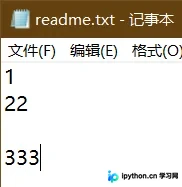
>>> f=open('readme.txt')
>>> f.readlines()
['1\n', '22\n', '\n', '333']
为了进一步搞清楚hint的作用机制,我编写了一个演示函数
readlines函数的测试代码
def readlinesFile(filename,nbyte):
    '''
    探索f.readlines(i)中i的作用,典型的调用形式:
    readlinesFile('readme.txt',12)
    '''
    for i in range(nbyte):
        f=open(filename)
        ss=f.readlines(i)
        if i==0:#如果hint=0,先把每一个元素输出
            textline=len(ss)#文件的总行数
            ntotalbyte=0#文件的总字数
            nwritebyte=0#已经写了的字节数
            for j in range(textline):
                #nwritebyte=ntotalbyte#已经写了的字节数
                ntotalbyte=ntotalbyte+len(ss[j])
                rowbyte=0#已经写了的新行的字节数,用来记一行已经输出的字节个数
                while nwritebyte<ntotalbyte:#当已写字节<总字节数
                    print(f'{nwritebyte+1}:',repr(ss[j][rowbyte])) #repr是为了输出换行符
                    nwritebyte=nwritebyte+1
                    rowbyte=rowbyte+1
            print(f'行数={textline},字数={ntotalbyte}')
        print(f'f.readlines{i}={ss}')
        f.close()
程序运行输出结果
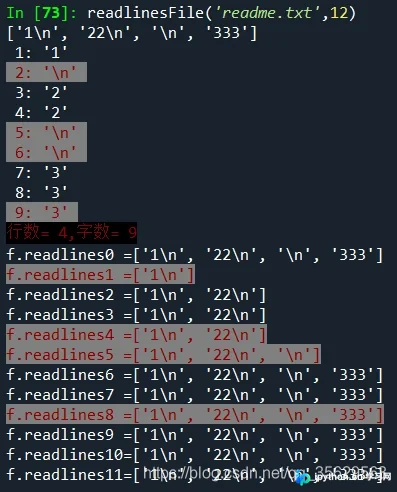
>>> readlinesFile('readme.txt',12) 1: '1' 2: '\n' 3: '2' 4: '2' 5: '\n' 6: '\n' 7: '3' 8: '3' 9: '3' 行数=4,字数=9 f.readlines0=['1\n', '22\n', '\n', '333'] f.readlines1=['1\n'] f.readlines2=['1\n', '22\n'] f.readlines3=['1\n', '22\n'] f.readlines4=['1\n', '22\n'] f.readlines5=['1\n', '22\n', '\n'] f.readlines6=['1\n', '22\n', '\n', '333'] f.readlines7=['1\n', '22\n', '\n', '333'] f.readlines8=['1\n', '22\n', '\n', '333'] f.readlines9=['1\n', '22\n', '\n', '333'] f.readlines10=['1\n', '22\n', '\n', '333'] f.readlines11=['1\n', '22\n', '\n', '333']
核心结论总结:
1.hint 参数指定的是输出显示的字节数限制
2.hint 默认值为-1,表示以列表形式读出文件所有内容
3.hint 设置为0时,其效果等同于-1,即读取全部内容
4.当hint所指的字节数正好是换行符时,实际输出结果会包含该换行符,即有效读取字节数为hint+1
优化后的readlinesFile函数实现
def readlinesFile(filename,nbyte):
    '''
    探索f.readlines(i)中i是指什么,典型的调用形式:
    readlinesFile('readme.txt',12)
    '''
    specialByte=[]#存储特殊的字节数用
    for i in range(nbyte):
        with open(filename) as f:#使用with语句就可以不使用f.close()了
            ss=f.readlines(i)
            if(i==0):#如果hint=0,先把每一个元素输出
                print(ss)
                textline=len(ss)#文件的总行数
                ntotalbyte=0#文件的总字数
                nwritebyte=0#已经写了的字节数
                for j in range(textline):
                    #nwritebyte=ntotalbyte#已经写了的字节数
                    ntotalbyte=ntotalbyte+len(ss[j])
                    rowbyte=0#已经写了的新行的字节数,用来记一行已经输出的字节个数
                    while nwritebyte<ntotalbyte:#当已写字节<总字节数
                        if(nwritebyte is ntotalbyte-1):
                            specialByte.append(nwritebyte)
                            print(f'\033[0;31;47m{nwritebyte+1:2d}:',repr(ss[j][rowbyte]),'\033[0m')#\033[0m是字体和背景颜色设置,注意可能需要其他库的支持
                        else:
                            print(f'{nwritebyte+1:2d}:',repr(ss[j][rowbyte]))
                        nwritebyte=nwritebyte+1
                        rowbyte=rowbyte+1
                print(f'\033[0;31;40m行数={textline:2d},字数={ntotalbyte:2d}\033[0m')
            if i in specialByte:
                print(f'\033[0;31;47mf.readlines{i:<2d}={ss}\033[0m') #<是左对齐
            else:
                print(f'f.readlines{i:<2d}={ss}') #<是左对齐
优化版函数的运行效果
参考文章:https://www.jb51.net/article/206578.htm
到此这篇关于Python中readlines函数的参数hint的相关知识总结的文章就介绍到这了,更多相关python readlines函数内容请搜索本站以前的文章或继续浏览下面的相关文章希望大家以后多多支持本站!
本站声明
本文内容仅供参考,不代表本站观点。转载或引用请注明出处。如发现内容问题,请通过联系我们页面反馈。















