


Python递归遍历多层嵌套文件夹并提取指定文件

发布时间:2026-10-13 |
2人浏览过
本文介绍如何利用Python递归函数处理多层嵌套文件夹中的文件读取问题。通过os.path.isfile判断文件类型,结合os.listdir遍历子目录,将符合条件的文件路径存入列表。文章对比了初始版本存在逻辑缺陷的代码与修正后的完整实现,重点解决混合目录下的读取报错问题,为批量处理日志等文件提供实用参考。
多层嵌套文件夹读取需求
因工作需求,需要深入读取多层嵌套结构文件夹内的文件,具体目录层级结构如下所示:
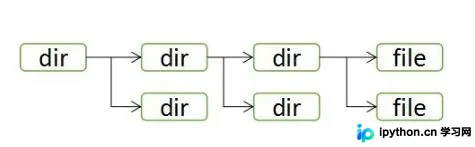
解决方案采用递归函数思路,利用Python内置的os.path.isfile方法检测当前路径是否为文件。若判定为目录而非文件,则调用os.listdir获取子目录列表,并对每个子项进行循环判断。
递归遍历实现方案
具体实现代码如下:
import os
path = 'abc'
path_read = []  #path_read saves all executable files

def check_if_dir(file_path):
  temp_list = os.listdir(file_path)  #put file name from file_path in temp_list
  for temp_list_each in temp_list:
    if os.path.isfile(file_path + '/' + temp_list_each):
      temp_path = file_path + '/' + temp_list_each
      if os.path.splitext(temp_path)[-1] == '.log':  #自己需要处理的是.log文件所以在此加一个判断
        path_read.append(temp_path)
      else:
        continue
    else:
      check_if_dir(file_path + '/' + temp_list_each)  #loop traversal

check_if_dir(path)
#print(path_read)
核心逻辑是将所有符合要求的文件路径通过字符串拼接方式,完整收集至一个列表中,以便在后续步骤中逐一提取并进行访问或操作。
在初期测试数据集中,观察到单个文件夹内要么仅包含子文件夹,要么仅包含文件。基于此假设,初次编写的函数直接通过temp_list[0]判断列表首项是否为文件。
然而,该初始版本存在显著缺陷:当文件夹内同时存在子文件夹和文件时,程序会尝试将文件夹路径当作文件读取,从而导致报错。
初始代码缺陷分析
初次编写的错误代码如下:
import os
path = 'abc'
path_read = []  #path_read saves all executable files

def check_if_dir(file_path):
  temp_list = os.listdir(file_path)  #put file name from file_path in temp_list

  if os.path.isfile(file_path + '/' + temp_list[0]):  #此处直接判断list中第一项是不是文件
    for temp_list_each in temp_list:
      temp_path = file_path + '/' + temp_list_each
      if os.path.splitext(temp_path)[-1] == '.log':
        path_read.append(temp_path)
      else:
        continue
  else:
    for temp_list_each in temp_list:
      check_if_dir(file_path + '/' + temp_list_each)  #loop traversal

check_if_dir(path)  #put all path in path_read
#print(path_read)
以上关于Python读取多层嵌套文件夹中文件的实例分享完毕,希望能为读者提供有益参考,欢迎继续支持本站获取更多技术内容。
本站声明
本文内容仅供参考,不代表本站观点。转载或引用请注明出处。如发现内容问题,请通过联系我们页面反馈。















