


C#实现汉字转汉语拼音:利用PinYinConverterCore处理多音字与模糊搜索

发布时间:2026-10-16 |
6人浏览过
本文介绍在C#项目中如何使用 PinYinConverterCore 将汉字转换为汉语拼音(包括全拼和首字母),重点解决多音字兼容性问题,并提供基于拼音缩写进行列表过滤的实际代码示例。
结果与准备:引入PinYinConverterCore
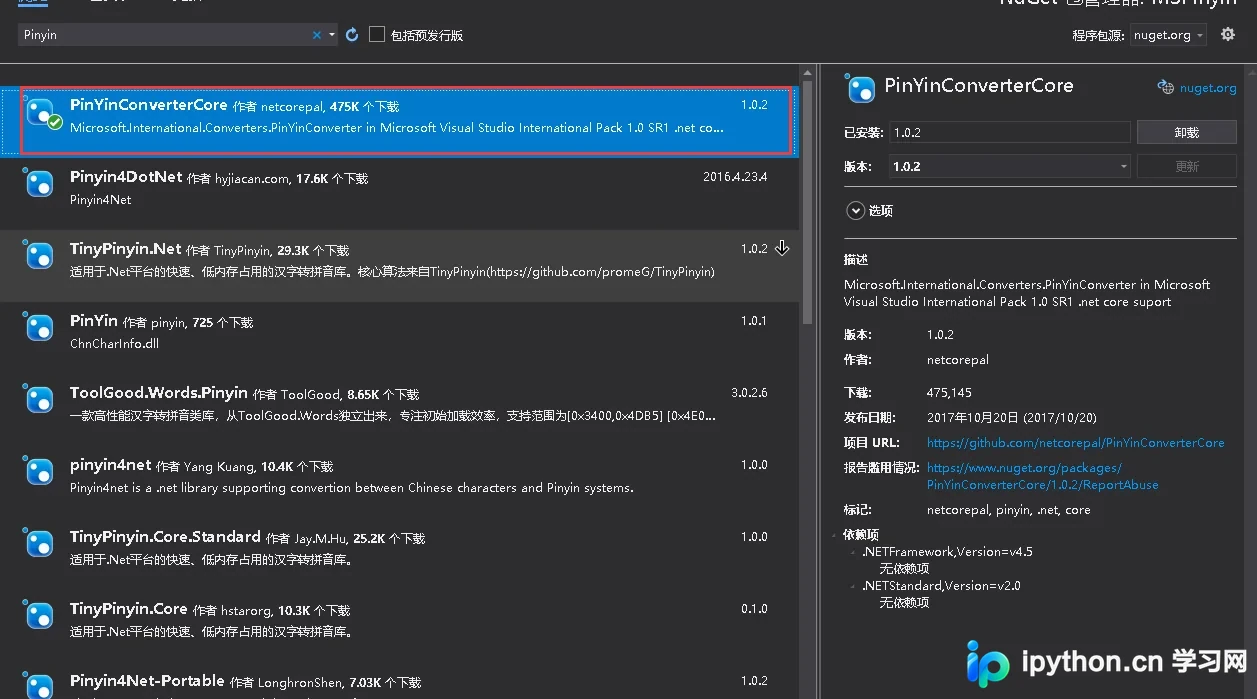
若需在搜索组件中根据汉语拼音的首字母查询物品名称,直接解析汉字存在多音字难题。虽然微软提供的 CHSPinYinConv 是常见选择,但其在 .NET Framework 环境中常因兼容性问题导致安装失败。推荐使用 PinYinConverterCore,它是一个兼容包,可在 Nuget 中搜索并安装,支持后续代码在多个框架环境下运行。
真实操作顺序:编写拼音转换扩展类
第1步:初始化字典获取单字拼音集合
目的:遍历输入文本中的每个字符,识别汉字并提取其所有可能的拼音(含声调)。
- 入口:
GetTotalPingYinDictionary(string text) - 动作:
- 使用
ToCharArray()分割字符串。 - 通过
ChineseChar.IsValidChar()验证是否为有效汉字。 - 若为汉字,利用
ChineseChar对象获取Pinyins列表;非汉字则保留原字符。 - 使用正则表达式去除拼音中的数字(声调),转为小写。
- 使用
DISTINCT对结果去重,防止重复项。
- 使用
- 参数:
string text待处理的中文文本。 - 完成状态:返回一个键为索引、值为该位置所有合法拼音列表的
Dictionary<int, List<string>>。
<summary>
/// 汉字转换拼音内部逻辑
</summary>
public static class PingYinUtil
{
    private static Dictionary<int, List<string>> GetTotalPingYinDictionary(string text)
    {
        var chs = text.ToCharArray();
        Dictionary<int, List<string>> totalPingYinList = new Dictionary<int, List<string>>();

        for (int i = 0; i < chs.Length; i++)
        {
            var pinyinList = new List<string>;
            if (ChineseChar.IsValidChar(chs[i]))
            {
                ChineseChar cc = new ChineseChar(chs[i]);
                // 获取拼音列表并过滤空值
                pinyinList = cc.Pinyins.Where(p => !string.IsNullOrWhiteSpace(p)).ToList();
            }
            else
            {
                pinyinList.Add(chs[i].ToString());
            }

            // 去除声调(数字)并转为小写
            pinyinList = pinyinList.ConvertAll(p => Regex.Replace(p, @"\d", "").ToLower());

            // 去重并过滤空白
            pinyinList = pinyinList.Where(p => !string.IsNullOrWhiteSpace(p)).Distinct().ToList();
            if (pinyinList.Any())
            {
                totalPingYinList[i] = pinyinList;
            }
        }
        return totalPingYinList;
    }
第2步:生成全拼组合(处理多音字)
目的:计算所有可能的拼音全拼组合,以便支持复杂的多音字查询。
- 入口:
GetTotalPingYin(this string text) - 动作:基于上一步的字典数据,采用笛卡尔积算法拼接相邻汉字的拼音,最后返回所有可能性的唯一列表。
    /// <summary>
    /// 获取汉语拼音全拼
    /// </summary>
    public static List<string> GetTotalPingYin(this string text)
    {
        var result = new List<string>;
        foreach (var pys in GetTotalPingYinDictionary(text))
        {
            var items = pys.Value;
            if (result.Count <= 0)
            {
                result = items;
            }
            else
            {
                // 全拼循环匹配(笛卡尔积)
                var newTotalPingYinList = new List<string>;
                foreach (var totalPingYin in result)
                {
                    newTotalPingYinList.AddRange(items.Select(item => totalPingYin + item));
                }
                newTotalPingYinList = newTotalPingYinList.Distinct().ToList();
                result = newTotalPingYinList;
            }
        }
        return result;
    }
第3步:生成首字母缩写组合
目的:为快速检索提取首字母。相比全拼,首字母能显著缩小数据量,适合用户侧的模糊输入。
- 入口:
GetFirstPingYin(this string text) - 动作:截取各拼音的第一个字符,再进行类似全拼的组合运算。
    /// <summary>
    /// 获取汉语拼音首字母
    /// </summary>
    public static List<string> GetFirstPingYin(this string text)
    {
        var result = new List<string>;
        foreach (var pys in GetTotalPingYinDictionary(text))
        {
            var items = pys.Value;
            if (result.Count <= 0)
            {
                // 提取首字母
                result = items.ConvertAll(p => p.Substring(0, 1)).Distinct().ToList();
            }
            else
            {
                // 首字母循环匹配
                var newFirstPingYinList = new List<string>;
                foreach (var firstPingYin in result)
                {
                    newFirstPingYinList.AddRange(items.Select(item => firstPingYin + item.Substring(0, 1)));
                }
                newFirstPingYinList = newFirstPingYinList.Distinct().ToList();
                result = newFirstPingYinList;
            }
        }
        return result;
    }
}
测试用例:构建数据与执行筛选
为了展示实际效果,我们定义一个简单的学生模型,并在内存列表中应用拼音过滤。首先录入一组混合了中文和外文的用户名样本。
// 录入模拟数据
StudentList = new List<Student>
{
    new Student() {Name = "张三"},
    new Student() {Name = "章黎"},
    new Student() {Name = "张三丰"},
    new Student() {Name = "李四"},
    new Student() {Name = "王五"},
    new Student() {Name = "John"},
    new Student() {Name = "W.吴"},
    new Student() {Name = "阿姨"},
    new Student() {Name = "阿胶"},
    new Student() {Name = "麦合苏提.麦合苏提"}
};
随后,对用户输入的搜索词进行处理。我们将每个学生的姓名转换为首字母列表并存入属性中,最后利用 LINQ 的 Where 方法判断目标缩写是否存在于该列表中。
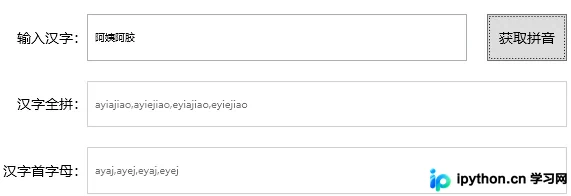
核心筛选逻辑
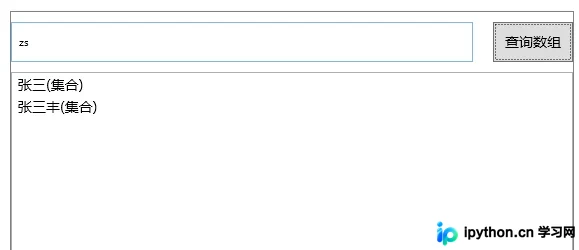
- 动作:遍历列表,调用扩展方法生成拼音。
- 条件:使用
Contains检查用户输入的字符串是否被学生的某个拼音首字母组合所包含。
// 搜索输入框内容
var text = TextBoxSearch.Text;

// 批量处理拼音并过滤
StudentList = StudentList.Where(s => s.Pinyin.Exists(p => p.Contains(text))).ToList();
此方法在处理如“张(zhang)”、“Zh”等多维度的搜索请求时具备较高的容错率。
以上就是 C# 使用 PinYinConverterCore 实现汉字转汉语拼音及模糊查询的详细内容,更多关于 C# 汉字转拼音的资料请关注本站其它相关文章!
本站声明
本文内容仅供参考,不代表本站观点。转载或引用请注明出处。如发现内容问题,请通过联系我们页面反馈。















