


Python如何在文本指定行上方插入内容并高效解析日志文件

在使用Python进行文本处理时,经常需要定位特定字符串并在其上方插入新行。本文详细对比了三种实现方案:全量读取覆盖、FileInput原地过滤以及二进制流定位重写,并提供耗时测试数据供选择。针对大文件内存限制问题,重点介绍基于文件指针定位的高效写法。文末附带利用正则表达式提取复杂日志字段并按需生成的实战代码,帮助开发者根据实际场景选择最优解。
核心需求与实现思路
在实际脚本编写中,直接修改配置或日志文件的特定位置是常见需求。由于普通文本文件不支持中间插入操作,通常需要将数据暂存、调整索引顺序后重新写入,或通过二进制指针截断并拼接数据。以下分别演示三种主流做法及对应的性能差异。
方案一:列表索引定位后全量重写
第1步:读取文件并定位目标行
目的:获取原始文本结构并找到目标行的物理索引。入口:open(filename)函数。动作:调用read().splitlines()将所有行转换为Python列表。参数:filename指定源文件路径,match为待匹配的目标字符串。完成状态:列表长度等于行数,索引与物理顺序严格对应。
第2步:插入新行并写回原文件
目的:将新内容注入到指定索引位置,并保持其他行顺序不变。入口:列表内置方法list.insert(index, item)。动作:计算目标索引后执行插入,随后以写入模式打开原文件。参数:mode='w'清空旧数据,'\n'.join(lines)重组换行符。完成状态:文件体积可能因新增行略微变化,磁盘内容与期望列表完全一致。
⚠️ 风险提示:此操作会覆盖原文件。执行前建议手动复制备份,或在代码中增加备份逻辑。对于兆字节级以上的超大文本,可能导致内存溢出(OOM)。
def match_then_insert(filename, match, content):
    """匹配后在该行追加
    :param filename: 要操作的文件
    :param match: 匹配内容
    :param content: 追加内容
    """
    lines = open(filename).read().splitlines()
    index = lines.index(match)
    lines.insert(index, content)
    open(filename, mode='w').write('\n'.join(lines))

match_then_insert('test.txt', match='c', content='123')
方案二:FileInput类原地过滤
第3步:使用FileInput逐行处理并覆盖
目的:降低单次内存占用,避免一次性加载整个文件。入口:标准库from fileinput import FileInput。动作:启用inplace=True开启原地重定向模式,遍历每一行时检测匹配条件。参数:inplace=True将print()输出强制指向原文件路径。完成状态:控制台无额外打印,硬盘上的文件已被逐行重建。
from fileinput import FileInput
def match_then_insert(filename, match, content):
    for line in FileInput(filename, inplace=True):  # 原地过滤
        if match in line:
            line = content + '\n' + line
        print(line, end='')  # 输出重定向到原文件

match_then_insert('test.txt', match='c', content='123')
方案三:二进制流与seek定位(推荐)
第4步:以rb+模式逐行扫描并定位光标
目的:在不将全部文本载入内存的前提下精确控制读写位置。入口:open(filename, mode='rb+')二进制混合读写模式。动作:循环调用readline()读取字节流,解码后比对目标字串。参数:mode='rb+'允许同时读取与写入且不截断文件。完成状态:f.readline()返回下一行字节或空字节b''触发退出条件。
第5步:截取剩余内容并插值重写
目的:实现真正的“插入”而非覆盖末尾。入口:文件对象指针控制方法。动作:通过seek()将游标回退至当前行起始位置,read()抓取后续所有内容,truncate()切断冗余数据区。参数:seek(-len(line), 1)相对当前位置回退;content.encode()确保字节匹配。完成状态:文件剩余部分完整接在新内容之后,总行数加一。
⚠️ 风险提示:同样涉及原文件覆写,务必提前备份。若文件中存在非UTF-8字符,decode()可能引发异常,建议统一指定encoding='utf-8'。
def match_then_insert(filename, match, content):
    with open(filename, mode='rb+') as f:
        while True:
            try:
                line = f.readline()  # 逐行读取
            except IndexError:  # 超出范围则退出
                break
            line_str = line.decode().splitlines()[0]
            if line_str == match:
                f.seek(-len(line), 1)  # 光标移动到上一行
                rest = f.read()  # 读取余下内容
                f.seek(-len(rest), 1)  # 光标移动回原位置
                f.truncate()  # 删除余下内容
                content = content + '\n'
                f.write(content.encode())  # 插入指定内容
                f.write(rest)  # 还原余下内容
                break
match_then_insert('test.txt', match='c', content='123')
方案性能对比与注意事项
在相同环境连续执行1000次测试的场景下,三种方案的运行耗时如下:
| 方案 | 耗时/s |
|---|---|
| 读进列表后覆盖原文件 | 54.42 |
| FileInput类 | 121.59 |
| seek定位法 | 3.53 |
测试代码框架如下:
from timeit import timeit
from fileinput import FileInput
def init_txt():
    open('test.txt', mode='w').write('\n'.join(['a', 'b', 'c', 'd', 'e']))
def f1(filename='test.txt', match='c', content='123'):
    lines = open(filename).read().splitlines()
    index = lines.index(match)
    lines.insert(index, content)
    open(filename, mode='w').write('\n'.join(lines))
def f2(filename='test.txt', match='c', content='123'):
    for line in FileInput(filename, inplace=True):
        if match in line:
            line = content + '\n' + line
        print(line, end='')
def f3(filename='test.txt', match='c', content='123'):
    with open(filename, mode='rb+') as f:
        while True:
            try:
                line = f.readline()
            except IndexError:
                break
            line_str = line.decode().splitlines()[0]
            if line_str == match:
                f.seek(-len(line), 1)
                rest = f.read()
                f.seek(-len(rest), 1)
                f.truncate()
                content = content + '\n'
                f.write(content.encode())
                f.write(rest)
                break
init_txt()
print(timeit(f1, number=1000))
init_txt()
print(timeit(f2, number=1000))
init_txt()
print(timeit(f3, number=1000))关于运行报错:若出现编码相关异常,可在脚本顶部添加# -*- coding: utf-8 -*-声明,或在每次打开文件时显式传入encoding='utf-8'参数。
进阶实战:正则匹配提取复杂日志数据
当面对格式固定的批量日志文件时,单纯文本替换已不足以满足需求。借助re模块配合命名元组,可以快速抽取关键字段并导出为新报表。以下为典型提取流程:
import re
from collections import namedtuple

alert = namedtuple('Spider_Alert', 'alert_time, alert_hostname, alert_project, alert_spider')
path = r'D:\data\ceshi.txt'
g_path = r'D:\data\'
file_name = r'result.txt'
file_path = g_path + file_name
alerts_list = list()

with open(path, encoding="utf-8") as file:
    lines = file.readlines()
    count = 0
    time = None
    hostname = None
    project = None
    for line in lines:
        if re.search(r'^\d{2}:\d{2}:\d{2}\s*$', line):
            time = re.search(r'^(\d{2}:\d{2}:\d{2})\s*$', line).group(1)
        if re.search(r'^hostname:\s*(.+)', line):
            hostname = re.search(r'^hostname:\s*(.+)', line).group(1)
        if re.search(r'project:\s*([^,]+),', line):
            project = re.search(r'project:\s*([^,]+),', line).group(1)
        if re.search(r'spider:\s*([^,]+),', line):
            spider = re.search(r'spider:\s*([^,]+),', line).group(1)
        if re.search(r'^error_data', line):
            spider_alert = alert(alert_time=time, alert_hostname=hostname, alert_project=project, alert_spider=spider)
            alerts_list.append(spider_alert)

for element in alerts_list:
    print(element[0], element[1], element[3])
    with open(file_path, 'a', encoding="utf-8") as file:
        file.write(element[0] + "\t" + element[1] + "\t" + element[3] + '\n')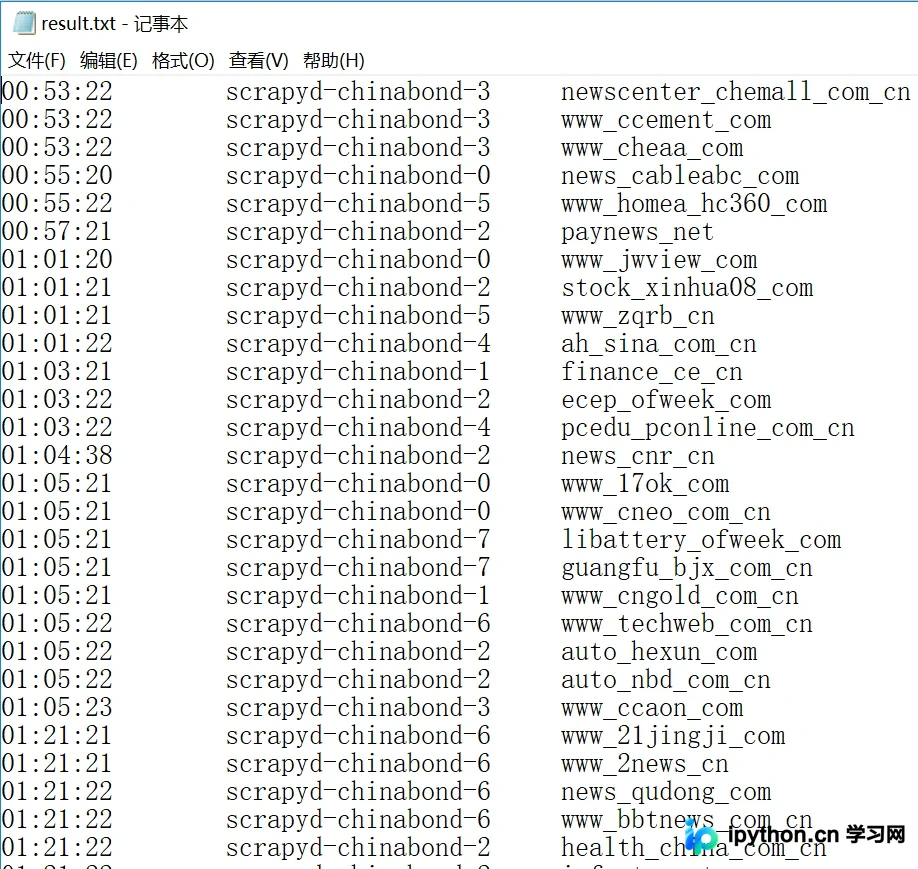
总结
针对文本指定位置插入数据的任务,日常小型配置文件推荐使用列表索引法,代码最简捷;需要兼顾内存稳定性时可选FileInput原地过滤;而追求极致性能或处理GB级日志文档,务必采用二进制seek指针定位方案。配合正则表达式的字段抽取能力,可有效替代繁琐的字符串切片操作。以上就是Python在文本中定位插入内容及日志解析的详细内容,更多关于Python文件操作与数据处理的技术资料请关注本站其它相关文章!
本站声明
本文内容仅供参考,不代表本站观点。转载或引用请注明出处。如发现内容问题,请通过联系我们页面反馈。















