


基于Python与Pygame制作Flappy Bird小游戏的完整步骤

本文详解使用Python与Pygame库搭建Flappy Bird小游戏的核心流程,涵盖环境配置、开始界面帧动画、主循环物理交互、像素级碰撞检测及计分系统实现,并提供完整的代码结构与命令行运行指南,帮助开发者快速掌握2D休闲游戏的开发逻辑。
开发环境准备
完成本项目的开发需满足以下基础条件:
- 编程语言:Python(原文基于3.6.4版本,建议实际环境升级至3.8以上以获得更好的性能与包管理支持)
- 核心依赖:
pygame图形音频库,以及Python标准库(如itertools) - 环境配置:安装Python后将解释器加入系统环境变量,确保在终端可直接调用
python命令。
使用pip安装依赖模块即可开始编码:
pip install pygame核心逻辑设计与代码实现
游戏采用状态机模式划分,主要分为“开始界面”、“主游戏循环”与“结算界面”三个阶段。以下为各阶段的核心实现步骤与关键代码。
第1步:初始化游戏常量与资源参数
所有外部配置(如屏幕宽高、刷新率FPS、角色初始位置等)应统一封装在配置文件(通常为cfg.py)中。主程序启动时需读取这些参数,并负责加载背景图、角色贴图、音效等资源字典。这一步是后续所有坐标计算与渲染的基准。
第2步:编写开始界面与动态背景逻辑
开始界面的视觉重点在于营造飞行假象。主要依赖三个循环机制:
- 地板滚动:将背景与地板的宽度差作为偏移量基准,通过取模运算实现无缝向左平移。
- 小鸟扇翅:利用
itertools.cycle生成[0, 1, 2, 1]的帧索引序列,每5帧切换一次贴图,形成连续拍打动画。 - 悬停上下起伏:通过累加计数器控制位移方向变量
shift的正负反转,使小鸟在垂直方向做规律波动。
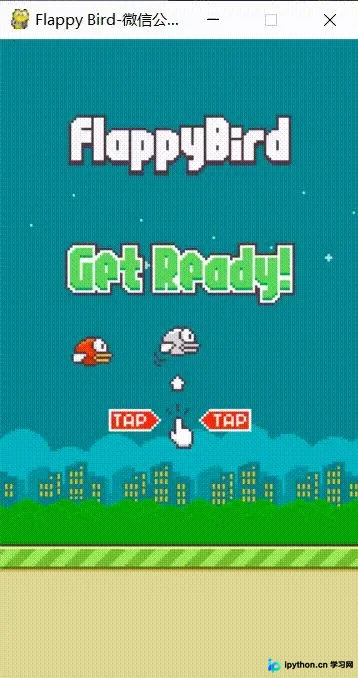
具体渲染与事件监听代码如下:
'''显示开始界面'''
def startGame(screen, sounds, bird_images, other_images, backgroud_image, cfg):
    base_pos = [0, cfg.SCREENHEIGHT * 0.79]
    base_diff_bg = other_images['base'].get_width() - backgroud_image.get_width()
    msg_pos = [(cfg.SCREENWIDTH - other_images['message'].get_width()) / 2, cfg.SCREENHEIGHT * 0.12]

    bird_idx = 0
    bird_idx_change_count = 0
    bird_idx_cycle = itertools.cycle([0, 1, 2, 1])
    bird_pos = [cfg.SCREENWIDTH * 0.2, (cfg.SCREENHEIGHT - list(bird_images.values())[0].get_height()) / 2]
    bird_y_shift_count = 0
    bird_y_shift_max = 9
    shift = 1

    clock = pygame.time.Clock()
    while True:
        for event in pygame.event.get():
            if event.type == pygame.QUIT or (event.type == pygame.KEYDOWN and event.key == pygame.K_ESCAPE):
                pygame.quit()
                sys.exit()
            elif event.type == pygame.KEYDOWN:
                if event.key == pygame.K_SPACE or event.key == pygame.K_UP:
                    return {'bird_pos': bird_pos, 'base_pos': base_pos, 'bird_idx': bird_idx}

        sounds['wing'].play()
        bird_idx_change_count += 1
        if bird_idx_change_count % 5 == 0:
            bird_idx = next(bird_idx_cycle)
            bird_idx_change_count = 0

        base_pos[0] = -((-base_pos[0] + 4) % base_diff_bg)
        bird_y_shift_count += 1
        if bird_y_shift_count == bird_y_shift_max:
            bird_y_shift_max = 16
            shift = -1 * shift
            bird_y_shift_count = 0
        bird_pos[-1] = bird_pos[-1] + shift

        screen.blit(backgroud_image, (0, 0))
        screen.blit(list(bird_images.values())[bird_idx], bird_pos)
        screen.blit(other_images['message'], msg_pos)
        screen.blit(other_images['base'], base_pos)
        pygame.display.update()
        clock.tick(cfg.FPS)
第3步:实现主游戏循环与管道生成机制
进入主循环后,除延续背景移动外,需新增管道实体组、处理玩家输入的物理反馈,并管理道具生命周期。
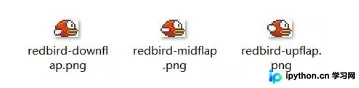
按键响应部分,按下空格或上箭头时触发上升速度叠加,配合每帧衰减的重力参数,模拟真实的加速度运动。管道生成采用预分配策略,初始随机创建两对,随后在首个管道触及特定横坐标时补充新管道,并在完全移出左边界后安全销毁以避免内存泄漏。
主循环核心控制流如下:
# 进入主游戏
score = 0
bird_pos, base_pos, bird_idx = list(game_start_info.values())
base_diff_bg = other_images['base'].get_width() - backgroud_image.get_width()
clock = pygame.time.Clock()

# 初始化管道精灵组
pipe_sprites = pygame.sprite.Group()
for i in range(2):
    pipe_pos = Pipe.randomPipe(cfg, pipe_images.get('top'))
    pipe_sprites.add(Pipe(image=pipe_images.get('top'), position=(cfg.SCREENWIDTH + 200 + i * cfg.SCREENWIDTH / 2, pipe_pos.get('top')[-1])))
    pipe_sprites.add(Pipe(image=pipe_images.get('bottom'), position=(cfg.SCREENWIDTH + 200 + i * cfg.SCREENWIDTH / 2, pipe_pos.get('bottom')[-1])))

bird = Bird(images=bird_images, idx=bird_idx, position=bird_pos)
is_add_pipe = True
is_game_running = True

while is_game_running:
    # 事件监听与跳跃反馈
    for event in pygame.event.get():
        if event.type == pygame.QUIT or (event.type == pygame.KEYDOWN and event.key == pygame.K_ESCAPE):
            pygame.quit()
            sys.exit()
        elif event.type == pygame.KEYDOWN:
            if event.key == pygame.K_SPACE or event.key == pygame.K_UP:
                bird.setFlapped()
                sounds['wing'].play()

    # 移动地板与管道组
    base_pos[0] = -((-base_pos[0] + 4) % base_diff_bg)
    flag = False
    for pipe in pipe_sprites:
        pipe.rect.left -= 4

        # 计分逻辑:穿越缺口时标记并加分
        if pipe.rect.centerx < bird.rect.centerx and not pipe.used_for_score:
            pipe.used_for_score = True
            score += 0.5
            if '.5' in str(score):
                sounds['point'].play()

        # 补充与清理管道
        if pipe.rect.left < 5 and pipe.rect.left > 0 and is_add_pipe:
            pipe_pos = Pipe.randomPipe(cfg, pipe_images.get('top'))
            pipe_sprites.add(Pipe(image=pipe_images.get('top'), position=pipe_pos.get('top')))
            pipe_sprites.add(Pipe(image=pipe_images.get('bottom'), position=pipe_pos.get('bottom')))
            is_add_pipe = False
        elif pipe.rect.right < 0:
            pipe_sprites.remove(pipe)
            flag = True

    if flag: is_add_pipe = True

    # 物理更新与边界检测
    boundary_values = [0, base_pos[-1]]
    is_dead = bird.update(boundary_values, float(clock.tick(cfg.FPS)) / 1000.)
    if is_dead:
        sounds['hit'].play()
        is_game_running = False

    # 绘制当前帧
    screen.blit(backgroud_image, (0, 0))
    pipe_sprites.draw(screen)
    screen.blit(other_images['base'], base_pos)
    showScore(screen, score, number_images)
    bird.draw(screen)
    pygame.display.update()
    clock.tick(cfg.FPS)
第4步:处理碰撞检测与结算界面
为保证打击感与判定准确度,弃用传统的矩形相交测试,改用像素级掩码检测:pygame.sprite.collide_mask。当小鸟主体或管道边缘重叠超过透明像素阈值时,判定为撞击并触发失败音效。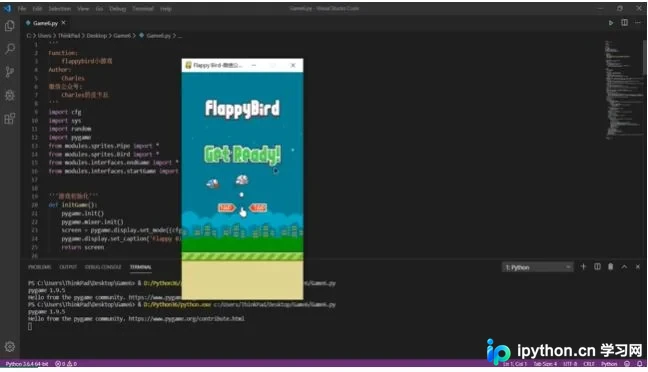
游戏结束后进入静态等待界面,小鸟受重力影响持续下落直至触碰底线。此时监听键盘信号,再次按下空格或上键即可重置状态返回主循环。
'''游戏结束界面'''
def endGame(screen, sounds, showScore, score, number_images, bird, pipe_sprites, backgroud_image, other_images, base_pos, cfg):
    sounds['die'].play()
    clock = pygame.time.Clock()
    while True:
        for event in pygame.event.get():
            if event.type == pygame.QUIT or (event.type == pygame.KEYDOWN and event.key == pygame.K_ESCAPE):
                pygame.quit()
                sys.exit()
            elif event.type == pygame.KEYDOWN:
                if event.key == pygame.K_SPACE or event.key == pygame.K_UP:
                    return

        boundary_values = [0, base_pos[-1]]
        bird.update(boundary_values, float(clock.tick(cfg.FPS)) / 1000.)

        screen.blit(backgroud_image, (0, 0))
        pipe_sprites.draw(screen)
        screen.blit(other_images['base'], base_pos)
        showScore(screen, score, number_images)
        bird.draw(screen)
        pygame.display.update()
        clock.tick(cfg.FPS)
运行验证与排错指引
完成代码整理后,打开终端进入工程根目录,执行以下命令启动游戏:
python Game6.py若遇到报错,请按以下顺序排查:
- ModuleNotFoundError: 确认未激活虚拟环境或未正确安装
pygame。尝试运行pip install pygame --upgrade重新获取最新版。 - AttributeError/KeyError: 检查配置文件
cfg中的路径映射是否与实际资源文件夹名称一致。原代码高度依赖全局字典键名(如'base','top'),修改贴图路径时需同步更新字典。 - 窗口黑屏/无响应: 检查是否遗漏了
pygame.init()初始化调用,或分辨率参数SCREENWIDTH/HEIGHT超出当前显示器适配范围。
总结
通过以上四个阶段的拆解,可以清晰看到一款2D跑酷游戏从画面铺陈到物理演算的完整链路。掌握精灵帧控制、掩码碰撞与事件分发机制后,即可在此基础上替换美术资源或增加道具系统。以上就是基于Python制作Flappy Bird小游戏的详细步骤,更多关于Python游戏开发与Pygame实战的资料请关注本站其它相关文章!
本站声明
本文内容仅供参考,不代表本站观点。转载或引用请注明出处。如发现内容问题,请通过联系我们页面反馈。















