


Python基于Pygame实现五子棋人机对战与人人对战开发指南

本文详解使用Python与Pygame库构建五子棋程序的完整流程,涵盖棋盘渲染、落子判定、胜负逻辑及基础AI算法集成。通过分模块代码示例与参数配置说明,指导开发者快速实现支持人人对战与人机对战的应用,并附带环境准备与常见报错排查指南。
开发目标与运行效果
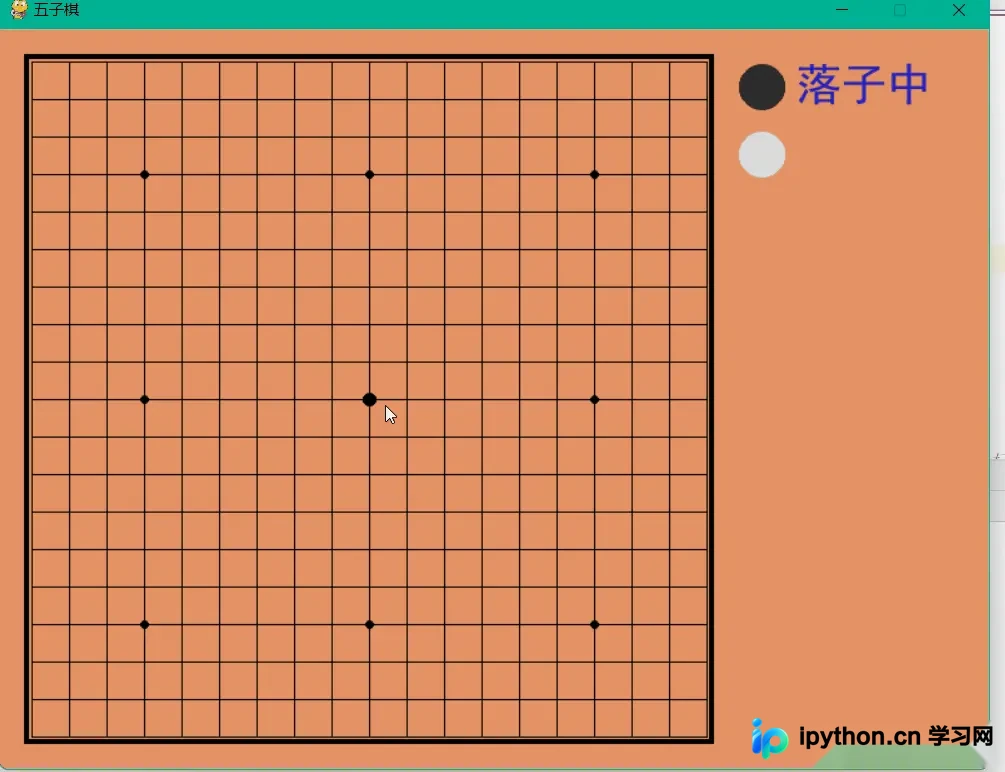
本教程旨在通过Python语言结合Pygame图形库,搭建一套完整的五子棋游戏框架。系统默认采用十九路棋盘(19x19),黑方先行,任意一方率先达成横、竖、斜方向五子连珠即可获胜。代码已整合界面渲染、事件监听与基础AI响应逻辑,可直接运行体验人机对战与人人对战模式。
环境准备与依赖安装
在本地运行本项目前,请确保已安装Python 3.6及以上版本,并通过终端安装图形交互依赖库:
pip install pygame若后续导入自定义路径模块时报错,建议在IDE终端中执行对应目录的初始化操作,或调整sys.path环境变量以指向源文件所在位置。
核心逻辑与主程序实现
为保证代码可读性与执行稳定性,以下将原始片段按功能维度重新组织为四个核心步骤。请注意修复了原稿中的缩进层级错误,以确保Python解释器可正确解析。
第1步:定义棋子类与棋盘状态管理
目的:建立底层数据结构,记录棋子类型、玩家标识及获胜检测机制。
入口:新建checkerboard.py文件。
动作:使用namedtuple封装棋子属性,初始化空白网格,并实现十字交叉方向的连珠计数逻辑。
from collections import namedtuple

Chessman = namedtuple('Chessman', 'Name Value Color')
Point = namedtuple('Point', 'X Y')
BLACK_CHESSMAN = Chessman('黑子', 1, (45, 45, 45))
WHITE_CHESSMAN = Chessman('白子', 2, (219, 219, 219))
offset = [(1, 0), (0, 1), (1, 1), (1, -1)]

class Checkerboard:
    def __init__(self, line_points):
        self._line_points = line_points
        self._checkerboard = [[0] * line_points for _ in range(line_points)]

    def _get_checkerboard(self):
        return self._checkerboard
    checkerboard = property(_get_checkerboard)

    # 判断是否可落子
    def can_drop(self, point):
        return self._checkerboard[point.Y][point.X] == 0

    def drop(self, chessman, point):
        print(f'{chessman.Name} ({point.X}, {point.Y})')
        self._checkerboard[point.Y][point.X] = chessman.Value
        if self._win(point):
            print(f'{chessman.Name}获胜')
            return chessman
        return None

    def _win(self, point):
        cur_value = self._checkerboard[point.Y][point.X]
        for os in offset:
            if self._get_count_on_direction(point, cur_value, os[0], os[1]):
                return True
        return False

    def _get_count_on_direction(self, point, value, x_offset, y_offset):
        count = 1
        for step in range(1, 5):
            x = point.X + step * x_offset
            y = point.Y + step * y_offset
            if 0 <= x < self._line_points and 0 <= y < self._line_points and self._checkerboard[y][x] == value:
                count += 1
            else:
                break
        for step in range(1, 5):
            x = point.X - step * x_offset
            y = point.Y - step * y_offset
            if 0 <= x < self._line_points and 0 <= y < self._line_points and self._checkerboard[y][x] == value:
                count += 1
            else:
                break
        return count >= 5
第2步:配置UI参数与字体初始化
目的:划分屏幕分辨率、网格间距、边框尺寸及字体样式,适配视觉输出。
入口:主脚本顶部全局常量区。
动作:计算棋盘物理像素边界,预设黑白红蓝配色元组,加载系统默认黑体字。
SIZE = 30
Line_Points = 19
Outer_Width = 20
Border_Width = 4
Inside_Width = 4
Border_Length = SIZE * (Line_Points - 1) + Inside_Width * 2 + Border_Width
Start_X = Start_Y = Outer_Width + int(Border_Width / 2) + Inside_Width
SCREEN_HEIGHT = SIZE * (Line_Points - 1) + Outer_Width * 2 + Border_Width + Inside_Width * 2
SCREEN_WIDTH = SCREEN_HEIGHT + 200
Stone_Radius = SIZE // 2 - 3
Stone_Radius2 = SIZE // 2 + 3
Checkerboard_Color = (0xE3, 0x92, 0x65)
BLACK_COLOR = (0, 0, 0)
WHITE_COLOR = (255, 255, 255)
RED_COLOR = (200, 30, 30)
BLUE_COLOR = (30, 30, 200)
RIGHT_INFO_POS_X = SCREEN_HEIGHT + Stone_Radius2 * 2 + 10

def print_text(screen, font, x, y, text, fcolor=(255, 255, 255)):
    imgText = font.render(text, True, fcolor)
    screen.blit(imgText, (x, y))
第3步:编写游戏循环与落子交互
目的:监听键盘与鼠标事件,切换执子权,触发AI落子并结算胜负次数。
入口:main()函数的核心while循环。
注意:原稿缩进存在断裂,已修正为合法嵌套结构,保留AI类调用接口以便扩展。
def main():
    import sys
    import pygame
    from pygame.locals import *
    import pygame.gfxdraw
    from 小游戏.五子棋.checkerboard import Checkerboard, BLACK_CHESSMAN, WHITE_CHESSMAN, Point

    # 此处省略了 _get_clickpoint 和 _get_next 的定义,实际运行需补充完整
    pygame.init()
    screen = pygame.display.set_mode((SCREEN_WIDTH, SCREEN_HEIGHT))
    pygame.display.set_caption('五子棋')
    font1 = pygame.font.SysFont('SimHei', 32)
    font2 = pygame.font.SysFont('SimHei', 72)
    fwidth, fheight = font2.size('黑方获胜')
    checkerboard = Checkerboard(Line_Points)
    cur_runner = BLACK_CHESSMAN
    winner = None
    computer = AI(Line_Points, WHITE_CHESSMAN)  # 需外部提供AI实现类
    black_win_count = 0
    white_win_count = 0

    while True:
        for event in pygame.event.get():
            if event.type == QUIT:
                sys.exit()
            elif event.type == KEYDOWN:
                if event.key == K_RETURN:
                    if winner is not None:
                        winner = None
                        cur_runner = BLACK_CHESSMAN
                        checkerboard = Checkerboard(Line_Points)
                        computer = AI(Line_Points, WHITE_CHESSMAN)
            elif event.type == MOUSEBUTTONDOWN:
                if winner is None:
                    pressed_array = pygame.mouse.get_pressed()
                    if pressed_array[0]:
                        mouse_pos = pygame.mouse.get_pos()
                        click_point = _get_clickpoint(mouse_pos)
                        if click_point is not None:
                            if checkerboard.can_drop(click_point):
                                winner = checkerboard.drop(cur_runner, click_point)
                                if winner is None:
                                    cur_runner = _get_next(cur_runner)
                                    computer.get_opponent_drop(click_point)
                                    AI_point = computer.AI_drop()
                                    winner = checkerboard.drop(cur_runner, AI_point)
                                    if winner is not None:
                                        white_win_count += 1
                                        cur_runner = _get_next(cur_runner)
                                    else:
                                        black_win_count += 1
                                else:
                                    pass
                            else:
                                print('超出棋盘区域')
第4步:实现棋盘绘制与坐标转换
目的:将逻辑坐标映射至屏幕像素,渲染网格线与实心圆棋子。
入口:独立绘图函数与坐标计算器。
动作:使用pygame.gfxdraw绘制抗锯齿线条与填充圆,通过整除与余数判断鼠标准确点击位置。
def _draw_checkerboard(screen):
    screen.fill(Checkerboard_Color)
    pygame.draw.rect(screen, BLACK_COLOR, (Outer_Width, Outer_Width, Border_Length, Border_Length), Border_Width)
    for i in range(Line_Points):
        pygame.draw.line(screen, BLACK_COLOR,
                         (Start_Y, Start_Y + SIZE * i),
                         (Start_Y + SIZE * (Line_Points - 1), Start_Y + SIZE * i),
                         1)
    for j in range(Line_Points):
        pygame.draw.line(screen, BLACK_COLOR,
                         (Start_X + SIZE * j, Start_X),
                         (Start_X + SIZE * j, Start_X + SIZE * (Line_Points - 1)),
                         1)
    for i in (3, 9, 15):
        for j in (3, 9, 15):
            radius = 5 if i == j == 9 else 3
            pygame.gfxdraw.aacircle(screen, Start_X + SIZE * i, Start_Y + SIZE * j, radius, BLACK_COLOR)
            pygame.gfxdraw.filled_circle(screen, Start_X + SIZE * i, Start_Y + SIZE * j, radius, BLACK_COLOR)

def _draw_chessman(screen, point, stone_color):
    pygame.gfxdraw.aacircle(screen, Start_X + SIZE * point.X, Start_Y + SIZE * point.Y, Stone_Radius, stone_color)
    pygame.gfxdraw.filled_circle(screen, Start_X + SIZE * point.X, Start_Y + SIZE * point.Y, Stone_Radius, stone_color)

def _draw_chessman_pos(screen, pos, stone_color):
    pygame.gfxdraw.aacircle(screen, pos[0], pos[1], Stone_Radius2, stone_color)
    pygame.gfxdraw.filled_circle(screen, pos[0], pos[1], Stone_Radius2, stone_color)

def _get_clickpoint(click_pos):
    pos_x = click_pos[0] - Start_X
    pos_y = click_pos[1] - Start_Y
    if pos_x < -Inside_Width or pos_y < -Inside_Width:
        return None
    x = pos_x // SIZE
    y = pos_y // SIZE
    if pos_x % SIZE > Stone_Radius:
        x += 1
    if pos_y % SIZE > Stone_Radius:
        y += 1
    if x >= Line_Points or y >= Line_Points:
        return None
    return Point(x, y)

if __name__ == '__main__':
    main()
完成判断与测试验证

保存全部代码片段至对应模块后,执行主脚本。当鼠标左键点击有效网格且无重叠棋子时,界面应立即绘制对应颜色圆点;黑方落子后自动触发白方AI响应。任意一方形成五子连线,控制台打印获胜提示,按下Enter键即可重置盘面并刷新胜率统计。
常见问题排查
- ModuleNotFoundError: No module named '小游戏':需修改from 小游戏.五子棋.checkerboard import ...为相对路径或直接粘贴核心类到同一目录。
- NameError: name 'AI' is not defined:原文仅声明了实例化调用,实际部署需补充基于启发式评分或Minimax算法的AI类定义。
- 鼠标点击漂移/越界无响应:检查_get_clickpoint中的余数阈值是否与Stone_Radius保持一致,部分高清屏需乘上DPI缩放系数。
总结
通过模块化拆解棋盘类、渲染层与事件总线,可清晰掌握Pygame在游戏开发中的坐标映射与帧刷新机制。结合基础AI接口预留,开发者能够在此基础上逐步加入开局库、禁手规则或深度搜索算法,进一步提升程序竞技水平。以上就是Python实现五子棋人机对战与人人对战开发流程的详细内容,更多关于Pygame游戏编程与AI算法集成的资料请关注本站其它相关文章!
本站声明
本文内容仅供参考,不代表本站观点。转载或引用请注明出处。如发现内容问题,请通过联系我们页面反馈。















