


C# Dictionary通用操作封装:增删改查一键搞定

发布时间:2026-10-15 |
5人浏览过
本文详细介绍了如何为C#的Dictionary集合实现一套通用的辅助类,涵盖根据键值添加、查找键获取值、遍历获取所有匹配键、修改指定键值对以及按条件移除元素等核心功能。
一、实现效果
1.1 实现的功能
该帮助类旨在解决开发中对 Dictionary<TKey, TValue> 进行高频操作时遇到的繁琐问题,具体支持以下七项核心功能:
- 添加信息到字典中:智能判断键是否存在,存在则更新值,不存在则新增,避免重复添加错误。
- 根据键获取值:安全返回指定键对应的值,若键不存在或字典为空则返回默认值。
- 根据值获取键:反向查找,返回所有匹配指定值的键列表(支持多对一关系)。
- 修改指定键的值:精准定位并更新已有键的值。
- 修改指定值为相同信息:全局替换所有匹配特定值的目标,常用于批量数据清洗。
- 根据键移除信息:删除指定键值对。
- 根据值移除信息:删除所有值匹配特定目标的项目。
1.2 实现的功能效果图
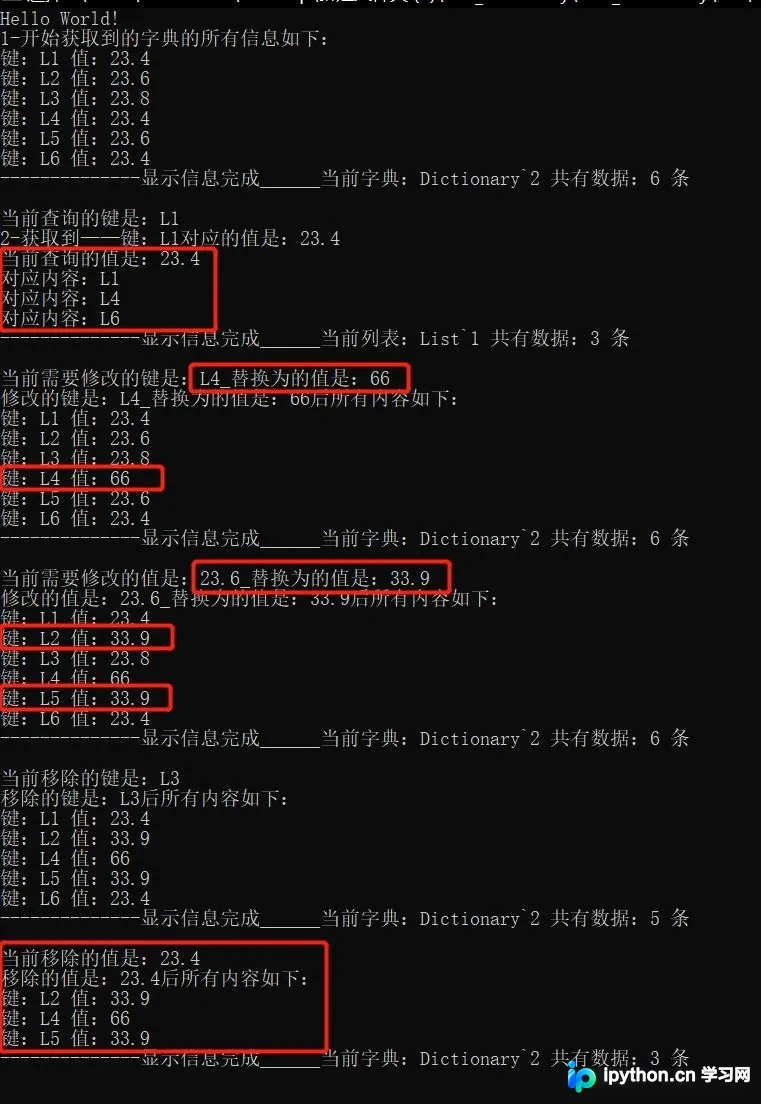
二、实现核心
第1步:构建泛型扩展类
定义一个静态泛型类 DictionaryHelper,利用 C# 的泛型特性使其适用于任意类型的 Key 和 Value,增强通用性。
添加信息到字典中
目的:统一添加逻辑,防止因重复 Key 导致的 ArgumentException。
代码示例
public static void AddInfoToDic<TKey, TValue>(Dictionary<TKey, TValue> dic, TKey key, TValue value)
{
    // 防止传入空字典实例
    if (dic == null)
    {
        dic = new Dictionary<TKey, TValue>();
    }

    // 已存在则覆盖,不存在则添加
    if (dic.ContainsKey(key))
    {
        dic[key] = value;
    }
    else
    {
        dic.Add(key, value);
    }
}
根据键获取值
目的:提供安全的读取接口,避免使用 [key] 索引器时可能抛出的异常。
public static TValue GetValueOfKey<TKey, TValue>(Dictionary<TKey, TValue> dic, TKey key)
{
    TValue tmpValue = default(TValue); // 返回类型默认值
    if (dic != null && dic.Count > 0)
    {
        if (dic.ContainsKey(key))
        {
            tmpValue = dic[key];
        }
    }
    return tmpValue;
}
根据值获取键
目的:实现反向查找。注意:由于多个 Key 可对应同一 Value,此处返回 List<TKey>。
public static List<TKey> GetKeyOfValue<TKey, TValue>(Dictionary<TKey, TValue> dic, TValue value)
{
    List<TKey> keyList = new List<TKey>();
    foreach (KeyValuePair<TKey, TValue> kv in dic)
    {
        // 注意:引用类型建议使用EqualityComparer<TValue>.Default.Equals以防空引用
        if (kv.Value.Equals(value))
        {
            keyList.Add(kv.Key);
        }
    }
    return keyList;
}
修改指定键的值
目的:仅当 Key 存在时才执行更新,返回布尔值标识操作是否成功。
public static bool ModifyInfoOfKey<TKey, TValue>(Dictionary<TKey, TValue> dic, TKey needModifyKey, TValue replaceValue)
{
    if (dic == null || dic.Count < 1) return false;
    if (dic.ContainsKey(needModifyKey))
    {
        dic[needModifyKey] = replaceValue;
        return true;
    }
    return false;
}
修改指定值为相同信息
目的:批量更新所有匹配的 Value。采用倒序或重置索引的方式遍历,确保在移除/修改当前元素后索引不越界。
public static void ModifyInfoOfValue<TKey, TValue>(Dictionary<TKey, TValue> dic, TValue needModifyValue, TValue replaceValue)
{
    if (dic == null || dic.Count < 1) return;

    for (int i = 0; i < dic.Count;)
    {
        // 获取当前索引的元素
        var item = dic.ElementAt(i);
        if (item.Value.Equals(needModifyValue))
        {
            dic[item.Key] = replaceValue;
            i = 0; // 重要:修改后重置索引,从头开始遍历以确保不遗漏后续匹配项
        }
        else
        {
            i++;
        }
    }
}
根据键移除信息
public static bool RemoveInfoOfKey<TKey, TValue>(Dictionary<TKey, TValue> dic, TKey needDeleteKey)
{
    if (dic.ContainsKey(needDeleteKey))
    {
        dic.Remove(needDeleteKey);
        return true;
    }
    return false;
}
根据值移除信息
目的:删除所有匹配指定 Value 的条目。同样需要处理遍历时动态改变集合大小的问题。
public static bool RemoveInfoOfValue<TKey, TValue>(Dictionary<TKey, TValue> dic, TValue needDeleteValue)
{
    if (dic == null || dic.Count < 1) return false;

    int initCount = dic.Count;
    for (int i = 0; i < dic.Count;)
    {
        var item = dic.ElementAt(i);
        if (item.Value.Equals(needDeleteValue))
        {
            dic.Remove(item.Key);
            i = 0; // 重置索引
        }
        else
        {
            i++;
        }
    }
    // 如果初始数量大于最终数量,说明有元素被移除
    return initCount > dic.Count;
}
三、使用方法
3.1 引用命名空间
在使用前,确保项目中包含帮助类所在的命名空间:
using Utils;3.2 完整使用示例
以下示例演示了如何初始化字典、填充数据,并依次执行查找、修改、删除等操作,最终输出结果。
using System;
using System.Collections.Generic;
using Utils;

namespace Test_Dictionary
{
    class Program
    {
        static void Main(string[] args)
        {
            Console.WriteLine("Hello World!");

            // 1. 初始化字典
            Dictionary<string, string> dic = GetDictionary();
            ShowInfoOfDic(dic);

            // 2. 根据键获取值
            string queryKey = "L1";
            string tmpValue = DictionaryHelper.GetValueOfKey(dic, queryKey);
            Console.WriteLine($"键 L1 对应的值是:{tmpValue}");

            // 3. 根据值获取键
            string queryValue = "23.4";
            List<string> tmpKeys = DictionaryHelper.GetKeyOfValue(dic, queryValue);
            ShowInfoOfList(tmpKeys);

            // 4. 修改指定键的值
            DictionaryHelper.ModifyInfoOfKey(dic, "L4", "66");
            ShowInfoOfDic(dic);

            // 5. 修改指定值为相同信息
            DictionaryHelper.ModifyInfoOfValue(dic, "23.6", "33.9");
            ShowInfoOfDic(dic);

            // 6. 根据键移除信息
            DictionaryHelper.RemoveInfoOfKey(dic, "L3");
            ShowInfoOfDic(dic);

            // 7. 根据值移除信息
            DictionaryHelper.RemoveInfoOfValue(dic, "23.4");
            ShowInfoOfDic(dic);

            Console.ReadLine();
        }

        // 辅助方法:生成测试数据
        public static Dictionary<string, string> GetDictionary()
        {
            Dictionary<string, string> dic = new Dictionary<string, string>();
            DictionaryHelper.AddInfoToDic(dic, "L1", "23.4");
            DictionaryHelper.AddInfoToDic(dic, "L2", "23.6");
            DictionaryHelper.AddInfoToDic(dic, "L3", "23.8");
            DictionaryHelper.AddInfoToDic(dic, "L4", "23.4");
            DictionaryHelper.AddInfoToDic(dic, "L5", "23.6");
            DictionaryHelper.AddInfoToDic(dic, "L6", "23.4");
            return dic;
        }

        private static void ShowInfoOfDic(Dictionary<string, string> dic)
        {
            if (dic == null || dic.Count < 1) return;
            foreach (var item in dic)
            {
                Console.WriteLine($"键:{item.Key} 值:{item.Value}");
            }
            Console.WriteLine($"-------------- 字典共 {dic.Count} 条数据 ----\r\n");
        }

        private static void ShowInfoOfList(List<string> list)
        {
            if (list == null || list.Count < 1) return;
            foreach (var item in list)
            {
                Console.WriteLine($"对应内容:{item}");
            }
            Console.WriteLine($"-------------- 列表共 {list.Count} 条数据 ----\r\n");
        }
    }
}
以上就是 C# Dictionary通用操作封装的详细内容,更多关于 C# Dictionary操作方法 的资料请关注本站其它相关文章!
本站声明
本文内容仅供参考,不代表本站观点。转载或引用请注明出处。如发现内容问题,请通过联系我们页面反馈。















