


C#和VB.NET编程操作Word文档:插入与删除脚注

发布时间:2026-10-16 |
5人浏览过
本文详细介绍如何使用C#和VB.NET编程语言,配合Free Spire.Doc类库,对Word文档中的脚注进行自动化管理。内容涵盖在文档末尾或指定文本位置插入脚注的具体流程、代码实现以及样式自定义方法,帮助开发者通过代码高效处理Word文档的引用与注释功能。
准备条件
本文将使用 Free Spire.Doc for .NET 作为核心组件来处理Word文档。在进行以下操作前,需确保项目中已正确引入该库。可通过以下方式安装:
- NuGet包管理器:在Visual Studio的“解决方案资源管理器”中右键点击“引用”,选择“管理NuGet包”,搜索并安装
FreeSpire.Doc。 - 控制台命令:也可以通过程序包管理器控制台执行以下命令:
Install-Package FreeSpire.Doc -Version 10.8.0 - 手动引用:下载并解压安装包,将BIN文件夹下的
Spire.Doc.dll添加到项目的引用中。
第一步:在指定段落后插入脚注
此方法适用于需要在文档特定章节或段落末尾统一添加注释的场景。操作流程如下:
- 加载目标Word文档,获取第一节的引用。
- 定位到目标段落对象。
- 调用
AppendFootnote方法添加脚注对象。 - 配置脚注文本内容及标记样式。
C# 实现代码
using Spire.Doc;
using Spire.Doc.Documents;
using Spire.Doc.Fields;
using System.Drawing;

namespace AddFootnote
{
    class Program
    {
        static void Main(string[] args)
        {
            // 1. 创建Document实例并加载文件
            Document document = new Document();
            document.LoadFromFile("我与地坛.docx");

            // 2. 获取第一节及目标段落(此处为第二个段落,索引为1)
            Section section = document.Sections[0];
            Paragraph paragraph = section.Paragraphs[1];

            // 3. 在段落末尾追加脚注
            Footnote footnote = paragraph.AppendFootnote(FootnoteType.Footnote);

            // 4. 设置脚注正文内容、字体和颜色
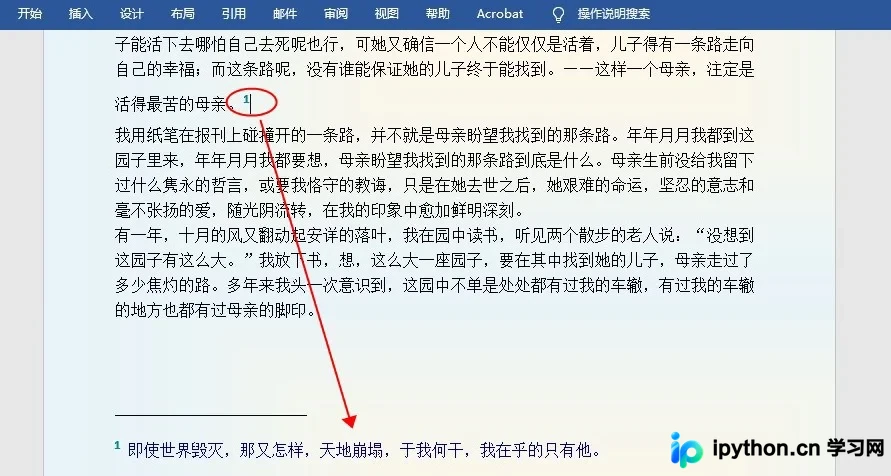
            TextRange text = footnote.TextBody.AddParagraph().AppendText("即使世界毁灭,那又怎样,天地崩塌,于我何干,我在乎的只有他。");
            text.CharacterFormat.FontName = "宋体";
            text.CharacterFormat.FontSize = 12;
            text.CharacterFormat.TextColor = Color.DarkBlue;

            // 5. 设置上标数字标记的格式
            footnote.MarkerCharacterFormat.FontName = "Calibri";
            footnote.MarkerCharacterFormat.FontSize = 15;
            footnote.MarkerCharacterFormat.Bold = true;
            footnote.MarkerCharacterFormat.TextColor = Color.DarkCyan;

            // 6. 保存结果
            document.SaveToFile("添加脚注.docx", FileFormat.Docx);
        }
    }
}
VB.NET 实现代码
Imports Spire.Doc
Imports Spire.Doc.Documents
Imports Spire.Doc.Fields
Imports System.Drawing

Namespace AddFootnote
    Friend Class Program
        Private Shared Sub Main(ByVal args As String())
            Dim document As Document = New Document()
            document.LoadFromFile("我与地坛.docx")

            Dim section As Section = document.Sections(0)
            Dim paragraph As Paragraph = section.Paragraphs(1)

            ' 在段落末尾添加脚注
            Dim footnote As Footnote = paragraph.AppendFootnote(FootnoteType.Footnote)

            Dim text As TextRange = footnote.TextBody.AddParagraph().AppendText("即使世界毁灭,那又怎样,天地崩塌,于我何干,我在乎的只有他。")
            text.CharacterFormat.FontName = "宋体"
            text.CharacterFormat.FontSize = 12
            text.CharacterFormat.TextColor = Color.DarkBlue

            ' 设置脚注上标数字的格式
            footnote.MarkerCharacterFormat.FontName = "Calibri"
            footnote.MarkerCharacterFormat.FontSize = 15
            footnote.MarkerCharacterFormat.Bold = True
            footnote.MarkerCharacterFormat.TextColor = Color.DarkCyan

            document.SaveToFile("添加脚注.docx", FileFormat.Docx)
        End Sub
    End Class
End Namespace
执行上述代码后,生成的文档将在对应段落后显示脚注编号及内容,效果如下图所示。
第二步:在特定文本后精确插入脚注
若需要针对文档中的具体关键词插入脚注,需先查找该文本的位置,然后在其后插入元素。关键步骤包括利用 FindString 定位,并通过 Insert 方法调整对象顺序。
- 使用
FindString搜索目标字符串。 - 获取包含该文本的
TextRange及其所在的Paragraph。 - 计算目标文本在段落对象集合中的索引。
- 先追加脚注,再将其移动到目标文本之后。
C# 实现代码
using Spire.Doc;
using Spire.Doc.Documents;
using Spire.Doc.Fields;
using System.Drawing;

namespace InsertFootnote
{
    class Program
    {
        static void Main(string[] args)
        {
            Document document = new Document();
            document.LoadFromFile("我与地坛.docx");

            // 查找指定文本
            TextSelection selection = document.FindString("最苦的母亲", false, true);
            TextRange textRange = selection.GetAsOneRange();

            // 获取所在段落及文本范围索引
            Paragraph paragraph = textRange.OwnerParagraph;
            int index = paragraph.ChildObjects.IndexOf(textRange);

            // 1. 追加脚注(默认在段尾)
            Footnote footnote = paragraph.AppendFootnote(FootnoteType.Footnote);

            // 2. 移动脚注至指定文本之后
            paragraph.ChildObjects.Insert(index + 1, footnote);

            // 3. 格式化脚注文本
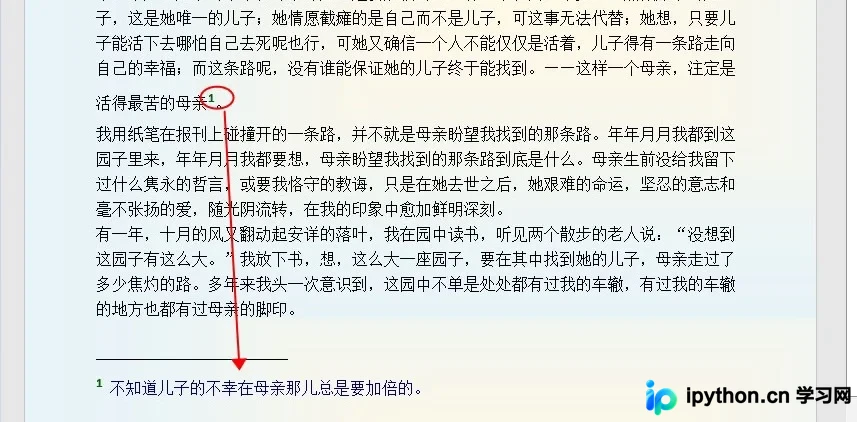
            TextRange text = footnote.TextBody.AddParagraph().AppendText("不知道儿子的不幸在母亲那儿总是要加倍的。");
            text.CharacterFormat.FontName = "宋体";
            text.CharacterFormat.FontSize = 12;
            text.CharacterFormat.TextColor = Color.DarkBlue;

            // 4. 格式化脚注标记
            footnote.MarkerCharacterFormat.FontName = "Calibri";
            footnote.MarkerCharacterFormat.FontSize = 15;
            footnote.MarkerCharacterFormat.Bold = true;
            footnote.MarkerCharacterFormat.TextColor = Color.DarkGreen;

            document.SaveToFile("插入脚注.docx", FileFormat.Docx);
        }
    }
}
VB.NET 实现代码
Imports Spire.Doc
Imports Spire.Doc.Documents
Imports Spire.Doc.Fields
Imports System.Drawing

Namespace InsertFootnote
    Friend Class Program
        Private Shared Sub Main(ByVal args As String())
            Dim document As Document = New Document()
            document.LoadFromFile("我与地坛.docx")

            ' 查找文本
            Dim selection As TextSelection = document.FindString("最苦的母亲", False, True)
            Dim textRange As TextRange = selection.GetAsOneRange()

            Dim paragraph As Paragraph = textRange.OwnerParagraph
            Dim index As Integer = paragraph.ChildObjects.IndexOf(textRange)

            ' 追加并插入脚注
            Dim footnote As Footnote = paragraph.AppendFootnote(FootnoteType.Footnote)
            paragraph.ChildObjects.Insert(index + 1, footnote)

            Dim text As TextRange = footnote.TextBody.AddParagraph().AppendText("不知道儿子的不幸在母亲那儿总是要加倍的。")
            text.CharacterFormat.FontName = "宋体"
            text.CharacterFormat.FontSize = 12
            text.CharacterFormat.TextColor = Color.DarkBlue

            footnote.MarkerCharacterFormat.FontName = "Calibri"
            footnote.MarkerCharacterFormat.FontSize = 15
            footnote.MarkerCharacterFormat.Bold = True
            footnote.MarkerCharacterFormat.TextColor = Color.DarkGreen

            document.SaveToFile("插入脚注.docx", FileFormat.Docx)
        End Sub
    End Class
End Namespace
此方法能精准地在包含“最苦的母亲”这段文字的右侧生成对应的脚注,结果如图所示。
第三步:删除Word文档中的脚注
如需清理文档中不需要的注释,可以通过遍历文档中的所有Section和Paragraph,检查其 ChildObjects 是否包含 Footnote 类型,并将其移除。由于原文未提供具体删除代码,建议参考以下逻辑思路:
- 遍历所有节
sections和段落paragraphs。 - 检查
paragraph.ChildObjects中的对象类型。 - 若发现类型为
Footnote的对象,调用paragraph.ChildObjects.Remove(f)将其从段落结构中移除。 - 保存文档以应用更改。
以上就是C#和VB.NET实现在Word中插入或删除脚注的详细内容,更多关于C# Word插入删除脚注的资料请关注本站其它相关文章!
本站声明
本文内容仅供参考,不代表本站观点。转载或引用请注明出处。如发现内容问题,请通过联系我们页面反馈。















