



在 C 语言里,只要遇到输入校验、文本扫描、命令解析或大小写归一化,基本都会用到 <ctype.h>。这篇文章不按函数名单纯罗列,而是按“判断字符类型”“转换字符”“组合处理字符串”三个常见任务来整理,读完后你可以更快判断该选 isalpha()、isdigit()、isspace() 还是 tolower()、toupper(),也能顺手避开一些示例里容易混淆的点。
什么是 <ctype.h>,适合解决什么问题
<ctype.h> 是 C 标准库中专门处理字符的头文件,主要提供两类能力:
- 字符分类:判断一个字符是不是字母、数字、空白字符、可打印字符等。
- 字符转换:把字母在大写和小写之间转换。
它的典型用途包括表单输入检查、日志或命令行参数解析、按字符扫描字符串,以及在不手写 ASCII 区间判断的情况下完成大小写处理。
常用字符分类函数怎么选
如果你的目标是“先判断、再分支处理”,通常优先看这一组函数。它们都接收一个字符参数,并返回是否满足条件。
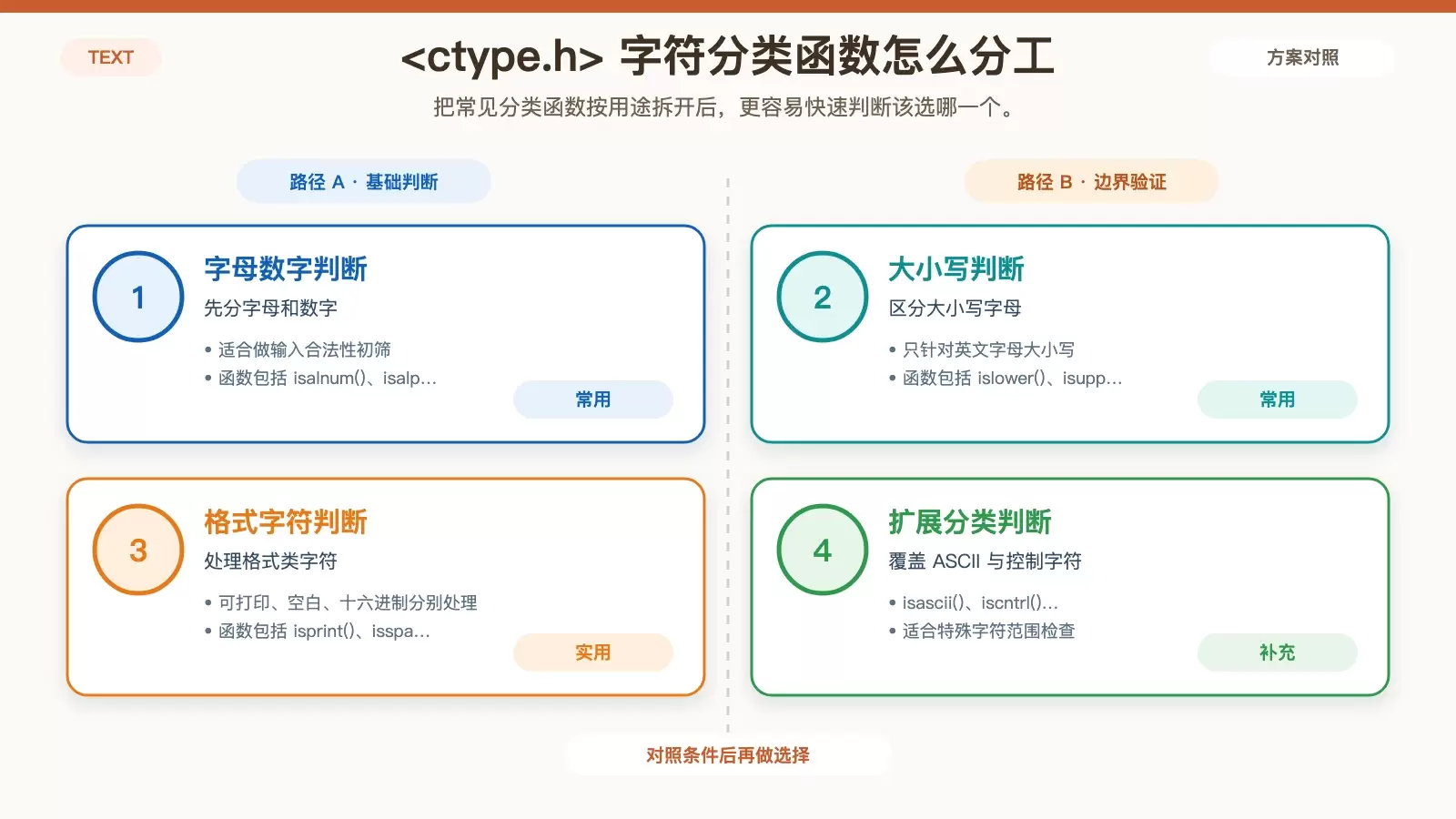
字母与数字判断:isalnum()、isalpha()、isdigit()
这三个函数适合最常见的输入有效性检查场景。
isalnum() 用于检查给定字符是否是字母或数字:
// www.ja vascriptcn.com code example
#include <stdio.h>
#include <ctype.h>

int main() {
    char ch = 'A';
    if (isalnum(ch)) {
        printf("'%c' 是字母或数字n", ch);
    } else {
        printf("'%c' 不是字母或数字n", ch);
    }
    return 0;
}
isalpha() 只判断是否为字母:
// www.ja vascriptcn.com code example
#include <stdio.h>
#include <ctype.h>

int main() {
    char ch = 'b';
    if (isalpha(ch)) {
        printf("'%c' 是字母n", ch);
    } else {
        printf("'%c' 不是字母n", ch);
    }
    return 0;
}
isdigit() 用于判断是否为数字字符:
// www.ja vascriptcn.com code example
#include <stdio.h>
#include <ctype.h>

int main() {
    char ch = '7';
    if (isdigit(ch)) {
        printf("'%c' 是数字n", ch);
    } else {
        printf("'%c' 不是数字n", ch);
    }
    return 0;
}
如果你在做用户名、标识符或简单 token 扫描,通常可以先用 isalnum() 快速过滤;如果要把字母和数字分开统计,再细分到 isalpha() 和 isdigit()。
字母大小写判断:islower()、isupper()
这一组函数适合只关心英文字母大小写的场景,比如规范化输入、格式约束或字符分析。
islower() 用于检查是否为小写字母:
// www.ja vascriptcn.com code example
#include <stdio.h>
#include <ctype.h>

int main() {
    char ch = 'x';
    if (islower(ch)) {
        printf("'%c' 是小写字母n", ch);
    } else {
        printf("'%c' 不是小写字母n", ch);
    }
    return 0;
}
isupper() 用于检查是否为大写字母:
// www.ja vascriptcn.com code example
#include <stdio.h>
#include <ctype.h>

int main() {
    char ch = 'Y';
    if (isupper(ch)) {
        printf("'%c' 是大写字母n", ch);
    } else {
        printf("'%c' 不是大写字母n", ch);
    }
    return 0;
}
这两个函数常和 tolower()、toupper() 搭配使用:先判断,再决定是否需要转换。
格式相关判断:isprint()、isspace()、isxdigit()
当你处理命令行输入、配置文件或十六进制文本时,这几个函数很实用。
isprint() 判断字符是否可打印:
// www.ja vascriptcn.com code example
#include <stdio.h>
#include <ctype.h>

int main() {
    char ch = '!';
    if (isprint(ch)) {
        printf("'%c' 是可打印字符n", ch);
    } else {
        printf("'%c' 不是可打印字符n", ch);
    }
    return 0;
}
isspace() 判断是否为空白字符,包括空格、制表符、换行符等:
// www.ja vascriptcn.com code example
#include <stdio.h>
#include <ctype.h>

int main() {
    char ch = 't';
    if (isspace(ch)) {
        printf("'%c' 是空白字符n", ch);
    } else {
        printf("'%c' 不是空白字符n", ch);
    }
    return 0;
}
isxdigit() 判断是否为十六进制数字字符:
// www.ja vascriptcn.com code example
#include <stdio.h>
#include <ctype.h>

int main() {
    char ch = 'F';
    if (isxdigit(ch)) {
        printf("'%c' 是十六进制数字n", ch);
    } else {
        printf("'%c' 不是十六进制数字n", ch);
    }
    return 0;
}
这里有一个细节需要留意:示例里的 isspace() 传入的是 't',它表示字母 t,而不是制表符。若要测试制表符,应写成 '\t';若测试换行符,则应写成 '\n'。
字符转换函数怎么用
如果你需要把大小写统一,<ctype.h> 主要依赖两个函数:tolower() 和 toupper()。
tolower()
tolower() 用于将大写字母转换为小写字母:
#include <stdio.h>
#include <ctype.h>

int main() {
    char ch = 'T';
    printf("转换前: '%c', 转换后: '%c'n", ch, tolower(ch));
    return 0;
}
toupper()
toupper() 用于将小写字母转换为大写字母:
#include <stdio.h>
#include <ctype.h>

int main() {
    char ch = 'g';
    printf("转换前: '%c', 转换后: '%c'n", ch, toupper(ch));
    return 0;
}
在做大小写无关比较前,通常会先把字符统一转成全小写或全大写,再进入后续逻辑。这样代码更直观,也能减少重复判断。
其他函数:isascii() 与 iscntrl()
除了常见分类与转换函数,原文还给出了两个补充函数。
isascii()
isascii() 用于检查给定字符是否是一个 ASCII 字符:
// www.ja vascriptcn.com code example
#include <stdio.h>
#include <ctype.h>

int main() {
    char ch = 128;
    if (isascii(ch)) {
        printf("'%d' 是 ASCII 字符n", ch);
    } else {
        printf("'%d' 不是 ASCII 字符n", ch);
    }
    return 0;
}
iscntrl()
iscntrl() 用于检查给定字符是否是控制字符:
// www.ja vascriptcn.com code example
#include <stdio.h>
#include <ctype.h>

int main() {
    char ch = 'a'; // 响铃控制字符
    if (iscntrl(ch)) {
        printf("'%c' 是控制字符n", ch);
    } else {
        printf("'%c' 不是控制字符n", ch);
    }
    return 0;
}
这部分示例同样有值得注意的地方:注释写着“响铃控制字符”,但代码使用的是 'a',它是普通字母 a,不是控制字符。若要表示响铃字符,通常应写成 '\a'。
综合示例:按字符遍历字符串
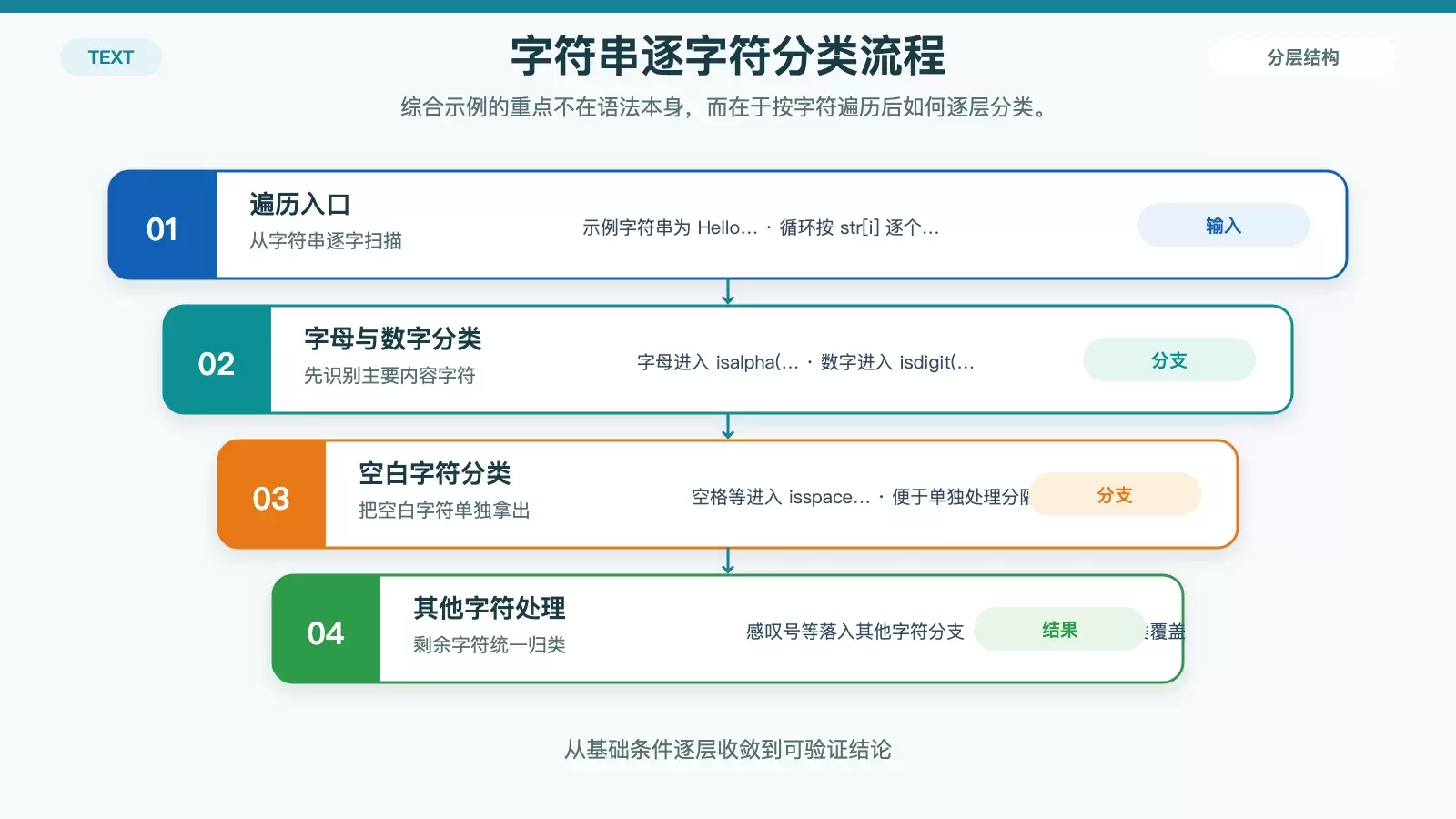
当这些函数组合起来使用时,最常见的写法就是遍历字符串,再按字符类别分别处理:
// www.ja vascriptcn.com code example
#include <stdio.h>
#include <ctype.h>

int main() {
    char str[] = "Hello World! 123";
    for (int i = 0; str[i]; i++) {
        if (isalpha(str[i])) {
            printf("%c 是字母n", str[i]);
        } else if (isdigit(str[i])) {
            printf("%c 是数字n", str[i]);
        } else if (isspace(str[i])) {
            printf("%c 是空白字符n", str[i]);
        } else {
            printf("%c 是其他字符n", str[i]);
        }
    }
    return 0;
}
这段代码展示了一个很典型的处理顺序:先判断字母,再判断数字,再判断空白字符,最后把剩余字符归入“其他字符”。在做简单词法分类、日志清洗或输入检查时,这种结构非常常见。
快速总结
如果只记一套最常用组合,可以这样理解:
- 判断字母、数字:
isalpha()、isdigit()、isalnum() - 判断大小写:
islower()、isupper() - 判断格式字符:
isspace()、isprint()、isxdigit() - 转换大小写:
tolower()、toupper()
对于日常 C 语言文本处理,这个头文件已经能覆盖大部分基础需求。真正上手时,关键不在于死记函数名,而在于知道自己是在做“分类”“转换”,还是“按字符扫描并分支处理”。















