


Python多线程编程详解:从基础状态到threading模块实战

本文基于Python 2.4环境,系统讲解Python线程编程基础。内容涵盖线程的五种状态、锁机制(Lock/RLock)、条件变量及信号量等同步指令。详细解析thread与threading标准库,通过生产者/消费者、定时器及线程局部数据等示例,展示如何在实际开发中高效利用多线程处理并发任务。
本文深入解析Python对多线程的支持,涵盖掌握多线程编程所需的基础知识,并完整介绍Python中两个核心线程标准库(thread和threading)的功能及使用示例。
注意:本文内容基于Python 2.4版本编写。若遇到不熟悉的术语,建议通过搜索引擎或维基百科查阅相关资料。
1. 线程基础
1.1. 线程状态
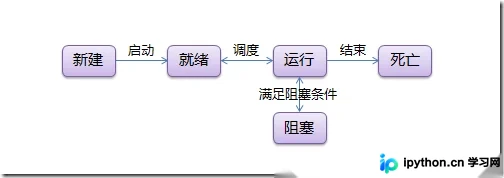
线程生命周期包含5种状态,其状态转换过程如下图所示:
1.2. 线程同步(锁)
多线程的核心优势在于能够并发执行多个任务(至少在视觉上如此)。然而,当多个线程共享数据时,容易引发数据不同步问题。例如,假设列表中所有元素初始值为0,线程"set"负责从后向前将元素修改为1,而线程"print"负责从前向后读取并打印列表。若在线程"set"修改过程中,线程"print"开始读取,输出结果可能是一半0一半1,这就是典型的数据竞争。为解决此问题,引入了锁机制。
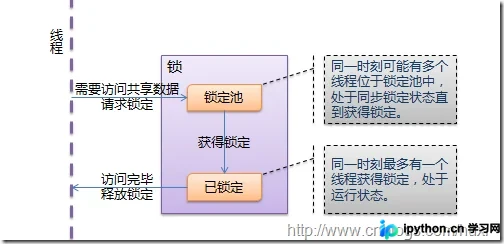
锁具有两种状态:锁定和未锁定。当线程(如"set")访问共享数据时,必须先获取锁;若其他线程(如"print")已持有锁,则当前线程进入同步阻塞状态暂停执行;待持有锁的线程释放锁后,等待的线程方可继续执行。通过这种机制,列表打印结果将要么全为0,要么全为1,避免了数据混乱。
线程与锁的交互过程如下图所示:
1.3. 线程通信(条件变量)
另一种常见场景是列表并非预先存在,而是由线程"create"动态创建。若线程"set"或"print"在线程"create"运行前访问列表,将引发异常。虽然可以使用锁解决,但这要求"set"和"print"无限循环等待,效率低下。更优方案是线程"create"完成后通知其他线程,因此引入了条件变量。
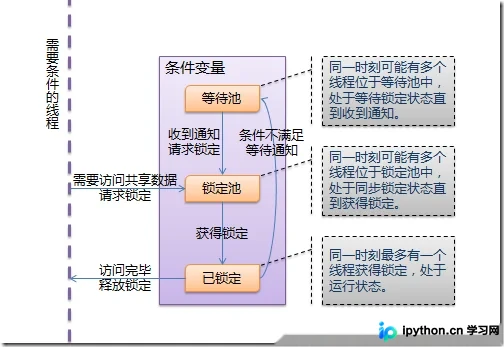
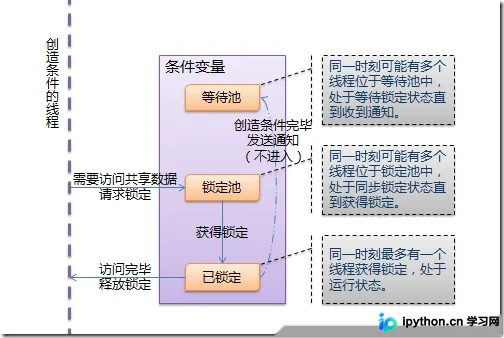
条件变量允许线程(如"set"和"print")在条件不满足(如列表为None)时进入等待状态;当条件满足(列表已创建)时,发出通知告知等待线程继续执行。
线程与条件变量的交互过程如下图所示:
1.4. 线程运行和阻塞的状态转换
最后分析线程在运行与阻塞状态间的转换机制。
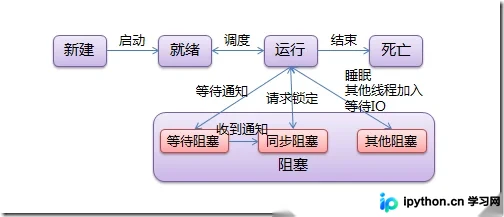
阻塞状态分为三种: 同步阻塞:线程请求锁定时进入此状态,成功获取锁后恢复运行; 等待阻塞:线程获得条件锁后调用“等待”进入此状态,收到其他线程通知后进入同步阻塞状态重新竞争锁; 其他阻塞:调用time.sleep()、anotherthread.join()或等待IO时进入此状态,此时线程不释放已获得的锁。
提示:若能理解上述内容,后续主题将较为轻松;这些概念在大多数主流编程语言中通用(即必须理解,否则其他教程也难以看懂)。
2. thread Python通过thread和threading两个标准库提供线程支持。thread模块提供低级别的原始线程及简单锁。
# encoding: UTF-8
import thread
import time

# 一个用于在线程中执行的函数
def func():
  for i in range(5):
    print 'func'
    time.sleep(1)

  # 结束当前线程
  # 这个方法与thread.exit_thread()等价
  thread.exit() # 当func返回时,线程同样会结束

# 启动一个线程,线程立即开始运行
# 这个方法与thread.start_new_thread()等价
# 第一个参数是方法,第二个参数是方法的参数
thread.start_new(func, ()) # 方法没有参数时需要传入空tuple

# 创建一个锁(LockType,不能直接实例化)
# 这个方法与thread.allocate_lock()等价
lock = thread.allocate()

# 判断锁是锁定状态还是释放状态
print lock.locked()

# 锁通常用于控制对共享资源的访问
count = 0

# 获得锁,成功获得锁定后返回True
# 可选的timeout参数不填时将一直阻塞直到获得锁定
# 否则超时后将返回False
if lock.acquire():
  count += 1

  # 释放锁
  lock.release()

# thread模块提供的线程都将在主线程结束后同时结束
time.sleep(6)
thread模块提供的其他方法包括:
thread.interrupt_main():在其他线程中终止主线程。 thread.get_ident():获取代表当前线程的唯一标识符(魔法数字),常用于从字典中获取线程相关数据。该数字无特定含义,线程结束后可能被新线程复用。
thread还提供ThreadLocal类(名为thread._local)以管理线程相关数据,threading模块引用了此类。
由于thread模块功能有限(如无法在主线程结束后继续运行、不支持条件变量等),通常不建议使用,此处不再赘述。
3. threading threading模块基于Java线程模型设计。在Java中,锁(Lock)和条件变量(Condition)是对象的基本行为(每个对象自带),而在Python中它们是独立对象。Python Thread提供了Java Thread的部分行为子集:不支持优先级、线程组,且线程不能被停止、暂停、恢复或中断。Java Thread中部分已实现的静态方法在threading中以模块方法形式提供。
threading模块提供的常用方法: threading.currentThread():返回当前线程变量。 threading.enumerate():返回包含正在运行线程的列表。正在运行指线程启动后、结束前,不包括启动前和终止后的线程。 threading.activeCount():返回正在运行的线程数量,结果与len(threading.enumerate())相同。
threading模块提供的类: Thread, Lock, Rlock, Condition, [Bounded]Semaphore, Event, Timer, local。
3.1. Thread
Thread是线程类,与Java类似,有两种使用方式:直接传入要运行的方法,或继承Thread并重写run()方法。
# encoding: UTF-8
import threading

# 方法1:将要执行的方法作为参数传给Thread的构造方法
def func():
  print 'func() passed to Thread'

t = threading.Thread(target=func)
t.start()

# 方法2:从Thread继承,并重写run()
class MyThread(threading.Thread):
  def run(self):
    print 'MyThread extended from Thread'

t = MyThread()
t.start()
构造方法: Thread(group=None, target=None, name=None, args=(), kwargs={}) group:线程组,目前尚未实现,文档提示必须为None; target:要执行的方法; name:线程名; args/kwargs:传入方法的参数。
实例方法: isAlive():返回线程是否正在运行(启动后、终止前)。 get/setName(name):获取/设置线程名。 is/setDaemon(bool):获取/设置是否为守护线程。初始值继承自创建该线程的父线程。当无非守护线程运行时,程序将终止。 start():启动线程。 join([timeout]):阻塞当前上下文线程,直到调用此方法的线程终止或到达指定timeout(可选参数)。
使用join()的示例代码:
# encoding: UTF-8
import threading
import time

def context(tJoin):
  print 'in threadContext.'
  tJoin.start()

  # 将阻塞tContext直到threadJoin终止。
  tJoin.join()

  # tJoin终止后继续执行。
  print 'out threadContext.'

def join():
  print 'in threadJoin.'
  time.sleep(1)
  print 'out threadJoin.'

tJoin = threading.Thread(target=join)
tContext = threading.Thread(target=context, args=(tJoin,))

tContext.start()
运行结果:
in threadContext. in threadJoin. out threadJoin. out threadContext.
3.2. Lock
Lock(指令锁)是最低级的同步指令。Lock处于锁定状态时,不属于特定线程。Lock包含两种状态:锁定和非锁定,以及两个基本方法。
可认为Lock有一个锁定池,当线程请求锁定时,线程进入池中,直到获得锁后出池。池中的线程处于状态图中的同步阻塞状态。
构造方法: Lock()
实例方法: acquire([timeout]):使线程进入同步阻塞状态,尝试获得锁。 release():释放锁。使用前线程必须已获得锁,否则抛出异常。
# encoding: UTF-8
import threading
import time

data = 0
lock = threading.Lock()

def func():
  global data
  print '%s acquire lock...' % threading.currentThread().getName()

  # 调用acquire([timeout])时,线程将一直阻塞,
  # 直到获得锁定或者直到timeout秒后(timeout参数可选)。
  # 返回是否获得锁。
  if lock.acquire():
    print '%s get the lock.' % threading.currentThread().getName()
    data += 1
    time.sleep(2)
    print '%s release lock...' % threading.currentThread().getName()

    # 调用release()将释放锁。
    lock.release()

t1 = threading.Thread(target=func)
t2 = threading.Thread(target=func)
t3 = threading.Thread(target=func)
t1.start()
t2.start()
t3.start()
3.3. RLock
RLock(可重入锁)是允许同一线程多次请求的同步指令。RLock使用“拥有线程”和“递归等级”概念,锁定状态下由特定线程拥有。拥有RLock的线程可再次调用acquire(),释放锁时需调用相同次数的release()。
可认为RLock包含一个锁定池和一个初始值为0的计数器,每次成功调用acquire()/release(),计数器+1/-1,为0时锁处于未锁定状态。
构造方法: RLock()
实例方法: acquire([timeout])/release():与Lock类似。
# encoding: UTF-8
import threading
import time

rlock = threading.RLock()

def func():
  # 第一次请求锁定
  print '%s acquire lock...' % threading.currentThread().getName()
  if rlock.acquire():
    print '%s get the lock.' % threading.currentThread().getName()
    time.sleep(2)

    # 第二次请求锁定
    print '%s acquire lock again...' % threading.currentThread().getName()
    if rlock.acquire():
      print '%s get the lock.' % threading.currentThread().getName()
      time.sleep(2)

    # 第一次释放锁
    print '%s release lock...' % threading.currentThread().getName()
    rlock.release()
    time.sleep(2)

    # 第二次释放锁
    print '%s release lock...' % threading.currentThread().getName()
    rlock.release()

t1 = threading.Thread(target=func)
t2 = threading.Thread(target=func)
t3 = threading.Thread(target=func)
t1.start()
t2.start()
t3.start()
3.4. Condition
Condition(条件变量)通常与一个锁关联。若需在多个Condition中共享锁,构造方法可传递Lock/RLock实例,否则自动生成RLock实例。
除Lock的锁定池外,Condition还包含等待池,池中线程处于等待阻塞状态,直到其他线程调用notify()/notifyAll()通知;收到通知后线程进入锁定池等待锁。
构造方法: Condition([lock/rlock])
实例方法: acquire([timeout])/release():调用关联锁的相应方法。 wait([timeout]):使线程进入Condition等待池并释放锁。使用前必须获得锁,否则抛出异常。 notify():从等待池选择一个线程并通知,收到通知的线程自动调用acquire()尝试获取锁(进入锁定池);其他线程仍在等待池。调用此方法不释放锁。使用前必须获得锁,否则抛出异常。 notifyAll():通知等待池中所有线程,这些线程将进入锁定池尝试获取锁。调用此方法不释放锁。使用前必须获得锁,否则抛出异常。
示例为常见的生产者/消费者模式:
# encoding: UTF-8
import threading
import time

# 商品
product = None
# 条件变量
con = threading.Condition()

# 生产者方法
def produce():
  global product

  if con.acquire():
    while True:
      if product is None:
        print 'produce...'
        product = 'anything'

        # 通知消费者,商品已经生产
        con.notify()

      # 等待通知
      con.wait()
      time.sleep(2)

# 消费者方法
def consume():
  global product

  if con.acquire():
    while True:
      if product is not None:
        print 'consume...'
        product = None

        # 通知生产者,商品已经没了
        con.notify()

      # 等待通知
      con.wait()
      time.sleep(2)

t1 = threading.Thread(target=produce)
t2 = threading.Thread(target=consume)
t2.start()
t1.start()
3.5. Semaphore/BoundedSemaphore
Semaphore(信号量)是计算机科学中最古老的同步指令之一。Semaphore管理内置计数器,调用acquire()时-1,调用release()时+1。计数器不能小于0;当计数器为0时,acquire()阻塞线程至同步锁定状态,直到其他线程调用release()。
基于此特性,Semaphore常用于同步具有“访客上限”的对象,如连接池。
BoundedSemaphore与Semaphore的唯一区别在于:前者在调用release()时检查计数器是否超过初始值,若超过则抛出异常。
构造方法: Semaphore(value=1):value为计数器初始值。
实例方法: acquire([timeout]):请求Semaphore。若计数器为0,阻塞线程至同步阻塞状态;否则计数器-1并立即返回。 release():释放Semaphore,计数器+1;若使用BoundedSemaphore,还将进行释放次数检查。release()方法不检查线程是否已获得Semaphore。
# encoding: UTF-8
import threading
import time

# 计数器初值为2
semaphore = threading.Semaphore(2)

def func():

  # 请求Semaphore,成功后计数器-1;计数器为0时阻塞
  print '%s acquire semaphore...' % threading.currentThread().getName()
  if semaphore.acquire():

    print '%s get semaphore' % threading.currentThread().getName()
    time.sleep(4)

    # 释放Semaphore,计数器+1
    print '%s release semaphore' % threading.currentThread().getName()
    semaphore.release()

t1 = threading.Thread(target=func)
t2 = threading.Thread(target=func)
t3 = threading.Thread(target=func)
t4 = threading.Thread(target=func)
t1.start()
t2.start()
t3.start()
t4.start()

time.sleep(2)

# 没有获得semaphore的主线程也可以调用release
# 若使用BoundedSemaphore,t4释放semaphore时将抛出异常
print 'MainThread release semaphore without acquire'
semaphore.release()
3.6. Event
Event(事件)是最简单的线程通信机制之一:一个线程通知事件,其他线程等待事件。Event内置初始为False的标志,调用set()设为True,调用clear()重置为False。wait()将阻塞线程至等待阻塞状态。
Event可视为简化版Condition。Event无锁,无法使线程进入同步阻塞状态。
构造方法: Event()
实例方法: isSet():若内置标志为True则返回True。 set():将标志设为True,并通知所有处于等待阻塞状态的线程恢复运行。 clear():将标志设为False。 wait([timeout]):若标志为True立即返回,否则阻塞线程至等待阻塞状态,等待其他线程调用set()。
# encoding: UTF-8
import threading
import time

event = threading.Event()

def func():
  # 等待事件,进入等待阻塞状态
  print '%s wait for event...' % threading.currentThread().getName()
  event.wait()

  # 收到事件后进入运行状态
  print '%s recv event.' % threading.currentThread().getName()

t1 = threading.Thread(target=func)
t2 = threading.Thread(target=func)
t1.start()
t2.start()

time.sleep(2)

# 发送事件通知
print 'MainThread set event.'
event.set()
3.7. Timer
Timer(定时器)是Thread的派生类,用于在指定时间后调用方法。
构造方法: Timer(interval, function, args=[], kwargs={}) interval:指定时间间隔; function:要执行的方法; args/kwargs:方法参数。
实例方法: Timer从Thread派生,未增加额外实例方法。
# encoding: UTF-8
import threading

def func():
  print 'hello timer!'

timer = threading.Timer(5, func)
timer.start()
3.8. local
local是小写字母开头的类,用于管理thread-local(线程局部)数据。对于同一local实例,线程无法访问其他线程设置的属性;线程设置的属性不会被其他线程的同名属性替换。
可将local视为“线程-属性字典”的字典,local封装了从自身使用线程作为key检索对应属性字典、再使用属性名作为key检索属性值的细节。
# encoding: UTF-8
import threading

local = threading.local()
local.tname = 'main'

def func():
  local.tname = 'notmain'
  print local.tname

t1 = threading.Thread(target=func)
t1.start()
t1.join()

print local.tname
熟练掌握Thread、Lock、Condition即可应对绝大多数多线程场景,某些情况下local也非常有用。本文最后使用这些类展示线程基础中提到的场景:
# encoding: UTF-8
import threading

alist = None
condition = threading.Condition()

def doSet():
  if condition.acquire():
    while alist is None:
      condition.wait()
    for i in range(len(alist))[::-1]:
      alist[i] = 1
    condition.release()

def doPrint():
  if condition.acquire():
    while alist is None:
      condition.wait()
    for i in alist:
      print i,
    print
    condition.release()

def doCreate():
  global alist
  if condition.acquire():
    if alist is None:
      alist = [0 for i in range(10)]
      condition.notifyAll()
    condition.release()

tset = threading.Thread(target=doSet,name='tset')
tprint = threading.Thread(target=doPrint,name='tprint')
tcreate = threading.Thread(target=doCreate,name='tcreate')
tset.start()
tprint.start()
tcreate.start()
以上就是关于Python线程指南的相关资料,希望大家以后多多支持本站。
本站声明
本文内容仅供参考,不代表本站观点。转载或引用请注明出处。如发现内容问题,请通过联系我们页面反馈。















