


Python实现数据库高并发读写优化:并行处理23万条数据实战

本文记录使用Python对23万条自然语言分析数据进行并行数据库读写优化的过程。通过为每个进程分配独立的connection和cursor避免冲突,并采用分表策略解决多进程写入竞争问题。文章详细阐述了并行读取与写入的实现逻辑及关键代码,旨在提升大规模数据处理的执行效率。
本文主要介绍如何利用Python实现数据库的并行运算,从而有效缩短代码的执行时间。虽然示例使用Python,但该优化思路同样适用于其他编程语言。
前言
本次处理的数据总量为23万条,这些数据是此前通过自然语言分析处理后得到的结果。具体数据样例见下图:
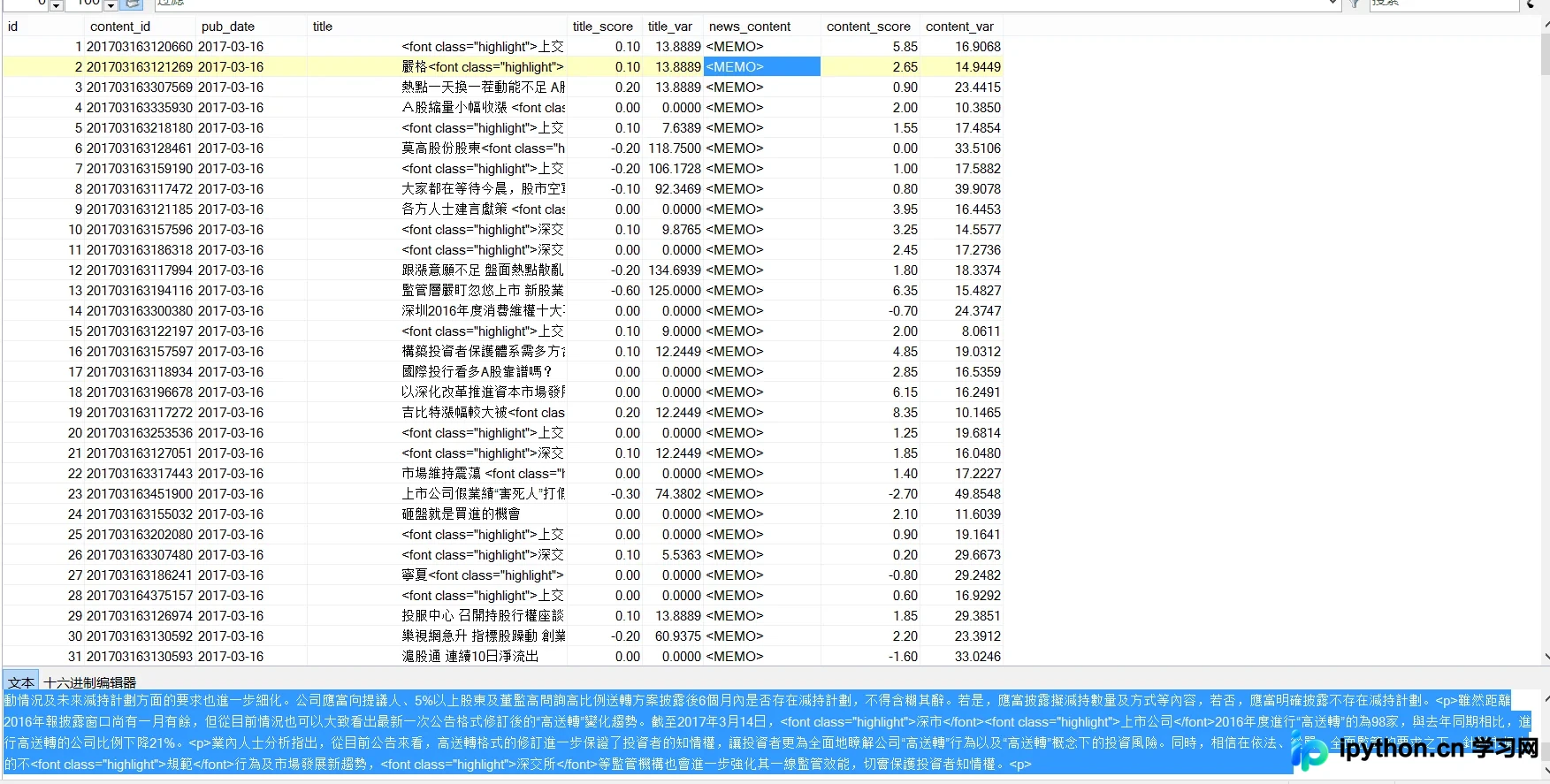
核心任务是对news主体内容进行读取,识别其中包含的股票名称。一旦检测到股票名,便将该股票名称、对应的日期以及score值写入数据库中。
面对几十万条数据,若采用单线程逐条读写并在本机操作,耗时将极其漫长,实际可行性极低。因此,关键在于如何高效地并行读取内容、执行相关操作,并最终将结果写入数据库。
并行读取和写入策略
关于并行读取:我们需要创建N*max_process个进程来对数据库进行读取操作。在执行读取时,需特别注意以下几点:
- 每个进程必须分配独立的connection(连接对象)以及对应的cursor(游标),否则数据库会因资源冲突而报错。
- 数据库服务器必须具备承受相应高并发访问的能力,必要时需手动调整数据库配置以支持高并发。
在实现过程中,如果未在进程内部创建新的connection,就会引发冲突。这是因为前一个进程获取权限后,可能被后续进程释放,从而导致NoneType Error错误。
- 关于并行写入:在修改数据库数据时,不允许多个进程同时更改同一张表。因此,我们需要基于现有表结构,创建max_process-1个结构相同的表用于写入。表的命名规则可在原表名基础上追加1、2、3等数字,具体可通过max_process取余运算确定。
在对应的进程内部,会先后出现用于读取的conn(保存消息后关闭)和用于写入的conn。每个进程所对应的表索引,由主循环中的num对max_process取余决定(例如100对应4,101对应5)。这样,每个进程仅对特定的表进行操作,实现了读写隔离。
部分代码实现细节
max_process = 16 #最大进程数
def read_SQL_write(r_host,r_port,r_user,r_passwd,r_db,r_charset,w_host,w_port,w_user,w_passwd,w_db,w_charset,cmd,index=None):
#得到tem字典保存着信息
try:
conn = pymysql.Connect(host=r_host, port=r_port, user=r_user, passwd =r_passwd, db =r_db, charset =r_charset)
cursor = conn.cursor()
cursor.execute(cmd)
except Exception as e:
error = "[-][-]%d fail to connect SQL for reading" % index
log_error('error.log',error)
return
else:
tem = cursor.fetchone()
print('[+][+]%d succeed to connect SQL for reading' % index)
finally:
cursor.close()
conn.close()
try:
conn = pymysql.Connect(host=w_host, port=w_port, user=w_user, passwd =w_passwd, db =w_db, charset =w_charset)
cursor = conn.cursor()
cursor.execute(cmd)
except Exception as e:
error = "[-][-]%d fail to connect SQL for writing" % index
log_error('error.log',error)
return
else:
print('[+][+]%d succeed to connect SQL for writing' % index)
r_dict = dict()
r_dict['id'] = tem[0]
r_dict['content_id'] = tem[1]
r_dict['pub_date'] = tem[2]
r_dict['title'] = cht_to_chs(tem[3])
r_dict['title_score'] =tem[4]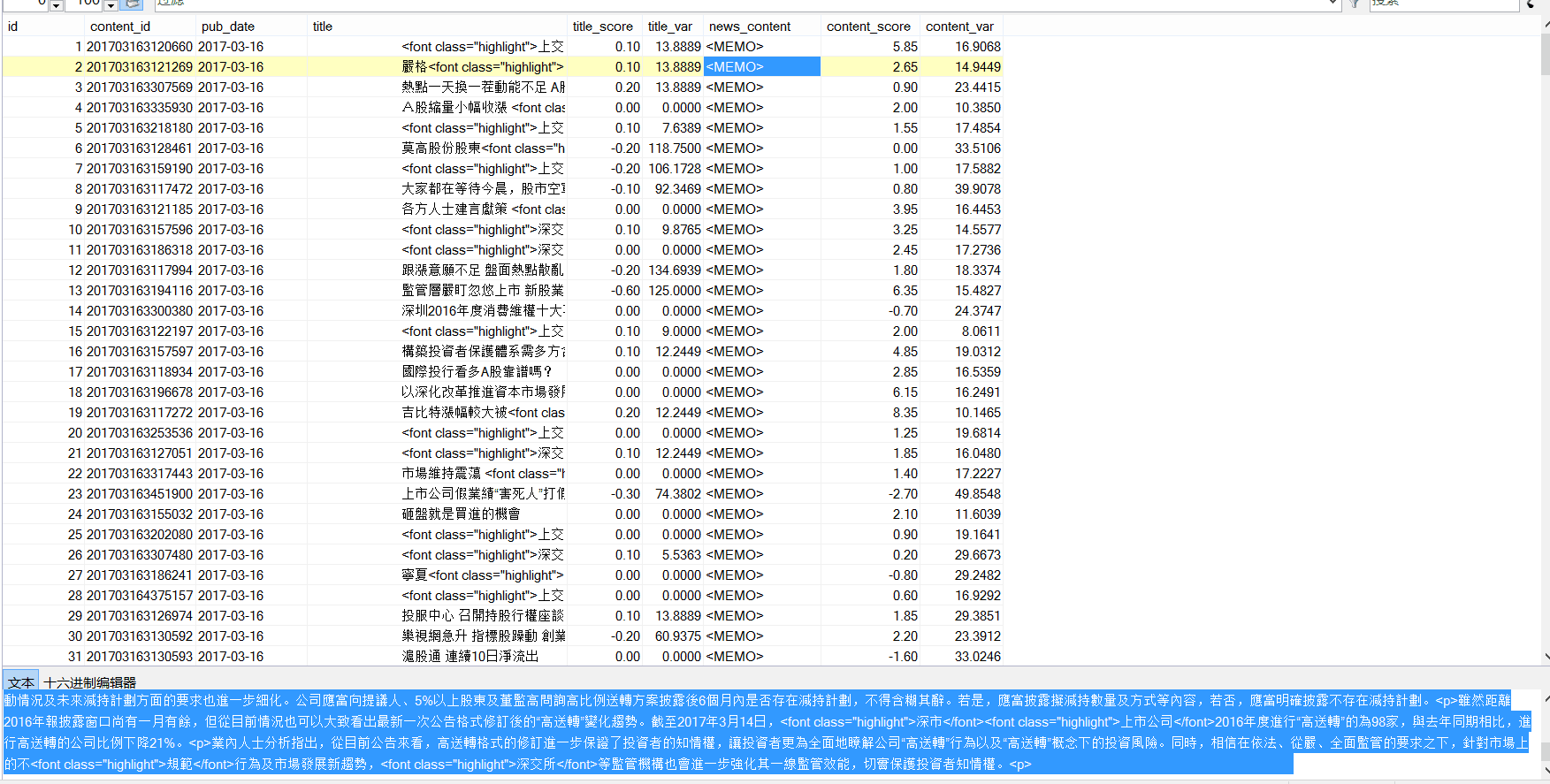
r_dict['news_content'] = cht_to_chs(tem[5])
r_dict['content_score'] = tem[6]
for key in stock_dict.keys():
#能找到对应的股票
if stock_dict[key][1] and ( r_dict['title'].find(stock_dict[key][1])!=-1 or r_dict['news_content'].find(stock_dict[key][1])!=-1 ):
w_dict=dict()
w_dict['code'] = key
w_dict['english_name'] = stock_dict[key][0]
w_dict['cn_name'] = stock_dict[key][1]
#得到分数
if r_dict['title_score']:
w_dict['score']=r_dict['title_score']
else:
w_dict['score']=r_dict['content_score']
#开始写入
try:
global max_process
cmd = "INSERT INTO dyx_stock_score%d VALUES ('%s', '%s' , %d , '%s' , '%s' , %.2f );" % \
(index%max_process ,r_dict['content_id'] ,r_dict['pub_date'] ,w_dict['code'] ,w_dict['english_name'] ,w_dict['cn_name'] ,w_dict['score'])
cursor.execute(cmd)
conn.commit()
except Exception as e:
error = " [-]%d fail to write to SQL" % index
cursor.rollback()
log_error('error.log',error)
else:
print(" [+]%d succeed to write to SQL" % index)
cursor.close()
conn.close()
def main():
num = 238143#数据库查询拿到的总数
p = None
for index in range(1,num+1):
if index%max_process==1:
if p:
p.close()
p.join()
p = multiprocessing.Pool(max_process)
r_cmd = ('select id,content_id,pub_date,title,title_score,news_content,content_score from dyx_emotion_analysis where id = %d;' % (index))
p.apply_async(func = read_SQL_write,args=(r_host,r_port,r_user,r_passwd,r_db,r_charset,w_host,w_port,w_user,w_passwd,w_db,w_charset,r_cmd,index,))
if p:
p.close()
p.join()
以上就是本文的全部内容,希望对大家的学习有所帮助,也希望大家多多支持本站。
本站声明
本文内容仅供参考,不代表本站观点。转载或引用请注明出处。如发现内容问题,请通过联系我们页面反馈。















