


Python+PyQt实现12306风格图片验证码交互

发布时间:2026-10-13 |
2人浏览过
本文介绍使用Python和PyQt4实现类似12306的图片验证码交互效果。核心思路是在鼠标点击位置动态添加按钮,并在按钮的点击事件中处理关闭逻辑。通过重写paintEvent绘制背景图,利用自定义信号addlable传递坐标信息,最终在指定位置渲染验证图标,为GUI开发提供参考。
本文分享了一段使用Python代码实现12306图片验证效果的完整示例,供读者参考学习。
实现逻辑主要包含两部分:首先在鼠标点击的位置生成一个按钮,随后在该按钮绑定的点击事件内部编写关闭操作的处理代码。
#coding:utf-8
from PyQt4.QtGui import *
from PyQt4.QtCore import *
from push_button import *
from PIL import Image

class Yanzheng(QWidget):
  def __init__(self,parent=None):
    super(Yanzheng,self).__init__(parent)
    self.m_start_point=0 #x坐标
    self.m_end_point=0 #y坐标
    self.coordinate=[]
    self.codeimage="./img/code.png"
    self.connect(self,SIGNAL("addlable"),self.addpic)
    self.main_layout=QFormLayout()
    self.setLayout(self.main_layout)
    self.resize(293,190)
    self.pixmap=QPixmap("./img/cur.png")

  def addpic(self):
    print self.m_start_point,self.m_end_point
    xpoint=self.m_start_point
    ypoint=self.m_end_point-28
    codepng2 = PushButton(self)
    codepng2.loadPixmapreal('./img/cur.png')
    codepng2.setGeometry(self.m_start_point,self.m_end_point,30,30)
    codepng2.show()
    #self.emit(SIGNAL("dellabel"),self.codepng2)
    self.coordinate.append("%s,%s" %(xpoint,ypoint))
    self.connect(codepng2,SIGNAL("clicked()"),lambda:self.dellabel(codepng2,xpoint,ypoint))
    #self.update()
  #删除标记
  def dellabel(self,q,x,y):
    print x,y
    self.coordinate.remove("%s,%s" %(x,y))
    q.close()

  def mousePressEvent(self,event):
    if (event.type()==QEvent.MouseButtonPress):
      self.m_start_point = event.pos().x()-12
      self.m_end_point= event.pos().y()-12
      self.emit(SIGNAL("addlable"))


  def paintEvent(self, event):
    p = QPainter(self)
    p.drawPixmap(0,0,QPixmap(self.codeimage))


if __name__=='__main__':
  import sys
  app=QApplication(sys.argv)
  inputurl=Yanzheng()
  inputurl.show()
  sys.exit(app.exec_())
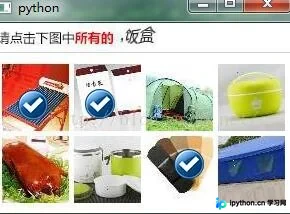
具体的运行效果如下图所示:
以上就是本文的全部内容,希望能为读者的学习带来帮助,同时也欢迎大家继续支持本站。
本站声明
本文内容仅供参考,不代表本站观点。转载或引用请注明出处。如发现内容问题,请通过联系我们页面反馈。















