



在 C 语言里,日期和时间处理几乎都离不开 <time.h>。这个头文件看起来内容不多,但同时覆盖了时间戳、日历时间、运行计时和字符串格式化几类常见需求。本文按“先理解数据结构,再看函数用途,最后用综合示例串起来”的顺序整理一遍,便于你在写日志、打印时间或做时间换算时快速选对接口。
<time.h> 能解决什么问题
<time.h> 是 C 标准库中负责日期与时间处理的头文件。它提供了时间相关的类型、宏定义和函数,常见用途包括:
- 获取当前时间戳
- 把时间戳转换为本地时间或 UTC 时间
- 把时间结构输出为可读字符串
- 按指定格式生成日期时间文本
- 结合
CLOCKS_PER_SEC统计程序运行时间
先看两个核心类型:time_t 和 struct tm
time_t:存放时间戳
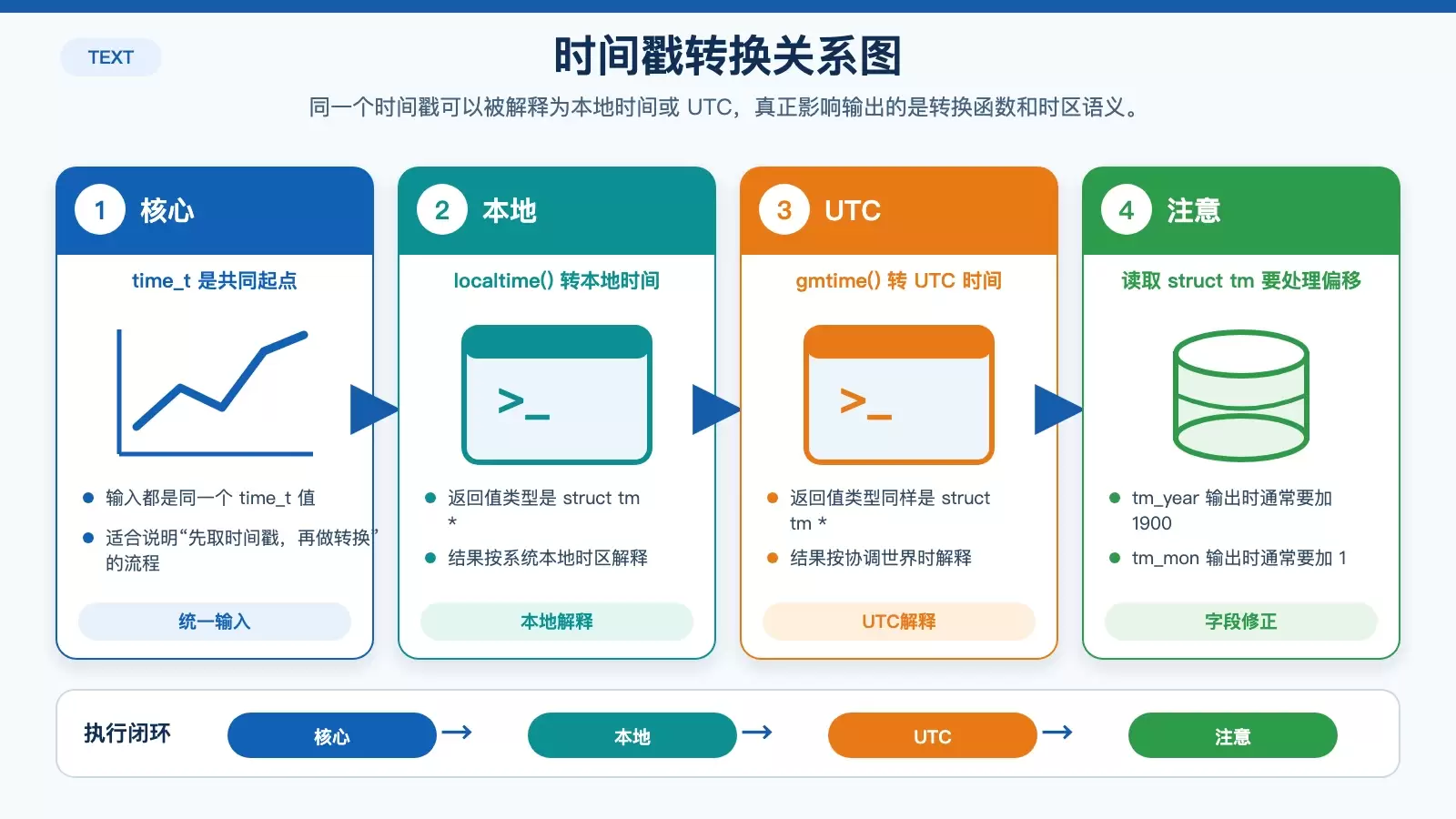
time_t 用于表示时间值,通常可理解为从 1970 年 1 月 1 日午夜开始,到当前时刻经过的秒数。它最常见的用途,就是存储时间戳。
struct tm:拆开的日期时间结构
如果说 time_t 是一个适合计算和传递的“整体时间值”,那么 struct tm 就是便于读取和格式化的“拆分后时间结构”。它包含年、月、日、时、分、秒等字段。
// www.ja vascriptcn.com code example
struct tm {
    int tm_sec;   // 秒,范围为 0 到 61
    int tm_min;   // 分钟,范围为 0 到 59
    int tm_hour;  // 小时,范围为 0 到 23
    int tm_mday;  // 一个月中的第几天,范围为 1 到 31
    int tm_mon;   // 月份,范围为 0 到 11
    int tm_year;  // 年份,范围为 1900 开始的年份
    int tm_wday;  // 一周中的第几天,范围为 0 到 6
    int tm_yday;  // 一年中的第几天,范围为 0 到 365
    int tm_isdst; // 夏令时标志
};
使用时有两个细节最容易踩坑:
tm_mon的范围是0到11,所以实际输出月份时通常要+ 1tm_year表示的是“从 1900 年开始的偏移”,所以输出完整年份时通常要+ 1900
时间戳与计时:CLOCKS_PER_SEC 和 time()
CLOCKS_PER_SEC
CLOCKS_PER_SEC 宏定义了每秒的时钟计时器滴答数,主要用于计算程序运行时间。
time():获取当前时间戳
time() 用于获取当前时间戳,是使用 <time.h> 时最常见的入口函数之一。
time_t time(time_t *t);示例:
// www.ja vascriptcn.com code example
#include <stdio.h>
#include <time.h>

int main() {
    time_t t;
    time(&t);
    printf("当前时间戳:%ldn", t);
    return 0;
}
如果你只想拿到返回值,也经常会写成 time(NULL)。
本地时间和 UTC 怎么转:localtime() 与 gmtime()
localtime():转为本地时间
localtime() 会把时间戳转换为本地时间,并返回一个指向 struct tm 的指针。
struct tm *localtime(const time_t *timep);示例:
// www.ja vascriptcn.com code example
#include <stdio.h>
#include <time.h>

int main() {
    time_t t = time(NULL);
    struct tm *local_time = localtime(&t);

    printf("本地时间:n");
    printf("年:%dn", local_time->tm_year + 1900);
    printf("月:%dn", local_time->tm_mon + 1);
    printf("日:%dn", local_time->tm_mday);
    printf("小时:%dn", local_time->tm_hour);
    printf("分钟:%dn", local_time->tm_min);
    printf("秒:%dn", local_time->tm_sec);

    return 0;
}gmtime():转为协调世界时(UTC)
gmtime() 同样把时间戳转换为 struct tm,但结果是 UTC 时间,而不是本地时区时间。
struct tm *gmtime(const time_t *timep);示例:
// www.ja vascriptcn.com code example
#include <stdio.h>
#include <time.h>

int main() {
    time_t t = time(NULL);
    struct tm *utc_time = gmtime(&t);

    printf("UTC时间:n");
    printf("年:%dn", utc_time->tm_year + 1900);
    printf("月:%dn", utc_time->tm_mon + 1);
    printf("日:%dn", utc_time->tm_mday);
    printf("小时:%dn", utc_time->tm_hour);
    printf("分钟:%dn", utc_time->tm_min);
    printf("秒:%dn", utc_time->tm_sec);

    return 0;
}
两者的区别可以直接理解为:输入都是同一个时间戳,但 localtime() 按当前系统所在时区解释,而 gmtime() 按 UTC 解释。
如何输出可读时间:asctime() 与 strftime()
asctime():直接转成字符串
asctime() 可以把 struct tm 转换成日期时间字符串,适合快速输出,但格式是固定的。

char *asctime(const struct tm *timeptr);示例:
// www.ja vascriptcn.com code example
#include <stdio.h>
#include <time.h>

int main() {
    time_t t = time(NULL);
    struct tm *local_time = localtime(&t);

    char *time_str = asctime(local_time);
    printf("当前时间:n%sn", time_str);

    return 0;
}strftime():按指定格式输出
如果你需要更常见的日志格式、数据库时间格式,或者前端接口常用的日期文本,就更适合用 strftime()。
size_t strftime(char *s, size_t maxsize, const char *format, const struct tm *timeptr);示例:
// www.ja vascriptcn.com code example
#include <stdio.h>
#include <time.h>

int main() {
    time_t t = time(NULL);
    struct tm *local_time = localtime(&t);

    char buffer[80];
    strftime(buffer, sizeof(buffer), "%Y-%m-%d %H:%M:%S", local_time);
    printf("当前时间:n%sn", buffer);

    return 0;
}
相比 asctime(),strftime() 的优势在于格式完全可控,因此在实际项目里通常更常用。
综合示例:把获取、转换和格式化串起来
下面这段代码把 <time.h> 中几个最常见的能力放到了一起,适合当作入门参考。
// www.ja vascriptcn.com code example
#include <stdio.h>
#include <time.h>

int main() {
    // 获取当前时间戳
    time_t t = time(NULL);
    printf("当前时间戳:%ldn", t);

    // 将时间戳转换为本地时间
    struct tm *local_time = localtime(&t);
    printf("本地时间:n");
    printf("年:%dn", local_time->tm_year + 1900);
    printf("月:%dn", local_time->tm_mon + 1);
    printf("日:%dn", local_time->tm_mday);
    printf("小时:%dn", local_time->tm_hour);
    printf("分钟:%dn", local_time->tm_min);
    printf("秒:%dn", local_time->tm_sec);

    // 将时间戳转换为UTC时间
    struct tm *utc_time = gmtime(&t);
    printf("UTC时间:n");
    printf("年:%dn", utc_time->tm_year + 1900);
    printf("月:%dn", utc_time->tm_mon + 1);
    printf("日:%dn", utc_time->tm_mday);
    printf("小时:%dn", utc_time->tm_hour);
    printf("分钟:%dn", utc_time->tm_min);
    printf("秒:%dn", utc_time->tm_sec);

    // 将时间转换为字符串
    char *time_str = asctime(local_time);
    printf("当前时间:n%sn", time_str);

    // 自定义时间格式
    char buffer[80];
    strftime(buffer, sizeof(buffer), "%Y-%m-%d %H:%M:%S", local_time);
    printf("自定义时间格式:n%sn", buffer);

    return 0;
}如果只是快速打印时间,time() + localtime() + asctime() 就够用了;如果你需要稳定、可控的输出格式,通常会选择 strftime()。















