


Python使用matplotlib绘制3D散点图完整指南

发布时间:2026-10-13 |
2人浏览过
本文详细介绍如何在Python中使用matplotlib库绘制3D散点图。通过导入必要的第三方包,利用Axes3D创建三维坐标轴,并演示如何生成随机数据及设置点的颜色、形状和坐标标签。包含完整的代码示例与效果解析,帮助开发者快速掌握三维数据可视化技巧。
在开始具体实现之前,建议先查阅官方提供的演示文档以获取基础概念。
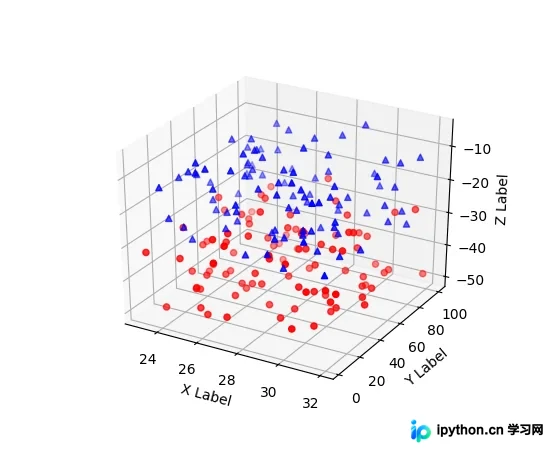
最终的视觉效果如下图所示。
'''
==============
3D scatterplot
==============
Demonstration of a basic scatterplot in 3D.
'''
from mpl_toolkits.mplot3d import Axes3D
import matplotlib.pyplot as plt
import numpy as np

def randrange(n, vmin, vmax):
 '''
 Helper function to make an array of random numbers having shape (n, )
 with each number distributed Uniform(vmin, vmax).
 '''
 return (vmax - vmin)*np.random.rand(n) + vmin

fig = plt.figure()
ax = fig.add_subplot(111, projection='3d')

n = 100

# For each set of style and range settings, plot n random points in the box
# defined by x in [23, 32], y in [0, 100], z in [zlow, zhigh].
for c, m, zlow, zhigh in [('r', 'o', -50, -25), ('b', '^', -30, -5)]:
 xs = randrange(n, 23, 32)
 ys = randrange(n, 0, 100)
 zs = randrange(n, zlow, zhigh)
 ax.scatter(xs, ys, zs, c=c, marker=m)

ax.set_xlabel('X Label')
ax.set_ylabel('Y Label')
ax.set_zlabel('Z Label')

plt.show()
上述内容展示了官网提供的代码片段及其对应的运行结果,接下来将分享本文具体的代码实现示例。
本实例运行前需要引入相关的第三方依赖库。
import matplotlib.pyplot as plt
from mpl_toolkits.mplot3d import Axes3D
随后执行绘图逻辑。
ax = plt.figure().add_subplot(111, projection = '3d')
#基于ax变量绘制三维图
#xs表示x方向的变量
#ys表示y方向的变量
#zs表示z方向的变量,这三个方向上的变量都可以用list的形式表示
#m表示点的形式,o是圆形的点,^是三角形(marker)
#c表示颜色(color for short)
ax.scatter(xs, ys, zs, c = 'r', marker = '^') #点为红色三角形

#设置坐标轴
ax.set_xlabel('X Label')
ax.set_ylabel('Y Label')
ax.set_zlabel('Z Label')

#显示图像
plt.show()
注意事项如下。
前文提到的
ax = plt.figure().add_subplot(111, projection = '3d')
实际上是后续代码段的简化写法。
fig = plt.figure()
ax = fig.add_subplot(111, projection = '3d')
总结
至此,关于在Python中使用matplotlib绘制3D散点图的实例详解已全部介绍完毕,希望能为读者提供切实的帮助。若感兴趣,欢迎继续浏览本站其他相关专题内容;如有疏漏之处,敬请留言指正。感谢各位对本站的支持!
本站声明
本文内容仅供参考,不代表本站观点。转载或引用请注明出处。如发现内容问题,请通过联系我们页面反馈。















