


Python matplotlib与numpy实现多平面二维条形图绘制

发布时间:2026-10-13 |
5人浏览过
本文介绍如何使用Python的matplotlib和numpy库,在三维坐标系中将二维条形图投射到不同的Y平面(如y=0, y=1等)。通过示例代码展示如何生成随机数据、设置颜色与透明度,并正确配置坐标轴标签,实现多平面条形图的可视化效果。
本文演示如何在不同的平面上绘制二维条形图。
该实例构建了一个三维图形,其中包含投射到平面y=0、y=1等位置的二维条形图。
演示结果如下:
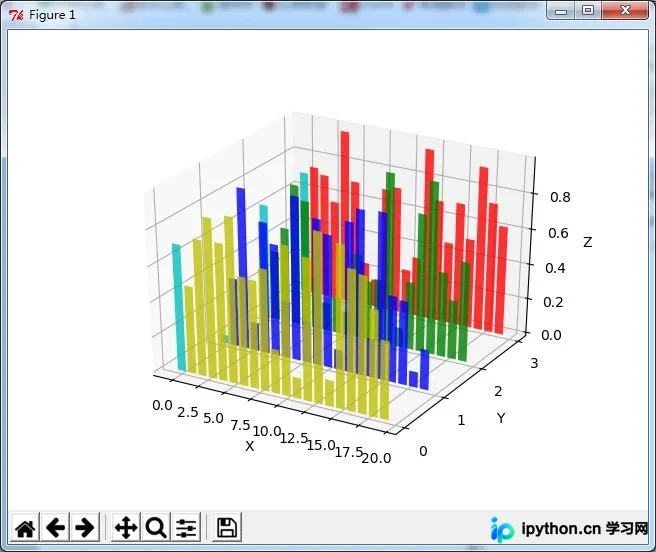
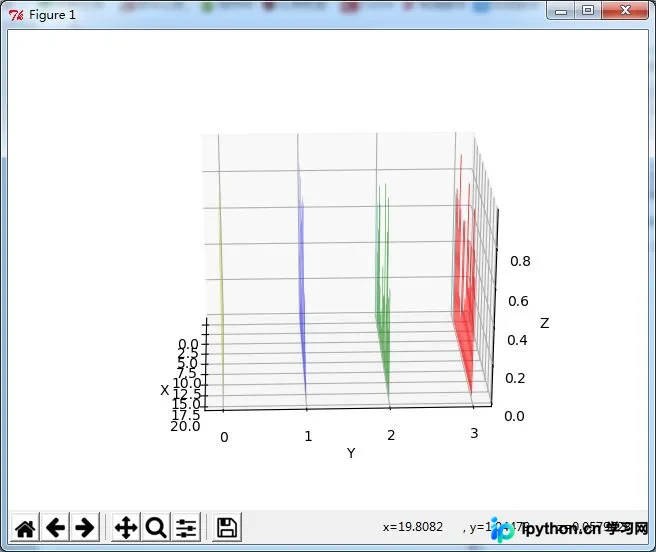
完整代码见下文。
from mpl_toolkits.mplot3d import Axes3D
import matplotlib.pyplot as plt
import numpy as np

# Fixing random state for reproducibility
np.random.seed(19680801)


fig = plt.figure()
ax = fig.add_subplot(111, projection='3d')

colors = ['r', 'g', 'b', 'y']
yticks = [3, 2, 1, 0]
for c, k in zip(colors, yticks):
  # Generate the random data for the y=k 'layer'.
  xs = np.arange(20)
  ys = np.random.rand(20)

  # You can provide either a single color or an array with the same length as
  # xs and ys. To demonstrate this, we color the first bar of each set cyan.
  cs = [c] * len(xs)
  cs[0] = 'c'

  # Plot the bar graph given by xs and ys on the plane y=k with 80% opacity.
  ax.bar(xs, ys, zs=k, zdir='y', color=cs, alpha=0.8)

ax.set_xlabel('X')
ax.set_ylabel('Y')
ax.set_zlabel('Z')

# On the y axis let's only label the discrete values that we have data for.
ax.set_yticks(yticks)

plt.show()
脚本运行耗时:(0分0.063秒)
总结
以上是关于使用Python、matplotlib和numpy在不同平面绘制二维条形图的完整内容,希望能对大家有所帮助。感兴趣的朋友可继续查阅本站其他相关专题,如有疏漏欢迎留言指正。感谢各位对本站的支持!
本站声明
本文内容仅供参考,不代表本站观点。转载或引用请注明出处。如发现内容问题,请通过联系我们页面反馈。















