


Python实战:抓取ChinaDaily新闻并计算TF-IDF词频

本文介绍如何使用Python编写爬虫程序,从ChinaDaily抓取十篇新闻文章。通过BeautifulSoup解析HTML获取标题与正文,结合TF-IDF算法计算每篇文章的高频关键词。最终将结果以JSON格式保存,并提供在线查看工具及GitHub源码链接,适合初学者学习网络抓取与文本分析基础。
对十篇新闻内容进行TF-IDF统计
计算每篇文章的TF-IDF词频,并将得分最高的前10个高频词保存为JSON文件
TF-IDF概念解析
TF-IDF(词频-逆文档频率)是信息检索和文本挖掘中广泛使用的加权技术。该统计方法用于评估某个字词在文件集或语料库中某一份文件里的重要程度。字词的重要性与其在文件中出现的次数成正比,但与该字在整个语料库中出现的频率成反比。TF-IDF加权形式常被搜索引擎用于衡量文件与用户查询的相关性。此外,搜索引擎还会结合链接分析等方法来确定文件在搜索结果中的排序。例如,若一篇文件总词数为100,其中“母牛”出现3次,则其词频TF为3/100=0.03。逆文档频率(IDF)通过计算包含该词的文件数与总文件数的比值的对数得出,如1000份文件包含“母牛”,总文件10,000,000份,则IDF为log(10,000,000 / 1,000)=4。最终TF-IDF分数为0.03 * 4=0.12。—— [ 维基百科 ]
本例选取ChinaDaily网站的十篇新闻作为分析对象。
实现步骤如下: 1. 使用HTTP请求获取网页数据。 2. 利用BeautifulSoup解析HTML,提取文章标题和正文内容。 3. 对提取的文本进行TF-IDF统计计算。 4. 将处理结果保存至JSON文件。
相关代码实现
@requires_authorization
#coding=utf-8

import requests
import bs4
import sys
import math
import json
reload(sys)
sys.setdefaultencoding('utf-8')

url_list = ['http://www.chinadaily.com.cn/china/2016-04/20/content_24701635.htm',
      'http://www.chinadaily.com.cn/china/2016-04/20/content_24700746.htm',
      'http://www.chinadaily.com.cn/china/2016-04/20/content_24681482.htm',
      'http://www.chinadaily.com.cn/china/2016-04/19/content_24675530.htm',
      'http://www.chinadaily.com.cn/china/2016-04/19/content_24675455.htm',
      'http://www.chinadaily.com.cn/china/2016-04/19/content_24674074.htm',
      'http://www.chinadaily.com.cn/china/2016-04/19/content_24655536.htm',
      'http://www.chinadaily.com.cn/china/2016-04/18/content_24643685.htm',
      'http://www.chinadaily.com.cn/china/2016-04/18/content_24636917.htm',
      'http://www.chinadaily.com.cn/china/2016-04/15/content_24562198.htm'
      ]

articles_title = []
articles_content = []

for pos,url in enumerate(url_list):
  r = requests.get(url)
  soup1 = bs4.BeautifulSoup(r.text)
  soup2 = bs4.BeautifulSoup(str(soup1.find_all(id="Title_e")))
  articles_title.append(soup2.h1.string)
  mystr = ""
  soup3 = bs4.BeautifulSoup(str(soup1.find_all(id="Content")))
  for x in soup3.find_all("p"):
    mystr = mystr + x.string

  str_p = ""
  contents = []
  for pos,x in enumerate(mystr):
    if x == '.' or x == ',':
      if pos < (len(mystr) - 1) and mystr[pos+1] >= '0' and mystr[pos+1] <= '9':
        str_p = str_p + x
      elif str_p == "":
        continue
      else:
        contents.append(str_p)
        str_p = ""
    elif x == '(' or x == ')' or x == ' ' or x == '"' or x == '[' or x == ']' or x == '-':
      if str_p == "":
        continue
      else:
        contents.append(str_p)
        str_p = ""
    else:
      str_p = str_p + x

  articles_content.append(contents)

Dict_idf = {}
DictList = []

for content in articles_content:
  Dict_tf = {}
  for x in content:
    if not Dict_tf.has_key(x):
      Dict_tf[x] = 1.0
      if not Dict_idf.has_key(x):
        Dict_idf[x] = 1.0
      else:
        Dict_idf[x] += 1.0
    else:
      Dict_tf[x] += 1.0

  for k, v in Dict_tf.items():
    Dict_tf[k] = v / len(content)

  DictList.append(Dict_tf)

for k, v in Dict_idf.items():
  Dict_idf[k] = math.log(float(len(url_list)) / v)

for pos,x in enumerate(DictList):
  for k,v in x.items():
    DictList[pos][k] = v*Dict_idf[k]
  DictList[pos] = sorted(x.iteritems(), key=lambda d: d[1], reverse=True)

"""
[
  [
    article_titile:"XXXX"
    [
      {
        word:"hello"
        value:3.5
      }
      {
        word:"hello"
        value:3.5
      }
      {
        word:"hello"
        value:3.5
      }
      ...
    ]
  ]
]
"""

data = []
for pos in range(10):
  data2=[]
  data2.append("article_titile:")
  data2.append(articles_title[pos])
  data2.append([{"word": k,"value":round(v,4)} for k,v in DictList[pos][:10]])
  data.append(data2)

# Writing JSON data
with open('data.json', 'w') as f:
  json.dump(data, f)
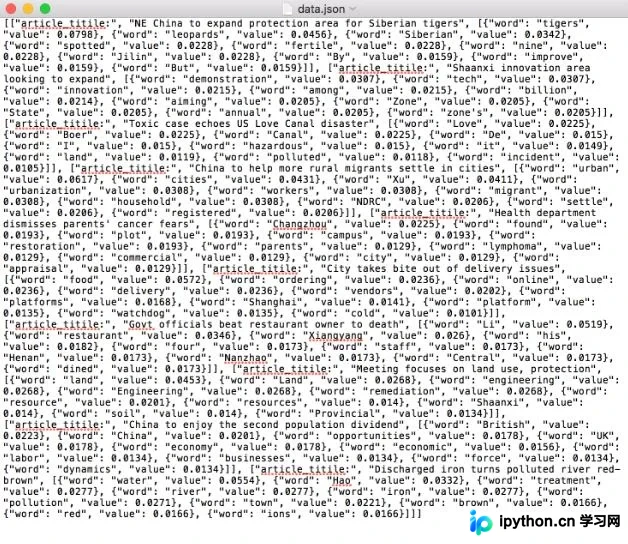
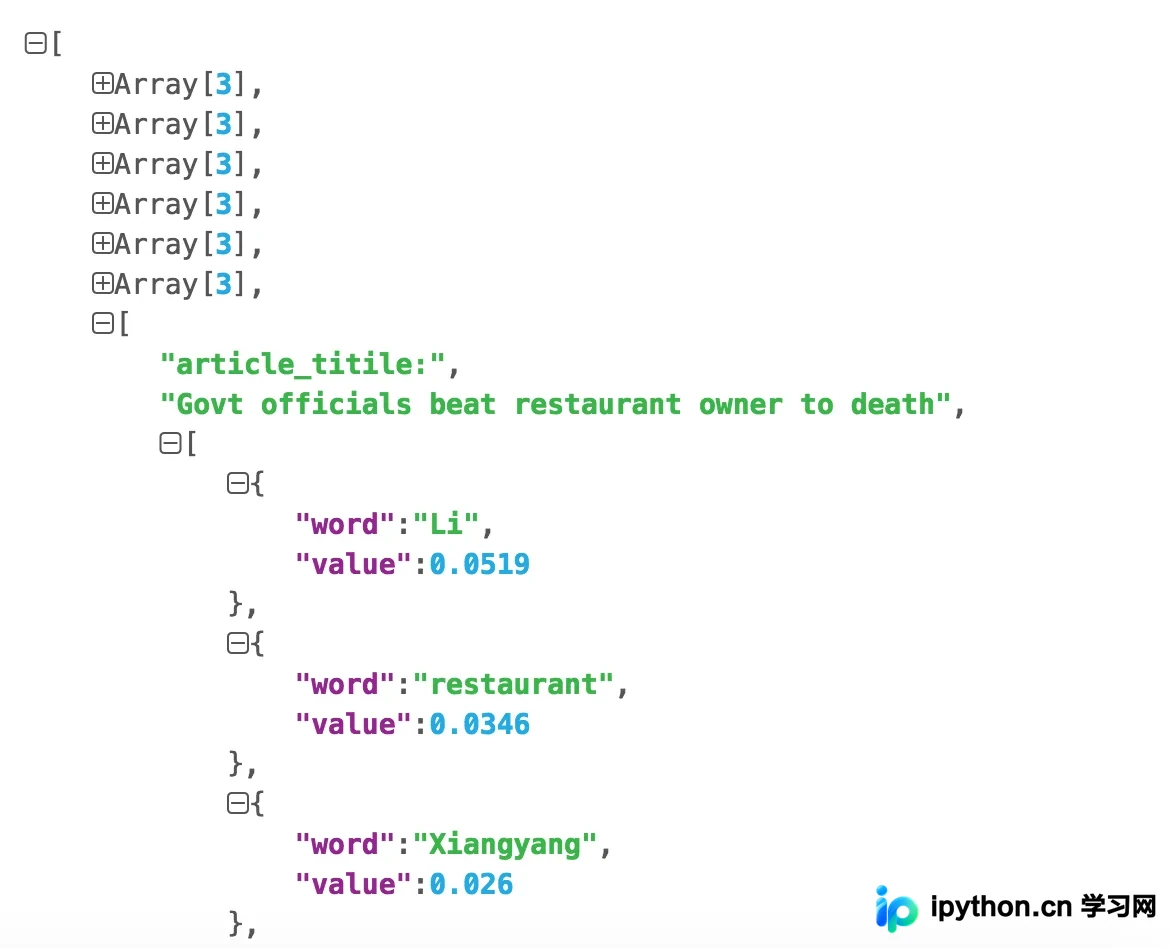
可通过json.cn工具查看生成的数据结果:
完整代码已托管于GitHub:https://github.com/mqsee/learngit
以上就是本文的全部内容,希望对各位的学习有所帮助,也欢迎大家多多支持本站。
本站声明
本文内容仅供参考,不代表本站观点。转载或引用请注明出处。如发现内容问题,请通过联系我们页面反馈。















