


TensorFlow实现图片读取与解码显示示例

发布时间:2026-10-13 |
3人浏览过
本文介绍如何使用TensorFlow读取原始图像数据并进行解码显示。通过tf.gfile.FastGFile获取原始字节,利用tf.image.decode_jpeg或decode_png解码为像素值,最后使用matplotlib展示图像。
TensorFlow提供了用于读取图像的函数,但该函数返回的是未经解码的原始图像数据,具体为tf.gfile.FastGFile(‘path', ‘r').read()。若需显示读入的图像,必须经过解码过程。TensorFlow提供了两个解码函数:tf.image.decode_jpeg和tf.image.decode_png,分别用于解码jpg格式和png格式的图像,从而得到可用于显示的图像像素值。若未进行解码,读取的图像仅为字符串,无法直接显示。
例如:
import matplotlib.pyplot as plt;
import tensorflow as tf;

image_raw_data_jpg = tf.gfile.FastGFile('11.jpg', 'r').read()
image_raw_data_png = tf.gfile.FastGFile('1.png', 'r').read()

with tf.Session() as sess:
  img_data_jpg = tf.image.decode_jpeg(image_raw_data_jpg) #图像解码
  img_data_jpg = tf.image.convert_image_dtype(img_data_jpg, dtype=tf.uint8) #改变图像数据的类型

  img_data_png = tf.image.decode_png(image_raw_data_png)
  img_data_png = tf.image.convert_image_dtype(img_data_png, dtype=tf.uint8)

  plt.figure(1) #图像显示
  plt.imshow(img_data_jpg.eval())
  plt.figure(2)
  plt.imshow(img_data_png.eval())
  plt.show()
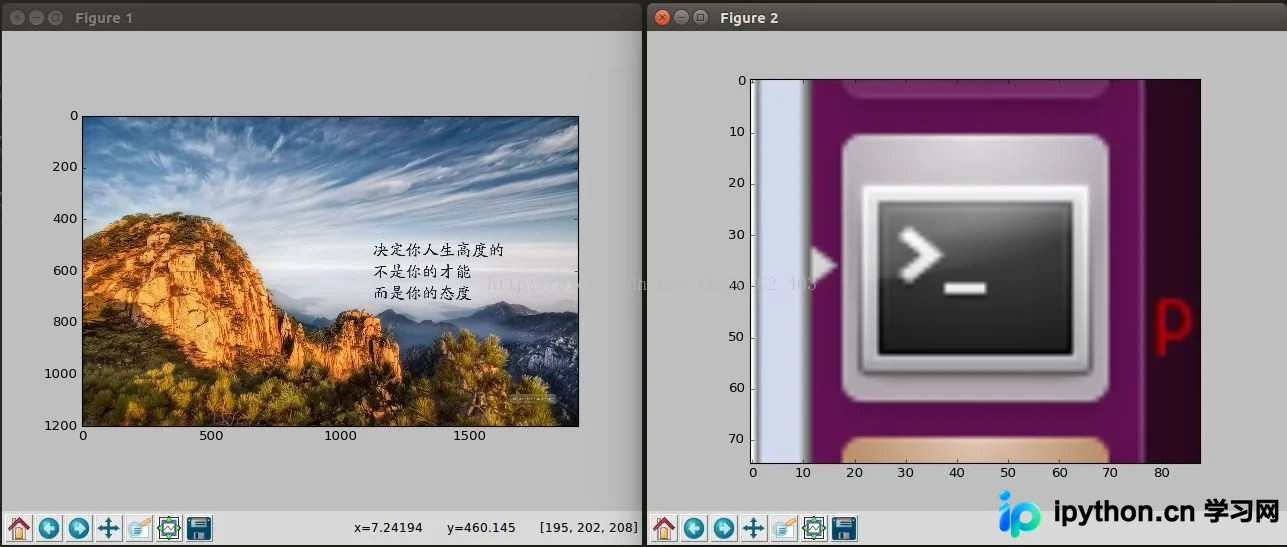
结果:
以上就是本文的全部内容,希望对大家的学习有所帮助,也希望大家多多支持本站。
本站声明
本文内容仅供参考,不代表本站观点。转载或引用请注明出处。如发现内容问题,请通过联系我们页面反馈。















