


Python海龟绘图实现小猪佩奇示例

发布时间:2026-10-13 |
3人浏览过
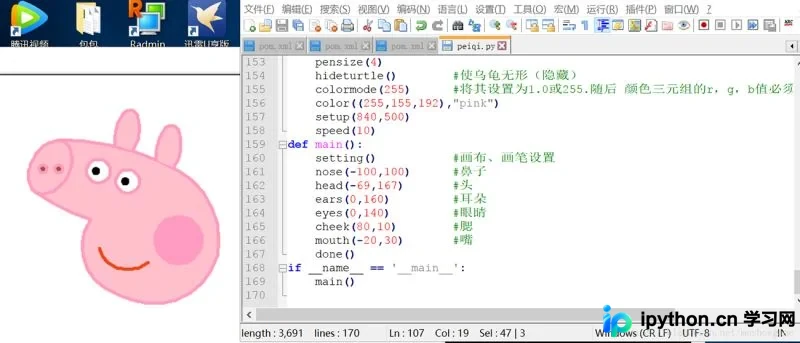
本文介绍利用Python内置Turtle模块绘制小猪佩奇的方法。通过设置画板、画笔颜色及粗细,按顺序绘制鼻子、头部、耳朵等部位,实现卡通形象。Turtle模块基于Tkinter,适合初学者理解代码逻辑与绘图指令。
基本原理
首先确定画布尺寸,配置画笔的颜色与粗细参数,并设定初始坐标位置。随后按照鼻子、头部、耳朵、眼睛、脸颊、嘴巴、身体、四肢及尾巴的顺序依次完成绘制,即可生成目标图形。
Turtle是Python标准库中内置的一个趣味模块,通常被称为“海龟绘图”。该模块基于Tkinter库构建,提供了基础的图形绘制功能。
在海龟绘图模式下,用户可以通过编写指令控制虚拟海龟在屏幕上的移动轨迹。海龟携带一支“钢笔”,其移动路径即为绘制线条的过程。通过编写代码让海龟以特定模式运动,可以创造出复杂的图形。使用海龟绘图不仅能用少量代码生成视觉效果,还能直观展示每行代码对海龟移动的影响,从而帮助理解程序逻辑。
因此,海龟绘图常被作为Python初学者的入门教学工具。如需了解更详细的功能与知识,请参考官方文档:
https://docs.python.org/3/library/turtle.html
from turtle import*
def nose(x,y):#鼻子
 penup()#提起笔
 goto(x,y)#定位
 pendown()#落笔,开始画
 setheading(-30)#将乌龟的方向设置为to_angle/为数字(0-东、90-北、180-西、270-南)
 begin_fill()#准备开始填充图形
 a=0.4
 for i in range(120):
  if 0<=i<30 or 60<=i<90:
   a=a+0.08
   left(3) #向左转3度
   forward(a) #向前走a的步长
  else:
   a=a-0.08
   left(3)
   forward(a)
 end_fill()#填充完成
 penup()
 setheading(90)
 forward(25)
 setheading(0)
 forward(10)
 pendown()
 pencolor(255,155,192)#画笔颜色
 setheading(10)
 begin_fill()
 circle(5)
 color(160,82,45)#返回或设置pencolor和fillcolor
 end_fill()
 penup()
 setheading(0)
 forward(20)
 pendown()
 pencolor(255,155,192)
 setheading(10)
 begin_fill()
 circle(5)
 color(160,82,45)
 end_fill()
def head(x,y):#头
 color((255,155,192),"pink")
 penup()
 goto(x,y)
 setheading(0)
 pendown()
 begin_fill()
 setheading(180)
 circle(300,-30)
 circle(100,-60)
 circle(80,-100)
 circle(150,-20)
 circle(60,-95)
 setheading(161)
 circle(-300,15)
 penup()
 goto(-100,100)
 pendown()
 setheading(-30)
 a=0.4
 for i in range(60):
  if 0<=i<30 or 60<=i<90:
   a=a+0.08
   lt(3) #向左转3度
   fd(a) #向前走a的步长
  else:
   a=a-0.08
   lt(3)
   fd(a)
 end_fill()
def ears(x,y): #耳朵
 color((255,155,192),"pink")
 penup()
 goto(x,y)
 pendown()
 begin_fill()
 setheading(100)
 circle(-50,50)
 circle(-10,120)
 circle(-50,54)
 end_fill()
 penup()
 setheading(90)
 forward(-12)
 setheading(0)
 forward(30)
 pendown()
 begin_fill()
 setheading(100)
 circle(-50,50)
 circle(-10,120)
 circle(-50,56)
 end_fill()
def eyes(x,y):#眼睛
 color((255,155,192),"white")
 penup()
 setheading(90)
 forward(-20)
 setheading(0)
 forward(-95)
 pendown()
 begin_fill()
 circle(15)
 end_fill()
 color("black")
 penup()
 setheading(90)
 forward(12)
 setheading(0)
 forward(-3)
 pendown()
 begin_fill()
 circle(3)
 end_fill()
 color((255,155,192),"white")
 penup()
 seth(90)
 forward(-25)
 seth(0)
 forward(40)
 pendown()
 begin_fill()
 circle(15)
 end_fill()
 color("black")
 penup()
 setheading(90)
 forward(12)
 setheading(0)
 forward(-3)
 pendown()
 begin_fill()
 circle(3)
 end_fill()
def cheek(x,y):#腮
 color((255,155,192))
 penup()
 goto(x,y)
 pendown()
 setheading(0)
 begin_fill()
 circle(30)
 end_fill()
def mouth(x,y): #嘴
 color(239,69,19)
 penup()
 goto(x,y)
 pendown()
 setheading(-80)
 circle(30,40)
 circle(40,80)
def setting():   #参数设置
 pensize(4)
 hideturtle()  #使乌龟无形(隐藏)
 colormode(255)  #将其设置为1.0或255.随后 颜色三元组的r,g,b值必须在0 .. cmode范围内
 color((255,155,192),"pink")
 setup(840,500)
 speed(10)
def main():
 setting()   #画布、画笔设置
 nose(-100,100)  #鼻子
 head(-69,167)  #头
 ears(0,160)   #耳朵
 eyes(0,140)   #眼睛
 cheek(80,10)  #腮
 mouth(-20,30)  #嘴
 done()
if __name__ == '__main__':
 main()
总结
上述内容介绍了使用Python绘制小猪佩奇的示例代码,希望能为读者提供帮助。如有任何疑问,欢迎留言,作者将及时回复。感谢对本站的支持!
本站声明
本文内容仅供参考,不代表本站观点。转载或引用请注明出处。如发现内容问题,请通过联系我们页面反馈。















