


Python使用Matplotlib绘制分布折线图的完整示例

发布时间:2026-10-14 |
4人浏览过
本文介绍如何使用Python的Matplotlib库绘制分布折线图。通过plot()函数设置数据点、标记样式及标签,展示如何生成包含特定数据分布的折线图,并解决中文显示与坐标轴调整问题,提供完整可运行代码示例。
Python绘制分布折线图的方法
在Python中绘制分布折线图,主要依赖matplotlib库中的plot()函数来实现。
基础代码示例
以下是一个基础的使用示例,展示了如何配置数据并生成图表。
# encoding=utf-8
import matplotlib.pyplot as plt
from pylab import * # 支持中文

mpl.rcParams['font.sans-serif'] = ['SimHei']
# 'mentioned0cluster',
names = ['mentioned1cluster','mentioned2cluster', 'mentioned3cluster', 'mentioned4cluster', 'mentioned5cluster', 'mentioned6cluster', 'mentioned7cluster', 'mentioned8cluster', 'mentioned9cluster', 'mentioned10cluster']
x = range(len(names))
# y_0625 = [39266,56796,42996,24872,13849,8609,5331,1971,554,169,26]

y_0626_1=[4793,100,0,0,0,0,0,0,0,0]
# y_0626_2=[2622,203,0,0,0,0,0,0,0,0,0]

# plt.plot(x, y, 'ro-')
# plt.plot(x, y1, 'bo-')
# pl.xlim(-1, 11) # 限定横轴的范围
# pl.ylim(-1, 110) # 限定纵轴的范围
plt.plot(x, y_0626_1, marker='o', mec='r', mfc='w', label='HighRating:MentionedClusterNum Distribution')
# plt.plot(x, y_0626_2, marker='o', mec='r', mfc='w', label='LowRating:MentionedClusterNum Distribution')
# plt.plot(x, y1, marker='*', ms=10, label=u'y=x^3曲线图')
plt.legend() # 让图例生效
plt.xticks(x, names, rotation=45)
plt.margins(0)
plt.subplots_adjust(bottom=0.15)
# plt.xlabel(u"time(s)邻居") # X轴标签
plt.xlabel("clusters")
plt.ylabel("number of reviews") # Y轴标签
plt.title("A simple plot") # 标题

plt.show()
图表输出结果
执行上述代码后,将得到对应的分布折线图结果。
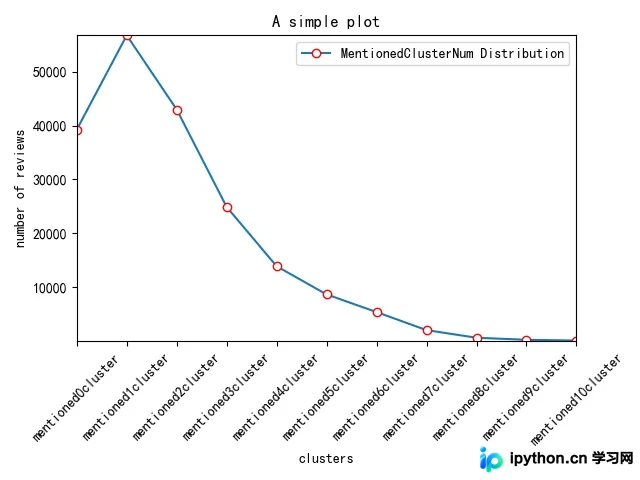
以上即为利用Python绘制分布折线图的完整示例代码。如需了解更多相关技术细节,建议查阅本站发布的其他Python数据可视化教程。
本站声明
本文内容仅供参考,不代表本站观点。转载或引用请注明出处。如发现内容问题,请通过联系我们页面反馈。















