


Python脚本运行参数设置详解:从命令行到PyCharm配置

发布时间:2026-10-13 |
4人浏览过
本文详细介绍Python脚本运行参数的设置方法,以Django的manage.py为例。内容涵盖通过命令行直接添加参数启动服务,以及在PyCharm集成开发环境中配置Script parameters的具体步骤。通过对比两种方式的实际操作与输出结果,帮助开发者快速掌握不同环境下的参数传递技巧,解决监听端口等配置问题。
在Django框架的学习过程中,运行manage.py脚本时通常需要指定监听端口,这即为给脚本传递运行参数。常见的教学视频多在Eclipse环境下演示,而网络上的Django教程大多聚焦于命令行直接运行manage.py并添加参数,较少涉及如何在PyCharm中配置运行参数。以下以manage.py为例,介绍两种设置运行参数的方法。若未设置任何运行参数,脚本的执行结果如下所示:
D:\Python2.7\python.exe "D:/Django project/DjangoProject1/manage.py"

Type 'manage.py help <subcommand>' for help on a specific subcommand.

Available subcommands:

[auth]
 changepassword
 createsuperuser

[django]
 check
 compilemessages
 createcachetable
 dbshell
 diffsettings
 dumpdata
 flush
 inspectdb
 loaddata
 makemessages
 makemigrations
 migrate
 sendtestemail
 shell
 showmigrations
 sqlflush
 sqlmigrate
 sqlsequencereset
 squashmigrations
 startapp
 startproject
 test
 testserver

[sessions]
 clearsessions

[staticfiles]
 collectstatic
 findstatic
 runserver

Process finished with exit code 0
由于缺少必要的参数,脚本不会显示监听端口信息。
1、通过命令行设置参数的常用方法
D:\Django project\DjangoProject1>python manage.py runserver 0.0.0.0:8000
在manage.py脚本所在的根目录下打开命令提示符(cmd),输入命令“python manage.py”后跟具体参数。执行后的运行结果如下:
Performing system checks...

System check identified no issues (0 silenced).

You have 13 unapplied migration(s). Your project may not work properly until you apply the migrations for app(s): admin, auth, contenttypes, sessions.
Run 'python manage.py migrate' to apply them.
April 11, 2017 - 13:26:13
Django version 1.10.6, using settings 'DjangoProject1.settings'
Starting development server at http://0.0.0.0:8000/
Quit the server with CTRL-BREAK.
[11/Apr/2017 13:27:16] "GET / HTTP/1.1" 200 1767
Not Found: /favicon.ico
[11/Apr/2017 13:27:16] "GET /favicon.ico HTTP/1.1" 404 1944
Not Found: /favicon.ico
[11/Apr/2017 13:27:16] "GET /favicon.ico HTTP/1.1" 404 1944
系统成功监听到8000端口。
2、在PyCharm中配置运行参数
run --> Edit Configurations -->Scrip parameters
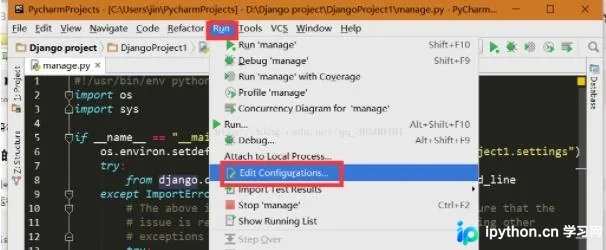
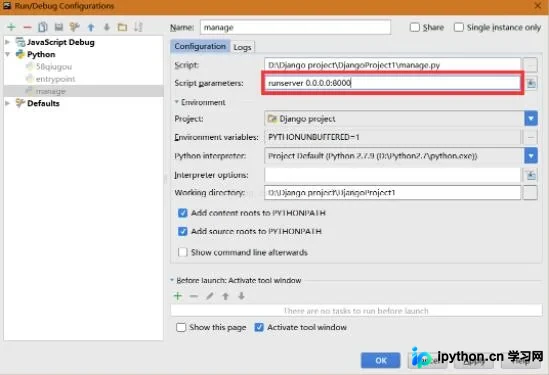
完成上述配置后再次运行脚本。
D:\Python2.7\python.exe "D:/Django project/DjangoProject1/manage.py" runserver 0.0.0.0:8000
Performing system checks...

System check identified no issues (0 silenced).

You have 13 unapplied migration(s). Your project may not work properly until you apply the migrations for app(s): admin, auth, contenttypes, sessions.
Run 'python manage.py migrate' to apply them.
April 11, 2017 - 14:07:30
Django version 1.10.6, using settings 'DjangoProject1.settings'
Starting development server at http://0.0.0.0:8000/
Quit the server with CTRL-BREAK.
此时可成功监听8000端口。
以上关于Python脚本运行参数设置的讲解到此结束,希望能为读者提供有价值的参考。
本站声明
本文内容仅供参考,不代表本站观点。转载或引用请注明出处。如发现内容问题,请通过联系我们页面反馈。















