


Python实现历史天气数据抓取与存储分析

发布时间:2026-10-13 |
6人浏览过
本文介绍如何利用Python进行历史天气数据的采集与分析。通过编写脚本获取天气信息,并将数据存入MySQL数据库及Excel文件中,为后续趋势分析提供数据支持。文章包含完整代码示例,适合对数据抓取和存储感兴趣的开发者参考。
对历史天气数据进行趋势分析。
首先需要执行数据采集步骤。
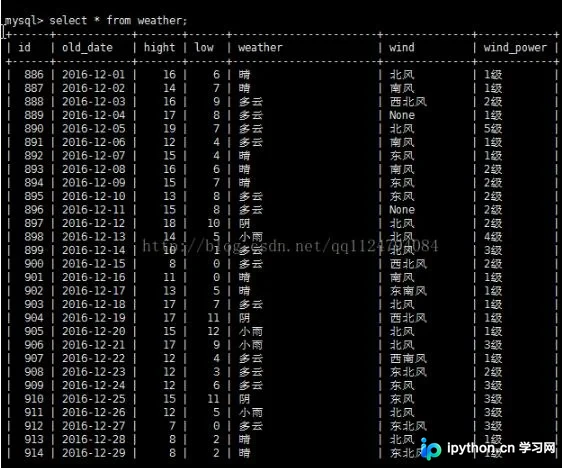
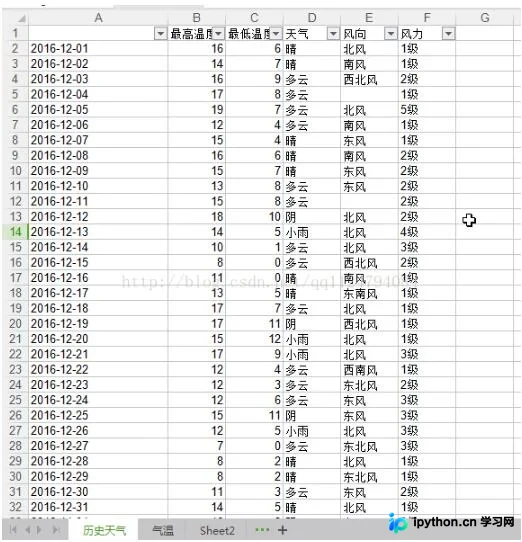
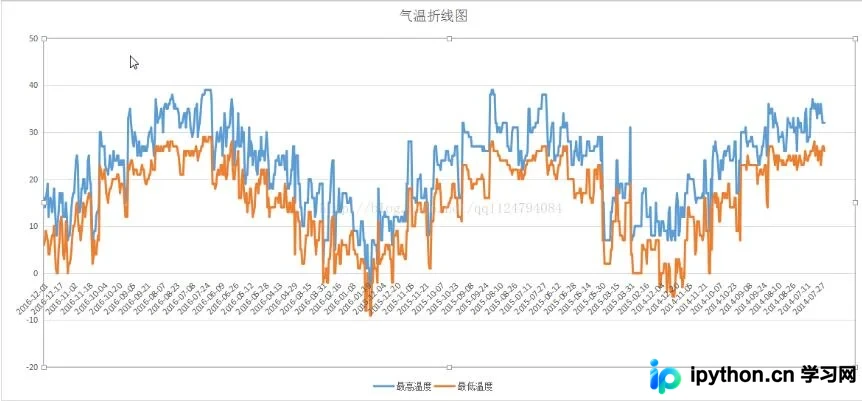
具体实现代码如下:
#-*- coding:utf-8 -*-
import requests
import random
import MySQLdb
import xlwt
from bs4 import BeautifulSoup
user_agent=['Mozilla/5.0 (Windows NT 6.1; WOW64) AppleWebKit/537.36 (KHTML, like Gecko) Chrome/54.0.2840.87 Safari/537.36',
    'Mozilla/5.0 (X11; U; Linux x86_64; zh-CN; rv:1.9.2.10) Gecko/20100922 Ubuntu/10.10 (maverick) Firefox/3.6.10',
    'Mozilla/5.0 (X11; Linux x86_64) AppleWebKit/537.11 (KHTML, like Gecko) Chrome/23.0.1271.64 Safari/537.11',
    'Mozilla/5.0 (Windows NT 6.1; WOW64) AppleWebKit/537.36 (KHTML, like Gecko) Chrome/30.0.1599.101 Safari/537.36',
    'Mozilla/5.0 (Windows NT 6.1; WOW64) AppleWebKit/537.1 (KHTML, like Gecko) Chrome/21.0.1180.71 Safari/537.1 LBBROWSER',
    'Mozilla/5.0 (compatible; MSIE 9.0; Windows NT 6.1; WOW64; Trident/5.0; SLCC2; .NET CLR 2.0.50727; .NET CLR 3.5.30729; .NET CLR 3.0.30729; Media Center PC 6.0; .NET4.0C; .NET4.0E; QQBrowser/7.0.3698.400)',
    ]
headers={
'Accept': 'text/html,application/xhtml+xml,application/xml;q=0.9,image/webp,*/*;q=0.8',
'Accept-Encoding': 'gzip, deflate, sdch',
'Accept-Language': 'zh-CN,zh;q=0.8',
'User-Agent': user_agent[random.randint(0,5)]}

myfile=xlwt.Workbook()
wtable=myfile.add_sheet(u"历史天气",cell_overwrite_ok=True)
wtable.write(0,0,u"日期")
wtable.write(0,1,u"最高温度")
wtable.write(0,2,u"最低温度")
wtable.write(0,3,u"天气")
wtable.write(0,4,u"风向")
wtable.write(0,5,u"风力")

db = MySQLdb.connect('localhost','root','liao1234','liao',charset='utf8')
cursor = db.cursor()

index = requests.get("http://lishi.tianqi.com/binjianqu/index.html",headers=headers)
html_index = index.text
index_soup = BeautifulSoup(html_index)
i = 1
for href in index_soup.find("div",class_="tqtongji1").find_all("a"):
  print href.attrs["href"]


  url = href.attrs["href"]
  r = requests.get(url,headers = headers)
  html = r.text
  #print html
  soup = BeautifulSoup(html)
  ss = []
  s = []
  for tag in soup.find("div",class_="tqtongji2").find_all("li"):
    print tag.string
    s.append(tag.string)
    if len(s) == 6:
      ss.append(s)
      s = []
  flag = 0
  for s in ss:
    if flag == 0:
      flag = 1
      continue
    else:
      sql = "insert into weather(old_date,hight,low,weather,wind,wind_power) values('%s','%s','%s','%s','%s','%s')"%(s[0],s[1],s[2],s[3],s[4],s[5])
      cursor.execute(sql)
      wtable.write(i,0,s[0])
      wtable.write(i,1,s[1])
      wtable.write(i,2,s[2])
      wtable.write(i,3,s[3])
      wtable.write(i,4,s[4])
      wtable.write(i,5,s[5])
      i += 1
myfile.save("weather.xls")
db.close()
以上就是基于Python进行历史天气数据采集与分析的完整内容,希望能为读者提供有价值的参考,同时也欢迎大家继续支持本站。
本站声明
本文内容仅供参考,不代表本站观点。转载或引用请注明出处。如发现内容问题,请通过联系我们页面反馈。















