


Python抓取CNVD工控漏洞库数据的实战方案

发布时间:2026-10-13 |
5人浏览过
本文分享利用Python抓取CNVD工控漏洞库信息的完整流程。针对网站反爬虫机制,通过模拟请求头、Cookie及Selenium自动化浏览器技术解决访问限制。代码涵盖从分页URL抓取到详情页信息提取的全过程,旨在帮助安全研究人员高效整理漏洞数据。
近日,一位同事需要整理http://ics.cnvd.org.cn/工控漏洞库中的数据,面对960多条记录,手动整理耗时巨大。
为此,我决定编写一个爬虫程序来自动抓取所需数据。
初步观察发现,该网站的数据结构非常规范,理论上实现起来应该比较顺利。
然而,实际访问时遇到了网站设置的多重反爬虫限制。
通过查阅相关资料并反复调试,最终成功解决了这些障碍。
具体设计思路如下:
第一步,抓取每个漏洞详情页对应的URL地址。
第二步,根据获取的URL,提取每个页面中的具体漏洞信息。
# -*- coding: utf-8 -*-
import requests
import re
import xlwt
import time
from bs4 import BeautifulSoup
headers = {
 'Accept':'text/html,application/xhtml+xml,application/xml;q=0.9,image/webp,*/*;q=0.8',
 'Accept-Encoding': 'gzip, deflate, sdch',
 'Accept-Language': 'zh-CN,zh;q=0.8',
 'User-Agent': 'Mozilla/5.0 (Windows NT 10.0; WOW64) AppleWebKit/537.36 (KHTML, like Gecko) Chrome/54.0.2840.71 Safari/537.36'
}
cookies={'__jsluid':'8d3f4c75f437ca82cdfad85c0f4f7c25'}
myfile=xlwt.Workbook()
wtable=myfile.add_sheet(u"信息",cell_overwrite_ok=True)
j = 0
a = 900
for i in range(4):
 url ="http://ics.cnvd.org.cn/?max=20&offset="+str(a)
 r = requests.get(urttp://ics.cnvd.org.cnl,headers=headers,cookies=cookies)
 print r.status_code
 while r.status_code != 200:
  r = requests.get(url,headers=headers,cookies=cookies)
  print r.status_code
 html = r.text
 soup = BeautifulSoup(html)
 #print html

 for tag in soup.find('tbody',id='tr').find_all('a',href=re.compile('http://www.cnvd.org.cn/flaw/show')):
  print tag.attrs['href']
  wtable.write(j,0,tag.attrs['href'])
  j += 1
 a += 20
 print u"已完成%s"%(a)
filename=str(time.strftime('%Y%m%d%H%M%S',time.localtime()))+"url.xls"
myfile.save(filename)
print u"完成%s的url备份"%time.strftime('%Y%m%d%H%M%S',time.localtime())
# -*- coding: utf-8 -*-
from selenium import webdriver
import xlrd
import xlwt
from selenium.webdriver.common.by import By
from selenium.webdriver.common.keys import Keys
from selenium.webdriver.support.ui import Select
from selenium.common.exceptions import NoSuchElementException
from selenium.common.exceptions import NoAlertPresentException
import unittest, time, re

class Gk(unittest.TestCase):
 def setUp(self):
  self.driver = webdriver.Firefox()
  self.driver.implicitly_wait(5)
  self.verificationErrors = []
  self.accept_next_alert = True

 def test_gk(self):
  myfile=xlwt.Workbook()
  wtable=myfile.add_sheet(u"info",cell_overwrite_ok=True)
  data = xlrd.open_workbook('url.xlsx')
  table = data.sheets()[0]
  nrows = table.nrows
  driver = self.driver

  j = 0
  for i in range(nrows):
   try:
    s = []
    driver.get(table.cell(i,0).value)
    title = driver.find_element_by_xpath("//h1").text
    print title
    s.append(title)
    trs = driver.find_element_by_xpath("//tbody").find_elements_by_tag_name('tr')
    for td in trs:
     tds = td.find_elements_by_tag_name("td")
     for tt in tds:
      print tt.text
      s.append(tt.text)
    k = 0
    for info in s:
     wtable.write(j,k,info)
     k += 1
    j += 1
   except:
    filename=str(time.strftime('%Y%m%d%H%M%S',time.localtime()))+"url.xls"
    myfile.save(filename)
    print u"异常自动保存%s的漏洞信息备份"%time.strftime('%Y%m%d%H%M%S',time.localtime())

  filename=str(time.strftime('%Y%m%d%H%M%S',time.localtime()))+"url.xls"
  myfile.save(filename)
  print u"完成%s的漏洞信息备份"%time.strftime('%Y%m%d%H%M%S',time.localtime())

 def is_element_present(self, how, what):
  try: self.driver.find_element(by=how, value=what)
  except NoSuchElementException, e: return False
  return True

 def is_alert_present(self):
  try: self.driver.switch_to_alert()
  except NoAlertPresentException, e: return False
  return True

 def close_alert_and_get_its_text(self):
  try:
   alert = self.driver.switch_to_alert()
   alert_text = alert.text
   if self.accept_next_alert:
    alert.accept()
   else:
    alert.dismiss()
   return alert_text
  finally: self.accept_next_alert = True

 def tearDown(self):
  self.driver.quit()
  self.assertEqual([], self.verificationErrors)

if __name__ == "__main__":
 unittest.main()
接下来,验证一下抓取结果是否符合预期。
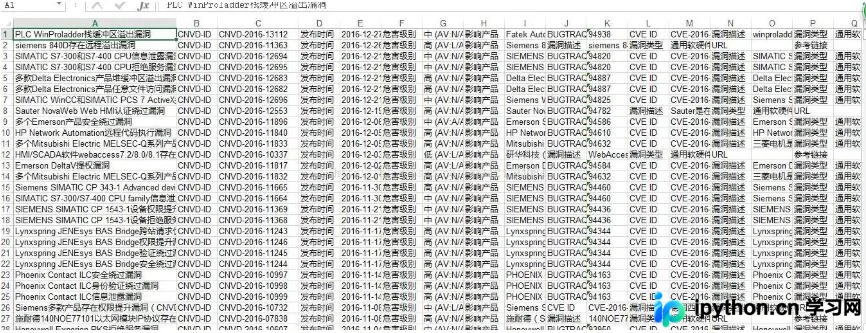
结果显示正常,剩余部分可通过手动整理完成,任务基本结束。
以上关于使用Python爬取CNVD漏洞库信息的实例分享完毕,希望能为读者提供参考,同时也欢迎大家继续支持本站。
本站声明
本文内容仅供参考,不代表本站观点。转载或引用请注明出处。如发现内容问题,请通过联系我们页面反馈。















