


Python与MySQL交互操作详解:基于PyMySQL库的增删改查实战

本文详细讲解如何使用Python通过PyMySQL库与MySQL数据库进行交互。内容涵盖库的安装配置、数据库连接方法、Cursor游标类型(DictCursor与Cursor)的区别及结果集处理,以及execute与executemany的多条数据插入技巧。此外,还演示了如何利用ON DUPLICATE KEY UPDATE语法实现存在即更新、不存在则插入的数据入库策略,并提供完整的基金数据抓取入库代码示例。
PyMySQL库安装与连接配置
本文介绍Python与MySQL数据库进行交互操作的具体实现方法,供读者参考学习。
在Python中实现与MySQL的交互,主要依赖pymysql第三方库。
该库的官方下载地址为: https://github.com/PyMySQL/PyMySQL
安装步骤如下(请确保已切换到项目对应的虚拟环境目录):
cd 项目根目录/abc/bin/
#执行
./python3 -m pip install pymysql
等待安装完成后,pymysql库将被下载至项目虚拟环境的site-packages目录下(例如abc/lib/python3.5/site-packages,具体路径视你的项目配置而定)。
官方文档地址为: http://pymysql.readthedocs.io/en/latest/
接下来演示具体的使用方式:
import pymysql.cursors
# 连接数据库
connection = pymysql.connect(host='localhost',
               user='root',
               password='root',
               db='test',
               charset='utf8mb4',
               cursorclass=pymysql.cursors.DictCursor)
try:
  with connection.cursor() as cursor:
    # Read a single record
    sql = "SELECT * From news"
    cursor.execute(sql)
    result = cursor.fetchone()
    print(result) # {'id': 1, 'title': '本机新闻标题'}
finally:
  connection.close()
示例中连接了本地名为test的数据库,并从news表中查询数据,返回结果如{'id': 1, 'title': '本机新闻标题'}所示。
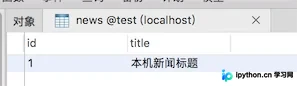
返回结果为字典类型,这是因为在建立数据库连接时进行了特定配置:
# 连接数据库
connection = pymysql.connect(host='localhost',
               user='root',
               password='root',
               db='test',
               charset='utf8mb4',
               cursorclass=pymysql.cursors.Cursor)
我们将cursorclass参数设置为:pymysql.cursors.DictCursor。
由于使用了字典游标,因此查询结果集以字典形式返回。
若需修改为其他类型,可调整为如下代码:
cursorclass=pymysql.cursors.Cursor
此时的结果集变为:
(1, '本机新闻标题')
结果类型变为元组。通常我们更倾向于使用字典类型,因为其中包含了明确的表字段名,便于后续处理。
Cursor游标类型详解
关于Cursor对象
PyMySQL主要提供4种游标类型:
Cursor:默认类型,查询返回list或tuple DictCursor:查询返回dict,包含字段名 SSCursor:行为同Cursor,但为无缓存游标 SSDictCursor:行为同DictCursor,但为无缓存游标。
数据插入与多条数据批量处理
数据插入操作
try:
  with connection.cursor() as cursor:
    sql = "INSERT INTO news(`title`)VALUES (%s)"
    cursor.execute(sql,["今天的新闻"])
  # 手动提交 默认不自动提交
  connection.commit()
finally:
  connection.close()
演示如何一次性插入多条数据
try:
  with connection.cursor() as cursor:
    sql = "INSERT INTO news(`title`)VALUES (%s)"
    cursor.executemany(sql,["新闻标题1","新闻标题2"])
  # 手动提交 默认不自动提交
  connection.commit()
finally:
  connection.close()
请注意executemany()方法与execute()方法的区别。
SQL绑定参数机制
sql = "INSERT INTO news(`title`)VALUES (%s)"
cursor.executemany(sql,["新闻标题1","新闻标题2"])
我们使用%s作为占位符,在执行SQL时才传入具体值。上述示例中传入的是list类型:
["新闻标题1","新闻标题2"]
是否可以使用元组类型呢?
cursor.executemany(sql,("元组新闻1","元组新闻2"))
实验表明,使用元组同样可以成功插入数据到表中。
基金数据入库与更新策略实战
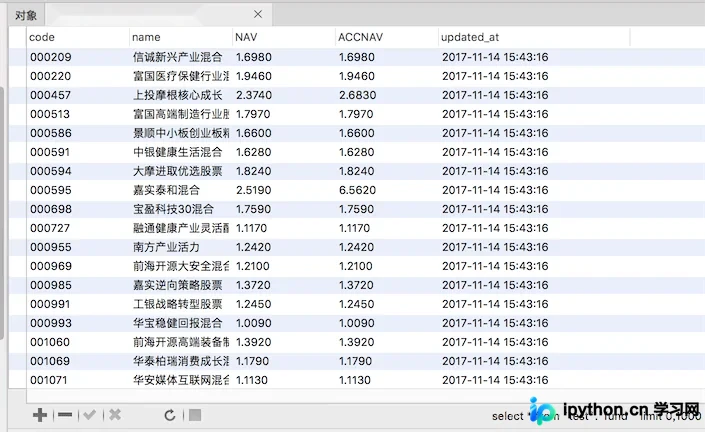
下面将之前分析得到的基金数据存入数据库。
首先创建基金表:
CREATE TABLE `fund` (
  `code` varchar(50) NOT NULL,
  `name` varchar(255),
  `NAV` decimal(5,4),
  `ACCNAV` decimal(5,4),
  `updated_at` datetime,
  PRIMARY KEY (`code`)
) COMMENT='基金表';
准备插入数据的SQL语句:
代码如下:
INSERT INTO fund(`code`,`name`,`NAV`,`ACCNAV`,`updated_at`)VALUES (%(code)s,%(name)s,%(NAV)s,%(ACCNAV)s,%(updated_at)s)
注意%(code)s这种占位符格式,要求执行SQL时传入的参数必须是字典数据类型。
MySQL相关小知识:
在插入数据时,如果主键已存在,则执行更新操作。
insert into 表名 xxxx ON duplicate Key update 表名
此时需要准备的SQL语句如下:
INSERT INTO fund(code,name,NAV,ACCNAV,updated_at)VALUES (%(code)s,%(name)s,%(NAV)s,%(ACCNAV)s,%(updated_at)s)
ON duplicate Key UPDATE updated_at=%(updated_at)s,NAV=%(NAV)s,ACCNAV=%(ACCNAV)s;
1、回顾之前分析的基金网站数据 //www.jb51.net/article/162452.htm
#...
codes = soup.find("table",id="oTable").tbody.find_all("td","bzdm")
result = () # 初始化一个元组
for code in codes:
  result += ({
    "code":code.get_text(),
    "name":code.next_sibling.find("a").get_text(),
    "NAV":code.next_sibling.next_sibling.get_text(),
    "ACCNAV":code.next_sibling.next_sibling.next_sibling.get_text()
   },)
最终我们将数据存放在一个result元组中。
打印该result变量可以看到:
代码如下:
({'code': '004223', 'ACCNAV': '1.6578', 'name': '金信多策略精选灵活配置', 'NAV': '1.6578'}, ...}]
该元组中的每个元素均为字典。
检查字典发现,虽然数据表字段基本对应,但缺少一个updated_at字段的数据。
2、对分析的网页数据重新进行处理
from datetime import datetime
updated_at = datetime.now().strftime("%Y-%m-%d %H:%M:%S")
result = () # 初始化一个元组
for code in codes:
  result += ({
    "code":code.get_text(),
    "name":code.next_sibling.find("a").get_text(),
    "NAV":code.next_sibling.next_sibling.get_text(),
    "ACCNAV":code.next_sibling.next_sibling.next_sibling.get_text(),
    "updated_at":updated_at
   },)
3、最终的插入代码逻辑
try:
  with connection.cursor() as cursor:
    sql = """INSERT INTO fund(`code`,`name`,`NAV`,`ACCNAV`,`updated_at`)VALUES (%(code)s,%(name)s,%(NAV)s,%(ACCNAV)s,%(updated_at)s)
ON duplicate Key UPDATE `updated_at`=%(updated_at)s,`NAV`=%(NAV)s,`ACCNAV`=%(ACCNAV)s"""
    cursor.executemany(sql,result)
  # 手动提交 默认不自动提交
  connection.commit()
finally:
  connection.close()
4、完整的HTML内容分析(基金网站网页内容)及插入数据库代码:
from bs4 import BeautifulSoup
import pymysql.cursors
from datetime import datetime
# 读取文件内容
with open("1.txt", "rb") as f:
  html = f.read().decode("utf8")
  f.close()
# 分析html内容
soup = BeautifulSoup(html,"html.parser")
# 所有基金编码
codes = soup.find("table",id="oTable").tbody.find_all("td","bzdm")
updated_at = datetime.now().strftime("%Y-%m-%d %H:%M:%S")
result = () # 初始化一个元组
for code in codes:
  result += ({
    "code":code.get_text(),
    "name":code.next_sibling.find("a").get_text(),
    "NAV":code.next_sibling.next_sibling.get_text(),
    "ACCNAV":code.next_sibling.next_sibling.next_sibling.get_text(),
    "updated_at":updated_at
   },)
# 连接数据库
connection = pymysql.connect(host='localhost',
               user='root',
               password='root',
               db='test',
               charset='utf8mb4',
               cursorclass=pymysql.cursors.Cursor)
try:
  with connection.cursor() as cursor:
    sql = """INSERT INTO fund(`code`,`name`,`NAV`,`ACCNAV`,`updated_at`)VALUES (%(code)s,%(name)s,%(NAV)s,%(ACCNAV)s,%(updated_at)s)
ON duplicate Key UPDATE `updated_at`=%(updated_at)s,`NAV`=%(NAV)s,`ACCNAV`=%(ACCNAV)s"""
    cursor.executemany(sql,result)
  # 手动提交 默认不自动提交
  connection.commit()
finally:
  connection.close()
更多关于Python相关内容感兴趣的读者可查看本站专题:《Python常见数据库操作技巧汇总》、《Python数学运算技巧总结》、《Python数据结构与算法教程》、《Python函数使用技巧总结》、《Python字符串操作技巧汇总》、《Python入门与进阶经典教程》及《Python文件与目录操作技巧汇总》
希望本文所述对大家进行Python程序设计有所帮助。
本站声明
本文内容仅供参考,不代表本站观点。转载或引用请注明出处。如发现内容问题,请通过联系我们页面反馈。















