


Python实现字符串列表写入Excel与TXT文件的方法

本文介绍了如何使用Python将字符串列表分别写入Excel(CSV格式)和TXT文件。通过numpy库保存为CSV,利用文件操作保存为TXT,并处理编码问题,提供完整代码示例供参考。
准备字符串列表数据
首先定义一个包含多个学术文献标题的字符串列表,例如:'icassp improved human face identification using frequency domain representation facial asymmetry', 'pattern recognition unsupervised methods classification hyperspectral images low spatial resolution', 'iscas post layout watermarking method ip protection', 'computers mathematics applications tauberian theorems product method borel cesàro summability', 'ieee t. geoscience remote sensing mirs all-weather 1dvar satellite data assimilation retrieval system'。
接下来演示如何将上述字符串列表保存为Excel兼容的CSV格式文件。
写入Excel(CSV格式)
docs = [doc.encode('latin-1', 'ignore') for doc in docs]
# convert list to array
docs_array = np.array(docs)
print(type(docs_array))
# saving...
np.savetxt('/Users/Desktop/portrait/jour_paper_docs.csv', docs_array, fmt='%s', delimiter=',')
print('Finish saving csv file')
执行保存操作后,生成的CSV文件将包含所有标题数据。
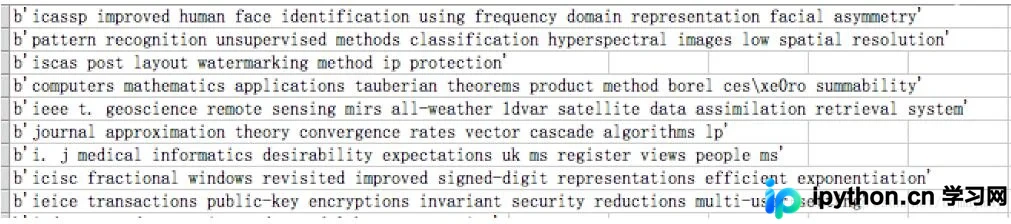
随后演示如何将相同的字符串列表保存为纯文本文件(TXT)。
写入TXT文本文件
def save(filename, docs):
 fh = open(filename, 'w', encoding='utf-8')
 for doc in docs:
  fh.write(doc)
  fh.write('\n')
 fh.close()
save('/Users/Desktop/portrait/jour_paper_docs.txt', docs)
执行保存操作后,生成的TXT文件将按行显示所有标题数据。
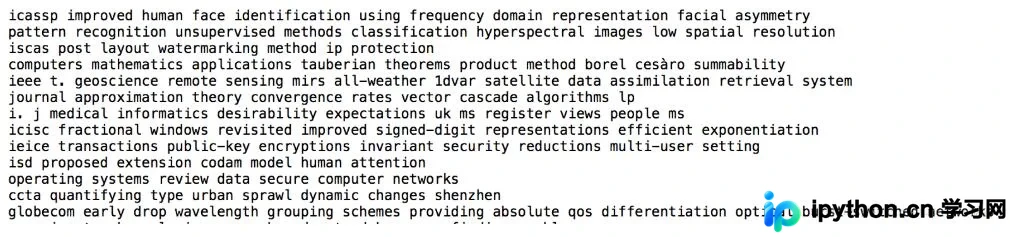
以上关于Python将字符串列表写入Excel和TXT文件的示例分享完毕,希望能为读者提供有效的参考,并欢迎大家继续支持相关技术平台。
本站声明
本文内容仅供参考,不代表本站观点。转载或引用请注明出处。如发现内容问题,请通过联系我们页面反馈。















