


Python调用外部系统命令的几种方法及对比

本文详细解析Python中调用外部系统命令的三种主要方式:os.system、os.popen以及subprocess模块。重点对比了各方法在获取命令执行结果码和标准输出方面的差异,并提供了subprocess模块中Popen、call、check_call及check_output函数的具体使用示例,帮助开发者根据实际需求选择最合适的调用方案。
前言
Python调用外部命令的方法概述
通过Python调用外部系统命令能够有效提升开发效率。在调用完成后,开发者可以依据命令返回的状态码以及具体的输出内容来进行后续的逻辑处理。本文将重点介绍Python中几种常见的外部系统命令调用方式,主要涵盖os.system()、os.popen()以及subprocess模块下的相关函数。
本文对Python调用外部系统命令的分析主要基于两个核心维度:第一,是否能够获取命令执行的状态码,因为在大多数应用场景中,判断命令是成功执行还是失败至关重要;第二,是否能够捕获命令的标准输出,部分场景下调用外部命令的目的正是为了获取其输出结果,进而通过输出内容来判定命令的执行状态。具体的分析对比如下:
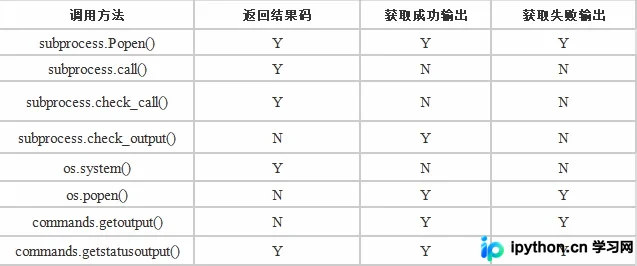
接下来,将对上述每种函数的具体用法及实例进行详细阐述。
subprocess模块详解
1、subprocess模块
首先介绍subprocess模块,因为该模块旨在替代旧有的os.system()和os.popen()等方法,官方推荐使用。subprocess模块能够调用外部系统命令来创建新的子进程,并允许连接到该子进程的输入/输出/错误管道,从而获取子进程的返回值。该模块主要包含call()、check_call()、check_output()以及Popen()等函数,简要说明如下:
Main API
  ========
  call(...): Runs a command, waits for it to complete, then returns the return code.
  check_call(...): Same as call() but raises CalledProcessError() if return code is not 0
  check_output(...): Same as check_call() but returns the contents of stdout instead of a return code
  Popen(...): A class for flexibly executing a command in a new process

  Constants
  ---------
  PIPE:  Special value that indicates a pipe should be created
  STDOUT: Special value that indicates that stderr should go to stdout
下面开始具体介绍subprocess模块中各函数的使用方法。
(1)subprocess.Popen类
subprocess.Popen(args, bufsize=0, executable=None, stdin=None, stdout=None, stderr=None, preexec_fn=None, close_fds=False, shell=False, cwd=None, env=None, universal_newlines=False, startupinfo=None, creationflags=0)
参数说明:
args:
  要调用的外部系统命令。
 bufsize:
  默认值为0, 表示不缓存,。为1表示行缓存,。其他正数表示缓存使用的大小,,负数-1表示使用系统默认的缓存大小。
 stdin、stdout、stdout
  分别表示标准输入、标准输出和标准错误。其值可以为PIPE、文件描述符和None等。默认值为None,表示从父进程继承。
 shell
  Linux:参数值为False时,Linux上通过调用os.execvp执行对应的程序。为Trule时,Linux上直接调用系统shell来执行程序。
  Windows:shell参数表示是否使用bat作为执行环境。只有执行windows的dir、copy等命令时才需要设置为True。其他程序没有区别。
 executable
  用于指定可执行程序。一般情况下我们通过args参数来设置所要运行的程序。如果将参数shell设为 True,executable将指定程序使用的shell。在windows平台下,默认的shell由COMSPEC环境变量来指定。
 preexec_fn
  只在Unix平台下有效,用于指定一个可执行对象(callable object),它将在子进程运行之前被调用
 cwd
 设置子进程当前目录
 env
  env是字典类型,用于指定子进程的环境变量。默认值为None,表示子进程的环境变量将从父进程中继承。
 Universal_newlines
  不同操作系统下,文本的换行符是不一样的。如:windows下用'/r/n'表示换,而Linux下用 ‘/n'。如果将此参数设置为True,Python统一把这些换行符当作'/n'来处理。
Popen对象所对应的属性和方法如下:
属性:
 stdin, stdout, stderr, pid, returncode
方法:
 communicate(self, input=None) -> returns a tuple (stdout, stderr).
 wait(self) -> Wait for child process to terminate. Returns returncode attribute.
常用实例
1、在D:\temp目录下创建test目录。此示例直接调用进程,不关注获取命令的输出内容和结果码。
import subprocess
p = subprocess.Popen(args='mkdir test', shell=True, cwd='d:/temp')
p.wait()
2、调用ping命令执行,并获取命令执行后的输出内容。
import subprocess
p = subprocess.Popen(args='ping -n 2 -w 3 192.168.1.104', stdin=subprocess.PIPE, stdout=subprocess.PIPE, stderr=subprocess.PIPE, shell=True)
p.wait()
print p.stdout.read()
说明:p.stdout、p.stdin、p.stderr均为文件对象,可以直接使用文件对象的相关函数,例如read()。
(2)subprocess.call()
函数原型:call(*popenargs, **kwargs)。call()用于调用外部系统命令并执行,最终返回程序执行的结果码。
import subprocess
retcode = subprocess.call('ping -n 2 -w 3 192.168.1.104', shell=True)
print retcode
(3)subprocess.check_call()
使用方法与call()相同。如果调用的命令执行成功,则返回结果码0;如果执行失败,则会抛出CalledProcessError异常。举例如下:
>>> p = subprocess.check_call('ping -n 2 -w 3 192.168.1.105', shell=True)
正在 Ping 192.168.1.105 具有 32 字节的数据:
请求超时。
请求超时。
192.168.1.105 的 Ping 统计信息:
  数据包: 已发送 = 2,已接收 = 0,丢失 = 2 (100% 丢失),
Traceback (most recent call last):
 File "<stdin>", line 1, in <module>
 File "c:\Python27\lib\subprocess.py", line 186, in check_call
  raise CalledProcessError(retcode, cmd)
subprocess.CalledProcessError: Command 'ping -n 2 -w 3 192.168.1.105' returned non-zero exit status 1
(4)subprocess.check_output()
函数原型:check_output(*popenargs, **kwargs)。其用法与call()一致。区别在于,如果执行成功,它返回的是标准输出的内容;如果执行失败,则抛出CalledProcessError异常。
import subprocess
output = subprocess.check_output('ping -n 2 -w 3 192.168.1.104', shell=True)
print output
os模块调用方法
2、os模块
(1)os.system()
os.system(command)。该函数用于调用外部系统命令,并返回命令执行的结果码。需要注意的是,它无法获取命令执行的输出结果,输出内容会直接打印到屏幕终端。
import os
retcode = os.system('ping -n 2 -w 3 192.168.1.104')
if retcode == 0:
  print "%s Success" % (ip,)
else:
  print "%s Fail" % (ip,)
(2)os.popen()
os.popen(command)。该函数用于调用外部系统命令,并返回命令执行的输出结果,但不返回结果码。
import os
output = os.popen('ping -n 2 -w 3 192.168.1.104')
print output
commands模块说明
3、commands模块
commands模块主要用于调用Linux shell命令。经测试,该模块在Windows系统上执行会失败。该模块主要包含以下3个函数:
getoutput(cmd): Return output (stdout or stderr) of executing cmd in a shell.
getstatus(file):Return output of "ls -ld <file>" in a string.
getstatusoutput(cmd):Return (status, output) of executing cmd in a shell
使用实例如下:
import commands
retcode, output = commands.getstatusoutput('ping -n 2 -w 3 192.168.1.104')
print retcode
print output
总结与建议
总结
在编写程序时,可根据具体的使用场景来选择不同的Python调用方法来执行外部系统命令。对于较为复杂的命令,建议考虑使用subprocess.Popen()来完成;如果仅是执行简单的命令,例如调用Windows的暂停程序命令,可以使用os.system(),如os.system('pause')。
以上就是本文的全部内容,希望对大家的学习有所帮助,也希望大家多多支持本站。
本站声明
本文内容仅供参考,不代表本站观点。转载或引用请注明出处。如发现内容问题,请通过联系我们页面反馈。















