


PHP结合jQuery实现红蓝双选项投票功能

本文介绍如何使用PHP、jQuery和MySQL实现一个红蓝双选项投票系统。通过HTML/CSS构建界面,利用jQuery发起AJAX请求与后端交互,PHP处理数据库操作并防止重复投票,最终在前端动态更新投票数与进度条比例。
实现结果与目标
本方案旨在实现一个直观的双向投票组件(如支持/反对、红蓝阵营对抗)。用户点击对应按钮投票后,前端会异步获取最新票数,并以进度条形式展示双方的占比。系统通过记录用户IP来限制每人每话题仅能投票一次。
准备条件
开发前请确保已搭建好 PHP 运行环境及 MySQL 数据库。需要准备两张数据表:一张存储各话题的红蓝票数(votes),另一张存储已投票用户的 IP 记录(votes_ip),用于防刷票控制。
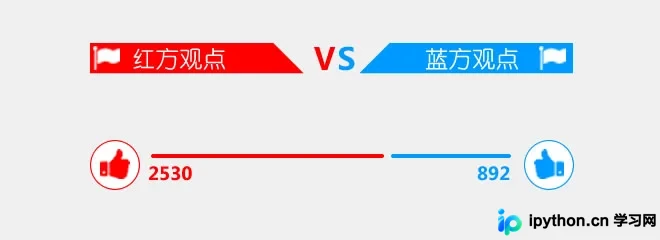
第 1 步:建立 MySQL 数据表
首先创建用于存储投票数据和 IP 记录的表结构。
- votes 表:用于记录 ID、红方点赞数(likes)和蓝方点踩数(unlikes)。
CREATE TABLE IF NOT EXISTS `votes` (
 `id` int(10) NOT NULL AUTO_INCREMENT,
 `likes` int(10) NOT NULL DEFAULT '0',
 `unlikes` int(10) NOT NULL DEFAULT '0',
 PRIMARY KEY (`id`)
) ENGINE=MyISAM DEFAULT CHARSET=utf8;

INSERT INTO `votes` (`id`, `likes`, `unlikes`) VALUES
(1, 30, 10);
- votes_ip 表:关联话题 ID 和用户 IP,用于校验是否已投过票。
CREATE TABLE IF NOT EXISTS `votes_ip` (
 `id` int(10) NOT NULL,
 `vid` int(10) NOT NULL,
 `ip` varchar(40) NOT NULL
) ENGINE=MyISAM DEFAULT CHARSET=utf8;
第 2 步:编写 HTML 页面结构
页面主要包含标题、红蓝双方的观点描述以及对应的操作区域。使用 #red 和 #blue 包裹各自的按钮和数据显示元素。
<div class="vote">
  <div class="votetitle">您对本站提供的文章的看法?</div>
  <div class="votetxt">非常实用<span>完全看不懂</span></div>
  <!-- 红方区域 -->
  <div class="red" id="red">
    <div class="redhand"></div>
    <div class="redbar" id="red_bar">
      <span></span>
      <p id="red_num"></p>
    </div>
  </div>
  <!-- 蓝方区域 -->
  <div class="blue" id="blue">
    <div class="bluehand"></div>
    <div class="bluebar" id="blue_bar">
      <span></span>
      <p id="blue_num"></p>
    </div>
  </div>
</div>
第 3 步:添加 CSS 样式美化
配置背景图及布局,设置左右两侧的手形按钮和进度条样式。代码中引用了 icon.png 作为图标源。
.vote{width:288px; height:220px; margin:60px auto 20px auto;position:relative}
.votetitle{width:100%;height:62px; background:url(icon.png) no-repeat 0 30px; font-size:15px}
.red{position:absolute; left:0; top:90px; height:80px;}
.blue{position:absolute; right:0; top:90px; height:80px;}
.votetxt{line-height:24px}
.votetxt span{float:right}
.redhand{position:absolute; left:0;width:36px; height:36px; background:url(icon.png) no-repeat -1px -38px;cursor:pointer}
.bluehand{position:absolute; right:0;width:36px; height:36px; background:url(icon.png) no-repeat -41px -38px;cursor:pointer}
.grayhand{width:34px; height:34px; background:url(icon.png) no-repeat -83px -38px;cursor:pointer}
.redbar{position:absolute; left:42px; margin-top:8px;}
.bluebar{position:absolute; right:42px; margin-top:8px; }
.redbar span{display:block; height:6px; background:red; width:100%;border-radius:4px;}
.bluebar span{display:block; height:6px; background:#09f; width:100%;border-radius:4px; position:absolute; right:0}
.redbar p{line-height:20px; color:red;}
.bluebar p{line-height:20px; color:#09f; text-align:right; margin-top:6px}
第 4 步:前端逻辑 (jQuery)
页面加载时调用 getdata() 函数获取初始状态;点击手型按钮时触发投票事件。函数接收 API 地址和投票主题 ID,通过 Ajax 返回 JSON 数据动态修改 DOM 元素的宽度与文本内容。
function getdata(url,sid){
  $.getJSON(url,{id:sid},function(data){
    if(data.success==1){
      var w = 208; //定义比例条的总宽度
      $("#red_num").html(data.red);
      $("#red").css("width",data.red_percent*100+"%");
      var red_bar_w = w*data.red_percent-10;
      $("#red_bar").css("width",red_bar_w);
      $("#blue_num").html(data.blue);
      $("#blue").css("width",data.blue_percent*100+"%");
      var blue_bar_w = w*data.blue_percent;
      $("#blue_bar").css("width",blue_bar_w);
    }else{
      alert(data.msg);
    }
  });
}

$(function(){
  getdata("vote.php",1);
  $(".redhand").click(function(){
    getdata("vote.php?action=red",1);
  });
  $(".bluehand").click(function(){
    getdata("vote.php?action=blue",1);
  });
});
第 5 步:后端处理 (PHP)
创建 vote.php 处理业务逻辑,连接数据库后判断请求类型。如果是投票动作,则调用 vote() 函数检查 IP 并递增票数;否则调用 jsons() 返回当前统计数据。
include_once("connect.php");
$action = $_GET['action'];
$id = intval($_GET['id']);
$ip = get_client_ip(); //需单独引入获取真实IP的方法
if($action=='red'){ vote(1,$id,$ip); }
elseif($action=='blue'){ vote(0,$id,$ip); }
else{ echo jsons($id); }
投票函数逻辑:
查询 votes_ip 表,若当前 IP 未出现过且为首次访问该话题,则更新票数并插入 IP 记录,返回新 JSON;若已存在 IP 记录或插入失败,则返回错误信息。
function vote($type,$id,$ip){
  $ip_sql=mysql_query("select ip from votes_ip where vid='$id' and ip='$ip'");
  $count=mysql_num_rows($ip_sql);
  if($count==0){
    if($type==1){
      $sql = "update votes set likes=likes+1 where id=".$id;
    }else{
      $sql = "update votes set unlikes=unlikes+1 where id=".$id;
    }
    mysql_query($sql);
    $sql_in = "insert into votes_ip (vid,ip) values ('$id','$ip')";
    mysql_query($sql_in);
    if(mysql_insert_id()>0){
      echo jsons($id);
    }else{
      $arr['success'] = 0;
      $arr['msg'] = '操作失败,请重试';
      echo json_encode($arr);
    }
  }else{
    $arr['success'] = 0;
    $arr['msg'] = '已经投票过了';
    echo json_encode($arr);
  }
}
数据读取函数逻辑:
从 votes 表读取指定 ID 的票数,计算红蓝双方的百分比,封装成 JSON 对象返回。
function jsons($id){
  $query = mysql_query("select * from votes where id=".$id);
  $row = mysql_fetch_array($query);
  $red = $row['likes'];
  $blue = $row['unlikes'];
  $arr['success']=1;
  $arr['red'] = $red;
  $arr['blue'] = $blue;
  $red_percent = round($red/($red+$blue),3);
  $arr['red_percent'] = $red_percent;
  $arr['blue_percent'] = 1-$red_percent;
  return json_encode($arr);
}
完成判断
部署完成后,在浏览器打开页面即显示初始状态。点击红/蓝色按钮,若无 IP 拦截且数据库连接正常,页面上的数字和进度条应实时变动并弹出成功提示。再次点击相同按钮将收到“已经投票过了”的提示。
注意事项与排错
- 原文使用的
mysql_query系列函数已在现代 PHP 版本中弃用,实际部署建议更换为mysqli或PDO扩展。 $id参数使用了intval进行了强转,能有效防御基本的 SQL 注入,但在votes_ip的vid字段匹配上仍建议采用预处理语句。- 如果 Demo 无法运行,请优先检查
connect.php中的数据库账号密码是否正确。 - IP 获取方法
get_client_ip()需要额外的工具文件支持以确保穿透代理后的准确性。
以上就是基于 PHP 和 jQuery 制作红蓝投票特效的详细内容,更多关于 PHP 投票功能的资料请关注本站其它相关文章!
本站声明
本文内容仅供参考,不代表本站观点。转载或引用请注明出处。如发现内容问题,请通过联系我们页面反馈。















