


wxPython结合Matplotlib绘制折线图的实现方法

发布时间:2026-10-13 |
2人浏览过
本文介绍如何在wxPython的Panel控件中嵌入Matplotlib绘制的折线图。通过导入FigureCanvasWxAgg和Figure模块,创建Figure对象并设置尺寸,将坐标轴添加到wxPanel中,最终实现数据可视化展示。
wxPython与Matplotlib集成基础
要在wxPython的Panel组件上实现Matplotlib曲线图的绘制,首先需导入必要的依赖库。
核心模块导入
import numpy
from matplotlib.backends.backend_wxagg import FigureCanvasWxAgg as FigureCanvas
from matplotlib.figure import Figure
以下是完整的源代码示例:
完整代码实现
#coding=utf-8
"""
程序的主入口
"""
import wx
import numpy
from matplotlib.backends.backend_wxagg import FigureCanvasWxAgg as FigureCanvas
from matplotlib.figure import Figure

class FirseFrame(wx.Frame):
 def __init__(self, parent=None, id=-1, title='', pos=wx.DefaultSize, size=wx.DefaultSize, style= wx.DEFAULT_FRAME_STYLE):

  wx.Frame.__init__(self, parent, id, title, pos, size, style)

  self.InitUI()
  pass
 def InitUI(self):
  self.SetBackgroundColour('white')

  self.scorePanel = wx.Panel(self)
  scores = [89, 98, 70, 80, 60, 78, 85, 90]
  sum = 0
  for s in scores:
   sum += s
  average = sum / len(scores)

  t_score = numpy.arange(1, len(scores) + 1, 1)
  s_score = numpy.array(scores)

  self.figure_score = Figure()
  self.figure_score.set_figheight(3.6)
  self.figure_score.set_figwidth(7.8)
  self.axes_score = self.figure_score.add_subplot(111)

  self.axes_score.plot(t_score, s_score, 'ro', t_score, s_score, 'k')
  self.axes_score.axhline(y=average, color='r')
  self.axes_score.set_title(u'My Scores')
  self.axes_score.grid(True)
  self.axes_score.set_xlabel('T')
  self.axes_score.set_ylabel('score')
  FigureCanvas(self.scorePanel, -1, self.figure_score)
  pass


class MainApp(wx.App):
 def OnInit(self):
  style = wx.DEFAULT_FRAME_STYLE^wx.MAXIMIZE_BOX
  self.frame = FirseFrame(id=-1, title=u'第一个窗口', pos=(10, 10), size=(340, 550), style=style)
  self.frame.Show()
  return True

def main():
 app = MainApp()
 app.MainLoop()

if __name__ == "__main__":
 main()
图表显示效果
运行后的界面效果如下:
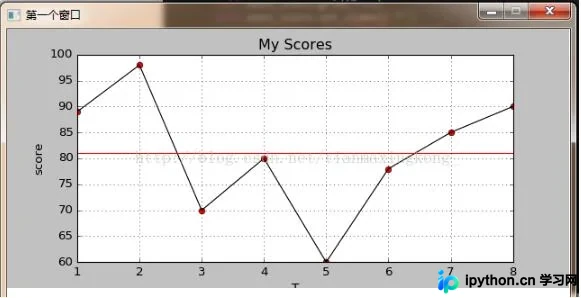
本文内容到此结束,希望能为读者的学习提供有益参考,同时也感谢大家对本平台的支持。
本站声明
本文内容仅供参考,不代表本站观点。转载或引用请注明出处。如发现内容问题,请通过联系我们页面反馈。















