


Python3批量下载RBSP ECT Level2数据的脚本实现

发布时间:2026-10-13 |
6人浏览过
本文介绍使用Python3编写脚本,从RBSP ECT Level2数据目录批量下载CDF文件的方法。通过解析网页HTML获取文件名列表,利用requests库将文件保存至本地指定路径。文章包含完整代码示例、参数配置说明及运行效果展示,适用于空间物理研究人员快速获取卫星观测数据。
数据源与算法概述
原始数据源位于美国洛斯阿拉莫斯国家实验室的RBSP ECT数据发布页面,具体路径为:https://www.rbsp-ect.lanl.gov/data_pub/rbspa/。
算法核心逻辑如下:首先访问目标数据目录,获取该目录下的网页HTML源码;接着解析HTML内容,提取所有CDF格式的文件名;随后通过HTTP请求将每个CDF文件下载至内存缓冲区;最后将内存中的数据写入本地硬盘指定目录。整个流程由Python3语言实现。
程序代码部分展示了完整的Python3实现方案,包括依赖导入、URL配置、文件解析逻辑及下载函数。
Python3批量下载实现代码
#!/bin/python3
# get the rbsp data
# writen by Liangjin Song on 20191219
import sys
import requests
from pathlib import Path

# the url containing the cdf files
url="https://www.rbsp-ect.lanl.gov/data_pub/rbspa/ECT/level2/2016/"
# local path to save the cdf file
path="/home/liangjin/Downloads/test/"

def main():
  re=requests.get(url)
  html=re.text
  cdfs=resolve_cdf(html)

  ncdf=len(cdfs)
  if ncdf == 0:
    return

  print(str(ncdf) + " cdf files are detected.")

  i=1
  # download
  for f in cdfs:
    rcdf=url+f
    lcdf=path+f
    print(str(i)+ "  Downloading " + rcdf)
    download_cdf(rcdf,lcdf)
    i+=1
  return

# resolve the file name of cdf
def resolve_cdf(html):
  cdfs=list()
  head=html.find("href=")

  if head == -1:
    print("The cdf files not found!")
    return cdfs

  leng=len(html)

  while head != -1:
    tail=html.find(">",head,leng)
    # Extract the cdf file name
    cdf=html[head+6:tail-1]
    head=html.find("href=",tail,leng)
    if cdf.find('cdf') == -1:
      continue
    cdfs.append(cdf)
  return cdfs

def download_cdf(rcdf,lcdf):
  rfile=requests.get(rcdf)
  with open(lcdf,"wb") as f:
    f.write(rfile.content)
  f.close()
  return

if __name__ == "__main__":
  lpath=Path(path)
  if not lpath.is_dir():
    print("Path not found: " + path)
    sys.exit(0)
  sys.exit(main())
参数配置与运行说明
使用说明部分详细解释了脚本运行所需的参数配置及环境要求。
脚本主要接受两个关键参数:url指定远程CDF文件所在的目录路径,path指定本地保存CDF文件的目录路径。需要注意的是,在Linux系统下,url和path的末尾必须包含斜杠“/”;若运行环境为Windows系统,路径分隔符应为反斜杠“\\”,此时path末尾需相应调整为“\\”。
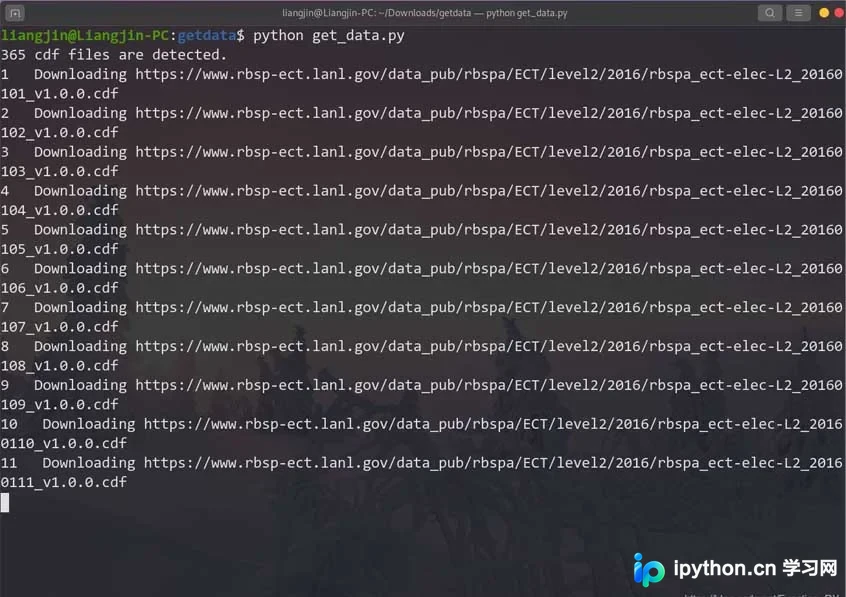
运行效果展示了脚本执行时的控制台输出,包括检测到的CDF文件总数、当前下载的文件索引及远程文件URL,以及最终的下载状态信息。
以上就是本文的全部内容,希望对大家的学习有所帮助,也希望大家多多支持本站。
本站声明
本文内容仅供参考,不代表本站观点。转载或引用请注明出处。如发现内容问题,请通过联系我们页面反馈。















