


Python实现Windows扫雷自动挂机:图像识别与模拟操作详解

本文详细介绍如何使用Python实现Windows扫雷游戏的自动运行。主要采用图像识别方案,通过抓取游戏窗口像素数据,利用Pillow和OpenCV分析方块颜色以构建地图矩阵。结合win32api模拟鼠标点击,并实现基于数字逻辑的基础扫雷算法,包括插旗判断与空白区域展开,旨在提供一套完整的自动化操作示例。
Python自动扫雷实现概述
本文详细解析如何利用Python语言开发自动扫雷程序,通过具体代码示例展示实现过程,为相关技术学习或工作应用提供参考价值。
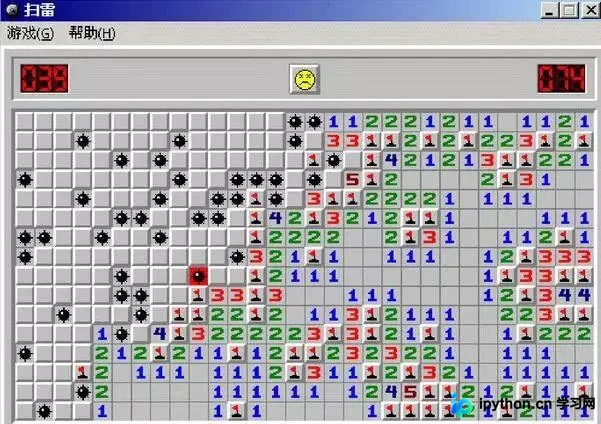
自动扫雷技术通常包含两种路径:一是直接读取游戏内存数据,二是通过图像分析获取界面信息并模拟鼠标操作。本文重点阐述第二种基于图像识别的方案。
环境准备与依赖配置
一、准备工作
开发环境基于Python 3.6.1版本。
项目依赖以下Python第三方库:
- win32api
- win32gui
- win32con
- Pillow
- numpy
- opencv
可使用命令 pip install --upgrade SomePackage 进行安装。
注意:部分Python版本需先下载pywin32,而另一些版本则需将pywin32升级至最新版本并自动关联pypiwin32,具体依赖情况因Python版本差异可能略有不同。
此处列出作者使用的第三方库及其版本供参考。
核心功能模块解析
二、关键代码组成
窗口定位与图像截取
1.定位游戏窗口及其坐标位置
#扫雷游戏窗口
class_name = "TMain"
title_name = "Minesweeper Arbiter "
hwnd = win32gui.FindWindow(class_name, title_name)

#窗口坐标
left = 0
top = 0
right = 0
bottom = 0

if hwnd:
  print("找到窗口")
  left, top, right, bottom = win32gui.GetWindowRect(hwnd)
  #win32gui.SetForegroundWindow(hwnd)
  print("窗口坐标:")
  print(str(left)+' '+str(right)+' '+str(top)+' '+str(bottom))
else:
  print("未找到窗口")
2.锁定并截取雷区图像区域
#锁定雷区坐标
#去除周围功能按钮以及多余的界面
#具体的像素值是通过QQ的截图来判断的
left += 15
top += 101
right -= 15
bottom -= 42

#抓取雷区图像
rect = (left, top, right, bottom)
img = ImageGrab.grab().crop(rect)
图像颜色值解析与地图构建
3.解析各图像块的RGBA颜色值
#数字1-8 周围雷数
#0 未被打开
#ed 被打开 空白
#hongqi 红旗
#boom 普通雷
#boom_red 踩中的雷
rgba_ed = [(225, (192, 192, 192)), (31, (128, 128, 128))]
rgba_hongqi = [(54, (255, 255, 255)), (17, (255, 0, 0)), (109, (192, 192, 192)), (54, (128, 128, 128)), (22, (0, 0, 0))]
rgba_0 = [(54, (255, 255, 255)), (148, (192, 192, 192)), (54, (128, 128, 128))]
rgba_1 = [(185, (192, 192, 192)), (31, (128, 128, 128)), (40, (0, 0, 255))]
rgba_2 = [(160, (192, 192, 192)), (31, (128, 128, 128)), (65, (0, 128, 0))]
rgba_3 = [(62, (255, 0, 0)), (163, (192, 192, 192)), (31, (128, 128, 128))]
rgba_4 = [(169, (192, 192, 192)), (31, (128, 128, 128)), (56, (0, 0, 128))]
rgba_5 = [(70, (128, 0, 0)), (155, (192, 192, 192)), (31, (128, 128, 128))]
rgba_6 = [(153, (192, 192, 192)), (31, (128, 128, 128)), (72, (0, 128, 128))]
rgba_8 = [(149, (192, 192, 192)), (107, (128, 128, 128))]
rgba_boom = [(4, (255, 255, 255)), (144, (192, 192, 192)), (31, (128, 128, 128)), (77, (0, 0, 0))]
rgba_boom_red = [(4, (255, 255, 255)), (144, (255, 0, 0)), (31, (128, 128, 128)), (77, (0, 0, 0))]
4.将扫描到的雷区图像数据保存至二维数组map中
#扫描雷区图像
def showmap():
  img = ImageGrab.grab().crop(rect)
  for y in range(blocks_y):
    for x in range(blocks_x):
      this_image = img.crop((x * block_width, y * block_height, (x + 1) * block_width, (y + 1) * block_height))
      if this_image.getcolors() == rgba_0:
        map[y][x] = 0
      elif this_image.getcolors() == rgba_1:
        map[y][x] = 1
      elif this_image.getcolors() == rgba_2:
        map[y][x] = 2
      elif this_image.getcolors() == rgba_3:
        map[y][x] = 3
      elif this_image.getcolors() == rgba_4:
        map[y][x] = 4
      elif this_image.getcolors() == rgba_5:
        map[y][x] = 5
      elif this_image.getcolors() == rgba_6:
        map[y][x] = 6
      elif this_image.getcolors() == rgba_8:
        map[y][x] = 8
      elif this_image.getcolors() == rgba_ed:
        map[y][x] = -1
      elif this_image.getcolors() == rgba_hongqi:
        map[y][x] = -4
      elif this_image.getcolors() == rgba_boom or this_image.getcolors() == rgba_boom_red:
        global gameover
        gameover = 1
        break
        #sys.exit(0)
      else:
        print("无法识别图像")
        print("坐标")
        print((y,x))
        print("颜色")
        print(this_image.getcolors())
        sys.exit(0)
  #print(map)
基础扫雷算法逻辑
5.执行扫雷核心算法逻辑
此处采用最基础的基础算法策略。
1.首先随机点击一个方块。
2.遍历所有已揭示的数字方块,若某数字周围未揭示的空白方块数量加上已插旗数量等于该数字,则判定剩余空白方块均为雷,并对这些空白方块执行右键插旗操作。
3.遍历所有已揭示的数字方块,若某数字周围已插旗数量等于该数字,则判定剩余未揭示的空白方块均无雷,对这些空白方块执行左键点击操作。
4.循环执行步骤2和3,若当前无符合上述条件的操作,则随机点击一个未揭示的空白方块。
#插旗
def banner():
  showmap()
  for y in range(blocks_y):
    for x in range(blocks_x):
      if 1 <= map[y][x] and map[y][x] <= 5:
        boom_number = map[y][x]
        block_white = 0
        block_qi = 0
        for yy in range(y-1,y+2):
          for xx in range(x-1,x+2):
            if 0 <= yy and 0 <= xx and yy < blocks_y and xx < blocks_x:
              if not (yy == y and xx == x):if map[yy][xx] == 0:
                  block_white += 1
                elif map[yy][xx] == -4:
                  block_qi += 1if boom_number == block_white + block_qi:for yy in range(y - 1, y + 2):
            for xx in range(x - 1, x + 2):
              if 0 <= yy and 0 <= xx and yy < blocks_y and xx < blocks_x:
                if not (yy == y and xx == x):
                  if map[yy][xx] == 0:
                    win32api.SetCursorPos([left+xx*block_width, top+yy*block_height])
                    win32api.mouse_event(win32con.MOUSEEVENTF_RIGHTDOWN, 0, 0, 0, 0)
                    win32api.mouse_event(win32con.MOUSEEVENTF_RIGHTUP, 0, 0, 0, 0)
                    showmap()

#点击白块
def dig():
  showmap()
  iscluck = 0
  for y in range(blocks_y):
    for x in range(blocks_x):
      if 1 <= map[y][x] and map[y][x] <= 5:
        boom_number = map[y][x]
        block_white = 0
        block_qi = 0
        for yy in range(y - 1, y + 2):
          for xx in range(x - 1, x + 2):
            if 0 <= yy and 0 <= xx and yy < blocks_y and xx < blocks_x:
              if not (yy == y and xx == x):
                if map[yy][xx] == 0:
                  block_white += 1
                elif map[yy][xx] == -4:
                  block_qi += 1if boom_number == block_qi and block_white > 0:for yy in range(y - 1, y + 2):
            for xx in range(x - 1, x + 2):
              if 0 <= yy and 0 <= xx and yy < blocks_y and xx < blocks_x:
                if not(yy == y and xx == x):
                  if map[yy][xx] == 0:
                    win32api.SetCursorPos([left + xx * block_width, top + yy * block_height])
                    win32api.mouse_event(win32con.MOUSEEVENTF_LEFTDOWN, 0, 0, 0, 0)
                    win32api.mouse_event(win32con.MOUSEEVENTF_LEFTUP, 0, 0, 0, 0)
                    iscluck = 1
  if iscluck == 0:
    luck()

#随机点击
def luck():
  fl = 1
  while(fl):
    random_x = random.randint(0, blocks_x - 1)
    random_y = random.randint(0, blocks_y - 1)
    if(map[random_y][random_x] == 0):
      win32api.SetCursorPos([left + random_x * block_width, top + random_y * block_height])
      win32api.mouse_event(win32con.MOUSEEVENTF_LEFTDOWN, 0, 0, 0, 0)
      win32api.mouse_event(win32con.MOUSEEVENTF_LEFTUP, 0, 0, 0, 0)
      fl = 0

def gogo():
  win32api.SetCursorPos([left, top])
  win32api.mouse_event(win32con.MOUSEEVENTF_LEFTDOWN, 0, 0, 0, 0)
  win32api.mouse_event(win32con.MOUSEEVENTF_LEFTUP, 0, 0, 0, 0)
  showmap()
  global gameover
  while(1):
    if(gameover == 0):
      banner()
      banner()
      dig()
    else:
      gameover = 0
      win32api.keybd_event(113, 0, 0, 0)
      win32api.SetCursorPos([left, top])
      win32api.mouse_event(win32con.MOUSEEVENTF_LEFTDOWN, 0, 0, 0, 0)
      win32api.mouse_event(win32con.MOUSEEVENTF_LEFTUP, 0, 0, 0, 0)
      showmap()
该算法在初级和中级难度下通过率尚可,但在高级难度下成功率较低,主要原因在于未考虑复杂的逻辑组合以及空白方块为雷的概率分布,后续可针对这两点进行优化以提升成功率。
以上内容为本文全部介绍,希望能为读者的学习与工作带来帮助,欢迎继续支持本站。
本站声明
本文内容仅供参考,不代表本站观点。转载或引用请注明出处。如发现内容问题,请通过联系我们页面反馈。















