


Python使用Matplotlib绘制封闭多边形教程

发布时间:2026-10-13 |
4人浏览过
本文介绍如何使用Python的Matplotlib库读取包含坐标数据的TXT文件,并绘制封闭多边形。通过解析逗号分隔的坐标点,利用pyplot.plot绘制红色轮廓线,并设置坐标轴范围以展示图形。
数据格式与文件说明
数据文件格式说明:在polygon.txt文件中存储了多边形数据,其中包含两个不同的多边形,每个多边形由一行一个点的坐标组成。
第一个多边形的坐标数据如下: 0.085, 0.834 0.024, 0.744 0, 0.63 0.024, 0.516 0.085, 0.427 0.5, 0.02 0.675, 0.191 0.795, 0.071 0.815, 0.052 0.835, 0.032 0.84, 0.026 0.844, 0.022 0.856, 0.012 0.871, 0.005 0.886, 0.001 0.903, 0
第二个多边形的坐标数据如下: 0.823, 0.061 0.823, 0.062 0.826, 0.061
Python绘制代码实现
import pylab as py
import time
from pylab import *
from matplotlib.font_manager import FontProperties
import matplotlib.pyplot as plt
font = FontProperties(fname=r"c:\windows\fonts\simsun.ttc", size=14)
def readdata(ls):
  l = ls.split(',')
  if len(l)>2:
    return [l[0],l[1]]
  else:
    return None

if "__main__"==__name__:
  print(9)
  file_obj=open('fanmaker.txt')
  k=0
  line=file_obj.readline()
  polygon =[]
  while line:
      k+=1
      px=[]
      py=[]
      while line:
        row = readdata(line)
        print (line)
        px.append(row[0])
        py.append(row[1])
        line=file_obj.readline()
        if line=='\n':
          ps=[]
          px.append(px[0])
          py.append(py[0])
          ps.append(px)
          ps.append(py)
          polygon.append(ps)
          line=file_obj.readline()
          break
  x=np.array(polygon[0][0])
  y=np.array(polygon[0][1])
##  plt.fill(x,y,'b')
  plt.plot(x,y,'b-', linewidth=2)
  for i in range(len(polygon)-1):
    x=np.array(polygon[i+1][0])
    y=np.array(polygon[i+1][1])
##    plt.fill(x,y,'b')
    plt.plot(x,y,'r-', linewidth=2)
    plt.hold(True)
##  plt.show()

  x1=[-0.5 ,1.5]
  x2=[-0.5,-0.5]
  x3=[1.5 ,-0.5]
  x4=[1.5,1.5]
  plt.plot(x1,x2,'-')
  plt.plot(x2,x3,'-')
  plt.plot(x3,x4,'-')
  plt.plot(x4,x1,'-')
  plt.axis([-0.5,1.5 ,-0.5,1.5])
  plt.show()
  #   plt.axis('tight')
  file_obj.close()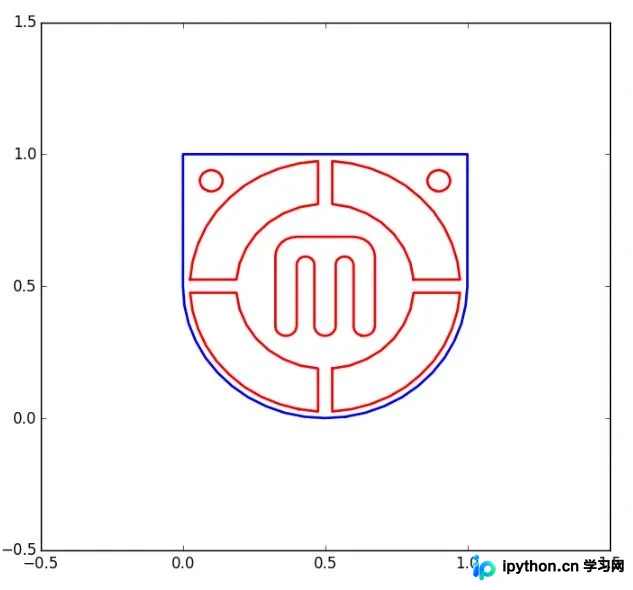
总结
以上就是Python绘制封闭多形的完整教程内容,希望能为读者提供有价值的参考,同时也欢迎大家继续支持本站获取更多技术分享。
本站声明
本文内容仅供参考,不代表本站观点。转载或引用请注明出处。如发现内容问题,请通过联系我们页面反馈。















