


Python使用requests与matplotlib实现电影票房数据抓取及可视化

发布时间:2026-10-13 |
4人浏览过
本文通过Python实现电影历史票房数据的抓取与可视化展示。利用requests库请求指定API获取JSON数据,结合matplotlib库绘制横向条形图。代码采用面向对象设计,封装了请求、解析及绘图逻辑,可直接运行查看结果,适合Python初学者参考学习。
Python电影票房数据抓取与可视化示例
本文分享一个使用Python抓取电影票房数据并生成图表的完整示例,供读者参考学习。
抓取的目标接口为电影历史票房排行榜,URL地址为:http://www.cbooo.cn/BoxOffice/getInland?pIndex=1&t=0
- 使用Python爬取历史电影票房记录。
- 对返回的JSON数据进行解析处理。
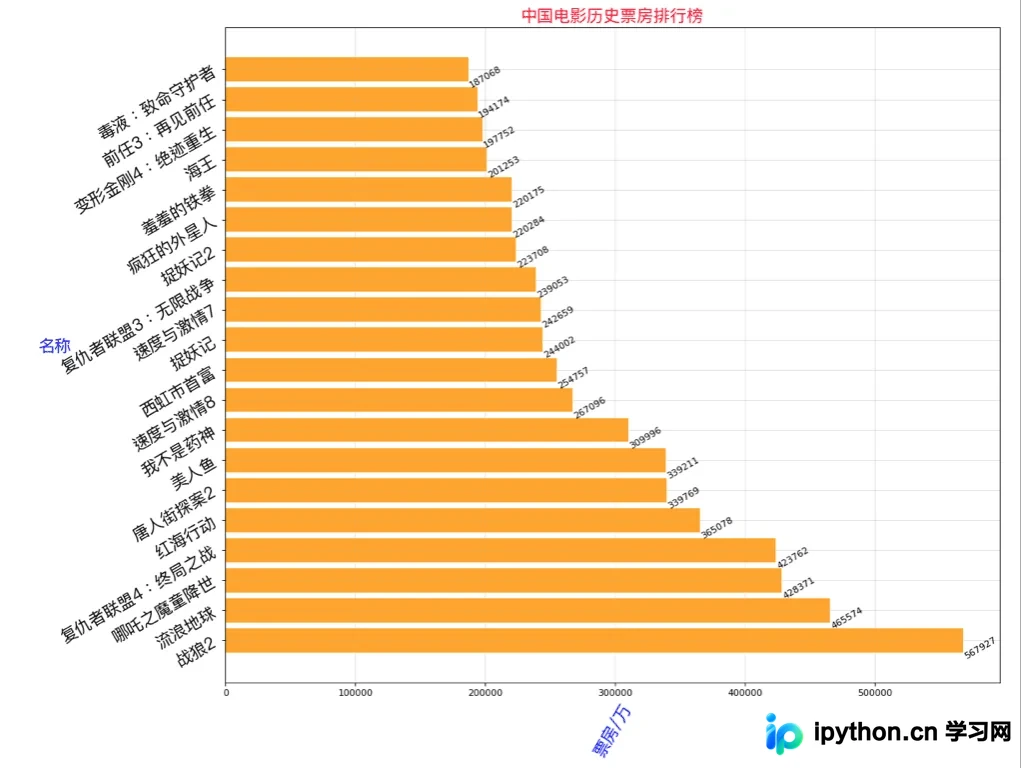
- 使用横向条形图进行数据可视化展示。
- 代码采用面向对象的思想进行封装。
环境依赖与库导入
首先需要导入所需的第三方库,包括网络请求、正则表达式、绘图及JSON处理模块。
基础库导入代码
import requests
import re
from matplotlib import pyplot as plt
from matplotlib import font_manager
import json
核心类实现与逻辑封装
定义核心类代码,实现数据请求、解析及图表展示功能。
DYOrder类完整代码
class DYOrder(object):
 #初始化
  def __init__(self,page=1):
    self.url = 'http://www.cbooo.cn/BoxOffice/getInland?pIndex={}&t=0'.format(page)
    self.headers = {'User-Agent':'Mozilla/5.0 (Macintosh; Intel Mac OS X 10_14_0) AppleWebKit/537.36 (KHTML, like Gecko) Chrome/76.0.3809.100 Safari/537.36'}
  #请求
  def __to_request(self):
    response = requests.get(url=self.url,headers=self.headers)
    return self.__to_parse(response.content.decode('utf-8'))
  #解析
  def __to_parse(self,html):
    #返回为JSON字符串
    #首先将字符串反序列化为JSON对象
    my_json = json.loads(html)
    return my_json
  #图表展示
  def __to_show(self,data,show_type):
    x = []
    y = []
    for value in data:
      x.append(value['MovieName'])
      y.append(int(value['BoxOffice']))

    my_font = font_manager.FontProperties(fname='/System/Library/Fonts/PingFang.ttc',size=18)

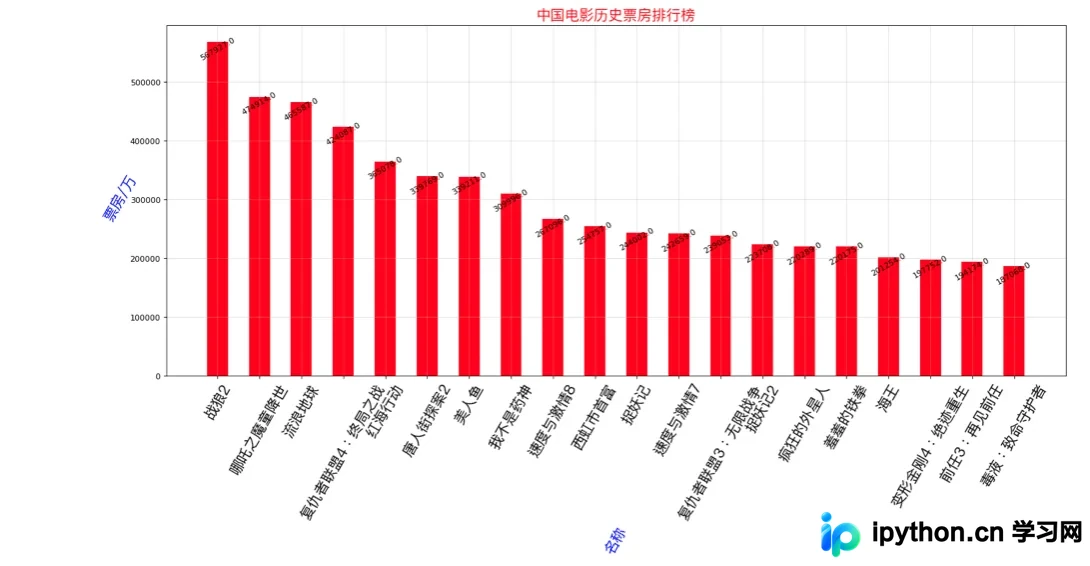
    if show_type == 1:
      plt.figure(figsize=(20,8),dpi=80)
      rects = plt.bar(range(len(x)),[float(i) for i in y],width=0.5,color='red')
      plt.xticks(range(len(x)),x,fontproperties=my_font,rotation=60)
      plt.xlabel('名称',rotation=60,color='blue',fontproperties=my_font)
      plt.ylabel('票房/万',rotation=60,color='blue',fontproperties=my_font)
      for rect in rects:
        height = rect.get_height()
        plt.text(rect.get_x() + rect.get_width()/2,height+0.4,str(height),ha='center',rotation=30)
    else:
      # 横向 plt.barh(y,x)
      plt.figure(figsize=(15,13),dpi=80)
      rects = plt.barh(range(len(x)),y,height=0.8,color='orange')
      plt.yticks(range(len(x)),x,fontproperties=my_font,rotation=30)
      plt.ylabel('名称',rotation=0,color='blue',fontproperties=my_font)
      plt.xlabel('票房/万',rotation=60,color='blue',fontproperties=my_font)
      for rect in rects:
        width = rect.get_width()
        plt.text(width, rect.get_y()+0.3/2,str(width),va='center',rotation=30)

    plt.grid(alpha=0.4)
    plt.title('中国电影历史票房排行榜',color='red',size=18,fontproperties=my_font)
    plt.show()
  #所有操作
  def to_run(self,show_type=1):
    result = self.__to_request()
    self.__to_show(result,show_type)
程序调用与结果展示
实例化类并调用方法以展示最终结果。
主程序调用代码
if __name__ == '__main__':
  dy_order = DYOrder(1)
  # type 1 竖向条形图 2 横向
  dy_order.to_run(2)
如需了解更多Python技术细节,可参考本站其他专题,包括《Python Socket编程技巧总结》、《Python正则表达式用法总结》、《Python数据结构与算法教程》、《Python函数使用技巧总结》、《Python字符串操作技巧汇总》、《Python入门与进阶经典教程》及《Python文件与目录操作技巧汇总》。
希望本文提供的代码示例能对读者的Python程序设计工作有所帮助。
本站声明
本文内容仅供参考,不代表本站观点。转载或引用请注明出处。如发现内容问题,请通过联系我们页面反馈。















