


Python利用OpenCV与递归算法实现语义图像分割

发布时间:2026-10-14 |
2人浏览过
本文介绍如何使用Python结合OpenCV库,通过递归算法实现语义图像分割。文章展示了从原图到分割结果的视觉效果,并提供了完整的递归遍历代码示例,详细解析了前景识别、边界处理及对象提取的核心逻辑,帮助开发者理解基于像素访问的分割实现方式。
实现效果展示
实现效果
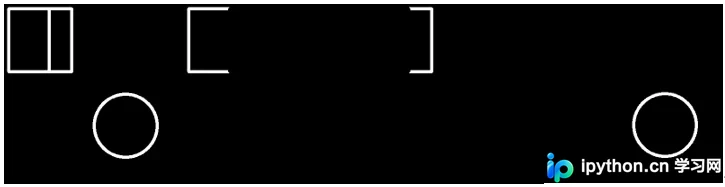
首张图像展示原始输入,后续图像则呈现经过分割处理后的结果。
Python递归分割代码实现
具体代码实现如下:
核心算法逻辑解析
# -*-coding:utf-8-*-
import numpy as np
import cv2

#----------------------------------------------------------------------
def obj_clip(img, foreground, border):
  result = []
  height ,width = np.shape(img)
  visited = set()
  for h in range(height):
    for w in range(width):
      if img[h,w] == foreground and not (h,w) in visited:
        obj = visit(img, height, width, h, w, visited, foreground, border)
        result.append(obj)
  return result
#----------------------------------------------------------------------
def visit(img, height, width, h, w, visited, foreground, border):
  visited.add((h,w))
  result = [(h,w)]
  if w > 0 and not (h, w-1) in visited:
    if img[h, w-1] == foreground:
      result += visit(img, height, width, h, w-1, visited , foreground, border)
    elif border is not None and img[h, w-1] == border:
      result.append((h, w-1))
  if w < width-1 and not (h, w+1) in visited:
    if img[h, w+1] == foreground:
      result += visit(img, height, width, h, w+1, visited, foreground, border)
    elif border is not None and img[h, w+1] == border:
      result.append((h, w+1))
  if h > 0 and not (h-1, w) in visited:
    if img[h-1, w] == foreground:
      result += visit(img, height, width, h-1, w, visited, foreground, border)
    elif border is not None and img[h-1, w] == border:
      result.append((h-1, w))
  if h < height-1 and not (h+1, w) in visited:
    if img[h+1, w] == foreground :
      result += visit(img, height, width, h+1, w, visited, foreground, border)
    elif border is not None and img[h+1, w] == border:
      result.append((h+1, w))
  return result
#----------------------------------------------------------------------
if __name__ == "__main__":
  import cv2
  import sys
  sys.setrecursionlimit(100000)
  img = np.zeros([400,400])
  cv2.rectangle(img, (10,10), (150,150), 1.0, 5)
  cv2.circle(img, (270,270), 70, 1.0, 5)
  cv2.line(img, (100,10), (100,150), 0.5, 5)
  #cv2.putText(img, "Martin",(200,200), 1.0, 5)
  cv2.imshow("img", img*255)
  cv2.waitKey(0)
  for obj in obj_clip(img, 1.0, 0.5):
    clip = np.zeros([400, 400])
    for h, w in obj:
      clip[h, w] = 0.2
    cv2.imshow("aa", clip*255)
    cv2.waitKey(0)
总结与展望
总结
至此,关于Python采用递归方式实现语义图像分割的讲解结束。如需了解更多Python语义图像分割相关内容,建议查阅本站过往文章或继续浏览后续教程,感谢大家的支持。
本站声明
本文内容仅供参考,不代表本站观点。转载或引用请注明出处。如发现内容问题,请通过联系我们页面反馈。















