


Python 3.7 调试实战:PyCharm 与命令行工具详解

本文详细介绍 Python 3.7 的调试方法。首先演示如何在 PyCharm IDE 中设置断点、查看变量及使用表达式求值进行代码追踪。随后针对无法安装 IDE 的测试服务器场景,介绍三种命令行调试工具:内建的 pdb 模块、日志调试库 PySnooper 以及断点调试器 breakpoint()。通过具体代码示例,帮助开发者掌握本地与远程环境下的调试技巧。
PyCharm IDE 窗口布局与调试基础
PyCharm IDE 窗口布局
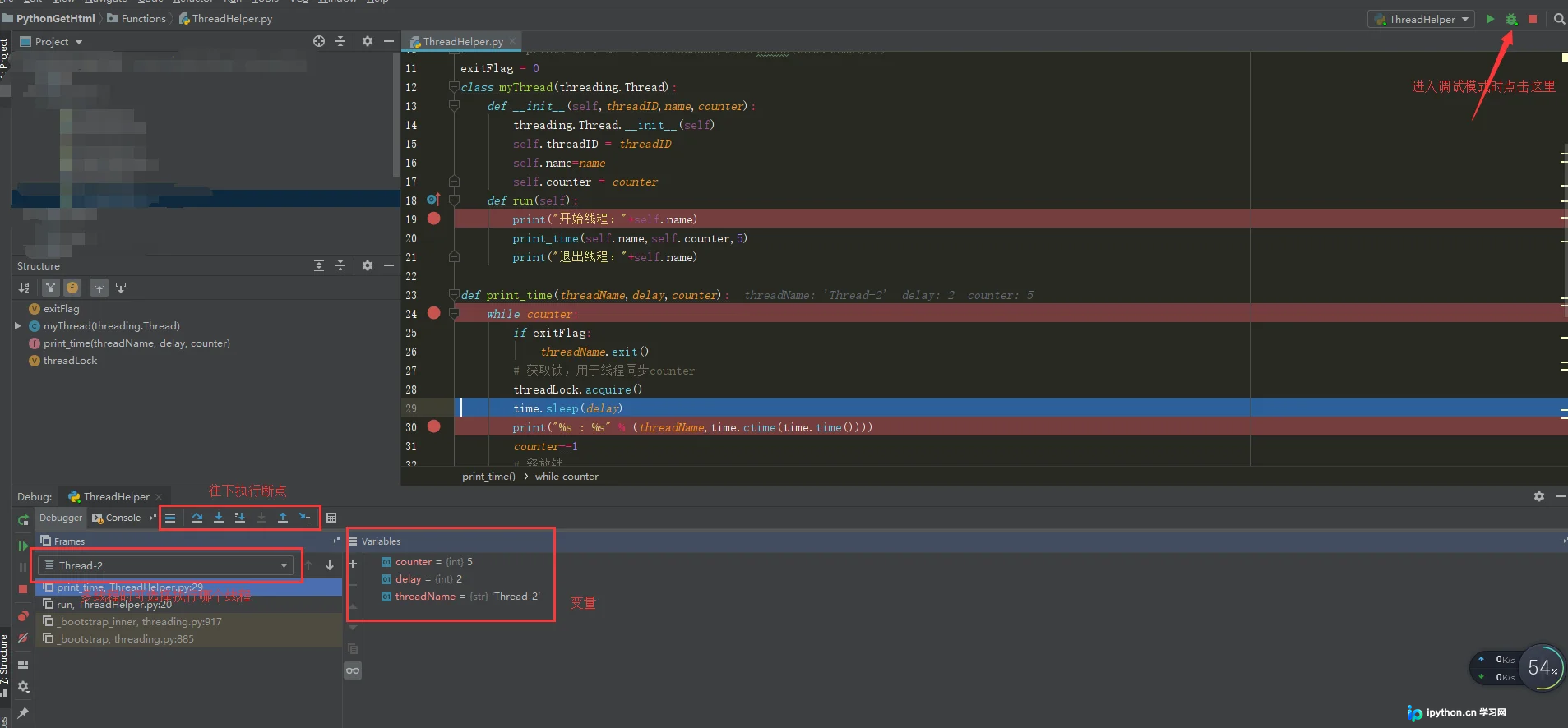
PyCharm 调试代码实例
以下以实际代码为例,展示 PyCharm 的调试过程。
__author__ = 'lxm'
#!/usr/bin/python
 import thread
 import time
 # Define a function for the thread
 def print_time( threadName, delay):
    count = 0
    while count <  5:
    count += 1
    print "%s: %s" % ( threadName, time.ctime(time.time()) )
def check_sum(threadName,valueA,valueB):
    print "to calculate the sum of two number her"
    result=sum(valueA,valueB)
    print "the result is" ,result;
 def sum(valueA,valueB):
    if valueA >0 and valueB>0:
    return valueA+valueB
def readFile(threadName, filename):
    file = open(filename)
    for line in file.xreadlines():
    print line
try:
    thread.start_new_thread( print_time, ("Thread-1", 2, ) )
    thread.start_new_thread( check_sum, ("Thread-2", 4,5, ) )
    thread.start_new_thread( readFile, ("Thread-3","test.txt",))
except:
    print "Error: unable to start thread"
 while 1:
 #   print "end"
    pass
断点设置与执行状态显示
调试前需先设置断点,断点可置于循环、条件判断表达式或程序关键逻辑处。设置方式包括:在代码编辑区将光标移至目标行,按下 Ctrl+F8 或选择菜单“Run”->“Toggle Line Break Point”;更快捷的方式是双击代码编辑区左侧边缘,出现红色圆点即表示断点已设置。调试启动后,当前执行行会以蓝色高亮显示。示例中设置了三个断点,蓝色高亮部分为当前执行代码。
断点设置
表达式求值与变量监控
在调试过程中,有时需追踪特定表达式的值以定位问题。PyCharm 支持表达式求值功能:选中目标表达式,选择“Run”->“Evaluate Expression”,在弹出的窗口中点击“Evaluate”即可查看结果。
PyCharm 还提供 Variables 和 Watches 窗口,调试步骤中涉及的变量值可直接在 Variables 栏中查看。
变量查看
若需动态监测某变量,可选中该变量并通过菜单“Run”->“Add Watch”将其添加至 Watches 栏。当调试运行至该变量所在语句时,Watches 窗口会实时显示该变量的具体值。
知识点扩展:
命令行调试工具介绍
Python 代码调试通常依赖 IDE 内置功能,但 IDE 调试存在局限性,例如在测试服务器上调试代码时,无法安装 IDE。此时可使用以下三种命令行工具进行调试。
准备调试代码
零、准备调试代码
在介绍三种调试工具前,先编写待调试代码。示例代码计算两个数的商,其中故意保留除数为 0 的 bug。
def division(start, end):
 for i in range(start, end, -1):
  num1 = i
  num2 = i - 1
  result = num1 / num2
  print(result)


if __name__ == '__main__':
 division(10, 0)
到此这篇关于python3.7调试的实例方法的文章就介绍到这了,更多相关python3.7怎么调试内容请搜索本站以前的文章或继续浏览下面的相关文章希望大家以后多多支持本站!
本站声明
本文内容仅供参考,不代表本站观点。转载或引用请注明出处。如发现内容问题,请通过联系我们页面反馈。















