


matplotlib图例legend语法及设置的方法

发布时间:2026-10-14 |
5人浏览过
本文详细介绍matplotlib中legend函数的基础语法与面向对象用法。涵盖loc参数调整图例位置、prop与fontsize控制字体、frameon及边框背景设置、标题添加等核心功能。通过案例演示如何将图例移至图形外部及实现多图例共存,并提供完整代码参考,帮助开发者灵活定制图表图例。
matplotlib图例基础语法与参数详解
1. 图例(legend)基础语法及用法
matplotlib.pyplot.legend() 函数的语法参数如下:matplotlib.pyplot.legend(*args, **kwargs)
| Keyword | Description |
| loc | Location code string, or tuple (see below).图例所有figure位置 |
| prop | the font property字体参数 |
| fontsize | the font size (used only if prop is not specified) |
| markerscale | the relative size of legend markers vs. original 图例标记与原始标记的相对大小 |
| markerfirst | If True (default), marker is to left of the label. 如果为True,则图例标记位于图例标签的左侧 |
| numpoints | the number of points in the legend for line 为线条图图例条目创建的标记点数 |
| scatterpoints | the number of points in the legend for scatter plot 为散点图图例条目创建的标记点数 |
| scatteryoffsets | a list of yoffsets for scatter symbols in legend 为散点图图例条目创建的标记的垂直偏移量 |
| frameon | If True, draw the legend on a patch (frame). 控制是否应在图例周围绘制框架 |
| fancybox | If True, draw the frame with a round fancybox. 控制是否应在构成图例背景的FancyBboxPatch周围启用圆边 |
| shadow | If True, draw a shadow behind legend. 控制是否在图例后面画一个阴影 |
| framealpha | Transparency of the frame. 控制图例框架的 Alpha 透明度 |
| edgecolor | Frame edgecolor. |
| facecolor | Frame facecolor. |
| ncol | number of columns 设置图例分为n列展示 |
| borderpad | the fractional whitespace inside the legend border 图例边框的内边距 |
| labelspacing | the vertical space between the legend entries 图例条目之间的垂直间距 |
| handlelength | the length of the legend handles 图例句柄的长度 |
| handleheight | the height of the legend handles 图例句柄的高度 |
| handletextpad | the pad between the legend handle and text 图例句柄和文本之间的间距 |
| borderaxespad | the pad between the axes and legend border 轴与图例边框之间的距离 |
| columnspacing | the spacing between columns 列间距 |
| title | the legend title |
| bbox_to_anchor | the bbox that the legend will be anchored.指定图例在轴的位置 |
| bbox_transform | the transform for the bbox. transAxes if None. |
(1) 设置图例位置
使用 loc 参数
|
0: ‘best'
1: ‘upper right'
2: ‘upper left'
3: ‘lower left'
|
4: ‘lower right'
5: ‘right'
6: ‘center left'
|
7: ‘center right'
8: ‘lower center'
9: ‘upper center'
10: ‘center'
|
(2) 设置图例字体
#设置字体大小
fontsize : int or float or {‘xx-small', ‘x-small', ‘small', ‘medium', ‘large', ‘x-large', ‘xx-large'}
(3) 设置图例边框及背景
plt.legend(loc='best',frameon=False) #去掉图例边框
plt.legend(loc='best',edgecolor='blue') #设置图例边框颜色
plt.legend(loc='best',facecolor='blue') #设置图例背景颜色,若无边框,参数无效
(4) 设置图例标题
plt.legend(loc='best',title='figure 1 legend') #去掉图例边框
面向对象方式操作图例
2. legend 面向对象命令
(1) 获取并设置 legend 图例
plt.legend(loc=0, numpoints=1)
leg = plt.gca().get_legend() #或leg=ax.get_legend()
ltext = leg.get_texts()
plt.setp(ltext, fontsize=12,fontweight='bold')
(2) 设置图例
legend = ax.legend((rectsTest1, rectsTest2, rectsTest3), ('test1', 'test2', 'test3'))
legend = ax.legend(loc='upper center', shadow=True, fontsize='x-large')
legend.get_frame().set_facecolor('red') #设置图例legend背景为红色
frame = legend.get_frame()
frame.set_alpha(1)
frame.set_facecolor('none') #设置图例legend背景透明
(3) 移除图例
ax1.legend_.remove() ##移除子图ax1中的图例
ax2.legend_.remove() ##移除子图ax2中的图例
ax3.legend_.remove() ##移除子图ax3中的图例
图例高级应用案例
3. 案例:设置图例 legend 到图形边界外
#主要是bbox_to_anchor的使用
box = ax1.get_position()
ax1.set_position([box.x0, box.y0, box.width , box.height* 0.8])
ax1.legend(loc='center', bbox_to_anchor=(0.5, 1.2),ncol=3)
4. 案例:显示多图例 legend
import matplotlib.pyplot as plt
import numpy as np
x = np.random.uniform(-1, 1, 4)
y = np.random.uniform(-1, 1, 4)
p1, = plt.plot([1,2,3])
p2, = plt.plot([3,2,1])
l1 = plt.legend([p2, p1], ["line 2", "line 1"], loc='upper left')

p3 = plt.scatter(x[0:2], y[0:2], marker = 'D', color='r')
p4 = plt.scatter(x[2:], y[2:], marker = 'D', color='g')
# This removes l1 from the axes.
plt.legend([p3, p4], ['label', 'label1'], loc='lower right', scatterpoints=1)
# Add l1 as a separate artist to the axes
plt.gca().add_artist(l1)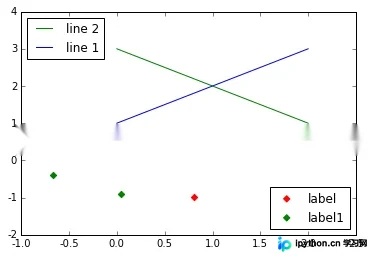
import matplotlib.pyplot as plt
line1, = plt.plot([1,2,3], label="Line 1", linestyle='--')
line2, = plt.plot([3,2,1], label="Line 2", linewidth=4)
# 为第一个线条创建图例
first_legend = plt.legend(handles=[line1], loc=1)
# 手动将图例添加到当前轴域
ax = plt.gca().add_artist(first_legend)
# 为第二个线条创建另一个图例
plt.legend(handles=[line2], loc=4)
plt.show()
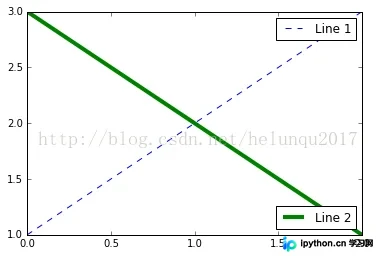
到此这篇关于 matplotlib 图例 legend 语法及设置的方法的文章就介绍到这了,更多相关 matplotlib legend 内容请搜索本站以前的文章或继续浏览下面的相关文章,希望大家以后多多支持本站!
本站声明
本文内容仅供参考,不代表本站观点。转载或引用请注明出处。如发现内容问题,请通过联系我们页面反馈。















