


基于Python与OpenCV的身份证号码提取及识别方法

本文介绍使用Python和OpenCV库进行中华人民共和国公民身份证号码提取与识别的实现过程。通过图像预处理、区域分割及模板匹配技术,将提取的身份证号码与标准OCR-B 10 BT字体模板进行相似度比对,最终输出识别结果。
实训背景与版权声明
在近期的智能信息处理实训中,我选取了身份证号码识别作为研究课题,旨在对中华人民共和国公民身份证进行有效识别,提取并解析其中的身份证号码,最终将其转换为字符串形式输出。目前实训项目已圆满结束,现将相关代码公开以供参考。该识别方案逻辑清晰,代码中已添加详细注释,若存在疑问欢迎交流探讨。在此郑重强调三次:严禁直接抄袭代码,严禁直接抄袭代码,严禁直接抄袭代码!特别是各位学弟学妹,请务必独立完成,切勿直接套用我的代码以免被老师发现而受罚。
实训环境配置
实训所采用的软硬件环境配置如下:操作系统为CentOS-7.5.1804,Python版本为3.6.6,OpenCV库版本为3.4.1。
测试数据与模板准备
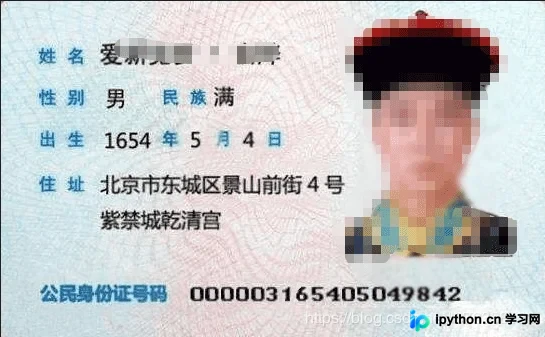
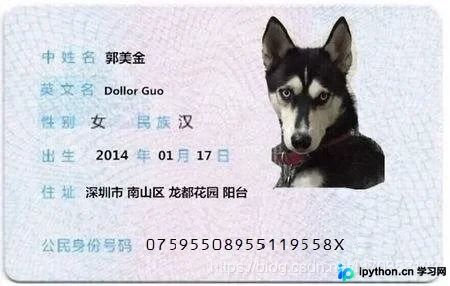
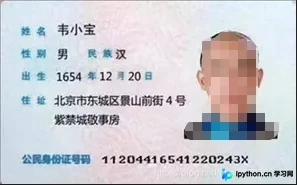
为了进行测试,我准备了测试用照片以及用于数字识别匹配的自制模板。经查询确认,身份证号码采用的字体格式为OCR-B 10 BT。实训中使用的身份证图片部分由老师提供,部分由我使用本人身份证拍摄,另有一张来自网络。由于部分身份证号码未采用标准字体格式,影响了识别效果,因此我对部分图片进行了预处理(如PS调整)。

系统处理流程
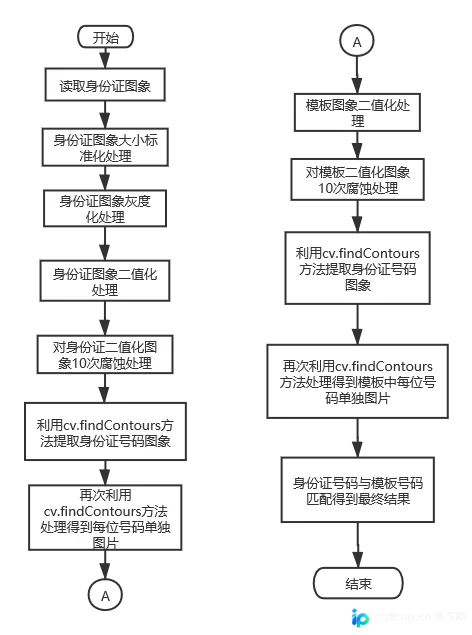
系统处理流程图如下所示。
识别策略调整
前期图像处理的细节不再赘述,流程图中及代码注释部分均有详细说明。整体流程并不复杂,起初曾考虑在数字识别环节使用现成方法或尝试卷积神经网络(CNN)并构建训练集进行识别。经与指导老师沟通,老师建议可尝试特征点匹配或其他类似方法。根据最终数字分割显示的效果,我确定了一种适用于当前代码情况的简便方案。
标准库建立与相似度匹配算法
首先建立标准号码库(利用前述自制模板分割后的数字图像获得)。随后,将每一张提取出的号码图片与库中所有标准号码图片进行相似度匹配,找出相似度最高的模板,从而判定该图片对应的具体数字。在模板号码分割成功后,核心步骤在于执行相似度匹配。为确保匹配的精度与效率,首先利用cv.resize()函数对提取出的每位身份证号码图像及标准号码库中的图像进行尺寸调整,统一将所有图像调整为12x18像素。这一尺寸的选择经过慎重考量:图像过大将导致计算耗时过长,过小则可能引入较大误差。具体的匹配方案为:统计待识别图片与每个模板图片中像素点相同的位置数量,相同像素点越多,表明相似度越高,该图片即最有可能对应某个特定号码。当18位号码全部识别完毕后,即可得到具体的相似度矩阵。
核心代码实现
具体实现代码如下所示:
import cv2 as cv
import numpy as np
import matplotlib.pyplot as plt

# 将身份证号码区域从身份证中提取出
def Extract(op_image, sh_image):

 binary, contours, hierarchy = cv.findContours(op_image,
  cv.RETR_TREE, cv.CHAIN_APPROX_SIMPLE)
 contours.remove(contours[0])
 max_x, max_y, max_w, max_h = cv.boundingRect(contours[0])
 color = (0, 0, 0)
 for c in contours:
 x, y, w, h = cv.boundingRect(c)
 cv.rectangle(op_image, (x, y), (x + w, y + h), color, 1)
 cv.rectangle(sh_image, (x, y), (x + w, y + h), color, 1)
 if max_w < w:
  max_x = x
  max_y = y
  max_w = w
  max_h = h
 cut_img = sh_image[max_y:max_y+max_h, max_x:max_x+max_w]
 cv.imshow("The recognized enlarged image", op_image)
 cv.waitKey(0)
 cv.imshow("The recognized binary image", sh_image)
 cv.waitKey(0)
 return cut_img

# 号码内部区域填充(未继续是用此方法)
def Area_filling(image, kernel):
 # The boundary image
 iterate = np.zeros(image.shape, np.uint8)
 iterate[:, 0] = image[:, 0]
 iterate[:, -1] = image[:, -1]
 iterate[0, :] = image[0, :]
 iterate[-1, :] = image[-1, :]
 while True:
 old_iterate = iterate
 iterate_dilation = cv.dilate(iterate, kernel, iterations=1)
 iterate = cv.bitwise_and(iterate_dilation, image)
 difference = cv.subtract(iterate, old_iterate)
 # if difference is all zeros it will return False
 if not np.any(difference):
  break
 return iterate

# 将身份证号码区域再次切割使得一张图片一位号码
def Segmentation(cut_img, kernel, n):
 #首先进行一次号码内空白填充(效果不佳,放弃)
 #area_img = Area_filling(cut_img, kernel)
 #cv.imshow("area_img", area_img)
 #cv.waitKey(0)
 #dilate = cv.dilate(area_img, kernel, iterations=1)
 #cv.imshow("dilate", dilate)
 #cv.waitKey(0)

 cut_copy = cut_img.copy()
 binary, contours, hierarchy = cv.findContours(cut_copy, cv.RETR_TREE, cv.CHAIN_APPROX_SIMPLE)
 contours.remove(contours[0])
 for c in contours:
 x, y, w, h = cv.boundingRect(c)
 for i in range(h):
  for j in range(w):
  # 把首次用findContours()方法识别的轮廓内区域置黑色
  cut_copy[y + i, x + j] = 0
  # cv.rectangle(cut_copy, (x, y), (x + w, y + h), color, 1)
 cv.imshow("Filled image", cut_copy)
 cv.waitKey(0)

 # 尝试进行分割
 binary, contours, hierarchy = cv.findContours(cut_copy, cv.RETR_TREE, cv.CHAIN_APPROX_SIMPLE)
 #tmp_img = cut_img.copy()
 # 如果识别的轮廓数量不是n+1位(首先是一个整个区域的轮廓,然后是n位号码各自的轮廓,身份证和匹配模板分割均用此方法)
 while len(contours)!=n+1:
 if len(contours) < n+1:
  # 如果提取的轮廓数量小于n+1, 说明可能有两位数被识别到一个轮廓中,做一次闭运算,消除数位之间可能存在的连接部分,然后再次尝试提取
  #cut_copy = cv.dilate(cut_copy, kernel, iterations=1)
  cut_copy = cv.morphologyEx(cut_copy, cv.MORPH_CLOSE, kernel)
  cv.imshow("cut_copy", cut_copy)
  cv.waitKey(0)
  # 再次尝试提取身份证区域的轮廓并将轮廓内区域用黑色覆盖
  binary, contours, hierarchy = cv.findContours(cut_copy, cv.RETR_TREE, cv.CHAIN_APPROX_SIMPLE)
  # 去掉提取出的第一个轮廓(第一个轮廓为整张图片)
  contours.remove(contours[0])
  for c in contours:
  x, y, w, h = cv.boundingRect(c)
  for i in range(h):
   for j in range(w):
   cut_copy[y + i, x + j] = 0
   # cv.rectangle(cut_copy, (x, y), (x + w, y + h), color, 1)
  cv.imshow("Filled image", cut_copy)
  cv.waitKey(0)
  #如果findContours()结果为n,跳出
  if len(contours) == n:
  break

 elif len(contours) > n+1:
  # 如果提取的轮廓数量大于n+1, 说明可能有一位数被识别到两个轮廓中,做一次开运算,增强附近身份证区域部分之间的连接部分,然后再次尝试提取
  #cut_copy = cv.erode(cut_copy, kernel, iterations=1)
  cut_copy = cv.morphologyEx(cut_copy, cv.MORPH_OPEN, kernel2)
  cv.imshow("cut_copy", cut_copy)
  cv.waitKey(0)
  #再次尝试提取身份证区域的轮廓并将轮廓内区域用黑色覆盖
  binary, contours, hierarchy = cv.findContours(cut_copy, cv.RETR_TREE, cv.CHAIN_APPROX_SIMPLE)
  #去掉提取出的第一个轮廓(第一个轮廓为整张图片)
  contours.remove(contours[0])
  for c in contours:
  x, y, w, h = cv.boundingRect(c)
  for i in range(h):
   for j in range(w):
   cut_copy[y + i, x + j] = 0
   # cv.rectangle(cut_copy, (x, y), (x + w, y + h), color, 1)
  #cv.imshow("cut_copy", cut_copy)
  #cv.waitKey(0)
  if len(contours) == n:
  break
 # 上述while()中循环完成后,处理的图像基本满足分割要求,进行最后的提取分割
 binary, contours, hierarchy = cv.findContours(cut_copy, cv.RETR_TREE, cv.CHAIN_APPROX_SIMPLE)
 contours.remove(contours[0])
 color = (0, 0, 0)
 for c in contours:
 x, y, w, h = cv.boundingRect(c)
 for i in range(h):
  for j in range(w):
  cv.rectangle(cut_copy, (x, y), (x + w, y + h), color, 1)
  cv.rectangle(cut_img, (x, y), (x + w, y + h), color, 1)

 cv.imshow("Filled image", cut_copy)
 cv.waitKey(0)
 cv.imshow("cut_img", cut_img)
 cv.waitKey(0)
 #print('number:', len(contours))
 # Returns the result of the split
 return contours
 #return cut_img

# Sort排序方法,先将图像分割,由于分割的先后顺序不是按照从左往右,根据横坐标大小将每位身份证号码图片进行排序
def sort(contours, image):
 tmp_num = []
 x_all = []
 x_sort = []
 for c in contours:
 x, y, w, h = cv.boundingRect(c)
 # 使用x坐标来确定身份证号码图片的顺序,把个图片坐标的x值放入x_sort中
 x_sort.append(x)
 # 建立一个用于索引x坐标的列表
 x_all.append(x)
 tmp_img = image[y+1:y+h-1, x+1:x+w-1]
 tmp_img = cv.resize(tmp_img, (40, 60))
 cv.imshow("Number", tmp_img)
 cv.waitKey(0)
 # 将分割的图片缩小至12乘18像素的大小,标准化同时节约模板匹配的时间
 tmp_img = cv.resize(tmp_img, (12, 18))
 tmp_num.append(tmp_img)
 # 利用x_sort排序,用x_all索引,对身份证号码图片排序
 x_sort.sort()
 num_img = []
 for x in x_sort:
 index = x_all.index(x)
 num_img.append(tmp_num[index])
 # 返回排序后图片列表
 return num_img

# 图像识别方法
def MatchImage(img_num, tplt_num):
 # IDnum用于存储最终的身份证字符串
 IDnum = ''
 # 身份证号码18位
 for i in range(18):
 # 存储最大相似度模板的索引以及最大相似度
 max_index = 0
 max_simil = 0
  # 模板有1~9,0,X共11个
 for j in range(11):
  # 存储身份证号码图片与模板之间的相似度
  simil = 0
  for y in range(18):
  for x in range(12):
   # 如果身份证号码图片与模板之间对应位置像素点相同,simil 值自加1
   if img_num[i][y,x] == tplt_num[j][y,x]:
   simil+=1
  if max_simil < simil:
  max_index = j
  max_simil = simil
  print(str(simil)+' ',end='')
 if max_index < 9:
  IDnum += str(max_index+1)
 elif max_index == 9:
  IDnum += str(0)
 else:
  IDnum += 'X'
 print()
 return IDnum

# 最终效果展示
def display(IDnum, image):
 image = cv.resize(image, (960, 90))
 plt.figure(num='ID_Number')
 plt.subplot(111), plt.imshow(image, cmap='gray'), plt.title(IDnum, fontsize=30), plt.xticks([]), plt.yticks([])
 plt.show()


if __name__ == '__main__':
 # 一共三张做测试用身份证图像
 path = 'IDcard01.jpg'
 #path = 'IDcard02.png'
 #path = 'IDcard.jpg'
 id_card = cv.imread(path, 0)
 cv.imshow('Original image', id_card)
 cv.waitKey(0)
 # 将图像转化成标准大小
 id_card = cv.resize(id_card,(1200, 820))
 cv.imshow('Enlarged original image', id_card)
 cv.waitKey(0)
 # 图像二值化
 ret, binary_img = cv.threshold(id_card, 127, 255, cv.THRESH_BINARY)
 cv.imshow('Binary image', binary_img)
 cv.waitKey(0)

 # RECTANGULAR
 kernel = cv.getStructuringElement(cv.MORPH_RECT, (3, 3))
 # RECTANGULAR
 kernel2 = cv.getStructuringElement(cv.MORPH_DILATE, (5, 5))
 #close_img = cv.morphologyEx(binary_img, cv.MORPH_CLOSE, kernel)
 # The corrosion treatment connects the ID Numbers
 erode = cv.erode(binary_img, kernel, iterations=10)
 cv.imshow('Eroded image', erode)
 cv.waitKey(0)

 cut_img = Extract(erode, binary_img.copy())
 cv.imshow("cut_img", cut_img)
 cv.waitKey(0)

 # 存储最终分割的轮廓
 contours = Segmentation(cut_img, kernel, 18)
 # 对图像进行分割并排序
 img_num = sort(contours, cut_img)

 # 识别用的模板
 tplt_path = '/home/image/Pictures/template.jpg'
 tplt_img = cv.imread(tplt_path, 0)
 #cv.imshow('Template image', tplt_img)
 #cv.waitKey(0)

 ret, binary_tplt = cv.threshold(tplt_img, 127, 255, cv.THRESH_BINARY)
 cv.imshow('Binary template image', binary_tplt)
 cv.waitKey(0)

 # 与身份证相同的分割方式
 contours = Segmentation(binary_tplt, kernel, 11)
 tplt_num = sort(contours, binary_tplt)
 # 最终识别出的身份证号码
 IDnum = MatchImage(img_num, tplt_num)
 print('\nID_Number is:', IDnum)
 # 图片展示
 display(IDnum, cut_img)
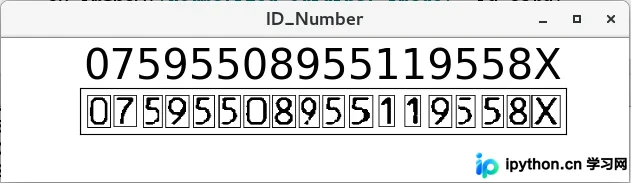
识别效果展示
识别效果展示如下。
总结
至此,关于Python+OpenCV实现身份证号码区域提取及识别的文章介绍完毕。如需了解更多相关Python+OpenCV身份证号码提取及识别内容,请搜索本站历史文章或继续浏览后续相关文章,希望大家今后多多支持本站!
本站声明
本文内容仅供参考,不代表本站观点。转载或引用请注明出处。如发现内容问题,请通过联系我们页面反馈。















