


Python接口自动化测试实战:基于Requests与Django的完整实现

本文详细介绍如何使用Python的Requests库与Django框架实现接口自动化测试。内容涵盖从Django基础项目搭建、路由配置、视图函数编写,到利用Unittest框架读取Excel测试用例并执行断言的全过程。通过登录、增删查等具体接口示例,展示如何构建完整的接口测试流程,适合希望掌握Python接口自动化测试的开发者参考。
引言与测试思路概述
国庆假期原计划撰写三篇关于接口测试的博客,但因照顾孩子未能按计划完成,直至今日才完成第二篇,深感抱歉。
第一篇博客地址为:https://www.jb51.net/article/197004.htm,主要介绍unittest框架,感兴趣读者可前往查阅。
接下来直接进入正题。
整体思路如下:
首先,使用Django实现登录、增加、删除、查看四个基础接口。
其次,在Excel中定义测试案例,读取案例后利用unittest框架进行组装和封装。
最后,启动Django服务并执行测试案例。
Django基础项目搭建与路由配置
一、先跑通unittest到Django的流程
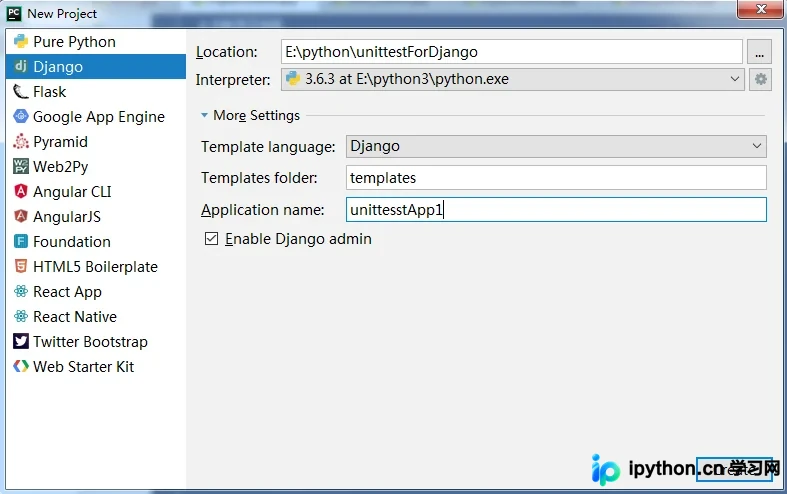
第一步,创建一个Django项目。
第二步,配置路由,此处采用二级路由结构。
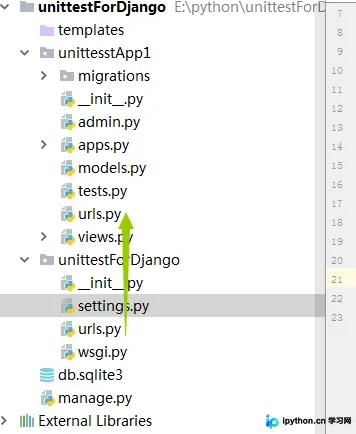
a、将工程目录下的urls.py文件复制到app目录下。
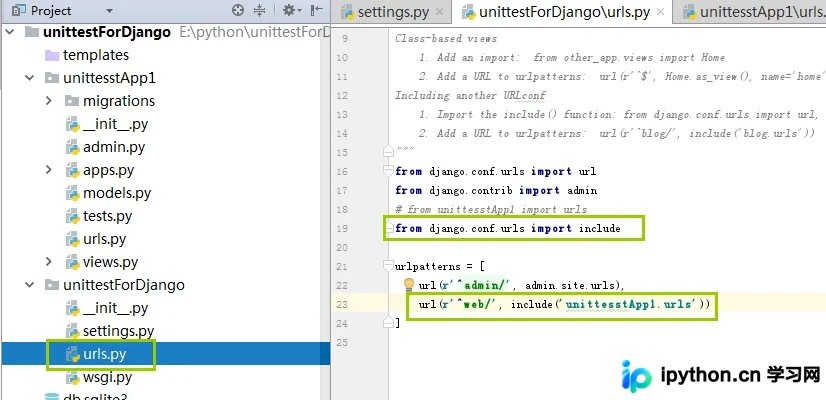
b、修改工程目录下的urls.py文件,定义一级路由。
c、修改app目录下的urls.py文件,设置二级路由。注意:务必删除默认的admin路由。
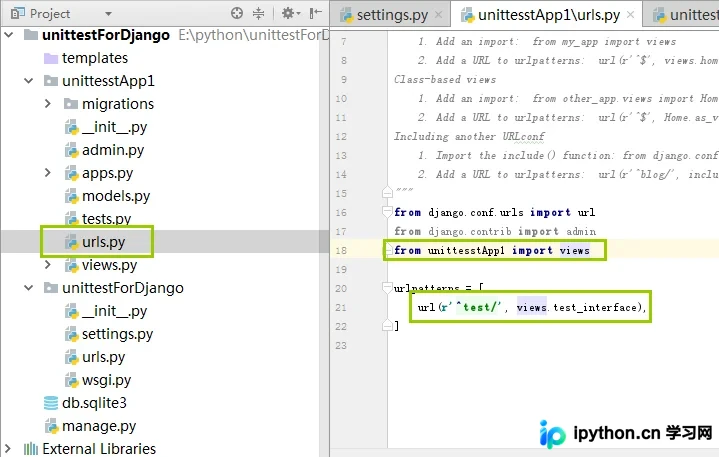
d、定义该路由指向的视图函数。
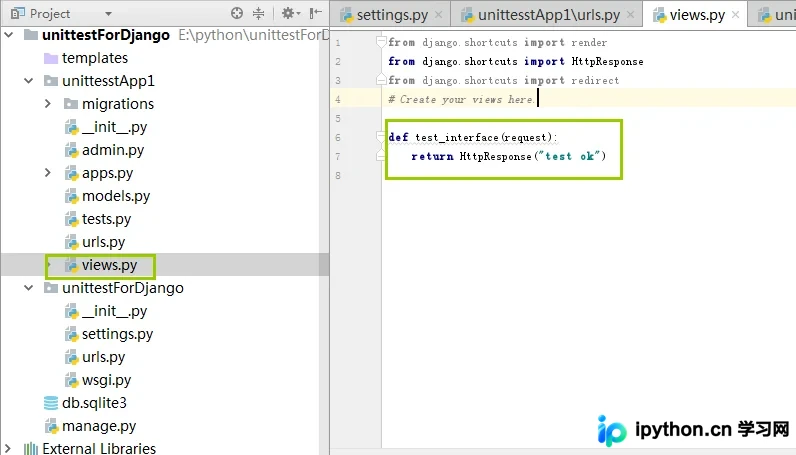
e、启动Django,指定使用9090端口,因为Jenkins使用的端口是8080,避免冲突。
E:\python\unittestForDjango>python manage.py runserver 9090
f、启动成功界面如图,圈出的警告可忽略,因未使用Django的admin功能。
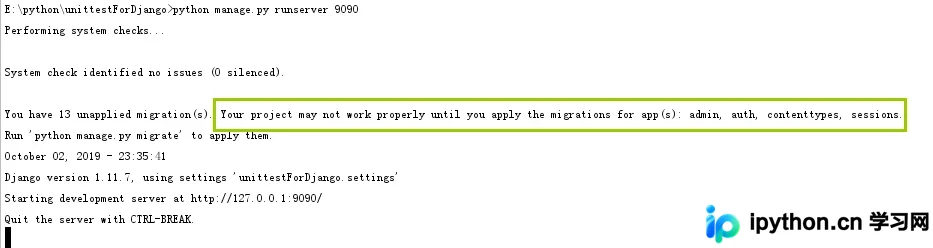
g、通过浏览器访问Django,确认简单项目已跑通。
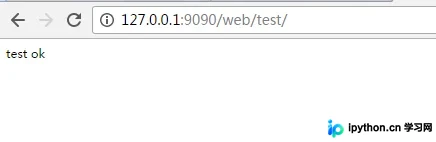
视图函数设计与Unittest框架集成
第三步,在视图函数中定义方法,分别处理GET和POST请求。
a、定义视图函数。
通过参数告知浏览器返回的是JSON数据。
return HttpResponse(result, content_type="application/json;charset=utf-8")
def test_login(request):
  method = request.method.upper()
  if method == "GET":
    result = {}
    name = request.GET.get("username",None)
    pwd = request.GET.get("pwd",None)
    result["name"] = name
    result["pwd"] = pwd
    result = json.dumps(result)
    # return HttpResponse(result)
    return HttpResponse(result, content_type="application/json;charset=utf-8")

  else:
    result = {}
    name = request.POST.get("username",None)
    pwd = request.POST.get("pwd",None)
    result["name"] = name
    result["pwd"] = pwd
    result = json.dumps(result)
    return HttpResponse(result,content_type="application/json;charset=utf-8")
b、使用requests模块发起POST和GET请求。
#Auther Bob
#--*--conding:utf-8 --*--
import requests
import json


class TestCase(object):
  def __init__(self,username,pwd,url):
    self.username = username
    self.pwd = pwd
    self.url = url


  def get(self):
    # 发送get请求
    url = self.url + "?username=" + str(self.username) + "&" + "pwd=" + str(self.pwd)
    res = requests.get(url=url)
    print(res.text,type(res.text))

  def post(self):
    # 发送post请求
    data = {
      "username" : self.username,
      "pwd" : self.pwd
    }
    res = requests.post(url=self.url,data=data)
    print(res.text)


if __name__ == '__main__':
  url = "http://127.0.0.1:9090/web/login/"
  username = "zhangsan"
  pwd = "123"

  t = TestCase(username,pwd,url)

  t.get()
  t.post()
c、引入unittest框架,测试案例编写方式如下。
import unittest
from test3 import test_request
class TestDjango(unittest.TestCase):


  def setUp(self):
    print("unittest框架的前置条件")

  def tearDown(self):
    print("unittest框架的后置条件")

  def test_01(self):
    url = "http://127.0.0.1:9090/web/login/"
    username = "zhangsan"
    pwd = "123"
    t = test_request.TestCase(url=url,username=username,pwd=pwd)
  def test_02(self):
    url = "http://127.0.0.1:9090/web/login/"
    username = "zhangsan"
    pwd = "123"
    t = test_request.TestCase(url=url,username=username,pwd=pwd)
    t.post()


if __name__ == '__main__':
  unittest.main(verbosity=2)
d、存在重复代码,可利用unittest框架中的classmethod解决,将实例化测试类置于前置条件中。
import unittest
from test3 import test_request
class TestDjango(unittest.TestCase):
  @classmethod
  def setUpClass(cls):
    url = "http://127.0.0.1:9090/web/login/"
    username = "zhangsan"
    pwd = "123"
    # 这里的t虽然是类变量,但是python的中的实例是可以用引用类变量的
    cls.t = test_request.TestCase(url=url,username=username,pwd=pwd)

  def setUp(self):
    print("unittest框架的前置条件")

  def tearDown(self):
    print("unittest框架的后置条件")

  def test_01(self):
    self.t.get()
  def test_02(self):
    self.t.post()

if __name__ == '__main__':
  unittest.main(verbosity=2)
e、在testcase中加入断言。
import unittest
from test3 import test_request
class TestDjango(unittest.TestCase):
  @classmethod
  def setUpClass(cls):
    url = "http://127.0.0.1:9090/web/login/"
    username = "zhangsan"
    pwd = "123"
    # 这里的t虽然是类变量,但是python的中的实例是可以用引用类变量的
    cls.t = test_request.TestCase(url=url,username=username,pwd=pwd)

  def setUp(self):
    print("unittest框架的前置条件")

  def tearDown(self):
    print("unittest框架的后置条件")

  def test_01(self):
    res = self.t.get()
    self.assertEqual(200,res.status_code)
  def test_02(self):
    res = self.t.post()
    self.assertEqual(200, res.status_code)

if __name__ == '__main__':
  unittest.main(verbosity=2)
f、引入testsuite。
import unittest
from unittest import TestLoader

from test3 import test_unittest


if __name__ == '__main__':
  suite = unittest.TestSuite()
  loader = TestLoader()
  test_cases1 = unittest.TestLoader().loadTestsFromModule(test_unittest)
  # 参数是一个模块,会把这个模块里的所有case加载进来
  suite.addTests(test_cases1)
  runner = unittest.TextTestRunner(verbosity=2)
  runner.run(suite)
Django接口设计与实现细节
二、在Django中设计接口
此处以简单示例设计用户表,并实现四个接口。
接口1:登录。
接口2:增加用户,需用户登录。
接口3:删除用户,需用户登录。
接口4:查询用户,无需用户登录。
1、先看登录接口。
a、登录接口对应的URL。
以下是一级路由配置。
url(r'^web/', include('unittesstApp1.urls'))以下是二级路由配置。
url(r'^login/', views.test_login),b、登录接口的视图函数。
def test_login(request):
  method = request.method.upper()
  if method == "GET":
    returndict = {"code": 200, "error": None}
    username = request.GET.get("username",None)
    password = request.GET.get("password",None)
    if username == "admin" and password == "admin123.":
      request.session["username"] = username
      request.session["password"] = password
      result = json.dumps(returndict)
    else:
      returndict["code"] = 201
      returndict["error"] = "用户名或者密码错误"
      result = json.dumps(returndict)
    return HttpResponse(result,content_type="application/json;charset=utf-8")
此处使用session代替cookies进行状态保持。
2、增加用户接口。
a、增加用户对应的URL。
一级路由同登录接口,以下是二级路由配置。
url(r'^add/', views.test_add),b、增加用户接口对应的视图函数,此处进行了多种异常处理,并判断用户是否登录(通过检查cookies)。
def test_add(request):
  method = request.method.upper()
  if method == "POST":
    returndict = {"code": 200, "error": None}
    username = request.session.get("username",None)
    password = request.session.get("password",None)

    if username == "admin" and password == "admin123.":
      newusername = request.POST.get("username",None)
      age = request.POST.get("age",None)
      sex = request.POST.get("sex",None)
      pwd = request.POST.get("pwd",None)
      userinfo = [newusername,age,sex,pwd]
      print(userinfo)
      if not "None" in userinfo and all(userinfo):
        if models.userInfo.objects.filter(username = userinfo[0]).exists():
          returndict["error"] = "{username} is exists,please add a new username".format(username = username)
          returndict["code"] = 201
          result = json.dumps(returndict)
          return HttpResponse(result, content_type="application/json;charset=utf-8")
        else:
          models.userInfo.objects.create(
            username = newusername,
            age = age,
            sex = sex,
            pwd = pwd
          )
          if models.userInfo.objects.filter(username=userinfo[0]).exists():
            result = json.dumps(returndict)
            return HttpResponse(result, content_type="application/json;charset=utf-8")
          else:
            returndict["error"] = "{username} is error,please retry add".format(username=username)
            returndict["code"] = 201
            result = json.dumps(returndict)
            return HttpResponse(result, content_type="application/json;charset=utf-8")
      else:
        returndict["error"] = "must input username,age,sex,pwd"
        returndict["code"] = 201
        result = json.dumps(returndict)
        return HttpResponse(result, content_type="application/json;charset=utf-8")
    else:
      returndict = {"code": 201, "error": "用户名或者密码错误"}
      result = json.dumps(returndict)
      return HttpResponse(result, content_type="application/json;charset=utf-8")
3、删除接口。
a、删除用户对应的URL。
一级路由同登录接口,此处仅看二级路由。
url(r'^del/', views.del_user),b、删除接口对应的视图函数,进行了多种异常处理,并通过检测cookies实现用户登录验证。
def del_user(request):
  method = request.method.upper()
  if method == "POST":
    returndict = {"code": 200, "error": None}
    username = request.session.get("username",None)
    password = request.session.get("password",None)
    if username == "admin" and password == "admin123.":
      delusername = request.POST.get("username",None)
      print(delusername)
      if delusername != None:
        if models.userInfo.objects.filter(username=delusername).exists():
          delid = models.userInfo.objects.get(username=delusername).id
          print(delid)
          try:
            models.userInfo.objects.get(id=delid).delete()
          except Exception as e:
            returndict = {"code": 201, "error": e}
            result = json.dumps(returndict)
            return HttpResponse(result, content_type="application/json;charset=utf-8")
          else:
            result = json.dumps(returndict)
            return HttpResponse(result, content_type="application/json;charset=utf-8")
        else:
          returndict = {"code": 201, "error": "{username} is not exists".format(username = delusername)}
          result = json.dumps(returndict)
          return HttpResponse(result, content_type="application/json;charset=utf-8")
      else:
        returndict = {"code": 201, "error": "you must input a username"}
        result = json.dumps(returndict)
        return HttpResponse(result, content_type="application/json;charset=utf-8")

    else:
      returndict = {"code": 201, "error": "username or password is error"}
      result = json.dumps(returndict)
      return HttpResponse(result, content_type="application/json;charset=utf-8")
4、查看接口。
a、查看接口对应的URL。
一级路由同登录接口URL,以下是二级路由配置。
url(r'^scan/', views.get_user),b、查看接口对应的视图函数,此处不检测用户是否登录,直接返回查询数据;若查询报错,则返回错误信息。
def get_user(request):
  method = request.method.upper()
  returndict = {"code": 200, "userinfo": None}
  if method == "GET":
    try:
      alluser = models.userInfo.objects.all().values_list("username")
      alluserlist = []
      for i in alluser:
        alluserlist.append(i)

      returndict["userinfo"] = alluserlist

    except Exception as e:
      returndict["code"] = "201"
      returndict["error"] = e
    finally:
      result = json.dumps(returndict)
      return HttpResponse(result, content_type="application/json;charset=utf-8")
5、设计删除数据库中所有数据的接口,用于后置条件清理。
def del_alluser(request):
  method = request.method.upper()
  if method == "POST":
    returndict = {"code": 200, "error": None}
    username = request.session.get("username", None)
    password = request.session.get("password", None)
    if username == "admin" and password == "admin123.":
      if models.userInfo.objects.all().count() > 0:
        models.userInfo.objects.all().delete()
      result = json.dumps(returndict)
      return HttpResponse(result, content_type="application/json;charset=utf-8")
测试案例准备与执行流程
三、案例准备
1、在Excel中编写接口测试案例。
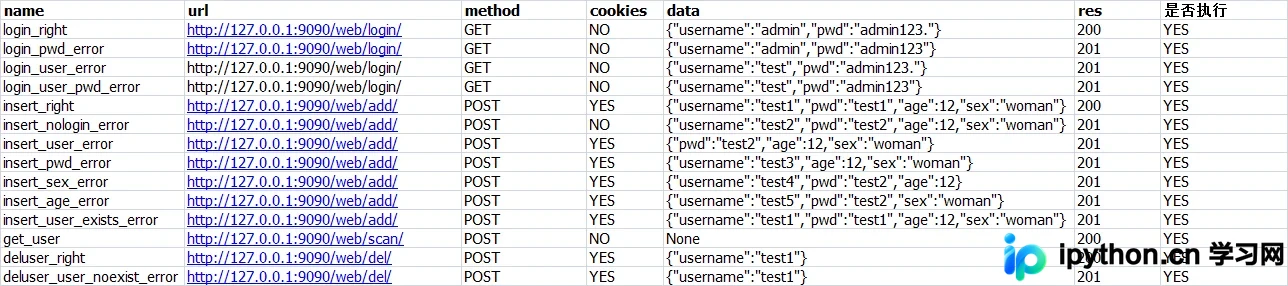
2、定义常量,即每列对应的值。
class TestConfig(object):
  def __init__(self):
    self.name = 0
    self.url = 1
    self.method = 2
    self.cookies = 3
    self.data = 4
    self.res = 5
    self.exec = 6

  def getname(self):
    return self.name

  def geturl(self):
    return self.url

  def getmethod(self):
    return self.method

  def getcookies(self):
    return self.cookies

  def getdata(self):
    return self.data

  def getres(self):
    return self.res

  def getexec(self):
    return self.exec
3、定义读取Excel的类,用于从Excel中读取案例。
import xlrd
import os

class testexcel(object):
  casepath = os.path.join(os.path.dirname(os.path.dirname(os.path.abspath(__file__))), "case", "testcase.xlsx")

  def __init__(self):
    self.casepath = testexcel.casepath
    self.execlobj = xlrd.open_workbook(self.casepath)
    self.sheetobj = self.execlobj.sheet_by_index(0)


  def get_excel_data(self,row,col):
    max_row = self.get_excel_max_row()
    max_col = self.get_excel_max_col()
    if row > max_row -1 or col > max_col - 1:
      return False
    else:
      data = self.sheetobj.cell_value(row,col)
      return data


  def get_excel_max_row(self):
    r_num = self.sheetobj.nrows
    return r_num


  def get_excel_max_col(self):
    c_num = self.sheetobj.ncols
    return c_num
4、定义接口函数。
import requests
import json


class TestLogin(object):
  def __init__(self,username,pwd,url):
    self.username = username
    self.pwd = pwd
    self.url = url

  def get(self):
    # 发送get请求
    url = self.url + "?username=" + str(self.username) + "&" + "password=" + str(self.pwd)
    res = requests.get(url=url,
              headers={
           "user-agent": "Mozilla/5.0 (Windows NT 6.1) AppleWebKit/537.36 (KHTML, like Gecko) Chrome/57.0.2987.133 Safari/537.36"
         })
    # print(json.loads(res.text))
    return res

  def post(self):
    # 发送post请求
    data = {
      "username" : self.username,
      "pwd" : self.pwd
    }
    res = requests.post(url=self.url,
              data=data,
              headers={
                "user-agent": "Mozilla/5.0 (Windows NT 6.1) AppleWebKit/537.36 (KHTML, like Gecko) Chrome/57.0.2987.133 Safari/537.36"
              },
              )
    # print(res.text)
    return res


class TestAdd(object):
  def __init__(self,username,age,sex,pwd,cookies,url):
    self.username = username
    self.age = age
    self.sex = sex
    self.pwd = pwd
    self.url = url
    self.cookies = cookies
  def post(self):
    # 发送post请求
    data = {
      "username" : self.username,
      "pwd" : self.pwd,
      "age" : self.age,
      "sex" : self.sex
    }
    res = requests.post(url=self.url,
              data=data,
              headers={
                "user-agent": "Mozilla/5.0 (Windows NT 6.1) AppleWebKit/537.36 (KHTML, like Gecko) Chrome/57.0.2987.133 Safari/537.36"
              },
              cookies=self.cookies,
              )
    # print(res.text)
    return res


class Testdel(object):
  def __init__(self, username,cookies,url):
    self.username = username
    self.cookies = cookies
    self.url = url

  def post(self):
    # 发送post请求
    data = {
      "username": self.username,
    }
    res = requests.post(url=self.url,
              data=data,
              headers={
                "user-agent": "Mozilla/5.0 (Windows NT 6.1) AppleWebKit/537.36 (KHTML, like Gecko) Chrome/57.0.2987.133 Safari/537.36"
              },
              cookies=self.cookies,
              )
    # print(res.text)
    return res


class Testscan(object):
  def __init__(self,url):
    self.url = url
  def get(self):
    res = requests.get(url=self.url,
              headers={
                "user-agent": "Mozilla/5.0 (Windows NT 6.1) AppleWebKit/537.36 (KHTML, like Gecko) Chrome/57.0.2987.133 Safari/537.36"
              },
              cookies=None,
              )
    return res
5、定义测试案例。
import unittest
from test3 import test_request
import json
from util import test_json
from util import test_excel
from case import testconfig
import requests

class TestDjango(unittest.TestCase):
  @classmethod
  def setUpClass(cls):
    cls.alldata = test_json.testjson()

  @classmethod
  def tearDownClass(cls):
    url = "http://127.0.0.1:9090/web/login/" + "?username=" + "admin" + "&" + "password=" + "admin123."
    res = requests.get(url=url,
              headers={
           "user-agent": "Mozilla/5.0 (Windows NT 6.1) AppleWebKit/537.36 (KHTML, like Gecko) Chrome/57.0.2987.133 Safari/537.36"
         })
    url = "http://127.0.0.1:9090/web/delall/"
    requests.post(url=url,
           headers={
             "user-agent": "Mozilla/5.0 (Windows NT 6.1) AppleWebKit/537.36 (KHTML, like Gecko) Chrome/57.0.2987.133 Safari/537.36"
           },
           cookies = res.cookies
           )


  def get_cookies(self):
    url = "http://127.0.0.1:9090/web/login/" + "?username=" + "admin" + "&" + "password=" + "admin123."
    res = requests.get(url=url,
              headers={
           "user-agent": "Mozilla/5.0 (Windows NT 6.1) AppleWebKit/537.36 (KHTML, like Gecko) Chrome/57.0.2987.133 Safari/537.36"
         })
    # print(json.loads(res.text))
    return res.cookies

  @unittest.skip('noexec')
  def test_login_ok(self):
    row = 1
    configobj = testconfig.TestConfig()
    excelobj = test_excel.testexcel()
    execstatus = excelobj.get_excel_data(row,configobj.getexec())
    if execstatus == "YES":
      cookiesstatus = excelobj.get_excel_data(row, configobj.getcookies())
      if cookiesstatus == "YES":
        cookies = self.get_cookies()
      else:
        cookies = None
      data = excelobj.get_excel_data(row, configobj.getdata())
      data = json.loads(data)
      url = excelobj.get_excel_data(row, configobj.geturl())
      res = excelobj.get_excel_data(row, configobj.getres())
      method = excelobj.get_excel_data(row, configobj.getmethod())
      if method == "GET":
        testobj = test_request.TestLogin(data["username"],data["pwd"],url)
        resobj = testobj.get()
        self.assertEqual(int(res),json.loads(resobj.text)["code"])

  @unittest.skip('noexec')
  def test_login_pwd_error(self):
    row = 2
    configobj = testconfig.TestConfig()
    excelobj = test_excel.testexcel()
    execstatus = excelobj.get_excel_data(row,configobj.getexec())
    if execstatus == "YES":
      cookiesstatus = excelobj.get_excel_data(row, configobj.getcookies())
      if cookiesstatus == "YES":
        cookies = self.get_cookies()
      else:
        cookies = None
      data = excelobj.get_excel_data(row, configobj.getdata())
      data = json.loads(data)
      url = excelobj.get_excel_data(row, configobj.geturl())
      res = excelobj.get_excel_data(row, configobj.getres())
      method = excelobj.get_excel_data(row, configobj.getmethod())
      if method == "GET":
        testobj = test_request.TestLogin(data["username"],data["pwd"],url)
        resobj = testobj.get()
        self.assertEqual(int(res),json.loads(resobj.text)["code"])

  @unittest.skip('noexec')
  def test_login_user_error(self):
    row = 3
    configobj = testconfig.TestConfig()
    excelobj = test_excel.testexcel()
    execstatus = excelobj.get_excel_data(row,configobj.getexec())
    if execstatus == "YES":
      cookiesstatus = excelobj.get_excel_data(row, configobj.getcookies())
      if cookiesstatus == "YES":
        cookies = self.get_cookies()
      else:
        cookies = None
      data = excelobj.get_excel_data(row, configobj.getdata())
      data = json.loads(data)
      url = excelobj.get_excel_data(row, configobj.geturl())
      res = excelobj.get_excel_data(row, configobj.getres())
      method = excelobj.get_excel_data(row, configobj.getmethod())
      if method == "GET":
        testobj = test_request.TestLogin(data["username"],data["pwd"],url)
        resobj = testobj.get()
        self.assertEqual(int(res),json.loads(resobj.text)["code"])

  @unittest.skip('noexec')
  def test_user_pwd_error(self):
    row = 4
    configobj = testconfig.TestConfig()
    excelobj = test_excel.testexcel()
    execstatus = excelobj.get_excel_data(row,configobj.getexec())
    if execstatus == "YES":
      cookiesstatus = excelobj.get_excel_data(row, configobj.getcookies())
      if cookiesstatus == "YES":
        cookies = self.get_cookies()
      else:
        cookies = None
      data = excelobj.get_excel_data(row, configobj.getdata())
      data = json.loads(data)
      url = excelobj.get_excel_data(row, configobj.geturl())
      res = excelobj.get_excel_data(row, configobj.getres())
      method = excelobj.get_excel_data(row, configobj.getmethod())
      if method == "GET":
        testobj = test_request.TestLogin(data["username"],data["pwd"],url)
        resobj = testobj.get()
        self.assertEqual(int(res),json.loads(resobj.text)["code"])

  @unittest.skip('noexec')
  def test_insert_ok(self):
    row = 5
    configobj = testconfig.TestConfig()
    excelobj = test_excel.testexcel()
    execstatus = excelobj.get_excel_data(row, configobj.getexec())
    if execstatus == "YES":
      cookiesstatus = excelobj.get_excel_data(row, configobj.getcookies())
      if cookiesstatus == "YES":
        cookies = self.get_cookies()
      else:
        cookies = None
      data = excelobj.get_excel_data(row, configobj.getdata())
      data = json.loads(data)
      url = excelobj.get_excel_data(row, configobj.geturl())
      res = excelobj.get_excel_data(row, configobj.getres())
      method = excelobj.get_excel_data(row, configobj.getmethod())
      if method == "POST":
        testobj = test_request.TestAdd(data["username"], data["age"],data["sex"], data["pwd"],cookies,url)
        resobj = testobj.post()
        print(json.loads(resobj.text))
        self.assertEqual(int(res), json.loads(resobj.text)["code"])

  @unittest.skip('noexec')
  def test_insert_nologin(self):
    row = 6
    configobj = testconfig.TestConfig()
    excelobj = test_excel.testexcel()
    execstatus = excelobj.get_excel_data(row, configobj.getexec())
    if execstatus == "YES":
      cookiesstatus = excelobj.get_excel_data(row, configobj.getcookies())
      if cookiesstatus == "YES":
        cookies = self.get_cookies()
      else:
        cookies = None
      data = excelobj.get_excel_data(row, configobj.getdata())
      data = json.loads(data)
      url = excelobj.get_excel_data(row, configobj.geturl())
      res = excelobj.get_excel_data(row, configobj.getres())
      method = excelobj.get_excel_data(row, configobj.getmethod())
      if method == "POST":
        testobj = test_request.TestAdd(data["username"], data["age"],data["sex"], data["pwd"],cookies,url)
        resobj = testobj.post()
        print(json.loads(resobj.text))
        self.assertEqual(int(res), json.loads(resobj.text)["code"])

  @unittest.skip("noexec")
  def test_insert_user_error(self):
    row = 7
    configobj = testconfig.TestConfig()
    excelobj = test_excel.testexcel()
    execstatus = excelobj.get_excel_data(row, configobj.getexec())
    if execstatus == "YES":
      cookiesstatus = excelobj.get_excel_data(row, configobj.getcookies())
      if cookiesstatus == "YES":
        cookies = self.get_cookies()
      else:
        cookies = None
      data = excelobj.get_excel_data(row, configobj.getdata())
      data = json.loads(data)
      url = excelobj.get_excel_data(row, configobj.geturl())
      res = excelobj.get_excel_data(row, configobj.getres())
      method = excelobj.get_excel_data(row, configobj.getmethod())
      if method == "POST":
        testobj = test_request.TestAdd(data.get("username",None), data.get("age",None), data.get("sex",None), data.get("pwd",None), cookies, url)
        resobj = testobj.post()
        print(json.loads(resobj.text))
        self.assertEqual(int(res), json.loads(resobj.text)["code"])

  @unittest.skip('no exec')
  def test_insert_pwd_error(self):
    row = 8
    configobj = testconfig.TestConfig()
    excelobj = test_excel.testexcel()
    execstatus = excelobj.get_excel_data(row, configobj.getexec())
    if execstatus == "YES":
      cookiesstatus = excelobj.get_excel_data(row, configobj.getcookies())
      if cookiesstatus == "YES":
        cookies = self.get_cookies()
      else:
        cookies = None
      data = excelobj.get_excel_data(row, configobj.getdata())
      data = json.loads(data)
      url = excelobj.get_excel_data(row, configobj.geturl())
      res = excelobj.get_excel_data(row, configobj.getres())
      method = excelobj.get_excel_data(row, configobj.getmethod())
      if method == "POST":
        testobj = test_request.TestAdd(data.get("username",None), data.get("age",None), data.get("sex",None), data.get("pwd",None), cookies, url)
        resobj = testobj.post()
        print(json.loads(resobj.text))
        self.assertEqual(int(res), json.loads(resobj.text)["code"])

  @unittest.skip("no exec")
  def test_insert_sex_error(self):
    row = 9
    configobj = testconfig.TestConfig()
    excelobj = test_excel.testexcel()
    execstatus = excelobj.get_excel_data(row, configobj.getexec())
    if execstatus == "YES":
      cookiesstatus = excelobj.get_excel_data(row, configobj.getcookies())
      if cookiesstatus == "YES":
        cookies = self.get_cookies()
      else:
        cookies = None
      data = excelobj.get_excel_data(row, configobj.getdata())
      print(data)
      data = json.loads(data)
      print(data)
      url = excelobj.get_excel_data(row, configobj.geturl())
      res = excelobj.get_excel_data(row, configobj.getres())
      method = excelobj.get_excel_data(row, configobj.getmethod())
      if method == "POST":
        testobj = test_request.TestAdd(data.get("username",None), data.get("age",None), data.get("sex",None), data.get("pwd",None), cookies, url)
        resobj = testobj.post()
        print(json.loads(resobj.text))
        self.assertEqual(int(res), json.loads(resobj.text)["code"])

  @unittest.skip('no exec')
  def test_insert_age_error(self):
    row = 10
    configobj = testconfig.TestConfig()
    excelobj = test_excel.testexcel()
    execstatus = excelobj.get_excel_data(row, configobj.getexec())
    if execstatus == "YES":
      cookiesstatus = excelobj.get_excel_data(row, configobj.getcookies())
      if cookiesstatus == "YES":
        cookies = self.get_cookies()
      else:
        cookies = None
      data = excelobj.get_excel_data(row, configobj.getdata())
      print(data)
      data = json.loads(data)
      print(data)
      url = excelobj.get_excel_data(row, configobj.geturl())
      res = excelobj.get_excel_data(row, configobj.getres())
      method = excelobj.get_excel_data(row, configobj.getmethod())
      if method == "POST":
        testobj = test_request.TestAdd(data.get("username",None), data.get("age",None), data.get("sex",None), data.get("pwd",None), cookies, url)
        resobj = testobj.post()
        print(resobj.text)
        print(json.loads(resobj.text))
        self.assertEqual(int(res), json.loads(resobj.text)["code"])

  @unittest.skip('no exec')
  def test_insert_user_exist(self):
    row = 11
    configobj = testconfig.TestConfig()
    excelobj = test_excel.testexcel()
    execstatus = excelobj.get_excel_data(row, configobj.getexec())
    if execstatus == "YES":
      cookiesstatus = excelobj.get_excel_data(row, configobj.getcookies())
      if cookiesstatus == "YES":
        cookies = self.get_cookies()
      else:
        cookies = None
      data = excelobj.get_excel_data(row, configobj.getdata())
      print(data)
      data = json.loads(data)
      print(data)
      url = excelobj.get_excel_data(row, configobj.geturl())
      res = excelobj.get_excel_data(row, configobj.getres())
      method = excelobj.get_excel_data(row, configobj.getmethod())
      if method == "POST":
        testobj = test_request.TestAdd(data.get("username", None), data.get("age", None), data.get("sex", None),
                        data.get("pwd", None), cookies, url)
        resobj = testobj.post()
        print(resobj.text)
        print(json.loads(resobj.text))
        self.assertEqual(int(res), json.loads(resobj.text)["code"])

  def test_get_user(self):
    row = 12
    configobj = testconfig.TestConfig()
    excelobj = test_excel.testexcel()
    execstatus = excelobj.get_excel_data(row, configobj.getexec())
    if execstatus == "YES":
      cookiesstatus = excelobj.get_excel_data(row, configobj.getcookies())
      if cookiesstatus == "YES":
        cookies = self.get_cookies()
      else:
        cookies = None

      url = excelobj.get_excel_data(row, configobj.geturl())
      res = excelobj.get_excel_data(row, configobj.getres())
      method = excelobj.get_excel_data(row, configobj.getmethod())
      if method == "POST":
        testobj = test_request.Testscan(url)
        resobj = testobj.get()
        # print(resobj.text
        print(json.loads(resobj.text))
        self.assertEqual(int(res), json.loads(resobj.text)["code"])

  @unittest.skip('no exec')
  def test_del_user(self):
    row = 13
    configobj = testconfig.TestConfig()
    excelobj = test_excel.testexcel()
    execstatus = excelobj.get_excel_data(row, configobj.getexec())
    if execstatus == "YES":
      cookiesstatus = excelobj.get_excel_data(row, configobj.getcookies())
      if cookiesstatus == "YES":
        cookies = self.get_cookies()
      else:
        cookies = None
      data = excelobj.get_excel_data(row, configobj.getdata())
      print(data)
      data = json.loads(data)
      print(data)
      url = excelobj.get_excel_data(row, configobj.geturl())
      res = excelobj.get_excel_data(row, configobj.getres())
      method = excelobj.get_excel_data(row, configobj.getmethod())
      if method == "POST":
        testobj = test_request.Testdel(data.get("username", None),cookies, url)
        resobj = testobj.post()
        print(resobj.text)
        print(json.loads(resobj.text))
        self.assertEqual(int(res), json.loads(resobj.text)["code"])


  def test_del_noexistuser(self):
    row = 14
    configobj = testconfig.TestConfig()
    excelobj = test_excel.testexcel()
    execstatus = excelobj.get_excel_data(row, configobj.getexec())
    if execstatus == "YES":
      cookiesstatus = excelobj.get_excel_data(row, configobj.getcookies())
      if cookiesstatus == "YES":
        cookies = self.get_cookies()
      else:
        cookies = None
      data = excelobj.get_excel_data(row, configobj.getdata())
      print(data)
      data = json.loads(data)
      print(data)
      url = excelobj.get_excel_data(row, configobj.geturl())
      res = excelobj.get_excel_data(row, configobj.getres())
      method = excelobj.get_excel_data(row, configobj.getmethod())
      if method == "POST":
        testobj = test_request.Testdel(data.get("username", None),cookies, url)
        resobj = testobj.post()
        print(resobj.text)
        print(json.loads(resobj.text))
        self.assertEqual(int(res), json.loads(resobj.text)["code"])
6、引入unittest的suit,组织案例。
import unittest
from unittest import TestLoader

from test3 import test_unittest


if __name__ == '__main__':
  suite = unittest.TestSuite()
  loader = TestLoader()
  test_cases1 = unittest.TestLoader().loadTestsFromModule(test_unittest)
  # 参数是一个模块,会把这个模块里的所有case加载进来
  suite.addTests(test_cases1)
  runner = unittest.TextTestRunner(verbosity=2)
  runner.run(suite)
四、执行案例
1、启动Django服务。
E:\python\unittestForDjango>python manage.py runserver 9090 Performing system checks...
System check identified no issues (0 silenced). October 19, 2019 - 22:46:42 Django version 1.11.7, using settings 'unittestForDjango.settings' Starting development server at http://127.0.0.1:9090/ Quit the server with CTRL-BREAK
2、执行测试套件。
test_del_noexistuser (test3.test_unittest.TestDjango) ... {"username":"test1"}
{'username': 'test1'}
ok
test_del_user (test3.test_unittest.TestDjango) ... skipped 'no exec'
test_get_user (test3.test_unittest.TestDjango) ... {"code": 201, "error": "test1 is not exists"}
{'code': 201, 'error': 'test1 is not exists'}
{'code': 200, 'userinfo': []}
ok
test_insert_age_error (test3.test_unittest.TestDjango) ... skipped 'no exec'
test_insert_nologin (test3.test_unittest.TestDjango) ... skipped 'noexec'
test_insert_ok (test3.test_unittest.TestDjango) ... skipped 'noexec'
test_insert_pwd_error (test3.test_unittest.TestDjango) ... skipped 'no exec'
test_insert_sex_error (test3.test_unittest.TestDjango) ... skipped 'no exec'
test_insert_user_error (test3.test_unittest.TestDjango) ... skipped 'noexec'
test_insert_user_exist (test3.test_unittest.TestDjango) ... skipped 'no exec'
test_login_ok (test3.test_unittest.TestDjango) ... skipped 'noexec'
test_login_pwd_error (test3.test_unittest.TestDjango) ... skipped 'noexec'
test_login_user_error (test3.test_unittest.TestDjango) ... skipped 'noexec'
test_user_pwd_error (test3.test_unittest.TestDjango) ... skipped 'noexec'

----------------------------------------------------------------------
Ran 14 tests in 1.466s

OK (skipped=12)
到此,关于Python自动化测试三部曲之Requests+Django实现接口测试的文章介绍完毕,更多相关内容请搜索本站以前的文章或继续浏览下面的相关文章,希望大家以后多多支持本站!
本站声明
本文内容仅供参考,不代表本站观点。转载或引用请注明出处。如发现内容问题,请通过联系我们页面反馈。















