


Python修改Excel指定列数据:从提取到保存的完整实战

本文详解如何使用Python的openpyxl库修改Excel表格指定列数据。内容涵盖从加载工作簿、提取单元格数据转换为列表、定位特定文本位置,到处理合并单元格报错及设置单元格对齐方式的全过程。通过完整代码示例,展示如何复制员工编号并生成随机工资,最终保存为新文件或覆盖原文件,适合需要批量处理Excel数据的开发者参考。
假设你正在处理公司内部的员工薪资表格,面前有一份包含每月工资记录的Excel文件。
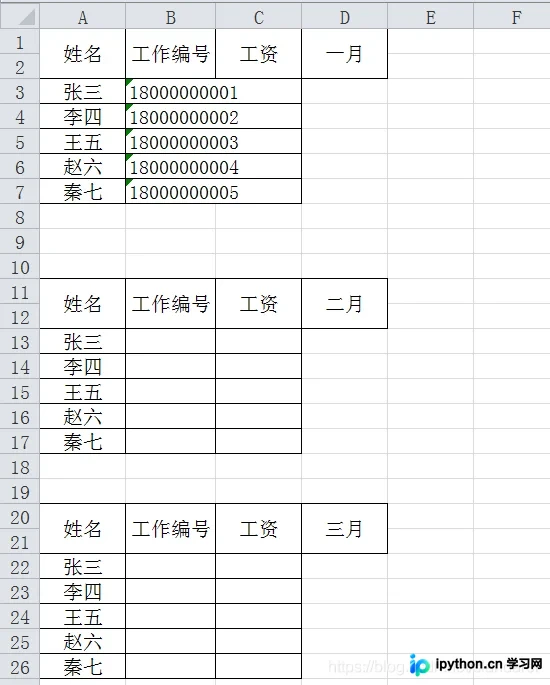
现在的任务是填充后续几个月的员工编号,并为每位员工随机生成2000到50000之间的数值作为当月工资。为了提升Python编程能力,我们来编写实现这一功能的代码。
1 库引入
首先需要导入必要的库。修改Excel内容需要用到openpyxl库,而生成随机数则需要random库。
import openpyxl
import random
2 提取cell
首先提取编号数据: 编号位于第B列
workbook=openpyxl.load_workbook('工资.xlsx')
table = workbook['Sheet1']

print(table['B'])
3 提取List
直接提取得到的是cell格式的数据,而非常见的list格式。可以通过以下方式将其转换为list格式:
def cell2List(CELL):
    LIST=[]
    for cell in CELL:
        LIST.append(cell.value)
    return LIST

IDList=cell2List(table['B'])
print(IDList)
4 修改List数据
接下来需要定位“工作编号”这几个字在列表中的位置。
def get_location_in_list(x, target):
    step = -1
    items = list()
    for i in range(x.count(target)):
        y = x[step + 1:].index(target)
        step = step + y + 1
        items.append(step)
    return items

IDPos=get_location_in_list(IDList, '工作编号')
print(IDPos)
随后,将最前面的员工名称复制到后续月份。假设已知共有5名员工,且标题“工作编号”占据两个格子(即“工作编号”后跟随一个空格)。 编写如下代码:
staffNum=5
for i in range(0,len(IDPos)):
    IDList[IDPos[i]+1:IDPos[i]+2+staffNum]=IDList[IDPos[0]+1:IDPos[0]+2+staffNum]
print(IDList)
5 修改cell值
此时只需将处理后的列表值重新赋回对应的cell即可:
tempi=0
for cell in table['B']:
    cell.value=IDList[tempi]
    tempi=tempi+1
运行后可能会遇到如下报错:

这是因为表格中存在合并单元格导致的。
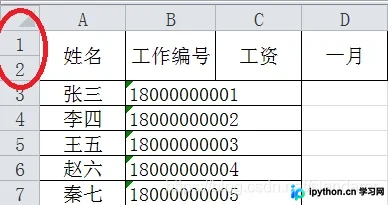
只需将代码调整为以下形式即可解决:
tempi=0
for cell in table['B']:
    try:
        cell.value=IDList[tempi]
    except:
        print('')
    tempi=tempi+1
6 存储回原EXCEL或新EXCEL
主要通过更改保存参数来实现。例如,若想将结果保存为名为result.xlsx的新文件:
workbook.save(filename = "result.xlsx")7 其他格式修正(居左为例)
如果发现存储后的编号居中显示:
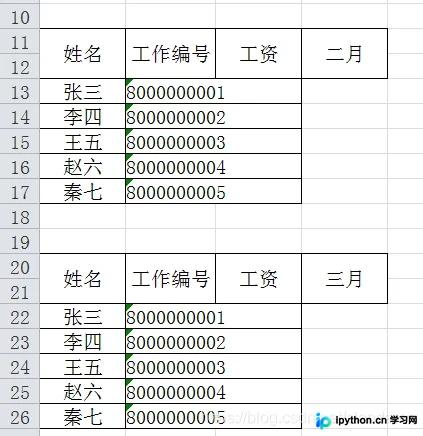
希望将其调整为左对齐,只需在前面的代码中增加对齐设置:
tempi=0
for cell in table['B']:
    try:
        cell.value=IDList[tempi]
        cell.alignment = openpyxl.styles.Alignment(horizontal='left', vertical='center')
    except:
        print('')
    tempi=tempi+1
8 随机生成工资
逻辑与前文类似,相对简单,建议结合完整代码自行理解。
9 完整代码
import openpyxl
import random

def cell2List(CELL):
    LIST=[]
    for cell in CELL:
        LIST.append(cell.value)
    return LIST
def get_location_in_list(x, target):
    step = -1
    items = list()
    for i in range(x.count(target)):
        y = x[step + 1:].index(target)
        step = step + y + 1
        items.append(step)
    return items

workbook=openpyxl.load_workbook('工资.xlsx')
table = workbook['Sheet1']

IDList=cell2List(table['B'])
salaryList=cell2List(table['C'])
IDPos=get_location_in_list(IDList, '工作编号')

staffNum=5
for i in range(0,len(IDPos)):
    IDList[IDPos[i]+1:IDPos[i]+2+staffNum]=IDList[IDPos[0]+1:IDPos[0]+2+staffNum]
    for j in range(IDPos[i]+1,IDPos[i]+2+staffNum):
            salaryList[j]=1


# tempi=0
# for cell in table['B']:
#     cell.value=IDList[tempi]
#     tempi=tempi+1

tempi=0
for cell in table['B']:
    try:
        cell.value=IDList[tempi]
        cell.alignment = openpyxl.styles.Alignment(horizontal='left', vertical='center')
    except:
        print('')
    tempi=tempi+1

tempi=0
for cell in table['C']:
    try:
        if salaryList[tempi]==1:
            cell.value=random.randint(2000,50000)
    except:
        print('')
    tempi=tempi+1

workbook.save(filename = "result.xlsx")
运行效果:
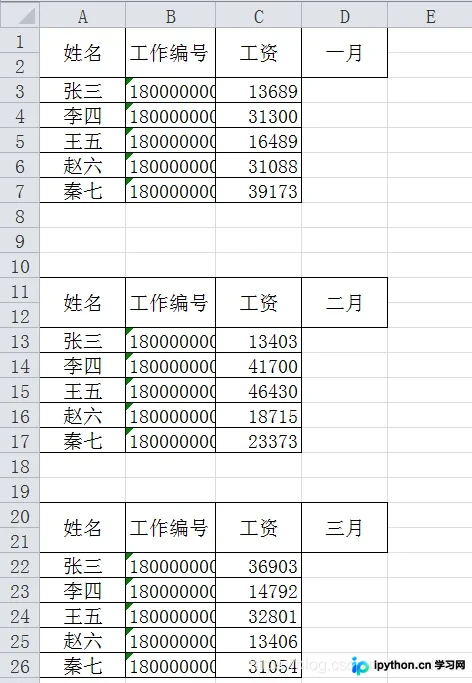
以上就是用Python修改Excel表某一列内容的详细内容,更多关于Python修改Excel的资料请关注本站其它相关文章!
本站声明
本文内容仅供参考,不代表本站观点。转载或引用请注明出处。如发现内容问题,请通过联系我们页面反馈。















