


Python结合百度AI实现表情包自动抓取与OCR重命名

本文详解如何利用Python抓取百度贴吧表情包,并通过百度AI开放平台的OCR接口识别图片文字。文章涵盖API Key申请、贴吧数据抓取及多线程下载,最终实现根据识别出的主要文字自动重命名图片文件,提升表情包管理效率。
本文介绍一种结合网络爬虫与人工智能技术的方法:首先从互联网抓取表情图像,随后利用百度AI接口识别图片内的说明文字,并依据识别出的文字对文件进行重命名。通过这种方式,用户在发送表情包时无需逐一打开图片查找,可直接根据文件名快速筛选并发送目标表情。
一、百度 AI 开放平台的 Key 申请方法
本示例调用百度 AI 的 API 接口以完成文字识别任务,因此必须预先获取相应的 API 使用权限。具体申请步骤如下:
在网页浏览器(如 Chrome 或火狐)的地址栏中输入 ai.baidu.com,进入百度云 AI 官网。在该页面右上角单击 控制台 按钮。
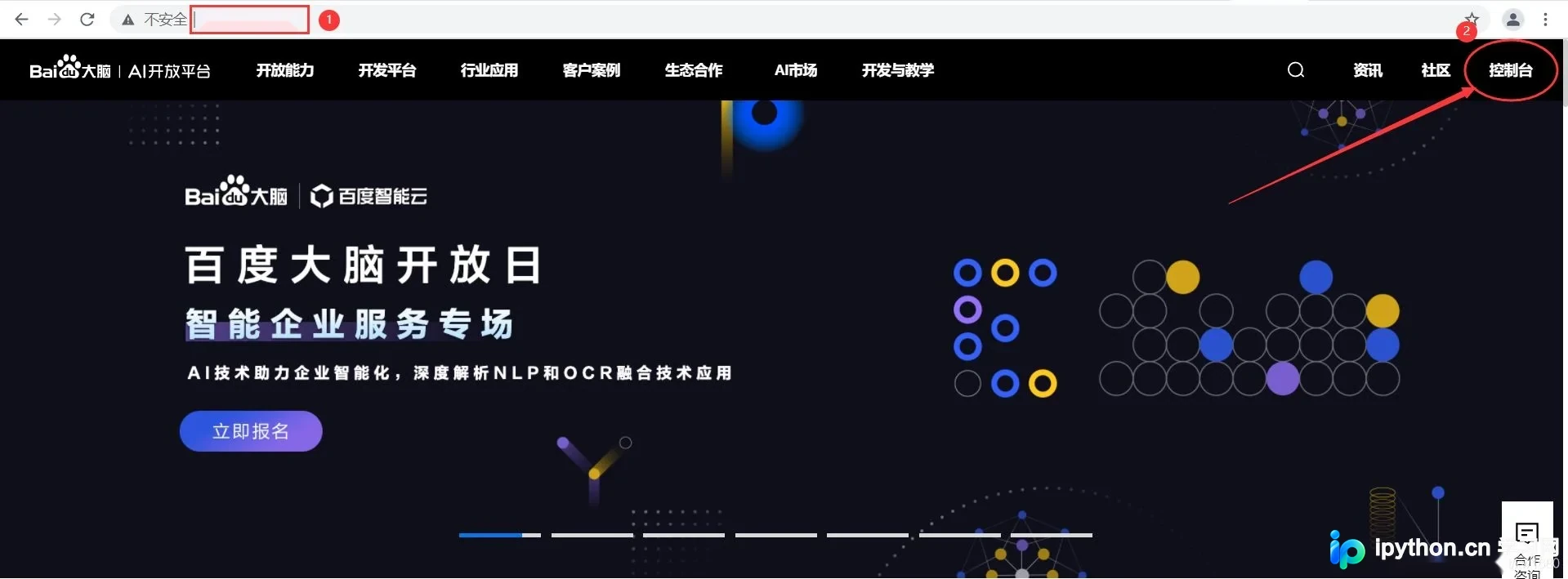
进入百度云 AI 官网的登录页面,输入百度账号和密码。若尚未拥有账号,可单击 立即注册 超链接进行注册申请。
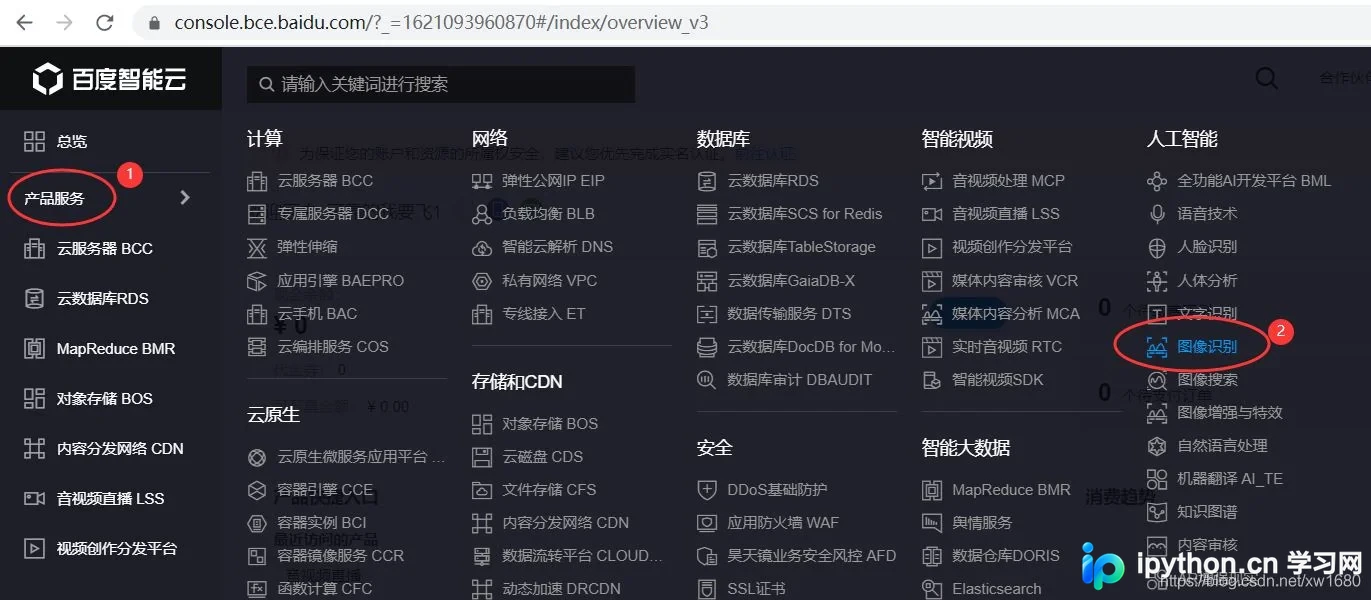
登录成功后,进入百度云 AI 官网的控制台页面。单击左侧导航栏的 产品服务 展开列表,在列表最右侧下方找到 人工智能 分类,随后选择 图像识别,或者直接选择 文字识别,如下图所示。
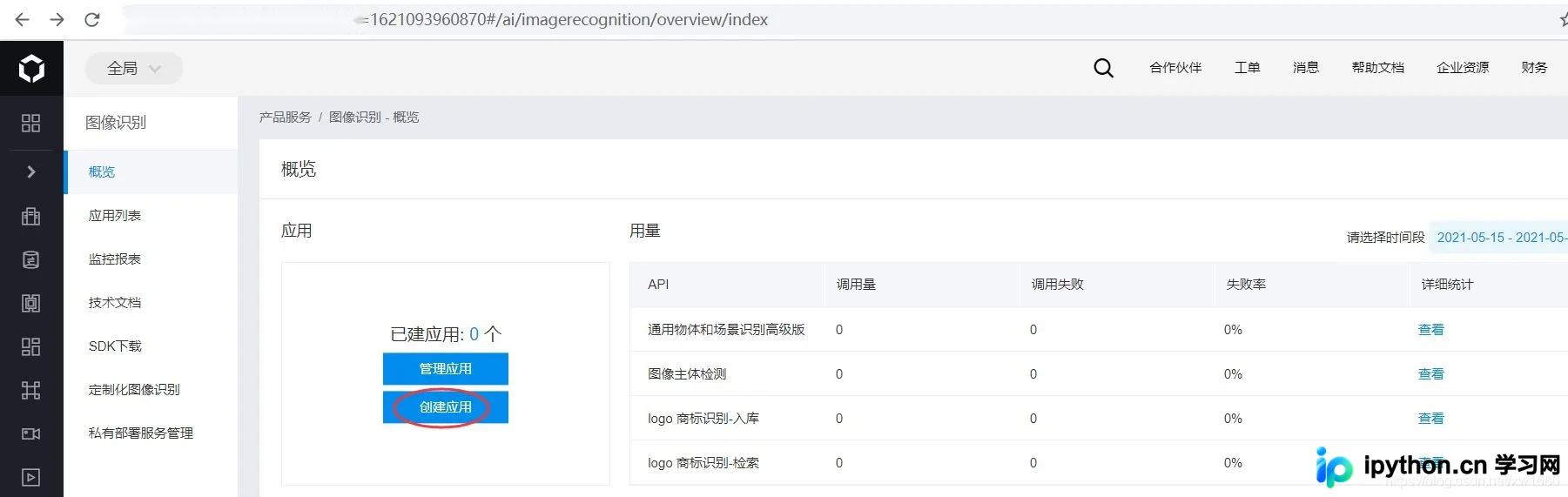
进入 图像识别一概览 页面。要使用百度云 AI 的 API,首先需申请权限。在申请权限前需创建自己的应用,因此单击 创建应用 按钮,如下图所示。
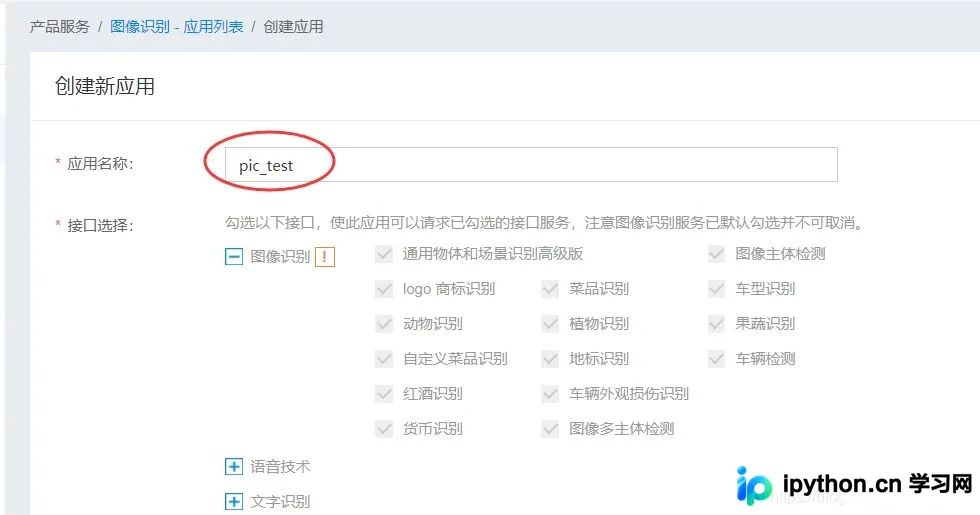
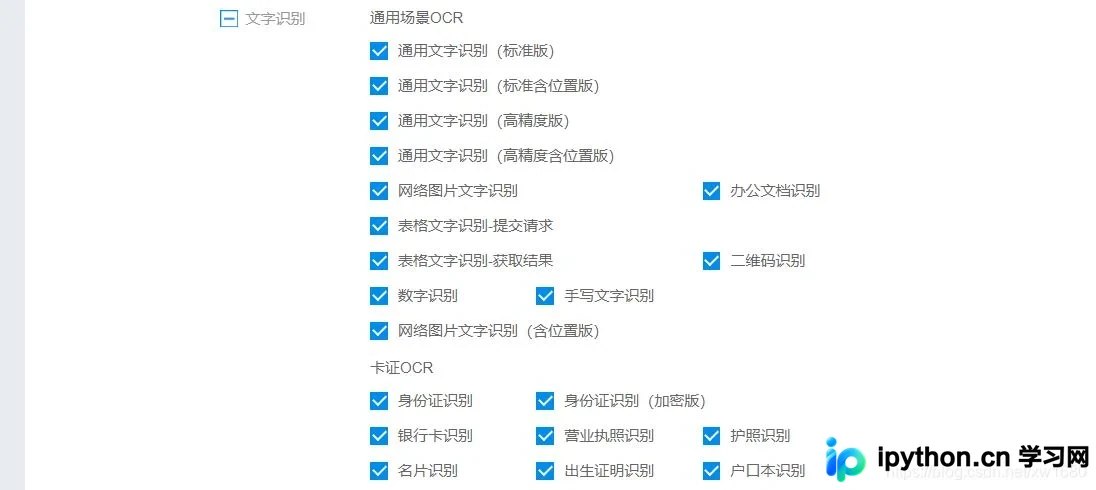
进入 创建应用 页面,该页面需输入应用名称、选择应用类型及接口。注意:此处接口建议多选,将后期可能用到的接口全部选中,以便开发其他实例时可直接使用。选择完接口后,选择文字识别包名,此处选择 不需要,输入应用描述,单击 立即创建 按钮,如下图所示。

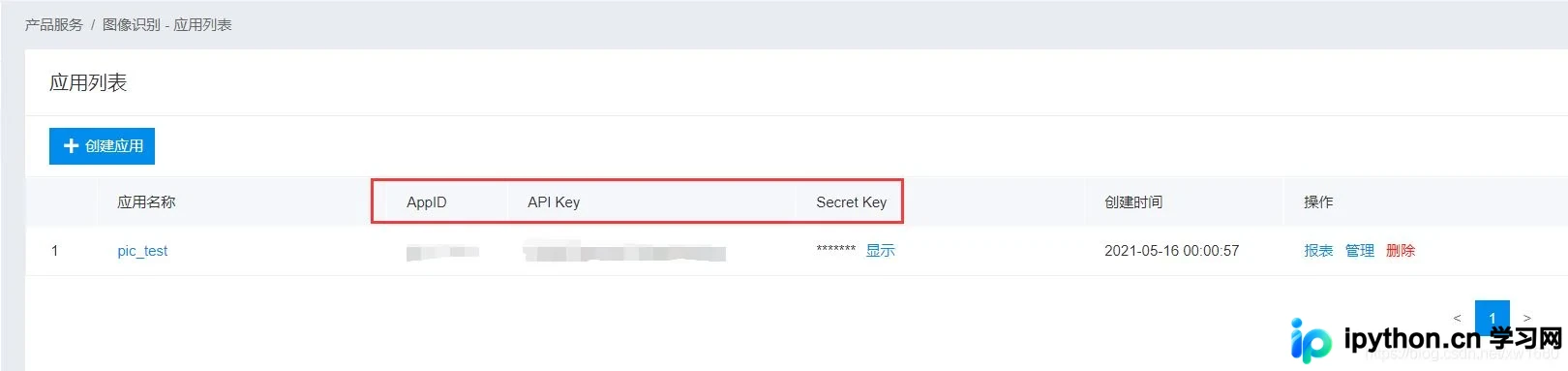
创建完成后,单击 返回应用列表 按钮,页面跳转至应用列表页面。在该页面可查看已创建的应用,以及百度云自动分配的 AppID、API Key 和 Secret Key。这些值因应用而异,务必妥善保存以便后续开发使用。
二、抓取贴吧表情包
本例在百度贴吧中选取了一些自制表情包,链接为:https://tieba.baidu.com/p/5522091060。 现需将图片全部爬取下来,具体操作步骤如下:
通过 Network 抓包检查返回数据是否与 Element 一致,即确认是否包含所需数据,而非通过 JS 动态加载。复制第一个图的图片链接,在 Network 选项卡的 Response 中进行查找。
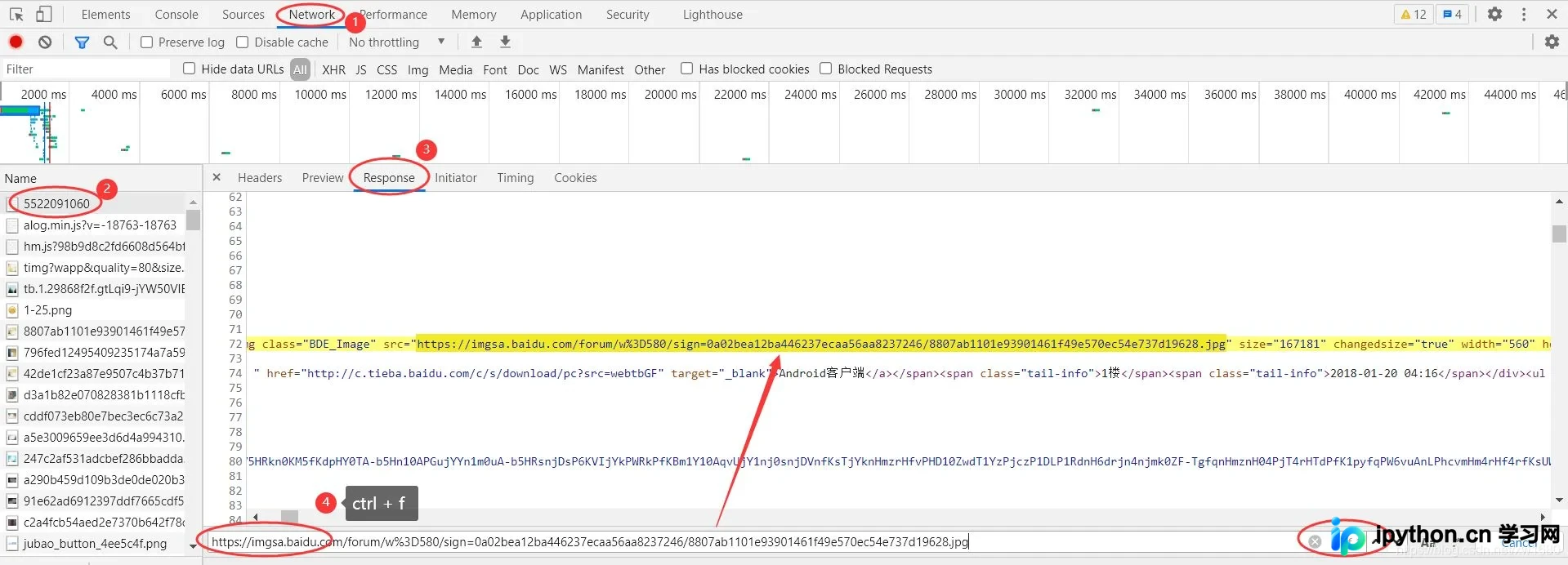
在 Network 抓包中未发现 Ajax 动态加载数据的踪迹。
点击第二页,抓包发现 Ajax 加载的痕迹。
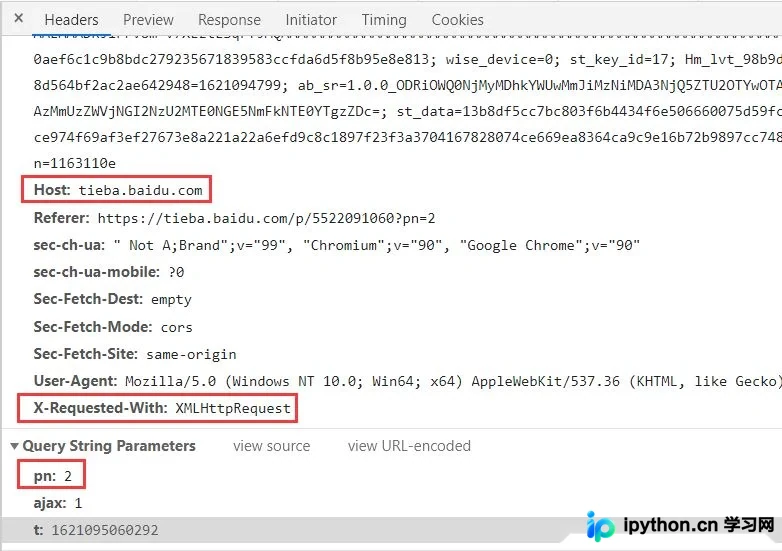
以第一个图的 url 进行搜索,同样可以找到相关数据。
推测三个参数中 pn 为 page_number,即页数。使用 postman 或自行编写代码模拟请求,记得加入 Host 和 X-Requested-With 头信息。验证 pn=1 是否对应第一页数据,验证通过后,可知所有页面数据均可通过该接口获取。
先加载获取末页是第几页,然后执行循环遍历以解析数据并获得图片 url,写入文件。使用多个线程进行下载,详细代码如下。
# 抓取百度贴吧某个帖子里的所有图片
import requests
import time
import threading
import queue
from bs4 import BeautifulSoup
import chardet
import os

tiezi_url = "https://tieba.baidu.com/p/5522091060"
headers = {
    'Host': 'tieba.baidu.com',
    'User-Agent': 'User-Agent: Mozilla/5.0 (Windows NT 10.0; Win64; x64) AppleWebKit/537.36 (KH'
                  'TML, like Gecko) Chrome/90.0.4430.212 Safari/537.36',
}
pic_save_dir = 'tiezi_pic/'
if not os.path.exists(pic_save_dir):  # 判断文件夹是否存在,不存在就创建
    os.makedirs(pic_save_dir)

pic_urls_file = 'tiezi_pic_urls.txt'
download_q = queue.Queue()  # 下载队列


# 获得页数
def get_page_count():
    try:
        resp = requests.get(tiezi_url, headers=headers, timeout=5)
        if resp is not None:
            resp.encoding = chardet.detect(resp.content)['encoding']
            html = resp.text
            soup = BeautifulSoup(html, 'lxml')
            a_s = soup.find("ul", attrs={'class': 'l_posts_num'}).findAll("a")
            for a in a_s:
                if a.get_text() == '尾页':
                    return a['href'].split('=')[1]
    except Exception as e:
        print(str(e))


# 下载线程
class PicSpider(threading.Thread):
    def __init__(self, t_name, func):
        self.func = func
        threading.Thread.__init__(self, name=t_name)

    def run(self):
        self.func()


# 获得每页里的所有图片URL
def get_pics(count):
    params = {
        'pn': count,
        'ajax': '1',
        't': int(time.time())
    }
    try:
        resp = requests.get(tiezi_url, headers=headers, timeout=5, params=params)
        if resp is not None:
            resp.encoding = chardet.detect(resp.content)['encoding']
            html = resp.text
            soup = BeautifulSoup(html, 'lxml')
            imgs = soup.findAll('img', attrs={'class': 'BDE_Image'})
            for img in imgs:
                print(img['src'])
                with open(pic_urls_file, 'a') as fout:
                    fout.write(img['src'])
                    fout.write('\n')
            return None
    except Exception:
        pass


# 下载线程调用的方法
def down_pics():
    global download_q
    while not download_q.empty():
        data = download_q.get()
        download_pic(data)
        download_q.task_done()


# 下载调用的方法
def download_pic(img_url):
    try:
        resp = requests.get(img_url, headers=headers, timeout=10)
        if resp.status_code == 200:
            print("下载图片:" + img_url)
            pic_name = img_url.split("/")[-1][0:-1]
            with open(pic_save_dir + pic_name, "wb+") as f:
                f.write(resp.content)

    except Exception as e:
        print(e)


if __name__ == '__main__':
    print("检索判断链接文件是否存在:")
    if not os.path.exists(pic_urls_file):
        print("不存在,开始解析帖子...")
        page_count = get_page_count()
        if page_count is not None:
            headers['X-Requested-With'] = 'XMLHttpRequest'
            for page in range(1, int(page_count) + 1):
                get_pics(page)
        print("链接已解析完毕!")
        headers.pop('X-Requested-With')
    else:
        print("存在")
    print("开始下载图片~~~~")
    headers['Host'] = 'imgsa.baidu.com'
    fo = open(pic_urls_file, "r")
    pic_list = fo.readlines()

    threads = []
    for pic in pic_list:
        download_q.put(pic)
    for i in range(0, len(pic_list)):
        t = PicSpider(t_name='线程' + str(i), func=down_pics)
        t.daemon = True
        t.start()
        threads.append(t)
    download_q.join()
    for t in threads:
        t.join()
    print("图片下载完毕")
运行结果:
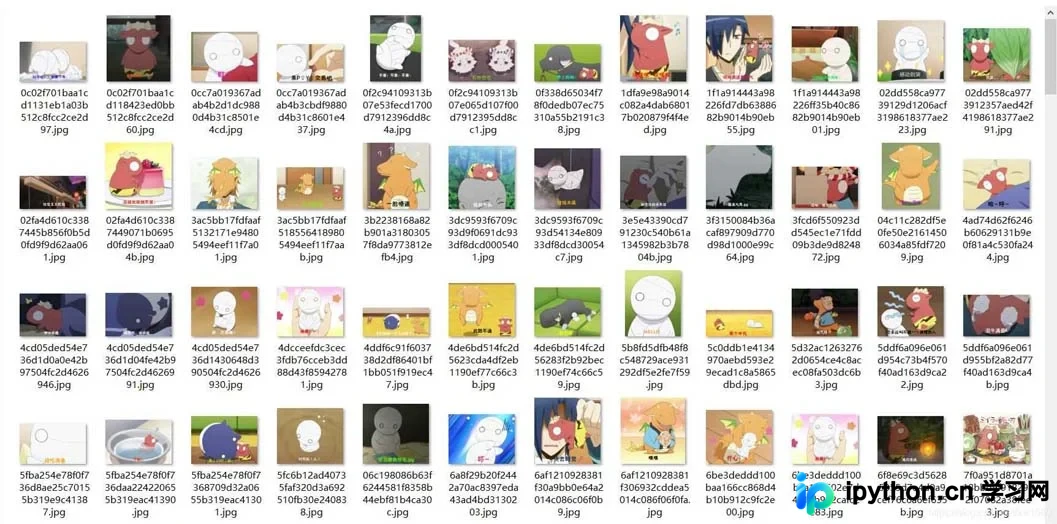
接下来通过 OCR 文字识别技术,直接提取表情中的文字并用于命名图片。这样可通过文件搜索表情关键字,快速找到所需的表情图片。使用谷歌的 OCR 文字识别引擎 Tesseract 对此类大图片小文字的场景不太适合,识别率较低甚至无法识别。此时使用百度云 OCR 较为合适,它能够自动定位图片中具体位置,并找出图片中所有的文字。
三、使用 Baidu-aip
申请百度 AI 的应用 key 之后,即可在本地系统中安装 Baidu-aip,代码如下:
pip install baidu-aip
先识别一张图片,查看效果如何:
from aip import AipOcr

# 新建一个AipOcr对象
config = {
    'appId': '填写自己的appId',
    'apiKey': '填写自己的apiKey',
    'secretKey': '填写自己的secretKey'
}
client = AipOcr(**config)


# 识别图片里的文字
def img_to_str(image_path):
    # 读取图片
    with open(image_path, 'rb') as fp:
        image = fp.read()

        # 调用通用文字识别, 图片参数为本地图片
    result = client.basicGeneral(image)
    # 返回拼接结果
    if 'words_result' in result:
        return '\n'.join([w['words'] for w in result['words_result']])


if __name__ == '__main__':
    print(img_to_str('tiezi_pic/5c0ddb1e4134970aebd593e29ecad1c8a5865dbd.jpg'))
运行程序,结果如下图所示:
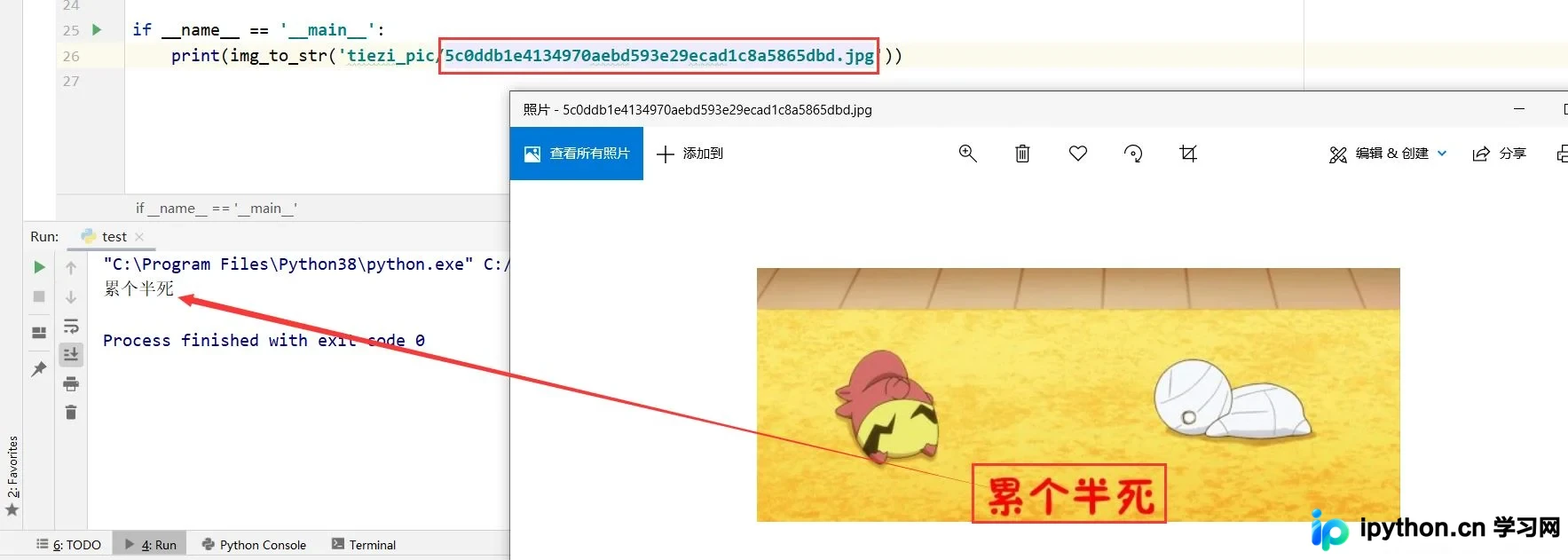
百度 AI 返回的是一个 JSON 格式数据,如下所示。返回一个字典对象,包含 log_id、words_result_num、words_result 三个键。其中 words_result_num 表示识别的文本行数,words_result 是一个列表,每个列表项目记录一条识别的文本,每个项目返回一个字典对象,包含 words 键,words 表示识别的文本。
{'words_result': [{'words': 'o。o'}, {'words': '6226-16:59'}, {'words': '绝望jpg'}], 'log_id': 1393611954748129280, 'words_result_num': 3}
o。o
6226-16:59
绝望jpg
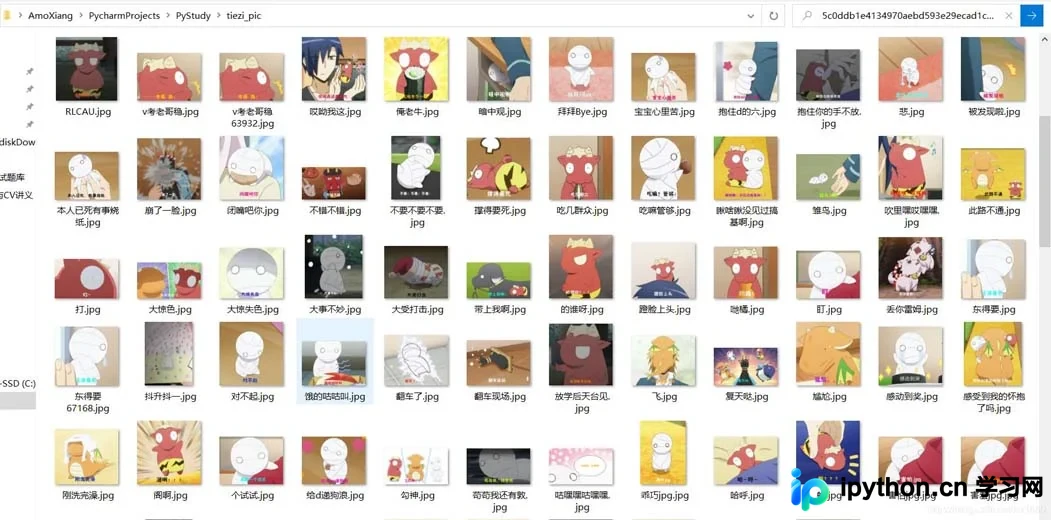
由于每个图片中可能包含很多文字信息,如水印的日期文字,以及个别特殊的文字符号被误解析,我们需要提出的是汉字或字母信息。同时可能会包含多条汉字信息,本例选择汉字或字母最长的一条来命名文件。完整的示例代码如下:
# 识别图片文字,批量命名图片文字

import os
from aip import AipOcr
import re
import datetime

# 新建一个AipOcr对象
config = {
    'appId': '填写自己的appId',
    'apiKey': '填写自己的apiKey',
    'secretKey': '填写自己的secretKey'
}
client = AipOcr(**config)

pic_dir = r"tiezi_pic/"


# 读取图片
def get_file_content(file_path):
    with open(file_path, 'rb') as fp:
        return fp.read()


# 识别图片里的文字
def img_to_str(image_path):
    image = get_file_content(image_path)
    # 调用通用文字识别, 图片参数为本地图片
    result = client.basicGeneral(image)
    # 结果拼接返回
    words_list = []
    if 'words_result' in result:
        if len(result['words_result']) > 0:
            for w in result['words_result']:
                words_list.append(w['words'])
            file_name = get_longest_str(words_list)
            print(file_name)
            file_dir_name = pic_dir + str(file_name).replace("/", "") + '.jpg'
            if os.path.exists(file_dir_name):  # 处理文件重名问题
                sec = datetime.datetime.now().microsecond  # 获取当前毫秒时值
                file_dir_name = pic_dir + str(file_name).replace("/", "") + str(sec) + '.jpg'
            try:
                os.rename(image_path, file_dir_name)
            except Exception:
                print(" 重命名失败:", image_path, " => ", file_name)


# 获取字符串列表中最长的字符串
def get_longest_str(str_list):
    pat = re.compile(r'[\u4e00-\u9fa5A-Za-z]+')
    str = max(str_list, key=hanzi_len)
    result = pat.findall(str)
    return ''.join(result)


def hanzi_len(item):
    pat = re.compile(r'[\u4e00-\u9fa5]+')
    sum = 0
    for i in item:
        if pat.search(i):
            sum += 1
    return sum


# 遍历某个文件夹下所有图片
def query_picture(dir_path):
    pic_path_list = []
    for filename in os.listdir(dir_path):
        pic_path_list.append(dir_path + filename)
    return pic_path_list


if __name__ == '__main__':
    pic_list = query_picture(pic_dir)
    if len(pic_list) > 0:
        for i in pic_list:
            img_to_str(i)
运行程序,结果如下图所示:
到此这篇关于Python基于百度AI实现抓取表情包的文章就介绍到这了,更多相关Python 抓取表情包内容请搜索本站以前的文章或继续浏览下面的相关文章希望大家以后多多支持本站!
本站声明
本文内容仅供参考,不代表本站观点。转载或引用请注明出处。如发现内容问题,请通过联系我们页面反馈。















