


OpenCV C++ 实现图像对比度动态调整算法

本文详细解析了基于OpenCV C++的图像对比度调整算法。通过设定阈值与调节参数percent,实现从降低对比度到极致二值化的全范围控制。文章提供了完整的C++核心函数代码及测试示例,涵盖正负参数下的RGB通道处理逻辑,适用于需要自定义图像增强效果的开发场景。
本文深入探讨了利用OpenCV进行图像对比度调整的具体方法,内容具备较高的实用参考价值,建议相关技术爱好者阅读了解。
实现原理
图像对比度定义为画面中最亮白色与最暗黑色之间的亮度层级差异,即灰度反差的大小。差异范围越宽,对比度越高;反之则越低。算法引入基准阈值thresh,并通过参数percent控制变化:当percent大于0时,增强对比度,使像素值距离thresh越远则变化幅度越大;当percent等于1时,对比度达到极致,像素仅保留0和255两个值;当percent等于0时,图像保持不变;当percent小于0时,降低对比度,使远离thresh的数值向thresh靠拢;当percent等于-1时,对比度完全消失,所有像素均变为thresh值。
对比度调整算法的具体执行流程如下:
1. 设定调整参数percent,取值范围为-100至100,该范围经归一化处理后对应-1至1,逻辑类似于图像处理软件中的对比度设置。
2. 对图像中所有像素点进行逐个处理。当percent大于等于0时,执行对比度增强,调整后的RGB三通道数值计算公式为:

3. 若percent小于0,执行对比度降低,此时调整后的图像RGB三通道数值计算公式为:

4. 当percent等于1时,执行极限处理:若像素值大于thresh则设为255,否则设为0。
至此,图像明度调整算法逻辑完成,核心参考自xingyanxiao。以下为C++语言的具体实现代码。
功能函数代码
// 对比度
cv::Mat Contrast(cv::Mat src, int percent)
{
	float alpha = percent / 100.f;
	alpha = max(-1.f, min(1.f, alpha));
	cv::Mat temp = src.clone();
	int row = src.rows;
	int col = src.cols;
	int thresh = 127;
	for (int i = 0; i < row; ++i)
	{
		uchar *t = temp.ptr<uchar>(i);
		uchar *s = src.ptr<uchar>(i);
		for (int j = 0; j < col; ++j)
		{
			uchar b = s[3 * j];
			uchar g = s[3 * j + 1];
			uchar r = s[3 * j + 2];
			int newb, newg, newr;
			if (alpha == 1)
			{
				t[3 * j + 2] = r > thresh ? 255 : 0;
				t[3 * j + 1] = g > thresh ? 255 : 0;
				t[3 * j] = b > thresh ? 255 : 0;
				continue;
			}
			else if (alpha >= 0)
			{
				newr = static_cast<int>(thresh + (r - thresh) / (1 - alpha));
				newg = static_cast<int>(thresh + (g - thresh) / (1 - alpha));
				newb = static_cast<int>(thresh + (b - thresh) / (1 - alpha));
			}
			else {
				newr = static_cast<int>(thresh + (r - thresh) * (1 + alpha));
				newg = static_cast<int>(thresh + (g - thresh) * (1 + alpha));
				newb = static_cast<int>(thresh + (b - thresh) * (1 + alpha));

			}
			newr = max(0, min(255, newr));
			newg = max(0, min(255, newg));
			newb = max(0, min(255, newb));
			t[3 * j + 2] = static_cast<uchar>(newr);
			t[3 * j + 1] = static_cast<uchar>(newg);
			t[3 * j] = static_cast<uchar>(newb);
		}
	}
	return temp;
}
C++测试代码
#include <opencv2/opencv.hpp>
#include <iostream>
using namespace cv;
using namespace std;

cv::Mat Contrast(cv::Mat src, int percent);

int main()
{
	cv::Mat src = imread("5.jpg");
	cv::Mat result = Contrast(src, 50.f);
	imshow("original", src);
	imshow("result", result);
	waitKey(0);
	return 0;
}

// 对比度
cv::Mat Contrast(cv::Mat src, int percent)
{
	float alpha = percent / 100.f;
	alpha = max(-1.f, min(1.f, alpha));
	cv::Mat temp = src.clone();
	int row = src.rows;
	int col = src.cols;
	int thresh = 127;
	for (int i = 0; i < row; ++i)
	{
		uchar *t = temp.ptr<uchar>(i);
		uchar *s = src.ptr<uchar>(i);
		for (int j = 0; j < col; ++j)
		{
			uchar b = s[3 * j];
			uchar g = s[3 * j + 1];
			uchar r = s[3 * j + 2];
			int newb, newg, newr;
			if (alpha == 1)
			{
				t[3 * j + 2] = r > thresh ? 255 : 0;
				t[3 * j + 1] = g > thresh ? 255 : 0;
				t[3 * j] = b > thresh ? 255 : 0;
				continue;
			}
			else if (alpha >= 0)
			{
				newr = static_cast<int>(thresh + (r - thresh) / (1 - alpha));
				newg = static_cast<int>(thresh + (g - thresh) / (1 - alpha));
				newb = static_cast<int>(thresh + (b - thresh) / (1 - alpha));
			}
			else {
				newr = static_cast<int>(thresh + (r - thresh) * (1 + alpha));
				newg = static_cast<int>(thresh + (g - thresh) * (1 + alpha));
				newb = static_cast<int>(thresh + (b - thresh) * (1 + alpha));

			}
			newr = max(0, min(255, newr));
			newg = max(0, min(255, newg));
			newb = max(0, min(255, newb));
			t[3 * j + 2] = static_cast<uchar>(newr);
			t[3 * j + 1] = static_cast<uchar>(newg);
			t[3 * j] = static_cast<uchar>(newb);
		}
	}
	return temp;
}
测试效果
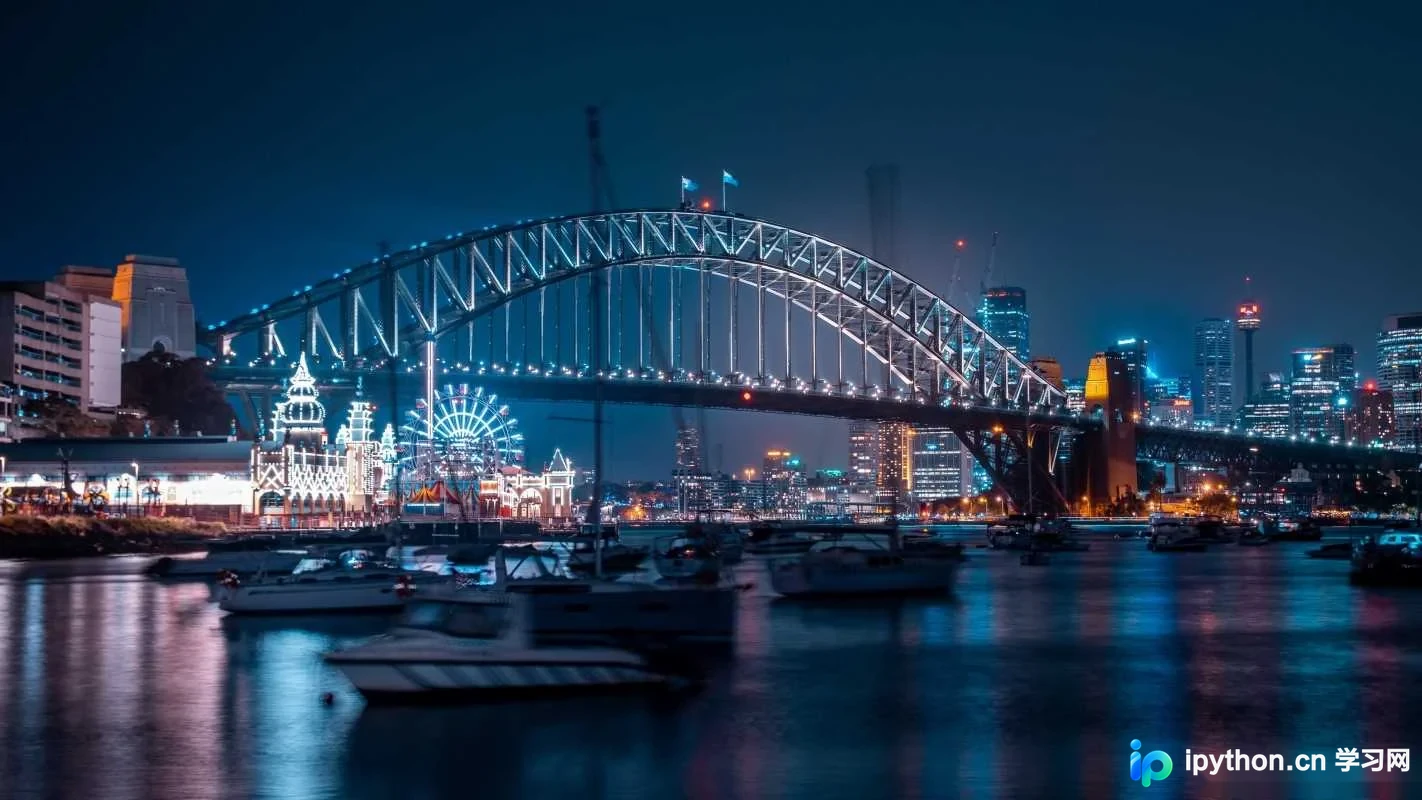
图1 原图
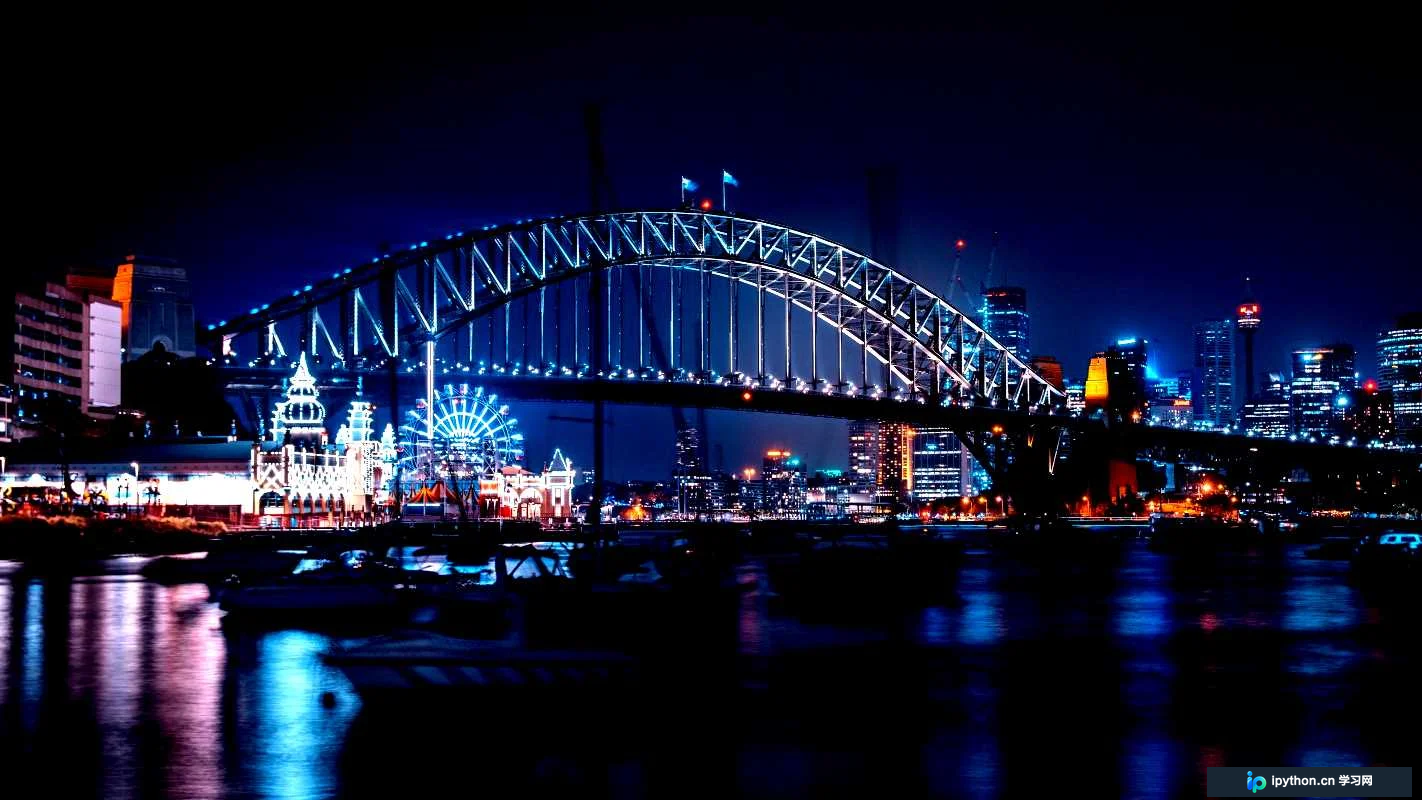
图2 参数为50的效果图
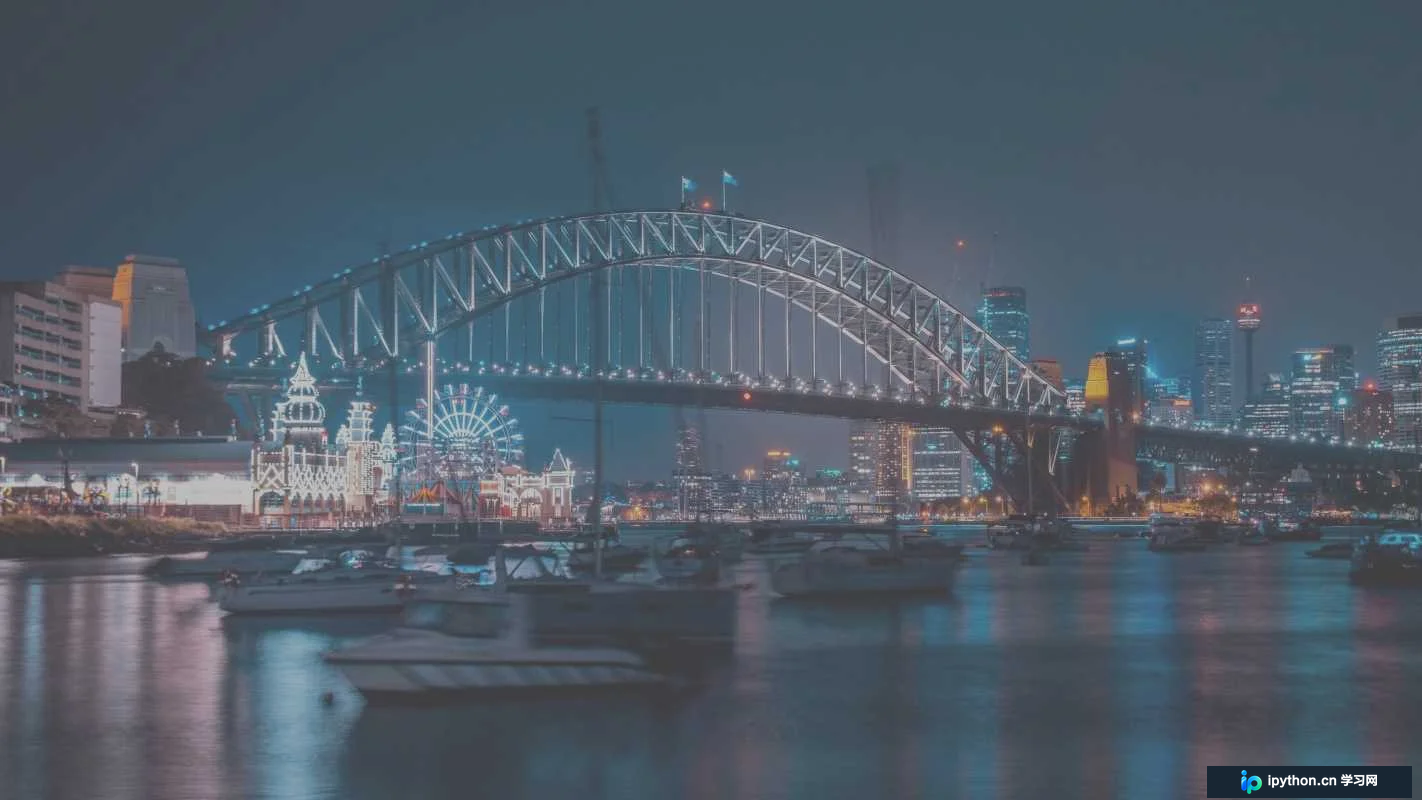
图3 参数为-50的效果图
通过灵活调整percent参数,即可实现图像对比度的动态控制。
本文关于OpenCV图像对比度实践的讲解到此结束,更多相关OpenCV图像对比度技术内容,欢迎查阅本站往期文章或继续关注后续更新,感谢支持。
本站声明
本文内容仅供参考,不代表本站观点。转载或引用请注明出处。如发现内容问题,请通过联系我们页面反馈。















